Montage keeps component templates in HTML instead of JavaScript
Montage is an elegant, open source HTML5 framework maintained by Montage Studio that rivals native SDKs, yet is easier to learn. It offers modular components, two-way data binding, and much more. Join us on irc.freenode.net#montage. Sign up for our beta to build Montage applications in the cloud.
At a glance
- What is it?
- Montage is a browser application framework where each component owns an HTML template, a script, a stylesheet and a serialized object model, with two-way data binding built on functional reactive bindings. It targets maintainability over novelty, and its last code push was on 2026-08-05 while the published package version still reads 18.0.0.
- Who is it for?
- Montage fits a team that wants components to be independently testable web pages with real HTML templates, and that values a managed draw cycle and serialization over a smaller dependency tree. It does not fit a project starting today, because the last push was on 2026-08-05, the npm package version is 18.0.0 and the documentation site is described as being updated.
- Can I use it commercially?
- Check first. The repository uses a licence we do not classify automatically, so read its LICENSE file before any commercial use.
- Is it still maintained?
- Yes. The repository last received commits 94 days ago.
- What is it written in?
- Mainly JavaScript, according to GitHub's language statistics.
Answers come from the project's GitHub data, last synced on November 7, 2026, and from our analysis. They are not legal advice.
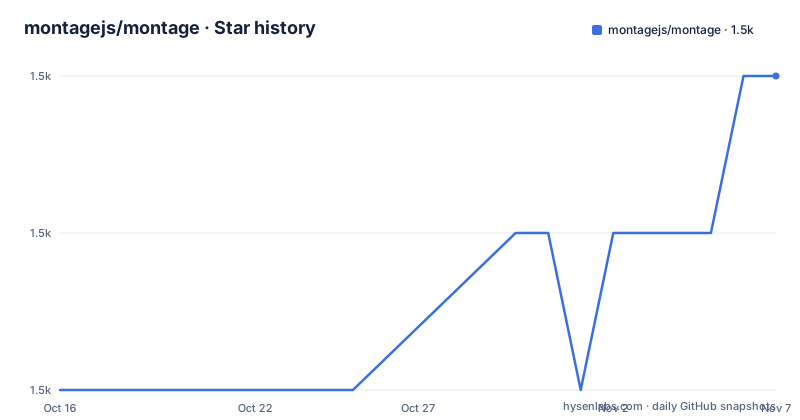
Star history
- montagejs/montage1,507 ★ · +2
| Repository | 2026-10-16 | 2026-11-07 |
|---|---|---|
| montagejs/montage | 1.5k | 1.5k |
2 Stars in the last 22 days, measured from the daily GitHub snapshot. Compare with other projects
Editorial analysis
A component is a web page with a script attached, not a JavaScript template
The defining choice in Montage shows up in a single sentence of the README: there are no fully JavaScript-driven templates in Montage. Each component is modeled as a stand-alone web application with its own HTML template, JavaScript, CSS, serialized component object model and resources, and with few exceptions a component can stand on the web platform like any other web page. The stated payoff is a split of labor. Designers work in the markup and styles they already know, and developers isolate and test individual components using familiar techniques. This is a direct contrast with frameworks that describe the interface in code, and it carries a cost of its own, because a page made of components is still assembled by the framework rather than by the browser alone.
Two-way bindings run on FRB, and that is where the sharp edges live
Montage builds its bindings on functional reactive bindings, in a separate project it links as FRB. A component or Montage object can establish a simple or bi-directional binding with another component or object, and when the bound property, or a deeper property path, of the bound object changes, the source object is kept in sync. The README makes a specific claim about what that buys you over traditional bindings: FRB can bind long property paths and the contents of collections, and it can incrementally update the results of chains of queries, including maps, flattened arrays, sums and averages, and it can add or remove elements from sets based on a flag changing. Incremental update is the reason to care, since a naive binding would recompute the whole chain. The counterpoint is that a second reactive system has to be learned and its update rules reasoned about.
A managed draw cycle and a serialization format in every component
The feature summary in the README lists object serialization with DOM mapping, event handling and a managed component draw cycle alongside the components and the bindings. Two of those deserve separate attention. The draw cycle is what makes the two-way bindings and the DOM mapping cohere, because the framework decides when a component is drawn rather than leaving it to each component author. The serialization with DOM mapping is what lets a component carry a serialized object model, which in turn is what makes a component reproducible from its template and its data. Combined with the encapsulation model, this is a framework organised around the idea that a component is a serializable unit with a template, a controller and a state, rather than a function that returns markup.
CommonJS, and dependencies that are not all version pinned
Montage fully supports CommonJS modules and sits in the Node and npm ecosystem. The package manifest backs that up with an overlay block that maps the browser and node entry points to core/core, redirects the montage module name, and maps the `mr` and `bluebird` module names to their locations inside node_modules. The runtime dependencies list is where this gets worth a second look. Most entries carry ordinary version ranges, such as `bluebird` at `~3.5.5` and `frb` at `~4.0.x`, but `mr` is pinned to `montagejs/mr#master`, a branch reference rather than a published version, and the manifest also carries a `proxy-polyfill`. A dependency tracked to a moving branch is the first thing to verify, because it is the part of the install that can change under you.
Scaffolding a project with minit and the port the dev server uses
The quick setup in the README is a five step path that ends with a browser window showing a Welcome component. `minit` is the Montage Initializer, a command line utility that generates prebuilt application templates and components and places the associated files in the right directories. Installing it globally comes after the Node.js installer, and the Windows variant differs from the Mac and Linux one.
$ mkdir -p ~/.npm
$ sudo npm install -gq minit@latest
Creating the project and serving it are the next two commands.
$ minit create:app -n yourappname$ cd yourappname
$ minit serve &The generated directory holds the default application template including the production dependencies, and the dev server listens on port 8083, so you point a browser at http://localhost:8083/ and the Welcome component loads. The README also flags a specific friction point: an EACCES warning when running minit:create is worked around with `sudo chown -R <username> ~/.npm`, which it attributes to a bug in npm.
Tests run in Node, in a browser page, or under Karma
The maintenance section is unusually complete for a project of this vintage, and it says which commands do what rather than pointing at a single test entry point. The tests live in the test directory. `npm test` runs them in Node, and opening test/run.html in a browser is the alternative for running the same suite in a browser. There is also a dedicated Jasmine runner, `npm run test:jasmine`, a Karma path with `npm run test:karma`, a watch variant for continuous runs with file change detection at `npm run test:karma-dev`, and a debug variant `npm run test:karma-debug` that opens a remote debug console on Karma. The repository root has karma.conf.js and the manifest carries karma, jasmine-core and the Chrome and Firefox launcher packages, so the browser matrix is a deliberate part of the setup.
A version number, a licence and an update that has not happened in seven years
The repository is not archived, and the last push was on 2026-08-05. The published npm version in the manifest is 18.0.0, and the most recent GitHub tags are older: 18.0.0 rc2 dated 2019-02-13, 18.0.0 rc1 dated 2019-02-07 and 17.2.1 dated 2019-02-07. So the code has seen commits in 2026 while the release history has not moved since early 2019, and that gap between recent commits and a 2019 tag is worth reading carefully rather than papering over. The package manifest declares the licence as BSD-3-Clause, and a LICENSE.md file sits at the repository root. The manifest also declares a Node requirement of >=10.16.2 and npm >=6.9.0. The README asks readers to be patient because the documentation is being updated.
Editorial conclusion
Montage fits a team that wants components to be independently testable web pages with real HTML templates, and that values a managed draw cycle and serialization over a smaller dependency tree. It does not fit a project starting today, because the last push was on 2026-08-05, the npm package version is 18.0.0 and the documentation site is described as being updated. Before you commit, run `minit serve` on a generated project and open the Welcome component, and check whether the `mr` dependency resolved to a usable commit, since it is pinned to a branch rather than a version.
Frequently asked questions
How do I create a new Montage project?
Install the `minit` initializer globally, then run `minit create:app -n yourappname`. That generates a directory with the default Montage application template including the production dependencies.
How do I run a Montage app locally?
Run `minit serve` from inside the generated project directory and point a browser at http://localhost:8083/. The Welcome component should load there as a simple single-page application.
What data binding does Montage use?
Montage uses functional reactive bindings, in a separate project it links as FRB. The README says FRB can bind long property paths and collection contents and can incrementally update chains of queries such as maps, flattened arrays, sums and averages.
Does Montage build user interfaces entirely in JavaScript?
No. The README states there are no fully JavaScript-driven templates in Montage, and that each component has its own HTML template, JavaScript, CSS and serialized component object model, so it can stand on the web platform like any other web page.
How do I run the Montage test suite?
The tests are in the test directory. `npm test` runs them in Node, `npm run test:jasmine` runs them in a browser, and the Karma variants are `npm run test:karma`, `npm run test:karma-dev` for continuous runs and `npm run test:karma-debug` for a remote debug console.
What are the system requirements for Montage?
The README asks for Node.js and npm, and a recent stable release of Chrome, Safari or Firefox, because Montage is intended to make use of the evolving web platform of modern browsers. The package manifest declares node >=10.16.2 and npm >=6.9.0.
Official sources
Add this badge to your README
If you maintain this project, the badge below links readers to this analysis and shows its maintenance status from the daily GitHub snapshot. Paste the markdown into your README; add ?metric=license or ?metric=stars to the image URL for a different field.

[](https://hysenlabs.com/projects/montagejs-montage)Star history chart for your README
[](https://hysenlabs.com/projects/montagejs-montage)Was this useful?