Selene is a Flutter shell, and that is the interesting part
A client backed by MoonTV v100 / Helios, supporting iOS, Android, macOS, and Windows, with experience optimizations for each platform.
At a glance
- What is it?
- Selene pairs a MoonTV or Helios backend with a Flutter client tuned for phones and desktops. The repository you are looking at holds screenshots and a README, not code, and the split tells you most of what you need to know.
- Who is it for?
- Selene is worth understanding as a client rather than a standalone app, because almost every feature depends on a backend you run yourself. The Flutter choice pays off in the places you would expect, with separate mobile and desktop playback stacks, and DLNA casting is the feature most consumer readers lack.
- Can I use it commercially?
- Not without permission. GitHub finds no licence file in the repository, and without a licence all rights are reserved by default: you may read the code but not reuse it. Check the README, or ask the authors, before using it.
- Is it still maintained?
- Yes. The repository last received commits 151 days ago.
- What is it written in?
- GitHub does not report a main language for this repository.
Answers come from the project's GitHub data, last synced on October 22, 2026, and from our analysis. They are not legal advice.
Star history
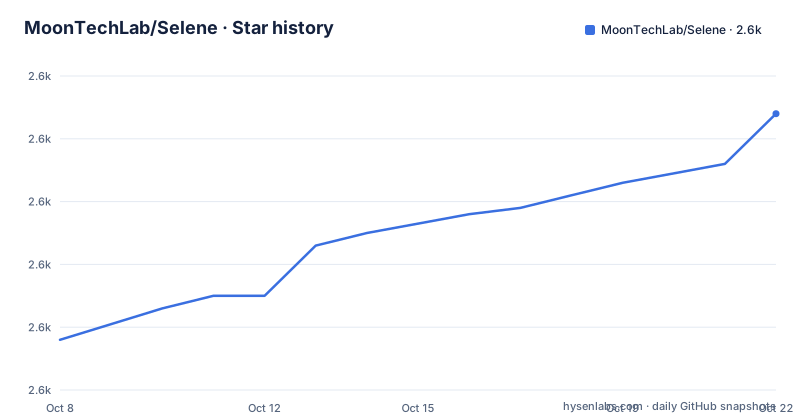
- MoonTechLab/Selene2,604 ★ · +36
| Repository | 2026-10-08 | 2026-10-22 |
|---|---|---|
| MoonTechLab/Selene | 2.6k | 2.6k |
36 Stars in the last 14 days, measured from the daily GitHub snapshot. Compare with other projects
Editorial analysis
What Selene is, in one sentence
Selene is a client application for MoonTV at version 100, and for Helios. The project's own description puts it plainly: it uses MoonTV v100 or Helios as the backend, keeps the original behaviour intact, and improves the operating experience on both mobile and desktop. It is built in Flutter and supports Android, iOS, macOS and Windows.
That positioning matters more than it first appears. Selene is not a streaming service and it does not carry a catalogue. It is the front end for a backend that somebody else runs, which means the content, the accounts, the watch history storage and the sync all live on the server side. The README's first-run description makes this concrete: on launch the app checks login status, redirects to a login page if you are not authenticated, and enters the main interface once you are. Authentication is a backend concern from the very first screen.
The client covers a familiar set of surfaces: a home page with trending content, continue watching and favourites; search with aggregated results across multiple sources and live suggestions; category browsing split across films, series, anime and variety content; and a player with playback controls that records progress automatically.
The repository contains no source code
This is the first thing to establish, because it changes what kind of article this is. The repository tree for this project holds four entries: a `.github/` directory, `README.md`, `logo.jpg`, and a `screenshot/` directory. There is no `lib/`, no `pubspec.yaml`, no Dart source, no build configuration. The README itself points elsewhere for the source, giving the address of a separate Selene-Source repository under the same organisation.
So the project is split across two repositories by design rather than by accident. The one you are looking at is the public-facing page: a logo, fourteen screenshots split between mobile and wide-screen views, and the documentation. The other one holds the code. Nothing in the README explains why the split exists, and it is worth knowing before you spend time browsing this repository expecting to find a pubspec or a provider setup.
Two further gaps in the public metadata are worth noting. The repository declares no licence, and the description field carries no programming language even though the project is Flutter and therefore Dart by definition. Both of those absences are visible to anyone querying the API. For a project with a solid star count and an active release cadence, that is an unusual amount of missing metadata, and the licence question in particular has direct consequences for reuse.
Reading the release notes as a maintenance signal
The release history is short and tells a useful story. Version 1.6.6 is dated November 2025. Version 1.6.7 lands the following May, and version 1.6.8 the next day, with the repository's most recent push matching that final release date exactly. That pattern, a burst of two releases in a day after a long quiet period, is typical of a small project that ships when a batch of fixes has accumulated.
The content of those two releases is more telling than the cadence. Version 1.6.8 fixes a long press on a video card, where the overlay mask stopped working so the menu could not be dismissed and taps and swipes leaked through to the page underneath. That is a mobile-specific gesture-handling bug, and it is exactly the category of defect that appears when a UI is rebuilt to work across four platforms rather than tuned on one.
Version 1.6.7 is a broader cleanup. It changes how detail information is fetched, switching to a different API to fix cases where a title's details would not load. It fixes several cases where asynchronous loading completed after the user had already navigated away, which would then refresh the UI of a page that was no longer on screen, producing errors or crashes on back navigation and rapid tab switching. It also hardens the player's asynchronous callbacks against route changes and resource loading races. Read together, these read as a debugging pass on navigation timing rather than new functionality, which suggests the release followed a user-reported wave of instability on mobile.
Two playback stacks, because Flutter does not have one
The technical section of the README lists the stack, and one detail is more interesting than the rest. Flutter 3.4.3 and Dart 3.4.3 form the base. Provider handles state management and Dio handles HTTP requests, both conventional choices for a Flutter app of this size. Cached Network Image handles image caching. DLNA Dart handles casting to a television.
The interesting part is that Selene does not use one video player. On mobile it uses Awesome Video Player on top of an FVP backend. On desktop it uses Media Kit instead. Two separate playback front ends for the same content means the team found that no single solution behaved acceptably across touch devices and desktop desktops. That is a real cost: playback behaviour, buffering edge cases and fullscreen handling all need testing twice, and any player bug gets reported separately per platform.
It is also a reasonable decision. The mobile and desktop paths have genuinely different requirements around gesture handling, hardware decoders, and window integration, and Flutter's plugin ecosystem does not currently paper over that gap. If you are evaluating the project as a reference implementation, the two-stack structure is the detail most worth studying.
Platform floors, and what the disclaimer actually commits to
The minimum versions are stated precisely, which makes them easy to check against your own devices: Android 5.0 at API 21, iOS 13.0, macOS 11.0 which the README calls Big Sur, and Windows 10. Android 5.0 is the notable one. That floor is old enough that the client should run on essentially any Android hardware still in service, and it is consistent with the DLNA use case, where the phone is often the remote and the television is the display.
The disclaimer deserves a careful reading, because it is unusually comprehensive. It states the project is for learning and exchange only and provides no commercial service. It notes the aggregated content comes from third-party platforms and disclaims any responsibility for the legality, accuracy, completeness or availability of that content. It states that copyright in all film and television content belongs to the original authors and rights holders, asks users to respect relevant law and support legitimate copies, asks users to comply with local law, and accepts no liability for any direct or indirect loss from use. It also says that while the developers value privacy, users bear the data security risk themselves. Using the app is framed as agreement to all of it.
There is a separate instruction above the feature list asking that videos or articles promoting the project not be published on Chinese social media platforms, and stating that no technology weekly or monthly style site is authorised to list the project. Both of these are part of how this project is distributed and are worth reading before you write about it. The combination of an open client, a self-hosted backend and an active search aggregation feature is the configuration most local media regulations are written about, and the project is explicit about where it expects to be discussed.
Who should look at this, and what to check first
Selene makes sense if you are already running MoonTV v100 or Helios and want a better front end than a browser tab. The value proposition is entirely in the client experience: multi-source aggregated search, resume playback, favourites, a Material Design 3 interface with dark mode, and casting to a large screen. If you do not control a backend, there is nothing here to point at.
The DLNA casting feature is the piece that distinguishes it from a browser. Casting a video to a television from a phone is still an awkward thing to do in many apps, and the README lists it under core features rather than as an extra, which suggests it is treated as table stakes.
If you are thinking about building on it, the order of checks is clear. First, establish whether the absence of a licence file blocks you, because without one you have no grant to copy, modify or redistribute the code regardless of what the README says. Second, look at the separate source repository to see what is actually there and whether it carries a licence the main repository omits. Third, confirm the Flutter and Dart version floors still match your build environment, since 3.4.3 for both is a specific pairing.
One last practical note. Star history is tracked in the README through an embedded chart, and the project asks for stars rather than code contributions, which fits a repository that is deliberately documentation-first. If you want to help, the useful contribution is reporting the kind of navigation and playback bugs that 1.6.7 and 1.6.8 were made of.
Editorial conclusion
Selene is worth understanding as a client rather than a standalone app, because almost every feature depends on a backend you run yourself. The Flutter choice pays off in the places you would expect, with separate mobile and desktop playback stacks, and DLNA casting is the feature most consumer readers lack. Before you plan around it, note that the public repository carries documentation and screenshots only, source lives in a second repository, and the project ships no license file, which is the single biggest obstacle to treating it as a base for your own work.
Frequently asked questions
What is Selene the app?
Selene is a Flutter client application for the MoonTV v100 and Helios backends. It provides multi-source aggregated search, automatic playback progress, favourites, dark mode and DLNA casting on Android, iOS, macOS and Windows.
Where is the Selene source code?
Not in this repository. The Selene repository holds a README, a logo and a screenshot directory only. The README points to a separate Selene-Source repository under the same organisation for the actual code.
What platforms does Selene support?
Android, iOS, macOS and Windows. The stated minimums are Android 5.0 at API 21, iOS 13.0, macOS 11.0 Big Sur, and Windows 10.
What tech stack does Selene use?
Flutter 3.4.3 and Dart 3.4.3, with Provider for state management and Dio for HTTP requests. Playback differs by platform: Awesome Video Player over an FVP backend on mobile, and Media Kit on desktop. Image caching uses Cached Network Image, and DLNA Dart handles casting.
Does Selene need a backend server?
Yes. Selene is a client for MoonTV v100 or Helios, and its first-run flow checks login status and redirects to a login page, so accounts and content live on a server you control rather than in the app.
Official sources
Add this badge to your README
If you maintain this project, the badge below links readers to this analysis and shows its maintenance status from the daily GitHub snapshot. Paste the markdown into your README; add ?metric=license or ?metric=stars to the image URL for a different field.

[](https://hysenlabs.com/projects/moontechlab-selene)Star history chart for your README
[](https://hysenlabs.com/projects/moontechlab-selene)Was this useful?