Firefox Private Relay: alias forwarding and local deployment
Keep your email safe from hackers and trackers. Make an email alias with 1 click, and keep your address to yourself.
At a glance
- What is it?
- Mozilla's Private Relay generates email addresses that forward messages without exposing the recipient's personal address. The repository contains the Django and frontend service, but adopting it requires more infrastructure and configuration than installing a browser add-on.
- Who is it for?
- Private Relay fits developers who want to host or modify Mozilla's alias service and can accept Django, PostgreSQL, email delivery and frontend maintenance. It is unsuitable for someone seeking a quick personal alias with no infrastructure work.
- Can I use it commercially?
- Check first. The repository uses a licence we do not classify automatically, so read its LICENSE file before any commercial use.
- Is it still maintained?
- Yes. The repository last received commits 4 days ago.
- What is it written in?
- Mainly Python, according to GitHub's language statistics.
Answers come from the project's GitHub data, last synced on November 7, 2026, and from our analysis. They are not legal advice.
Star history
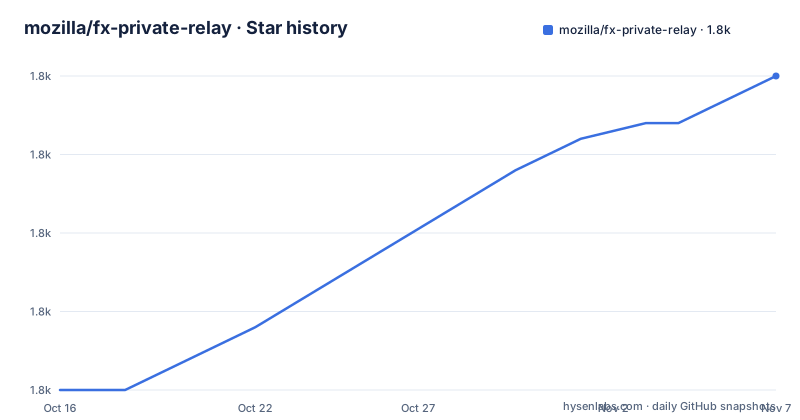
- mozilla/fx-private-relay1,820 ★ · +20
| Repository | 2026-10-16 | 2026-11-07 |
|---|---|---|
| mozilla/fx-private-relay | 1.8k | 1.8k |
20 Stars in the last 22 days, measured from the daily GitHub snapshot. Compare with other projects
Editorial analysis
The alias-forwarding boundary in Firefox Private Relay
Private Relay addresses a specific disclosure problem: a service that receives an email can harvest the personal address entered by the user. The README says recipients still receive messages, but generated addresses keep the user's personal address from being collected and later bought, sold, traded or combined with other data for identification, tracking or targeting.
That makes the project relevant to people who register accounts, subscribe to services or communicate with organizations while wanting a separate public-facing address. The recipient of an email sent to a generated alias still receives the message, but the personal address does not have to be the address exposed in that conversation.
The service is not described as an email security gateway. It does not claim to block harmful attachments, malicious links or unwanted messages. Its documented function is address replacement and delivery. Calling it spam protection, phishing protection or a general mailbox security product would go beyond the repository documentation.
Django, frontend and mail components behind generated addresses
Based on the repository layout and Python configuration, Private Relay is a Django application with a separate frontend, API, email and telephone-related modules. The `manage.py` entry point and `python manage.py` commands identify Django as the backend framework. `privaterelay/settings.py` is referenced as the Django settings module by `pyproject.toml`, while `gunicorn.conf.py`, `Dockerfile` and the production requirements point toward a server deployment rather than a desktop-only application.
The visible data path is straightforward at a conceptual level. A sender addresses a generated Private Relay mailbox. The service handles that mailbox and forwards the message so that the user receives it, while keeping the personal destination address away from the sender. The repository separates email-related code under `emails/`, application code under `privaterelay/`, API code under `api/` and browser code under `frontend/`. That separation fits a service with web management, delivery handling and client-side interface concerns.
The production `Dockerfile` builds the frontend in a Node stage and installs the Python requirements in a Python 3.12.14 stage. It exposes port 8000, collects static files and runs management commands that update email tracker lists during the image build. AWS SES is documented as the service required when real email sending is desired. The README does not explain the internal alias routing model, storage schema or exact forwarding retry policy, so those details should not be inferred from the directory names alone.
Local setup for the Private Relay site
The documented local workflow starts by cloning the repository with its submodules, because translated message files are stored through a Git submodule. The project requires Python 3.12, PostgreSQL, system headers for database dependencies and Volta-managed Node tooling for frontend compilation. AWS SES is optional for ordinary local development but needed to send real email.
On Unix-based systems, the README uses `virtualenv` rather than `python -m venv`. The following blocks reproduce the documented sequence. The backend and frontend must run in separate terminals after setup.
git clone --recurse-submodules https://github.com/mozilla/fx-private-relay.git
cd fx-private-relay
After cloning, create and activate the virtual environment. The repository's Windows instructions use `source` under Git Bash and provide a PowerShell-compatible activation alternative.
virtualenv env
source env/bin/activate
Install the backend dependencies, then install the frontend workspace dependencies from the repository root.
pip install -r requirements.txtcd frontend
npm install
cd ../Create local configuration, replace the example secret with an installation-specific value, migrate the database and create an administrator account. The README explicitly warns that `SECRET_KEY` should differ for every install.
cp .env-dist .envSECRET_KEY=secret-key-should-be-different-for-every-installpython manage.py migrate
python manage.py createsuperuserStart the Django backend in the first terminal. A local site is normally associated with Django's development server unless its printed address is changed through documented settings.
python manage.py runserverBuild and watch the frontend in a second terminal. This is the first useful local result to check: the Django process stays active while the frontend compiler processes changes.
cd frontend
npm run watch
Container deployment and production dependencies in fx-private-relay
The container path packages both sides of the application. A Node stage runs `npm ci --workspace frontend` and `npm run build --workspace frontend`, then its output is copied into the Python image. The application stage uses Python 3.12.14, installs the pinned requirements and exposes port 8000. It also creates locale links for specific language fallbacks before collecting Django static files.
This design favors reproducibility over a minimal local process. Versions in `requirements.txt` are pinned, including Django 6.1.2, Gunicorn 26.2.0, PostgreSQL support through `psycopg[c]==3.3.6`, Redis support through `django-redis`, Sentry SDK, `boto3` and several authentication and cryptography packages. The root `package.json` pins Playwright 1.63.0 for end-to-end tests and specifies Node 22.15.0 and npm 10.9.2 through Volta.
Containerization does not eliminate external dependencies. PostgreSQL remains part of the documented development requirements. SES is needed for real mail delivery. The production documentation also has an environment-variable section, but the repository README does not enumerate those values. Authentication configuration, feature flags and external service credentials must therefore be resolved against the repository's current configuration and production documentation rather than guessed.
The Docker build is also more than packaging. It executes email tracker list update commands with `--skip-checks`, compiles static files with `PHONES_ENABLED=True` and `API_DOCS_ENABLED=True`, and injects build metadata variables. Those settings describe the image produced by the repository file; they do not prove that a self-hosted installation enables every module in every environment.
Operational limits and the cost of self-hosting Private Relay
The largest constraint is that this repository is a service implementation, not a small alias library. A production adopter inherits responsibility for Django application configuration, PostgreSQL, email delivery, static assets, authentication, observability and frontend updates. The requirements include `sentry-sdk`, MarkUs metrics integrations, Redis support and security middleware, while the repository also contains end-to-end tests and deployment configuration. Those components indicate a broad operational surface even though the README does not define a minimum hosting specification.
A second boundary concerns message lifetime. The README confirms that recipients receive email and that the personal address remains hidden from the sending side. It does not state that the generated mailbox is disposable after one message, does not describe attachment retention, and does not promise that every receiving service will accept the generated address. A service that rejects unknown senders can therefore reduce the convenience of alias forwarding even when Private Relay itself forwards correctly.
Private Relay is the wrong tool when the requirement is to hide the sender's address from recipients, encrypt every message end to end, filter spam or operate without any mail infrastructure. A conventional password manager does not solve those different problems. For a developer wanting an isolated function inside an existing Python application, a simple provider-backed alias API may be easier to integrate than deploying this complete web service.
A relevant alternative is an email forwarding service operated by a hosting provider. Its approach is operational rather than code-level: the provider runs the database, web interface, queues and delivery workers, while the customer uses a hosted dashboard. Self-hosting `mozilla/fx-private-relay` instead gives control over the Django and frontend code but transfers those operating tasks to the adopter. Another alternative is writing alias routing directly against a transactional mail API, which can offer direct control but omits Mozilla's management interface, localization and established repository structure.
Release activity, license signals and upgrade work in Private Relay
The repository is not archived. Its last push was on 2026-10-15, and the recent release list includes 2026.10.12, 2026.10.05 and 2026.09.10. Those dates support calling the project recently changed, but they do not by themselves describe the stability of a particular deployment or guarantee compatibility for every release.
Upgrades can involve more than application code. Python must remain at 3.12 or later according to `pyproject.toml`, while the root package configuration pins Node 22.15.0 and npm 10.9.2 through Volta. Pinned Python dependencies include framework upgrades across Django, cryptography, Gunicorn, Redis support and test tooling. Database migrations are part of the documented startup sequence, so an operator should treat schema changes and static frontend rebuilding as expected deployment concerns.
License information needs care. The README badge and `package.json` identify MPL-2.0, while the repository metadata labels the top-level license as Other and points to the `LICENSE` file. For a modified or distributed deployment, the `LICENSE` file and any file-level notices are the authoritative project documents to inspect. This article does not provide legal advice or interpret obligations beyond those repository identifiers.
Editorial conclusion
Private Relay fits developers who want to host or modify Mozilla's alias service and can accept Django, PostgreSQL, email delivery and frontend maintenance. It is unsuitable for someone seeking a quick personal alias with no infrastructure work. Before adoption, verify the LICENSE file for the intended deployment and confirm how the required SES, database, authentication and production environment settings will be supplied.
Frequently asked questions
What is Firefox Private Relay used for?
It generates email addresses to use in place of personal addresses. Messages still reach the recipient, while the sender receives the generated address rather than the personal address.
What is required to run mozilla/fx-private-relay locally?
The documented requirements include Python 3.12, PostgreSQL, Python database headers, Node tooling through Volta, and the repository's Python and frontend dependencies. SES is required when sending real email.
Does mozilla/fx-private-relay filter spam or malicious messages?
No such filtering capability is documented in the README. Its stated purpose is generated address forwarding and protection of the user's personal address from harvesting.
Which license applies to mozilla/fx-private-relay?
The README and `package.json` identify MPL-2.0, but the repository metadata labels the license as Other and points to `LICENSE`. Intended adopters should inspect the repository's license file and applicable notices before redistribution or modification.
Official sources
Add this badge to your README
If you maintain this project, the badge below links readers to this analysis and shows its maintenance status from the daily GitHub snapshot. Paste the markdown into your README; add ?metric=license or ?metric=stars to the image URL for a different field.

[](https://hysenlabs.com/projects/mozilla-fx-private-relay)Star history chart for your README
[](https://hysenlabs.com/projects/mozilla-fx-private-relay)Was this useful?