typescript-plugin-css-modules for TypeScript IDEs
A TypeScript language service plugin providing support for CSS Modules.
At a glance
- What is it?
- typescript-plugin-css-modules adds editor type information for CSS Modules without changing the TypeScript compiler or application build. It suits projects whose stylesheet imports already work through a separate bundler pipeline.
- Who is it for?
- Adopt typescript-plugin-css-modules when your project already compiles CSS Modules and the immediate problem is missing editor completion or type information for stylesheet imports. Do not use it as the sole CSS processing or test integration.
- Can I use it commercially?
- Yes. MIT is a permissive licence: you can use, modify and sell software built on it, as long as you keep its copyright and licence notices.
- Is it still maintained?
- Yes. The repository last received commits 15 days ago.
- What is it written in?
- Mainly TypeScript, according to GitHub's language statistics.
Answers come from the project's GitHub data, last synced on November 6, 2026, and from our analysis. They are not legal advice.
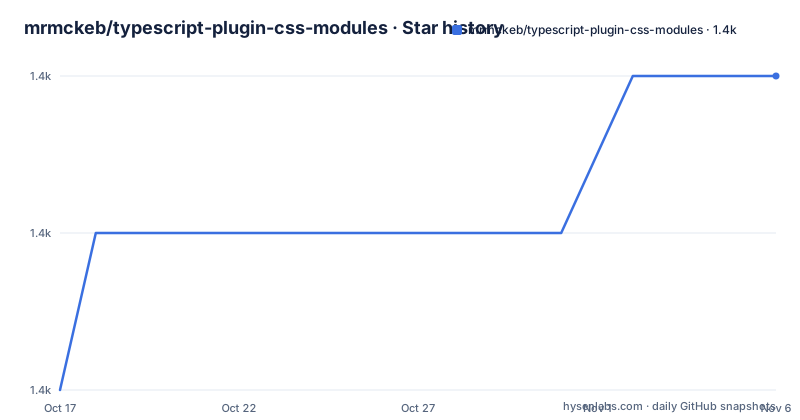
Star history
- mrmckeb/typescript-plugin-css-modules1,394 ★ · +2
| Repository | 2026-10-17 | 2026-11-06 |
|---|---|---|
| mrmckeb/typescript-plugin-css-modules | 1.4k | 1.4k |
2 Stars in the last 20 days, measured from the daily GitHub snapshot. Compare with other projects
Editorial analysis
Why typescript-plugin-css-modules exists
A CSS Modules file exports local class names to JavaScript or TypeScript, but the TypeScript language service does not infer those names from the stylesheet. Without assistance, an editor may treat an import such as `my.module.css` as an untyped module, losing property completion and reporting a type error even when a bundler already handles the stylesheet correctly. This plugin addresses that editor gap for developers using IDEs and other tools that support TypeScript language service plugins.
The plugin does not make CSS Modules work. A separate build tool must compile the stylesheet and provide the generated import to the application. The README points to the `css-loader` documentation for a Webpack configuration and to `jest-css-modules-transform` for Jest support. The package is therefore an editor integration rather than a stylesheet compiler, test transformer, or replacement for the bundler's CSS Modules implementation.
Its boundary is explicit. The README states that TypeScript does not load language service plugins during compilation. Consequently, the plugin cannot provide compilation errors or add runtime CSS Module support. This distinction matters when selecting it for a command-line build, a CI validation pipeline, or a project that does not yet have a working CSS processing pipeline.
How the TypeScript language service receives CSS class types
The project is configured as a TypeScript language service plugin in `tsconfig.json`. TypeScript-aware editors load the package and use it while presenting information about supported stylesheet imports. From the user's side, the resulting default import exposes class names found in the CSS Modules file, including names that are not valid identifiers through bracket notation.
The default import is always available. The README also documents named exports for classes that contain neither hyphens nor underscores. Classes outside that naming boundary remain accessible through the default export. This arrangement follows JavaScript identifier rules rather than changing the underlying CSS Modules export shape.
The package metadata shows the implementation surface. Its runtime dependencies include `postcss`, several `postcss-modules-*` packages, `icss-utils`, `tsconfig-paths`, and processors for `sass`, `less`, and optional `stylus`. The default file matcher is `\.module\.((c|le|sa|sc)ss|styl)$`, covering common filenames ending in `.module.css`, `.module.less`, `.module.sass`, `.module.scss`, or `.module.styl`. These dependencies indicate that the package processes stylesheet definitions and associated module exports instead of attaching one generic declaration to every CSS import.
Configuration can also come from `dotenvOptions` and `postcssOptions`. The README documents `additionalData`, which is appended to the top of source files. Its exact interaction with a particular preprocessor setup cannot be confirmed from the excerpt.
Installing the plugin and enabling the first stylesheet import
Install the package as a development dependency, then register it under `compilerOptions.plugins`. The README supplies commands for both Yarn and npm. The npm command is:
npm install -D typescript-plugin-css-modulesAfter installation, add the plugin configuration to `tsconfig.json`:
{
  "compilerOptions": {
    "plugins": [{ "name": "typescript-plugin-css-modules" }]
  }
}
Once the editor reloads the TypeScript project, a real use consists of importing a matching CSS Modules file and accessing its class names:
import styles from 'my.module.css';

const a = styles.myClass;
const b = styles['my_other-class'];
The first access uses property syntax for a valid class name. The second handles a hyphenated name that cannot be written as a normal JavaScript property after a dot. For identifiers without hyphens or underscores, named exports are enabled by default:
import styles, { myClass } from 'my.module.css';

const a = myClass;
const b = styles['my_other-class'];
Visual Studio Code users must also follow the README's Visual Studio Code instructions. The README excerpt does not include those editor-specific steps, so it would be unsafe to invent workspace settings or TypeScript version arguments. The README says Create React App users need no additional plugin configuration, while Webpack users may need to align options with their bundler setup.
Matching plugin options to the bundler configuration
No options are required, but agreement with the project's stylesheet pipeline determines whether the types shown by the editor match runtime class names. `customMatcher` defaults to `\.module\.((c|le|sa|sc)ss|styl)$`, so a project using another filename convention must tell the plugin which files it should process. Named exports default to `true`, while `allowUnknownClassnames` defaults to `false`. Disabling warnings for unknown class names applies only to default imports, according to the options table.
Name conversion is another likely point of divergence. The documented default for `classnameTransform` is `asIs`, while the visible configuration example includes `dashes`. If a bundler changes local names, the language service must use a compatible transform or completions can describe names that do not exist at runtime. The README excerpt does not enumerate every accepted `classnameTransform` value, so it would be premature to claim which alternatives are valid.
The plugin also accepts `postcssOptions`, `rendererOptions`, `customRenderer`, and `customTemplate`. These settings can connect class-name rendering with a project's processing behavior. `goToDefinition` is disabled by default and enables definition navigation when enabled. `noUncheckedIndexedAccess` defaults to `false` and is intended for compatibility with that TypeScript compiler setting. It changes how indexed access is typed, not how the bundler compiles CSS.
A configuration review should compare the matcher and name transformations first because they directly determine which class names appear. Renderer and PostCSS settings matter when the stylesheet pipeline changes exports or loads configuration. The README does not explain every possible interaction, so those settings should be changed only with the complete project documentation and bundler configuration available.
Compilation, Jest, and Webpack require separate integrations
The main limitation comes from the scope imposed by TypeScript language service plugins. The README states that plugins do not run during compilation. A `tsc` build therefore cannot use this package to validate CSS Module imports or report unknown class names as compiler errors. Editor diagnostics may improve, but a CI build that only invokes TypeScript compilation should not be expected to enforce CSS class names through this package.
For Jest, the README names `jest-css-modules-transform` as a different solution. Its role is test-time transformation: Jest needs a way to evaluate stylesheet imports that its test runtime would otherwise handle as unsupported or opaque. That is separate from supplying completion and type information to a TypeScript-aware editor.
For Webpack, the README refers to `css-loader` documentation covering CSS Modules and PostCSS. Webpack uses the stylesheet pipeline to generate the runtime representation consumed by the application. The plugin can present class names to TypeScript, but it does not configure Webpack, execute loaders, or create the JavaScript module emitted for a stylesheet.
This makes the package the wrong choice when no CSS Modules pipeline exists, when runtime export behavior must be repaired, or when CI diagnostics are the primary requirement. It is also insufficient by itself for runtime CSS support. Projects using Create React App receive a special case in the README because the plugin reportedly works there without additional configuration, but the README does not identify the relevant internal versions or constraints.
Package dependencies, maintenance, and MIT implications
The repository is not archived, and its last push was on 2026-08-06. Version `v5.2.0` was released on 2025-07-23, following `v5.1.0` on 2024-02-11 and `v5.0.2` on 2023-10-16. These dates establish recent repository activity and a sequence of releases, but they do not confirm compatibility with every TypeScript or editor version.
The package metadata uses the MIT license. That license permits use, modification, distribution, and sublicensing under its conditions, including preservation of the copyright and license notice. This describes the repository's declared licensing model rather than providing legal advice. Consumers still need to inspect the `LICENSE` file and account for dependency licenses.
The upgrade cost is higher for teams with custom stylesheet processing. Runtime dependencies include PostCSS modules packages, Sass, Less, optional Stylus, source maps, and configuration helpers. A major change in import syntax, Webpack class-name generation, PostCSS configuration, or TypeScript indexed-access behavior can require an option review. Projects using the documented default import path have less editor configuration, but they still depend on the plugin recognizing their filenames and deriving the expected export names.
Adoption decision for CSS Modules projects
Adopt typescript-plugin-css-modules when the project already compiles CSS Modules through a separate tool and the immediate problem is missing editor completion or type information for stylesheet imports. It is a focused fit for TypeScript-aware editors and tools that load language service plugins. Its named and default export examples cover ordinary identifiers and hyphenated class names without changing the application build.
Do not choose it as the only CSS Modules integration. It cannot make Webpack, Jest, or another runtime compile stylesheets, and it does not report CSS Module import errors during `tsc`. Projects whose primary requirement is build-time or CI enforcement need a processor or transform configured for that environment before adding editor types.
Before adoption, verify `customMatcher` against the project's filenames, then compare `classnameTransform` with the names emitted by the bundler. Confirm that the chosen editor loads the plugin, and retain separate CSS Modules configuration for runtime and test environments. The package improves TypeScript editor information, while the actual build pipeline remains responsible for executable stylesheet modules.
Editorial conclusion
Adopt typescript-plugin-css-modules when your project already compiles CSS Modules and the immediate problem is missing editor completion or type information for stylesheet imports. Do not use it as the sole CSS processing or test integration. Before adoption, verify that `customMatcher` recognizes the project's filenames and that `classnameTransform` agrees with the names emitted by the bundler. This package improves TypeScript editor information, while Webpack, Jest, or another runtime tool remains responsible for executable stylesheet modules.
Frequently asked questions
Does typescript-plugin-css-modules make CSS Module imports compile?
No. The README states that TypeScript does not load plugins during compilation, so the package cannot provide compilation errors or add CSS Modules support. A separate build integration must compile the stylesheets.
How do I install typescript-plugin-css-modules in Visual Studio Code?
Install it with npm or Yarn and add it to `compilerOptions.plugins` in `tsconfig.json`. Visual Studio Code users must also follow the README's editor-specific instructions, which are not reproduced in the README excerpt.
Can typescript-plugin-css-modules provide named exports for hyphenated CSS classes?
Named exports are documented for class names without hyphens or underscores. A hyphenated class remains available through the default export using bracket notation such as `styles['my_other-class']`.
Official sources
Add this badge to your README
If you maintain this project, the badge below links readers to this analysis and shows its maintenance status from the daily GitHub snapshot. Paste the markdown into your README; add ?metric=license or ?metric=stars to the image URL for a different field.

[](https://hysenlabs.com/projects/mrmckeb-typescript-plugin-css-modules)Star history chart for your README
[](https://hysenlabs.com/projects/mrmckeb-typescript-plugin-css-modules)Was this useful?