Mun: an ahead-of-time compiled language that hot-reloads, with LLVM 14 and Pixi as the build price
Source code for the Mun language and runtime.
At a glance
- What is it?
- mun-lang/mun is the Rust workspace behind the Mun language, its compiler, runtime and language server. Hot reloading is the headline idea, and the cost shows up in the toolchain, the unsigned binaries and a last tagged release from December 2023.
- Who is it for?
- Mun suits people who want to try changing a running program's functions and values without a restart, and who are comfortable building a Rust and LLVM 14 toolchain from source. Avoid it for anything that needs signed binaries, supported releases or a recent tagged version, since the newest release is v0.5.0 from December 2023 and the README says milestone releases get no support.
- Can I use it commercially?
- Check first. The repository uses a licence we do not classify automatically, so read its LICENSE file before any commercial use.
- Is it still maintained?
- Yes. The repository last received commits 4 days ago.
- What is it written in?
- Mainly Rust, according to GitHub's language statistics.
Answers come from the project's GitHub data, last synced on November 7, 2026, and from our analysis. They are not legal advice.
Star history
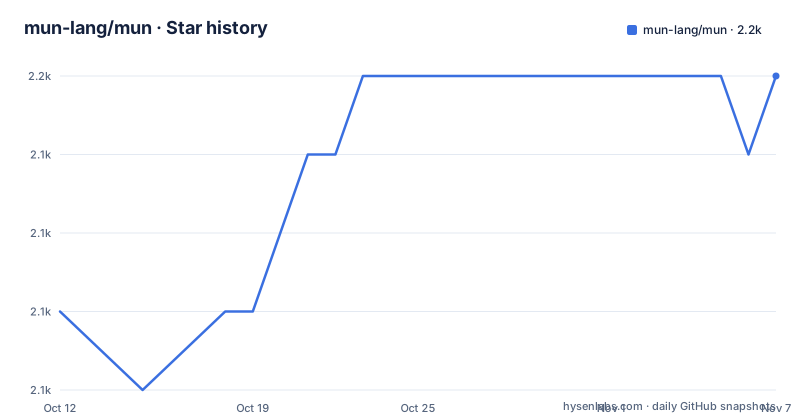
- mun-lang/mun2,150 ★ · +3
| Repository | 2026-10-12 | 2026-11-07 |
|---|---|---|
| mun-lang/mun | 2.1k | 2.2k |
3 Stars in the last 26 days, measured from the daily GitHub snapshot. Compare with other projects
Editorial analysis
Hot reloading is designed in, and the README says it can be switched off for production
Mun describes itself as a programming language empowering creation through iteration. The mechanism behind that line is hot reloading: changing code and resources of a live application, so you do not stop, restart and recompile whenever a function or value changes. The README calls this first class and says every aspect of Mun is designed with it in mind.
It has a stated price. Hot reloading introduces a slight runtime overhead, and the README says it can be disabled for production builds to get the best runtime performance. So a development build and a release build are not the same thing, and a benchmark taken with reloading on does not describe the shipped artifact.
The repository sits in the game development category in its Cargo.toml, and the examples folder points the same way with buoyancy, rust-bevy-simple, rust-pong and rust-spaceship. Those samples suggest the intended host is a Rust application that loads Mun code and swaps it while running.
Types are resolved at compile time, so errors surface in the editor and not in the running app
Mun is compiled ahead of time rather than interpreted or JIT compiled. By catching errors during that compilation, the README argues, an entire class of runtime errors disappears, and developers stay in the IDE instead of switching to the target application to debug.
Static typing supports that. Types are resolved at compile time, which gives immediate feedback while writing. The sample program shows what you write: `fn fibonacci(n: i32) -> i32`, literal suffixes such as `15u128` that restrict a literal's type, and variables whose type is inferred, as in `let n = 3;`. Both explicit and implicit returns are allowed, and the order of function definitions does not matter.
Structs carry a memory choice in the declaration itself. `struct(gc) GC(i32);` is garbage collected and passed by reference, while `struct(value) Tuple(f32, f32);` is passed by value. By default a struct is garbage collected. That means a Mun author decides allocation strategy per type, which a reader coming from a purely garbage collected language will notice at once.
Building needs LLVM 14, and Pixi is the route the README recommends
There are two ways to build from source. The one marked recommended uses Pixi, which installs pinned Rust and LLVM toolchains from conda-forge on Linux, macOS and Windows:
git clone https://github.com/mun-lang/mun.git
cd mun
git submodule update --init --recursive
pixi run build-release
Run the test suite with `pixi run test`. The llvmdev package supplies the static LLVM component libraries that llvm-sys links against. Windows still needs the MSVC linker and Windows SDK from Visual Studio Build Tools, and macOS needs the Xcode command line tools, so Pixi does not remove every platform prerequisite.
The alternative installs Rust and LLVM 14 yourself and runs:
git clone https://github.com/mun-lang/mun.git
cd mun
git submodule update --init --recursive
cargo build --release
The LLVM 14 requirement is the friction point. A system with a newer LLVM does not satisfy it, and the project links its own build guide for that dependency. The submodule update step is easy to forget and the build depends on it.
Prebuilt binaries are unsigned, unsupported and 64-bit only
The README carries two notes in capital emphasis for the download route. It does not provide support for milestone releases, and none of the binaries are currently signed. The downloads cover macOS, Linux and Windows, and on Windows only 64-bit.
Unsigned binaries matter on platforms that gate execution. A first run on macOS or Windows can meet an operating system warning, and nothing in the project documents a workaround. If you or your organisation require signed software, build from source instead.
The releases listed for the repository are v0.5.0 (28 December 2023), v0.4.0 (12 December 2022) and v0.3.0 (11 April 2021). The workspace version in Cargo.toml is 0.6.0-dev, so the main branch has moved on from the last release, and the pre-built binaries do not include whatever has landed since then. The README's docs badges point to the main docs and to the v0.4 docs, and the Cargo documentation field also names https://docs.mun-lang.org/v0.4.
The language server starts with one subcommand, and Neovim needs a hand-written config
Mun speaks the Language Server Protocol, and you start the server from the executable:
mun language-serverVisual Studio Code has a dedicated extension in the mun-lang/vscode-extension repository. For Vim or Neovim, the README suggests a language server plugin or the built-in lsp support in Neovim, using coc.nvim as its example. You paste a `languageserver` block into `:CocConfig`, set `command` to the real path of the mun executable, use `rootPatterns` of `mun.toml`, pass `args` of `language-server`, and set `filetypes` to `mun`.
One option in that block is optional: `"trace.server": "verbose"` helps with language server debugging and can be dropped.
The design claim behind this is that the language and compiler framework support source code queries, which allow code completion and refactoring tools. How complete those features are in practice is not documented in the README, so test completion and rename on a small project before assuming parity with mature languages.
Cross compilation promises any target from any supported host, and the repo ships C and C++ pieces
The Mun compiler can compile to all supported target platforms from any supported compiler platform. The README does not list the matrix of targets, so the exact set has to be read from the book or tested.
The repository layout shows how embedding is supported. Beside the Rust crates in crates/, there are c/ and cpp/ directories, a CMakeLists.txt, a .clang-format file and examples/CMakeLists.txt. Examples include mun-extern and mun-marshal, which relate to calling between Mun and a host. cbindgen appears in the workspace dependencies, a tool that generates C headers from Rust code, which fits the c/ directory.
Performance is claimed through LLVM. The README says Mun compiles to machine code that runs natively on any target platform and that LLVM handles optimisation. Its phrase guaranteeing the best possible performance is a design claim, and the README gives no benchmark figures for it. The benches/ folder exists, but its results are not in the repository facts.
Licensing reads as MIT or Apache-2.0 in the files, while GitHub shows no detected license
The repository metadata reports the license as NOASSERTION, which is what GitHub says when it cannot match the license files to a single known license. The repository holds both LICENSE-APACHE and LICENSE-MIT plus a COPYRIGHT file, and Cargo.toml declares `license = "MIT OR Apache-2.0"`. The README badge matches that dual form. So the terms are stated in the files even though the automatic detection does not report them.
The repository is not archived, and the last push was on 19 October 2026, with a 0.6.0-dev version in Cargo.toml. Still, a push date shows only that commits landed. It is not a release, and the latest tagged release remains v0.5.0 from 28 December 2023. For a language, that gap is worth weighing before betting a product on it.
Contribution paths exist: CONTRIBUTING.md, CODE_OF_CONDUCT.md and a Discord server linked from the README badge. Building the documentation book needs mdBook, ideally version 0.3.x, installed with cargo.
Editorial conclusion
Mun suits people who want to try changing a running program's functions and values without a restart, and who are comfortable building a Rust and LLVM 14 toolchain from source. Avoid it for anything that needs signed binaries, supported releases or a recent tagged version, since the newest release is v0.5.0 from December 2023 and the README says milestone releases get no support. Before committing, build with Pixi on your platform and run pixi run test.
Frequently asked questions
What does "Mun" mean in the mun-lang/mun project?
Mun is a programming language that describes itself as empowering creation through iteration. This repository holds its compiler, runtime and tooling, written in Rust.
Does mun-lang/mun relate to what "mun" means in slang?
No. The repository is a statically typed, ahead-of-time compiled language with hot reloading. Nothing in it covers slang meanings of the word.
Does mun-lang/mun relate to what mun means in French?
No. It is a programming language with an LLVM based compiler and a language server started by mun language-server, not a French word reference.
Official sources
Add this badge to your README
If you maintain this project, the badge below links readers to this analysis and shows its maintenance status from the daily GitHub snapshot. Paste the markdown into your README; add ?metric=license or ?metric=stars to the image URL for a different field.

[](https://hysenlabs.com/projects/mun-lang-mun)Star history chart for your README
[](https://hysenlabs.com/projects/mun-lang-mun)Was this useful?