Gittyup: a Qt 6 Git client that carries its own libgit2 and OpenSSL
Understand your Git history!
At a glance
- What is it?
- Gittyup is a C++ graphical Git client that continues GitAhead. Its README spends most of its length on a source build with submodules, a hand-built OpenSSL, and CMake, so the install path you pick decides how much work you do.
- Who is it for?
- Gittyup suits developers on Linux, macOS or Windows who want a graphical view of Git history and are content with a Qt application that carries its own libgit2. It is a poor choice if you cannot install Flatpak or Homebrew and also cannot build OpenSSL, because the source route asks for submodules, Perl and NASM on Windows, and Qt 6.4 or later.
- Can I use it commercially?
- Yes. MIT is a permissive licence: you can use, modify and sell software built on it, as long as you keep its copyright and licence notices.
- Is it still maintained?
- Yes. The repository last received commits 5 days ago.
- What is it written in?
- Mainly C++, according to GitHub's language statistics.
Answers come from the project's GitHub data, last synced on November 7, 2026, and from our analysis. They are not legal advice.
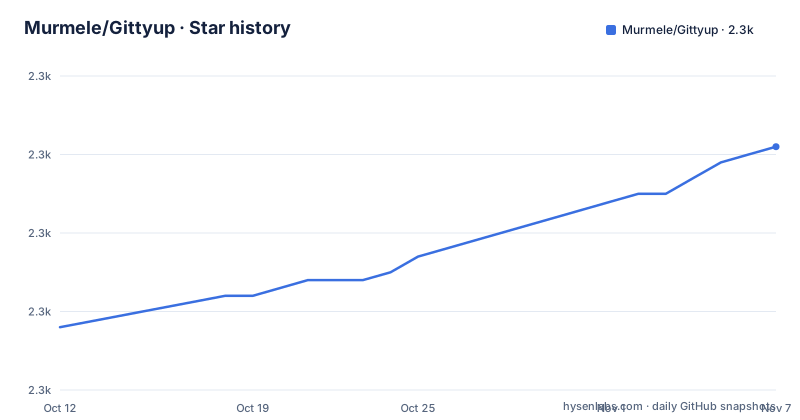
Star history
- Murmele/Gittyup2,321 ★ · +23
| Repository | 2026-10-12 | 2026-11-07 |
|---|---|---|
| Murmele/Gittyup | 2.3k | 2.3k |
23 Stars in the last 26 days, measured from the daily GitHub snapshot. Compare with other projects
Editorial analysis
A GitAhead continuation that ships as Flatpak, binaries or source
Gittyup is a graphical Git client built to help you understand and manage your source code history. The README states that it continues the GitAhead client, and the license section confirms both projects fall under the MIT license, with the text in LICENSE.md.
The latest stable release is offered as a pre-built Flatpak for Linux and as 32 and 64 bit binaries for Windows and macOS. You can also build from source. A separate pre-built development version is published under the `development` tag, last built on 28 March 2026, while the stable line reached `gittyup_v2.0.0` on 30 November 2025 after `gittyup_v1.4.0` in May 2024.
The primary language is C++, and the repository was last pushed to on 24 September 2026.
Qt 6.4 is the only external dependency you must supply
The README separates dependencies into two groups. Qt, required at version 6.4 or later, is the one external dependency. Everything else comes as a submodule of the repository: `libgit2` and `cmark` are required, `git` is needed only for the credential helpers, `libssh2` gives `libgit2` its SSH support, and `openssl` is needed by `libssh2` and `libgit2` on some platforms.
Some submodules are optional or can be replaced by system libraries, according to the README. The build environment asks for a C++11 compiler, with MSVC 2017 or later recommended on Windows, GCC 6.2 or later on Linux and Xcode 10.1 or later on macOS. CMake 3.19 or later is required, and Ninja is optional.
If Qt sits in a non-standard location, pass `-DCMAKE_PREFIX_PATH=<path-to-qt>`, pointing at the directory that contains `bin` and `lib`.
OpenSSL is built by hand before CMake runs
The source build is not a single configure and make. After initialising submodules you build OpenSSL yourself, from `dep/openssl/openssl`, with a platform-specific recipe. Windows uses `perl Configure VC-WIN64A` followed by `nmake`. Intel macOS uses `./Configure darwin64-x86_64-cc no-shared`, Apple Silicon uses `./Configure darwin64-arm64-cc no-shared`, and Linux uses `./config -fPIC`, each followed by `make`.
The README adds that building OpenSSL on Windows requires Perl and NASM. That is two extra tools to install before CMake even starts, and the README does not mention a way to skip the step on Windows other than satisfying the dependency from a system library, which it says is possible only for some submodules.
Submodules are fetched with:
git submodule init
git submodule update --depth 1
Configure and build with CMake and Ninja
Once OpenSSL exists, you create a build directory and configure from it. The README starts from the root of the repository, runs `mkdir -p build/release`, changes into that directory, and calls CMake with the Ninja generator:
cmake -G Ninja -DCMAKE_BUILD_TYPE=Release ../..The build itself is the single command `ninja`. Because Ninja is listed as optional in the build environment, a different generator should work, though the README only demonstrates the Ninja path.
Ubuntu users have a shortcut. A convenient shell script, `pack/buildUbuntu.sh`, is linked from the README. It installs the necessary prerequisites and builds a release version for immediate use. The README gives no equivalent script for Fedora, Windows or macOS, so those platforms follow the manual steps.
Installing without compiling: Flatpak, the AUR and a Homebrew cask
On Linux the README calls Flatpak the easiest route, using the application ID `com.github.Murmele.Gittyup` on Flathub. Arch Linux users install the `gittyup` package from the AUR with `git clone https://aur.archlinux.org/gittyup.git`, then `cd gittyup` and `makepkg -si`, or through an AUR helper. The `gittyup-git` package gives the VCS build.
On macOS the README points to the `gittyup` cask in Homebrew:
brew install gittyupThere is also a short Bash script for launching the Flatpak from a terminal. It wraps `flatpak run com.github.Murmele.Gittyup` so the process is disowned and its output goes to /dev/null, and you save it somewhere on your path and mark it executable with `chmod +x` before running `gittyup`. The README does not describe a Windows installer beyond the pre-built binaries on the release page.
Where the documentation stops and a feature tour begins elsewhere
The Features section of the README is a single sentence that sends you to the GitHub Page at murmele.github.io/Gittyup. The README itself therefore lists no feature set.
The consequence is that you cannot judge from the README alone whether Gittyup handles your workflow, for example whether it supports a particular remote or a large repository. Open the feature page before installing, and use the issue tracker if you hit something missing.
Help channels are named. Stack Overflow questions go under the `gittyup` tag, bugs go in the issue tracker, and a Matrix channel, `Gittyup:matrix.org`, covers anything left over. The README asks you to search existing questions and issues before posting a new one.
Contributions run through clang-format and ctest
Contributors fork the repository, create a new named branch and open pull requests against `master`, following the standard GitHub workflow. The README asks for commit messages that follow the seven guidelines from the linked article on writing a great commit message, and states that contributions are released under the project's license.
Two scripts back that up. `cl-fmt.sh` checks code formatting, and `setup-env.sh` installs a pre-commit hook that runs `clang-format` over every modified file. Before pushing, you run the unit tests with `ctest` from your build directory to catch regressions.
The repository also holds translations under `l10n/`, packaging files in `pack/`, a Flatpak manifest `com.github.Murmele.Gittyup.yml`, and a `test/` directory. The README welcomes bug fixes, new features, documentation and translations alike.
Editorial conclusion
Gittyup suits developers on Linux, macOS or Windows who want a graphical view of Git history and are content with a Qt application that carries its own libgit2. It is a poor choice if you cannot install Flatpak or Homebrew and also cannot build OpenSSL, because the source route asks for submodules, Perl and NASM on Windows, and Qt 6.4 or later. Before committing, check which release you will actually get: the stable 2.0.0 build or the rolling development build.
Frequently asked questions
how to install gittyup
The README lists Flatpak as the easiest Linux route, a Homebrew cask on macOS with brew install gittyup, an AUR package for Arch Linux, and pre-built Windows binaries. You can also build from source.
how to install gittyup on ubuntu
The README links a shell script, pack/buildUbuntu.sh, that installs the prerequisites and builds a release version. Flatpak and the AUR (for Arch Linux) are the other Linux routes it names.
how to install gittyup on windows
The README says the latest stable release is available as 32 and 64 bit binaries for Windows. Building from source on Windows needs Perl and NASM for OpenSSL.
Official sources
Add this badge to your README
If you maintain this project, the badge below links readers to this analysis and shows its maintenance status from the daily GitHub snapshot. Paste the markdown into your README; add ?metric=license or ?metric=stars to the image URL for a different field.

[](https://hysenlabs.com/projects/murmele-gittyup)Star history chart for your README
[](https://hysenlabs.com/projects/murmele-gittyup)Was this useful?