Mutagen keeps local tools pointed at remote code, but the support window is one month wide
Fast file synchronization and network forwarding for remote development
At a glance
- What is it?
- Mutagen pairs real-time file synchronization with network forwarding so local editors and build tools can operate on code in SSH hosts and Docker containers. What the README withholds is every command, flag, and configuration detail, and the support policy drops each minor series one month after its successor ships.
- Who is it for?
- Mutagen fits teams that want to keep a local toolchain pointed at a remote filesystem without giving up an SSH session or a container shell, and its Go 1.25.0 module, grpc and protobuf stack, and per-platform dependencies make the shape of the system readable from the manifest alone. Do not adopt it expecting a documented command surface, because the README carries no install command, no session file example, and no flag list.
- Can I use it commercially?
- Check first. The repository uses a licence we do not classify automatically, so read its LICENSE file before any commercial use.
- Is it still maintained?
- Activity is slowing. The repository last received commits 6 months ago.
- What is it written in?
- Mainly Go, according to GitHub's language statistics.
Answers come from the project's GitHub data, last synced on November 14, 2026, and from our analysis. They are not legal advice.
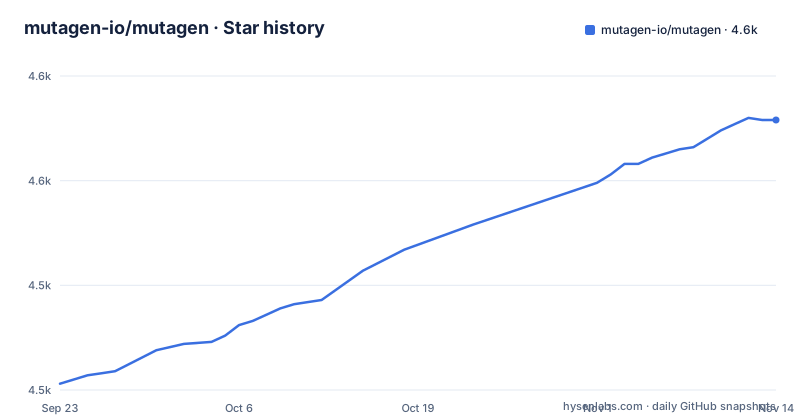
Star history
- mutagen-io/mutagen4,579 ★ · +126
| Repository | 2026-09-23 | 2026-11-14 |
|---|---|---|
| mutagen-io/mutagen | 4.5k | 4.6k |
126 Stars in the last 52 days, measured from the daily GitHub snapshot. Compare with other projects
Editorial analysis
Three endpoint types, two traffic mechanisms, and no commands at all
Mutagen is not a remote shell and not a container runtime. It is a tool that keeps your existing local tools pointed at files that live somewhere else, so an editor, a compiler, or a test runner running on your machine reads and writes paths on a cloud server or inside a container. Two mechanisms carry that traffic: real-time file synchronization and network forwarding. The README names three endpoint types, each with its own documentation page: local systems, SSH-accessible locations, and Docker containers. The same session shape can therefore describe laptop to laptop, laptop to SSH host, and laptop to container, with the transport chosen per endpoint rather than per session.
What the README does not give you is any of the mechanics. There is no session configuration example, no flag list, no sample command line, and no timing or throughput figure anywhere in the text. Every operational detail is deferred to the documentation site at mutagen.io/documentation, which the README treats as the actual manual.
v0.18.1 is the newest tag while master took commits in April 2026
The support policy is the part of the README most likely to affect an upgrade decision. It uses semantic versioning, and it states that before version 1.0 each minor release series is supported for one month after the first release in the next minor series, with the example that v0.10.x is supported until one month after v0.11.0 ships. That clock starts when the successor arrives, not on a calendar date.
The release list shows why the wording matters. The newest tag is v0.18.1, published 2025-02-24. Before it sit v0.18.0 from 2024-10-24 and the v0.18.0-rc3 candidate from 2024-10-23, one day apart. No v0.19 has appeared, so the one month clock for v0.18.x has not started and that series is still inside its own stated window. The default branch master, meanwhile, took its most recent push on 2026-04-22. Commits have landed on master long after the last tag, which leaves two populations of users: those pinning a release run code about a year behind the tip, and those tracking master run something the project has never tagged. Builds for a given minor series are pinned to the Go minor release and dependency versions used during development of that series, with patch releases folded in only when they carry security fixes.
The go.mod file is where the architecture is actually visible
The dependency manifest is the most detailed technical artifact in the repository, and it is published verbatim in the tree rather than generated at install time:
module github.com/mutagen-io/mutagen

go 1.25.0

require (
	github.com/Microsoft/go-winio v0.6.2
	github.com/bmatcuk/doublestar/v4 v4.10.0
	github.com/dustin/go-humanize v1.0.1
	github.com/eknkc/basex v1.0.1
	github.com/fatih/color v1.19.0
	github.com/fsnotify/fsevents v0.2.0
	github.com/google/go-cmp v0.7.0
	github.com/google/uuid v1.6.0
	github.com/hectane/go-acl v0.0.0-20230122075934-ca0b05cb1adb
	github.com/klauspost/compress v1.18.5
	github.com/mattn/go-isatty v0.0.21
	github.com/mutagen-io/extstat v0.0.0-20210224131814-32fa3f057fa8
	github.com/mutagen-io/gopass v0.0.0-20230214181532-d4b7cdfe054c
	github.com/spf13/cobra v1.10.2
	github.com/spf13/pflag v1.0.10
	github.com/zeebo/xxh3 v1.1.0
	go.yaml.in/yaml/v4 v4.0.0-rc.4
	golang.org/x/net v0.53.0
	golang.org/x/sys v0.43.0
	golang.org/x/text v0.36.0
	google.golang.org/grpc v1.80.0
	google.golang.org/grpc/cmd/protoc-gen-go-grpc v1.6.1
	google.golang.org/protobuf v1.36.11
)

require (
	github.com/inconshreveable/mousetrap v1.1.0 // indirect
	github.com/klauspost/cpuid/v2 v2.2.10 // indirect
	github.com/mattn/go-colorable v0.1.14 // indirect
	golang.org/x/term v0.42.0 // indirect
	google.golang.org/genproto/googleapis/rpc v0.0.0-20260120221211-b8f7ae30c516 // indirect
)
Read the list as a description of the machine. github.com/spf13/cobra and github.com/spf13/pflag supply a command line interface with flags. google.golang.org/grpc and google.golang.org/protobuf, together with the protoc-gen-go-grpc generator, describe a binary RPC protocol rather than a stream of shell commands. github.com/mutagen-io/gopass covers password entry, which matters because SSH endpoints need credentials. One entry deserves a second look: go.yaml.in/yaml/v4 sits in the direct block at v4.0.0-rc.4, a release candidate rather than a final tag, so configuration parsing depends on a prerelease library. go.sum sits beside go.mod, so exact module hashes are recorded even though the version lines are readable.
Platform differences surface as dependencies, not as documentation
Cross-platform work shows up in the require list rather than in prose. Windows support pulls in github.com/Microsoft/go-winio, which provides named pipe transport on that platform, and github.com/hectane/go-acl, which handles access control list manipulation. macOS support pulls in github.com/fsnotify/fsevents for file system event delivery, and github.com/mutagen-io/extstat carries extended stat information across platform boundaries. Compression sits in the same block as github.com/klauspost/compress, hashing as github.com/zeebo/xxh3, and pattern matching as github.com/bmatcuk/doublestar/v4.
The README's own status line is one sentence long: Mutagen is built and tested on Windows, macOS, and Linux, and binaries for many more platforms are linked from the latest releases page. No minimum or maximum OS version appears anywhere. For a reader this means the platform question is settled by trying a binary rather than by reading, and on an older Windows or an untested Linux distribution the failure surface is whatever the release archive happens to ship.
The tree carries agent files and an unexplained sspl directory
The top level looks like a Go project with build and policy documents wrapped around it. Alongside .gitattributes, .github/, .gitignore, LICENSE, and README.md sit AGENTS.md, BUILDING.md, CLAUDE.md, CONTRIBUTING.md, DCO, and SECURITY.md, plus five directories: cmd/, pkg/, scripts/, tools/, and images/. A sixth, sspl/, sits with them.
Two entries stand out because the README never mentions them. AGENTS.md and CLAUDE.md sit at the root with no line of prose explaining their contents or which one an agent should read. The sspl/ directory is equally unexplained: it is not referenced by the README, not tied to any documented feature, and not named in the dependency list. Whether it holds vendored code, generated assets, or a separate licensing arrangement, the repository text does not say, and guessing wrong about a directory whose name looks like a license scheme is an expensive mistake.
The rest of the root is conventional. CONTRIBUTING.md is where the README sends contributors, SECURITY.md backs the disclosure note, and BUILDING.md holds the compile instructions. DCO sits alongside the contribution guide, which tells you sign-off rather than a license header governs incoming patches.
The repository answers license and disclosure questions with a pointer
Two questions a reader usually wants answered are deliberately pointed elsewhere. The first is licensing. The repository metadata reports no asserted license, and the README says only that license information is in the LICENSE file, so anyone planning a commercial deployment has to read that file directly and cannot resolve the question from the README or from a badge.
The second is how problems get reported. The README says Mutagen takes security seriously, asks reporters to practice responsible disclosure, and directs email to [email protected] instead of a GitHub issue, with SECURITY.md as the reference. That address is a Docker mailbox rather than a project specific one, and it is the only signal in the README about who backs the project now. There is no advisory history, no CVE list, and no bug bounty text in the README.
For a reader, both gaps push work back onto you. License compatibility for a tool that sits inside a build path is a legal question this repository does not answer, and because a tool of this kind holds file paths and credentials for every endpoint in a session, the disclosure address means you need working mail rather than a platform workflow to report a problem.
The name collides with a Python audio library, and four third party tools extend it
Mutagen shares its name with quodlibet/mutagen, a Python module for handling audio metadata, and the README says so directly under unrelated projects. The two have nothing to do with each other, which makes the name the first practical obstacle for a new reader: the disambiguating facts are the implementation language, Go against Python, and the project domain, mutagen.io. Two of the third party tools listed in the README repeat the pattern, since one is named MutagenMon and a different project is named mutagenmon with different casing and a different implementation language.
The README lists four external projects without endorsing a workflow. Mutagen Helper lets you define sessions with configuration files that live inside a codebase, which is a different starting point from a session described outside the repository. docker-magento-mutagen is a Docker based development environment for Magento that uses Mutagen for file synchronization. MutagenMon is a Python based GUI for monitoring sessions. The second mutagenmon is a Go based native GUI for Mac and notes that it provides Apple notarized builds.
Discussion goes to a Slack workspace linked from the README, release news to a Twitter account, and the project publishes a CI badge for test status and a Go Report Card badge.
Editorial conclusion
Mutagen fits teams that want to keep a local toolchain pointed at a remote filesystem without giving up an SSH session or a container shell, and its Go 1.25.0 module, grpc and protobuf stack, and per-platform dependencies make the shape of the system readable from the manifest alone. Do not adopt it expecting a documented command surface, because the README carries no install command, no session file example, and no flag list. Before committing, read the LICENSE file directly, read BUILDING.md if you plan to compile, and confirm your OS version is covered, since the releases page links binaries for many more platforms without naming supported versions.
Frequently asked questions
What is Mutagen for remote development?
It enables existing local tools to work with code in remote environments such as cloud servers and containers by providing real-time file synchronization and network forwarding, between local systems, SSH-accessible locations, and Docker containers.
How do I install Mutagen?
The README does not carry the install commands. It links to installation instructions at https://mutagen.io/documentation/introduction/installation, and notes that Mutagen is built and tested on Windows, macOS, and Linux with binaries for many more platforms linked from the latest release.
How do I use Mutagen for the first time?
The README directs new users to the Overview and Getting started guides at mutagen.io/documentation/introduction, and states that information about all of Mutagen's features lives in the documentation. No session configuration or command example appears in the README itself.
Does Mutagen run on Windows?
Mutagen is built and tested on Windows, macOS, and Linux, and binaries are available for many more platforms. The README names no specific OS versions, and the module requires Go 1.25.0 for building from source.
Official sources
Add this badge to your README
If you maintain this project, the badge below links readers to this analysis and shows its maintenance status from the daily GitHub snapshot. Paste the markdown into your README; add ?metric=license or ?metric=stars to the image URL for a different field.

[](https://hysenlabs.com/projects/mutagen-io-mutagen)Star history chart for your README
[](https://hysenlabs.com/projects/mutagen-io-mutagen)Was this useful?