MarkDown-to-HTML-Parser: A Browser-Only Markdown Renderer for Static Sites
This tool converts Markdown-formatted text into structured HTML for static hosted web display.
At a glance
- What is it?
- This JavaScript project turns Markdown into styled HTML entirely in the browser, using one HTML file, one CSS file, and a bundled marked.js. It suits static hosts like GitHub Pages but has real limits around security and feature depth.
- Who is it for?
- Adopt this if you need a zero-build, client-side Markdown viewer for a static site, blog, or documentation page and you are comfortable with the security trade-offs of rendering raw HTML. Do not use it for multi-user editing, untrusted Markdown, or anything requiring custom syntax or server-side processing.
- Can I use it commercially?
- Yes, with conditions. MPL-2.0 is a weak copyleft licence: you can use it inside commercial and closed-source software, but if you distribute changes to its own files, you must publish those changes under the same licence.
- Is it still maintained?
- Yes. The repository last received commits 1 day ago.
- What is it written in?
- Mainly JavaScript, according to GitHub's language statistics.
Answers come from the project's GitHub data, last synced on October 21, 2026, and from our analysis. They are not legal advice.
Star history
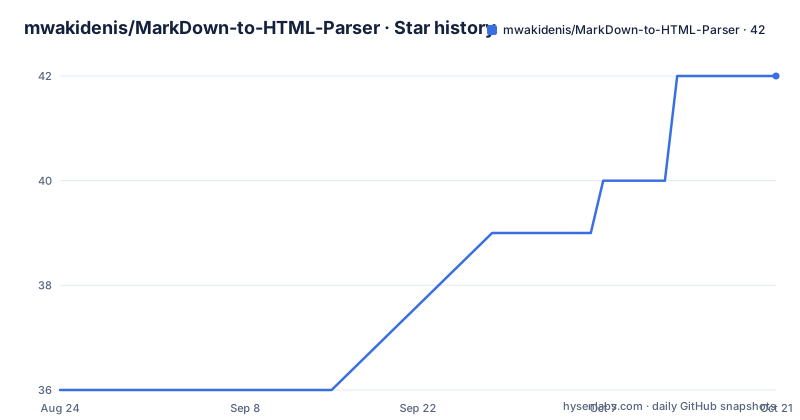
- mwakidenis/MarkDown-to-HTML-Parser42 ★ · +6
| Repository | 2026-08-24 | 2026-10-21 |
|---|---|---|
| mwakidenis/MarkDown-to-HTML-Parser | 36 | 42 |
6 Stars in the last 58 days, measured from the daily GitHub snapshot. Compare with other projects
Editorial analysis
What This Parser Actually Solves
The project addresses a narrow but real problem: how to display Markdown content on a static website without a build step or a backend. Most static site generators, like Jekyll or Hugo, convert Markdown to HTML at build time. That approach requires a local toolchain or a CI pipeline. This parser flips the model. It fetches a .md file at runtime, parses it in the browser, and injects the resulting HTML into the page. The target user is a developer who maintains a blog, a documentation page, or a tutorial section on GitHub Pages and wants to edit Markdown files directly without regenerating the site. The README lists use cases: static websites, documentation pages, personal blogs, portfolios, tutorials, FAQs, and changelogs. The core value is simplicity. You clone the repo, drop in a Markdown file, and open index.html. No server, no Node.js, no package manager. For a hobbyist or a small project, that removes a whole class of friction.
The Mechanism: Fetch, Parse, Inject
The architecture is visible from the file layout. index.html is a single-page application that does three things. It fetches a Markdown file using the fetch() API, parses the text with the marked.js library, and then injects the resulting HTML into a preview panel. The library is bundled locally as marked.min.js, a UMD build, so there is no CDN dependency. That means the whole thing works offline as long as the Markdown file is local or reachable. The page also has a left panel for editing Markdown directly, and the right panel updates instantly as you type. That live editing feature is not something you get from a static site generator. It is closer to a client-side preview tool. The toolbar lets you enter any .md file URL and click Load to render it. That is a simple data flow: user input or URL, fetch, parse, DOM injection. The README does not mention any sanitization step. That is a gap, and it matters.
Getting It Running: Commands and Config
The README gives exact commands. Clone the repository, then serve the directory locally with python -m http.server 8080 and open http://localhost:8080. That is the only command you need. There is no npm install, no build script, no configuration file. The project structure is flat: index.html, style.css, marked.min.js, and example.md. The example.md file is loaded on startup, so you see something immediately. To use your own content, you edit the Markdown in the left panel or enter a .md file URL in the toolbar and click Load. Customization is limited to the CSS file. The README says you can control typography, headings, code blocks, layout, spacing, colors, and theme through style.css. That is the entire configuration surface. There is no API, no CLI, no server-side option. The simplicity is the point, but it also means you cannot change the parser behavior without editing the bundled library or the HTML logic.
A Real Limitation: No Sanitization and No Build Control
The most serious limitation is that the README never mentions sanitizing the HTML output. marked.js converts Markdown to HTML, and by default it allows raw HTML to pass through. If you load a Markdown file from an untrusted source, that file can contain script tags or event handlers. The parser will inject them into the page, and they will run. That is a stored XSS vector. For a personal blog where you author every file, the risk is low. For a community site where users submit content, it is disqualifying. The project does not include a sanitizer like DOMPurify, and there is no mention of configuring marked to disable raw HTML. The second limitation is the lack of a build step. Because parsing happens at runtime, the browser must download the Markdown file and the library before rendering. That adds latency and means the content is not in the initial HTML for search engines. If SEO matters, a static site generator that pre-renders HTML is a better fit. Also, the parser depends on fetch(), which requires a server context. Opening index.html directly from the file system may fail due to CORS, so the README's python -m http.server is not optional.
The Alternative: Static Site Generators with Build-Time Rendering
The obvious alternative is a static site generator like Jekyll or Hugo. Those tools convert Markdown to HTML at build time, producing plain HTML files that you upload to any host. The difference in approach is fundamental. This parser moves the conversion to the client, so the browser does the work on every page load. A generator does the work once, ahead of time, and serves static HTML. That means faster page loads, better SEO, and no dependence on JavaScript. It also means you need a build environment, which is exactly what this project avoids. If your workflow already includes a command line, a generator is usually the better choice for a production site. But if you want to edit Markdown files and see the result instantly without any tooling, this parser has a niche. The trade-off is clear: convenience and zero setup versus performance, security, and searchability.
Maintenance and License Implications
The repository has no recent releases, and the last push date is unknown. That makes maintenance a question mark. The project bundles marked.min.js, and marked.js is actively maintained upstream. But this repo does not show a process for updating that bundle. If a security fix lands in marked, you would have to manually replace the file. The README does not mention a version pin or an update path. That is a real cost for anyone who adopts it. The license is MPL-2.0, according to the README. That is a file-level copyleft license. You can use the code in a larger project, but any changes you make to the licensed files must be shared under MPL-2.0. The README states this clearly. That is less restrictive than GPL, but it still imposes obligations if you modify index.html or style.css. For a personal project, that is usually fine. For a commercial product that embeds this tool, you need to keep the modified files available to users. The README also contains a contradictory MIT license line in one section, but the main license section says MPL-2.0. That inconsistency is worth noting, but the MPL-2.0 statement is the one that appears in the detailed license section.
Editorial conclusion
Adopt this if you need a zero-build, client-side Markdown viewer for a static site, blog, or documentation page and you are comfortable with the security trade-offs of rendering raw HTML. Do not use it for multi-user editing, untrusted Markdown, or anything requiring custom syntax or server-side processing. Before adopting, verify the bundled marked.min.js version and its known vulnerabilities, and check whether the MPL-2.0 license obligations fit your distribution model, especially if you modify the source files.
Frequently asked questions
How can I convert Markdown to HTML?
Open index.html in a browser or on any static host, type Markdown in the left panel, and the right panel updates instantly. To render an existing file instead, put its .md URL in the toolbar and click Load.
How to parse a Markdown file?
index.html fetches the .md file with fetch() and parses it at runtime with marked.js, bundled locally as marked.min.js, then injects the resulting HTML into the preview panel.
How can I display a Markdown file in HTML?
Add a .md file URL in the toolbar and click Load, and the file renders in the same right-hand panel that shows typed Markdown. example.md is the sample loaded on startup, and style.css styles the rendered output.
How can I turn a Markdown file into a webpage?
MD-to-HTML-Parser renders at read time instead of generating a file: the page fetches, parses and injects the HTML client-side, with no server and no build step. The README describes no export or download step.
Official sources
Add this badge to your README
If you maintain this project, the badge below links readers to this analysis and shows its maintenance status from the daily GitHub snapshot. Paste the markdown into your README; add ?metric=license or ?metric=stars to the image URL for a different field.

[](https://hysenlabs.com/projects/mwakidenis-markdown-to-html-parser)Star history chart for your README
[](https://hysenlabs.com/projects/mwakidenis-markdown-to-html-parser)