Mitrokit Ventures: A Next.js 14 Personal Brand Site With an Admin Panel That Does a Lot, but Not Everything
Next.js personal brand website with admin dashboard
At a glance
- What is it?
- Mitrokit Ventures is a full-stack Next.js 14 template for a personal brand or agency site, bundling a public homepage with an authenticated admin dashboard. It is feature-rich but carries GPL-3.0 licensing and a Cloudflare deployment path that needs careful checking.
- Who is it for?
- Adopt Mitrokit Ventures if you want a ready-made Next.js 14 site with an admin dashboard and you are comfortable with GPL-3.0, which may affect how you distribute any derivative work. Do not adopt it if you need a headless CMS or a production-ready auth system without custom hardening.
- Can I use it commercially?
- Yes, with conditions. GPL-3.0 is a copyleft licence: if you distribute software that includes it, you must release that software's source code under the same licence. Running it internally without distributing it does not trigger that obligation.
- Is it still maintained?
- Yes. The repository received new commits within the last day.
- What is it written in?
- Mainly TypeScript, according to GitHub's language statistics.
Answers come from the project's GitHub data, last synced on October 22, 2026, and from our analysis. They are not legal advice.
Star history
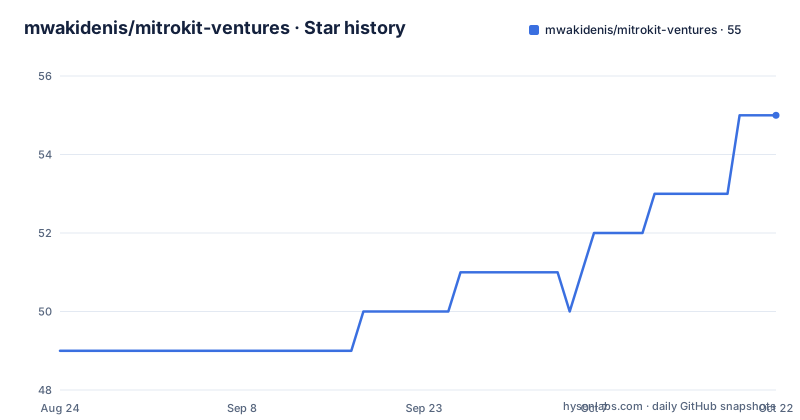
- mwakidenis/mitrokit-ventures55 ★ · +6
| Repository | 2026-08-24 | 2026-10-22 |
|---|---|---|
| mwakidenis/mitrokit-ventures | 49 | 55 |
6 Stars in the last 59 days, measured from the daily GitHub snapshot. Compare with other projects
Editorial analysis
What This Project Actually Solves
Mitrokit Ventures is a template for a personal brand or small agency website. It solves the problem of assembling a modern marketing site from scratch: hero, services, projects, testimonials, blog, FAQ, contact form, and newsletter signup. On top of that, it includes an admin panel at /admin where a non-technical owner can manage content without touching code. The target user is a freelancer or small studio that wants a polished public face plus a simple way to update projects and blog posts. It is not a general-purpose CMS. It is a specific, opinionated bundle of Next.js 14, TypeScript, Tailwind, and Prisma that you are meant to customize.
The Architecture: One Next.js App, Two Faces
The repository is a single Next.js application with a public frontend and an authenticated backend. The public side is a long homepage with sections driven by React components. The backend lives under /api with three REST endpoints: /api/auth/login, /api/contact, and /api/subscribe. The admin panel is a separate route group under /admin. Data flows through Prisma ORM, which by default points at a SQLite file (DATABASE_URL="file:./dev.db") but can be switched to PostgreSQL or MySQL by editing schema.prisma. State management uses Zustand with five stores: authStore, blogStore, projectStore, adminStore, and uiStore. This split is conventional for a small app, but it means the admin panel is tightly coupled to the same codebase. You cannot run the admin as a separate service, and you cannot easily swap in a different frontend.
Authentication and Roles: JWT and bcrypt, But No Refresh Tokens
The README describes authentication with JWT tokens and bcrypt password hashing. There are three roles: USER, ADMIN, and SUPER_ADMIN. The login endpoint is the only auth route listed. There is no mention of token refresh, logout invalidation, or password reset. For a small site that might be fine, but it is a real limitation. If you plan to have many editors or long-lived sessions, you will need to add refresh token logic or session management yourself. The audit logging feature, which tracks admin actions, is a good security touch, but the README does not specify what actions are logged or how the logs are exposed. That gap means you cannot assume the audit trail covers everything you need.
Getting It Running: Commands and Config That Actually Work
The README gives a clear path. Clone the repo, run npm install, then create a .env file with three keys: DATABASE_URL, JWT_SECRET, and NEXT_PUBLIC_SITE_URL. The default DATABASE_URL points to a local SQLite file, which is the fastest way to test. Then run npm run db:generate and npm run db:push to create the schema. After that, npm run dev starts the server on localhost:3000. For production, npm run build and npm run start are standard. The project also includes Cloudflare Pages support via @cloudflare/next-on-pages and wrangler, with a public/_headers file for deployment. That is a nice option, but note that Next.js 14 and Cloudflare Pages have known compatibility issues with certain features like middleware and image optimization. You should verify that your specific setup works before relying on it.
The Database Schema: More Models Than the README Shows
The README truncates the schema listing, but it shows the User model with fields for id, email, password, name, role, and timestamps, plus relations to Posts, Projects, Messages, Testimonials, and AuditLogs. That implies the database has at least six models. The Project model is partially shown with title and id. The blog uses markdown content, tags, reading time, likes, views, and comments, which suggests a Post model with those fields. The schema is designed to be flexible, but the README does not document every field. If you need to add a new content type, you will have to edit schema.prisma and run a migration. That is normal, but it is a maintenance cost. The default SQLite setup is fine for development, but for production you will likely switch to PostgreSQL, which means updating the provider and possibly adjusting field types.
Content Management: Markdown Blog and Admin Panel, But No Media Library
The blog uses gray-matter, remark, and remark-html to process markdown. That is a lightweight approach: you write posts in markdown, and the site renders them. The admin panel presumably lets you create and edit posts, but the README does not describe a media uploader or image manager. For a personal brand site, you will probably want to add images to blog posts and projects. Without a built-in media library, you will need to host images elsewhere or extend the admin. The contact form uses server actions, which is a modern Next.js pattern. The newsletter subscription endpoint is simple. These are functional, but they are not as polished as a dedicated CMS like Sanity or Contentful. If your content is mostly text, this works. If you need rich media, plan to build it.
Licensing and Maintenance: GPL-3.0 Is a Big Decision
The project is licensed under GPL-3.0. That is a strong copyleft license. If you build a derivative work and distribute it, you must release your source under the same license. For a personal brand site that you never distribute, that may not matter. But if you plan to sell this template or use it for a client who expects proprietary rights, GPL-3.0 is a problem. The README does not mention any commercial license. Maintenance is another consideration. The last push date is unknown, and there are no recent releases listed. That means you cannot rely on regular updates. You will be responsible for keeping dependencies current, especially Next.js, React, and Prisma, which have frequent breaking changes. The project uses specific versions like Next.js 14.2.3 and React 18.3.1, so upgrading to Next.js 15 or React 19 will require manual work.
Alternatives: Compare With a Headless CMS or a Static Generator
The main alternative is to skip the admin panel entirely and use a headless CMS like Sanity or Contentful. Those services give you a hosted editing interface, media management, and API access. You would build the frontend in Next.js and fetch content at build time or runtime. That approach decouples content from code, which is better if you have non-technical editors who need to update content frequently. Mitrokit Ventures bundles the admin into the same app, which is simpler to deploy but harder to scale. Another alternative is a static site generator like Astro, which is faster for content-heavy sites but does not include an admin panel out of the box. The trade-off is clear: Mitrokit gives you an all-in-one package, but you trade flexibility and a managed backend for a self-hosted, GPL-licensed monolith.
Editorial conclusion
Adopt Mitrokit Ventures if you want a ready-made Next.js 14 site with an admin dashboard and you are comfortable with GPL-3.0, which may affect how you distribute any derivative work. Do not adopt it if you need a headless CMS or a production-ready auth system without custom hardening. Before deploying, verify the JWT secret handling, the Prisma schema for your target database, and whether the Cloudflare Pages configuration works with your Next.js version. The project is a solid starting point for a personal brand site, but its real value depends on how much custom security and data modeling you are willing to add.
Frequently asked questions
Which framework versions does mitrokit-ventures actually depend on?
The README states Next.js 14.2.3 with TypeScript 5.4.5, React 18.3.1 and Tailwind 3.4.3, but the package manifest asks for Next 15.1.3 or newer and the lint configuration to match. The manifest also carries a token library at version 6 that the README never mentions, while the token and hashing libraries the README names are absent from it.
Which database does mitrokit-ventures expect?
Three answers. The README's environment section sets a local file database address, its backend section describes PostgreSQL through the Prisma object-relational mapper with MySQL and SQLite switchable, and the example environment file at the root uses a PostgreSQL connection string. That last file also lists authentication, email, realtime and GitHub token variables the other two never mention.
Which database commands can I run in mitrokit-ventures?
The README tells you to run a client generation, a schema push and a migration command, each with an equivalent through the Prisma command line. The package manifest defines only a development server, a build, a start and a lint, and Prisma itself is not a dependency, so the script names are the only part of that sequence that does not exist.
Official sources
Add this badge to your README
If you maintain this project, the badge below links readers to this analysis and shows its maintenance status from the daily GitHub snapshot. Paste the markdown into your README; add ?metric=license or ?metric=stars to the image URL for a different field.

[](https://hysenlabs.com/projects/mwakidenis-mitrokit-ventures)Star history chart for your README
[](https://hysenlabs.com/projects/mwakidenis-mitrokit-ventures)Was this useful?