Jellyfin Enhanced: a feature layer for the Jellyfin web interface
A comprehensive enhancement layer for the Jellyfin web UI with keyboard shortcuts, subtitle styling, TMDB and User reviews, Seerr integration with auto-request, a media calendar and download monitor via Sonarr & Radarr, and a growing collection of quality-of-life improvements.
At a glance
- What is it?
- Jellyfin Enhanced is a Jellyfin plugin that adds quality tags to posters, a spoiler guard, keyboard shortcuts, a release calendar, and a request path that goes through Seerr, and it does all of that in the interface your users already have, including the official mobile apps, because it is installed once on the server. It is GPL licensed and ships as a versioned build for every Jellyfin release line.
- Who is it for?
- Adopt Jellyfin Enhanced if you run a shared Jellyfin server and want poster quality tags, a spoiler guard, shortcut-driven navigation and Seerr requests without writing a plugin yourself, and pin the build for the Jellyfin version you run. Do not adopt it on a Jellyfin release older than 10.11, since the plugin requires 10.11 or newer, and do not adopt it if your users are on the official mobile apps and you need a feature that the shared web interface cannot deliver.
- Can I use it commercially?
- Yes, with conditions. GPL-3.0 is a copyleft licence: if you distribute software that includes it, you must release that software's source code under the same licence. Running it internally without distributing it does not trigger that obligation.
- Is it still maintained?
- Yes. The repository last received commits 1 day ago.
- What is it written in?
- Mainly JavaScript, according to GitHub's language statistics.
Answers come from the project's GitHub data, last synced on October 23, 2026, and from our analysis. They are not legal advice.
Star history
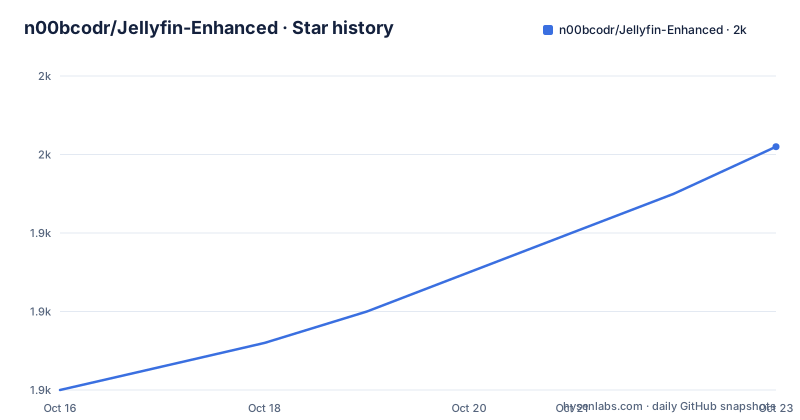
- n00bcodr/Jellyfin-Enhanced1,951 ★ · +31
| Repository | 2026-10-16 | 2026-10-23 |
|---|---|---|
| n00bcodr/Jellyfin-Enhanced | 1.9k | 2k |
31 Stars in the last 7 days, measured from the daily GitHub snapshot. Compare with other projects
Editorial analysis
One install on the server, every screen gains the features
Jellyfin is a free media server you run yourself, and Jellyfin Enhanced is a free plugin for that server. It adds dozens of features to the screens you already use in the Jellyfin web app, and in the official Android and iOS apps and Jellyfin Desktop, because those use the same web interface.
That last point is the architectural decision that makes the plugin different from a typical Jellyfin extension. Most Jellyfin plugins are server-side and expose new API endpoints, which means the web client has to be taught to use them, and the mobile apps lag behind. A plugin that injects itself into the web interface instead works everywhere the web interface works, with no app update, no per-device installation, and no separate configuration on a phone or a television.
The cost of that approach is that it depends on the web interface remaining compatible, which is why the compatibility story matters so much here. The README states that the plugin needs Jellyfin 10.11 or newer, 12.x and its release candidates included, and that the same repository URL serves every version, with Jellyfin installing the build that matches the server.
The features are grouped by audience in the README, which is a good sign for a project with many features. For viewers, poster tags, richer movie pages, a better player, shortcuts and a random picker. For households, a spoiler guard, options to hide things from the home screen, reviews and activity, and phone support. For whoever runs the server, requests, a calendar, active streams showing who is watching right now, and admin tools.
Adding a custom repository, four steps
The install is presented as taking a minute, and it is four steps in the Jellyfin dashboard.
Open Dashboard, then Plugins, then Repositories, and click the add button. Give the repository a name, for example Jellyfin Enhanced, and paste the repository URL, which is:
https://raw.githubusercontent.com/n00bcodr/jellyfin-plugins/main/manifest.jsonThen open the Catalog tab, find Jellyfin Enhanced, and click Install. Finally, restart Jellyfin, refresh the browser, and press the question mark key. If the Enhanced panel opens, the install worked.
The refresh step is not a detail. The plugin modifies the interface at runtime in the browser, so a cached copy of the old page will keep the old behaviour, and the hard refresh is what makes the client pick up the new code.
The important structural point is that the repository serves every version at once. The server asks the manifest for the build that matches its own release, which is why the README can say the same URL works for 10.11 and for 12.x, and why the download badges in the README are split into a 10.11 count and a 12.x count, referring to two different packaged builds of the same plugin.
The README also points to an installation guide and a troubleshooting page for the cases where the panel does not appear.
The request path through Seerr, and the details around it
The request flow is the most substantive feature, and it is worth reading in detail because it is where the plugin meets other people's services.
You search Jellyfin as usual. If what you want is not on the server, it shows up underneath from Seerr, and you can request it with one click. The request goes to whoever runs the server, who approves it from inside Jellyfin. Requests are available from search results, detail pages and discovery pages, including 4K and specific seasons.
Around that core there is a lot of careful work. There are recommendation and Similar rows on every movie and show page with request buttons, and browsing by genre, network, studio, actor, collection or tag, plus a Recommendations page with trending and popular titles. Search understands a year, so typing Dune (2021) matches that film. When you are near the end of a season, the next season is requested for you automatically, and the same works for the next movie in a collection. When requesting you can pick the server, the quality profile and the folder, see your request quota, and use Request More to add missing seasons.
Two features show the level of care. Watchlist sync between Seerr and Jellyfin runs in both directions. And there is a fix for shows Seerr cannot match, which is common with anime: pick the right match or type its TVDB ID before requesting.
The last point is a boundary worth respecting. The README states that parental controls are respected, with results following each user's rating limit and blocked tags. A feature that surfaces titles from an external service has to reapply the server's own restrictions to those results, and the README says it does.
Per-user toggles, and admin defaults that are usually off
The two-level configuration model is the second thing that distinguishes this plugin.
Install it once on the server, and everyone who uses the server gets the new features, with nothing to install on phones, TVs or computers. Then every person picks what they want: press the question mark key anywhere in Jellyfin to open the Enhanced panel and switch features on or off for themselves.
Above that, the server owner chooses which features are available and how they are set up by default, and the README notes that many start switched off.
This matters for a shared server more than it would for a single-user one. A household where one member watches with the spoiler guard on and another does not is a realistic arrangement, and the per-user panel is what makes it work without two accounts and two configurations. The admin layer, with the requests approval flow and the per-feature defaults, is what makes it workable for whoever is responsible for the server.
The integrations follow the same pattern. Connecting Seerr, Sonarr, Radarr, TMDB or MDBList adds even more, and those connections are the server owner's decision, not the user's.
The regression harness: Playwright, jsdom and visual tests
The repository carries a testing setup that says something about how the project is maintained.
The root package.json is a private package named jellyfin-enhanced-regression, with a Node engine requirement of 22.12.0 or newer. Its scripts are the interesting part:
"test": "npm run test:frontend",
"test:frontend": "node tests/frontend/run.mjs",
"test:browser": "playwright test --config tests/browser/playwright.config.cjs",
"test:visual": "playwright test --config tests/browser/playwright.config.cjs --grep @visual"
So there are three layers. A frontend suite that runs under Node with a custom runner, a browser suite driven by Playwright against a real browser, and a visual subset selected by the @visual tag, with a separate coverage helper built on istanbul, which is why the dev dependencies include istanbul-lib-instrument, istanbul-lib-coverage, istanbul-lib-report and istanbul-reports, plus jsdom and Playwright at a pinned version.
The visual tests are the part that matters most for a plugin that restyles a media server's interface. A plugin that changes colours, tags and layouts will break subtly in ways that no unit test catches, and a screenshot comparison against a real Jellyfin 12 server is the only way to notice that a poster row now overlaps a button.
The repository layout supports it, with a tests/ directory, a scripts/ directory, a css/ directory, a docs/ directory with an mkdocs.yml for the documentation site, images/, a manifest.json for the plugin repository, a .pre-commit-config.yaml, a .vscode/ directory and a SECURITY.md.
Where Jellyfin Enhanced is the wrong choice
The first wrong-tool case is a Jellyfin release older than 10.11. The plugin states that it needs 10.11 or newer, and there is no older build in the same repository, so a server that cannot be upgraded simply cannot use it.
The second is a deployment where the web interface is not the interface. The plugin's reach into the official Android and iOS apps works because those apps wrap the same web interface, and that is also its limit. Anything that is a native client, a third-party app with its own rendering, or an API-only integration, will see none of it, and the plugin's own features are not available there.
The third is a server that does not want an external request service connected. The request features depend on Seerr, and the README describes integrations with Sonarr, Radarr, TMDB and MDBList. For a server whose administrators do not want titles surfaced from an outside index, those features stay off, and then a large part of the plugin's value goes with them. The per-feature design means the plugin is still usable in that state, just much less useful.
There is also the coupling question, which follows from the design. A plugin that modifies the web interface at runtime depends on the internals of that interface, so a Jellyfin release that changes its markup can break the plugin in ways that are not compile errors. The weekly release cadence is the mitigation, and the version-matched packaging is what makes it work, but it does mean the plugin tracks the server closely rather than sitting comfortably beside it.
GPL-3.0, version 12.12, and a release every week
The plugin is licensed under GPL-3.0, with the LICENSE file at the repository root. The repository is not archived, and the last push was on 2026-10-19, the day before this review.
The release cadence is the most striking number in the project. The listed releases are v12.12.0.0 from 2026-10-11, described as Catch Up, Tag Colour Overrides and a Much Lighter Page Load, v12.11.0.0 from 2026-10-04 with Seerr UI updates, Language Tag Links and Improved native tabs, and v12.10.0.0 from 2026-10-03, which was release 100, with Native Poster Tags and a Much Faster Startup.
Three releases in eight days, and the version numbers are tied to the plugin's own major line, 12.x, which is separate from the Jellyfin version it targets. Release 100 is also a useful marker, since it tells you how much has changed since the project started.
The remaining structure is that of a well-run project with a documentation site, a security policy, a contributing guide, a pre-commit configuration, a Visual Studio Code setup and a plugin repository manifest at the root, plus the plugin package itself in its own directory. The Discord server is linked from the README for questions, and the documentation site carries the installation guide, the troubleshooting pages and the per-feature documentation.
Editorial conclusion
Adopt Jellyfin Enhanced if you run a shared Jellyfin server and want poster quality tags, a spoiler guard, shortcut-driven navigation and Seerr requests without writing a plugin yourself, and pin the build for the Jellyfin version you run. Do not adopt it on a Jellyfin release older than 10.11, since the plugin requires 10.11 or newer, and do not adopt it if your users are on the official mobile apps and you need a feature that the shared web interface cannot deliver. Before you install, read the installation guide and troubleshooting pages, and check the release notes, because the project ships roughly weekly and the changes between builds are substantial.
Frequently asked questions
How do I install Jellyfin Enhanced?
In Jellyfin open Dashboard, Plugins, Repositories, add a repository with the URL https://raw.githubusercontent.com/n00bcodr/jellyfin-plugins/main/manifest.json, then open the Catalog tab, install Jellyfin Enhanced, restart Jellyfin, refresh the browser and press the question mark key to open the Enhanced panel.
Which Jellyfin versions does Jellyfin Enhanced support?
It needs Jellyfin 10.11 or newer, with 12.x and its release candidates included. The same repository URL serves every version, and Jellyfin installs the build that matches the server it is running on.
Do users have to install anything on their phones or TVs?
No. The plugin is installed once on the server, and it adds its features to the Jellyfin web app, the official Android and iOS apps and Jellyfin Desktop, because those use the same web interface. Each user then chooses which features they want through the Enhanced panel.
How does the Seerr request feature work?
Searching Jellyfin shows Seerr results for titles you do not have, and one click sends a request that the server owner approves from inside Jellyfin. Requests are possible from search, detail and discovery pages including 4K and specific seasons, with automatic requests for the next season or collection entry, watchlist sync in both directions, and a manual TVDB match for shows Seerr cannot identify.
What licence is Jellyfin Enhanced released under?
GPL-3.0, with the LICENSE file at the repository root. The most recent release is v12.12.0.0, dated 2026-10-11, and the last push was on 2026-10-19.
Official sources
Add this badge to your README
If you maintain this project, the badge below links readers to this analysis and shows its maintenance status from the daily GitHub snapshot. Paste the markdown into your README; add ?metric=license or ?metric=stars to the image URL for a different field.

[](https://hysenlabs.com/projects/n00bcodr-jellyfin-enhanced)Star history chart for your README
[](https://hysenlabs.com/projects/n00bcodr-jellyfin-enhanced)Was this useful?