IronClaw: A Rust-Based Agent OS That Puts Local Privacy Before Cloud Convenience
IronClaw is an Agent OS focused on privacy, security and extensibility.
At a glance
- What is it?
- IronClaw is an open-source Agent OS in Rust that runs AI assistants locally with WASM sandboxing, encrypted secrets, and endpoint allowlisting. It targets users who want control over their AI tools but demands a real setup commitment.
- Who is it for?
- Adopt IronClaw if you are a developer or privacy-focused user who wants a self-hosted AI assistant with strict data boundaries and is willing to configure providers, channels, and extensions manually. Avoid it if you expect a plug-and-play assistant with a managed cloud backend or if you need the background service on native Windows, where the README only describes starting the WebUI in the foreground with ironclaw serve.
- Can I use it commercially?
- Yes. Apache-2.0 is a permissive licence: you can use, modify and sell software built on it, as long as you keep its copyright and licence notices.
- Is it still maintained?
- Yes. The repository last received commits 5 days ago.
- What is it written in?
- Mainly Rust, according to GitHub's language statistics.
Answers come from the project's GitHub data, last synced on November 13, 2026, and from our analysis. They are not legal advice.
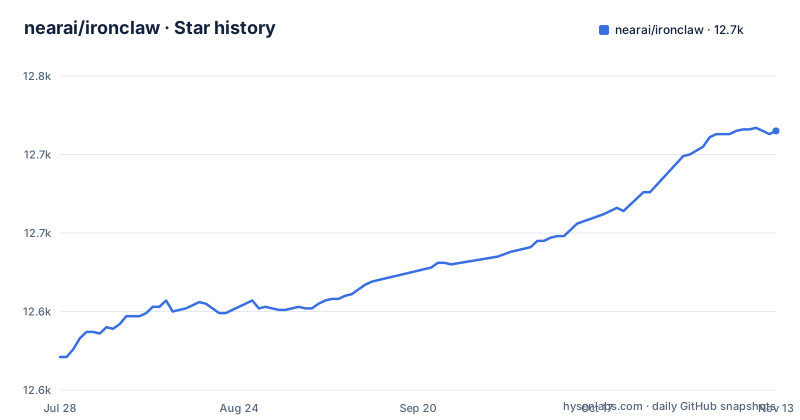
Star history
- nearai/ironclaw12,715 ★ · +144
| Repository | 2026-07-28 | 2026-11-13 |
|---|---|---|
| nearai/ironclaw | 12.6k | 12.7k |
144 Stars in the last 108 days, measured from the daily GitHub snapshot. Compare with other projects
Editorial analysis
What IronClaw Actually Is
IronClaw is an Agent OS, not a single chatbot. It is a Rust-based system that runs a personal AI assistant locally, with the stated goal of keeping your data on your machine. The README positions it as a response to AI systems that are opaque about data handling and aligned with corporate interests. The core promise is that your data stays yours, stored locally and encrypted. This is for people who want the utility of an AI assistant without sending conversations to a vendor's cloud. It is also for developers who want to extend the assistant with custom tools, because IronClaw supports building tools on the fly as WASM modules. The project is licensed under Apache-2.0, which means you can use, modify, and distribute it with few restrictions, though you should read the license terms yourself for any specific obligations.
The Architecture: Sandboxes, Secrets, and Local Storage
The architecture is built around defense in depth, a term the README uses explicitly. At the base is a WASM sandbox for untrusted tools. These tools run in isolated WebAssembly containers with capability-based permissions. The key design choice is that secrets are never exposed to the tools themselves. Instead, credentials are injected at the host boundary, and there is leak detection to catch accidental exfiltration. This is a meaningful separation: a tool can perform actions but cannot read your API keys. HTTP requests are restricted to an endpoint allowlist, so a tool can only call hosts you have explicitly approved. The system also includes Docker sandboxing for heavier jobs, using per-job tokens and an orchestrator/worker pattern. This layered approach means that even if one layer fails, others may contain the damage.
Getting It Running: Commands and Configuration Keys
Installation is straightforward if you are on macOS, Linux, or Windows/WSL. You pick a release tag from the Releases page and run a curl command that pipes the installer to sh. For example, with IRONCLAW_RELEASE_TAG set to ironclaw-v1.4.1, the command downloads and executes the installer script. After that, you run ironclaw onboard to start the guided setup. This command asks you to choose an LLM provider, enter an API key in a hidden prompt, and optionally set a model. It provisions local configuration, an encrypted credential store, and a WebUI login token. On macOS and Linux it also installs and starts a background service. You can check the status with ironclaw status and get the login link again. To switch providers later, you use ironclaw models set-provider openai --model gpt-5-mini and then ironclaw config set openai.api_key. The config command is also used for other settings, like google.client_id or webui.token --rotate. A notable detail is that secret values never accept a positional argument; they are always prompted, which prevents them from appearing in shell history. Configuration changes do not restart the service automatically, so you must run ironclaw service restart after changes that affect the running service.
Extensibility and Self-Expansion: The WASM Tool Pipeline
One of IronClaw's distinguishing features is dynamic tool building. The README says you can describe what you need, and IronClaw builds it as a WASM tool. This is a self-expanding capability, meaning the assistant can create new tools at runtime without waiting for a vendor update. The mechanism is not fully detailed, but it implies a code-generation step that compiles to WebAssembly. This is powerful for automation, but it also introduces risk: a tool that is generated on the fly is still untrusted code, and it runs in the same WASM sandbox. The sandbox is the safety net, so the quality of that sandbox determines the safety of the whole system. The plugin architecture allows you to drop in new WASM tools and channels without restarting, which is convenient for long-running services. However, the README notes that channels like Slack and Telegram have no configuration-file settings and no CLI enablement key. You must install the extension and complete its setup on the WebUI Extensions page. This is a deliberate design choice: it keeps configuration centralized but adds a manual step that may surprise users who expect a CLI flag.
Persistent Memory and Background Automation
IronClaw includes a persistent memory system that combines full-text and vector search using Reciprocal Rank Fusion. This is a hybrid approach that merges results from both search methods, which can improve relevance over a single method. The workspace filesystem provides path-based storage for notes, logs, and context, so you can organize data in a familiar way. Identity files maintain consistent personality and preferences across sessions, which is useful for a personal assistant that needs to remember how you like things done. For background work, IronClaw has routines: cron schedules, event triggers, and webhook handlers. There is also a heartbeat system for proactive background execution, which is for monitoring and maintenance tasks. The README mentions self-repair, automatic detection and recovery of stuck operations. This suggests the system can handle failures without manual intervention, but the details of how it detects 'stuck' operations are not given. For a system that runs as a background service, these features are important because they reduce the need for constant supervision.
Limitations and Failure Modes
The most obvious limitation is the installation and setup complexity. The curl-to-sh installer is common, but it requires trust in the script and the release process. Verify the installer's integrity yourself before piping it to sh. Another limitation is Windows support: the primary path is Windows/WSL, and while there is an MSI installer, the README says Windows users can start the WebUI in the foreground with ironclaw serve, implying that the background service is not fully supported on Windows. If you need a native Windows service, this may be a blocker. The configuration model also has a quirk: channels like Slack and Telegram have no CLI enablement, so you must use the WebUI. This is fine for a local setup, but it makes scripting and automation of channel setup harder. Finally, the README's feature list describes prompt injection defense only as pattern detection, content sanitization and policy enforcement, so read its Security section and the source before relying on it in production.
Alternatives and How They Differ
The main alternative in this space is something like Ollama or LocalAI, which also run LLMs locally but focus on model serving rather than being a full Agent OS. Ollama, for example, provides a REST API to run models, but it does not include a WASM sandbox for tools or a credential store. You would need to build the agent layer yourself. Another alternative is a cloud-based assistant like ChatGPT, which offers convenience but sends your data to a third party. IronClaw's approach is different because it combines a choice of LLM providers, including Ollama, with a sandboxed tool execution environment. The key difference is that IronClaw treats the assistant as a system with multiple layers, not just a model endpoint. If you only need to run a model, Ollama is simpler. If you need an assistant that can act on your behalf with safety boundaries, IronClaw is more aligned, but it requires more setup and maintenance.
Maintenance and Upgrade Cost
The release cadence is active, with v1.4.0 on 2026-08-27, v1.4.1-rc.2 on 2026-09-24 and v1.4.1 on 2026-09-29. The README says configuration writes never restart the service automatically, so after a change that affects the running service you run ironclaw service restart manually. This is a small but recurring cost. Source builds require Rust 1.96+ and Node.js 22+ with Corepack/pnpm, which is a specific toolchain you must maintain. If you use the prebuilt binaries, you avoid that, but you still need to track releases and reinstall. Overall, the maintenance cost is moderate: you need to stay on top of releases and understand the service management commands, but the system is designed to run as a background service, so the day-to-day overhead is low once it is set up.
Editorial conclusion
Adopt IronClaw if you are a developer or privacy-focused user who wants a self-hosted AI assistant with strict data boundaries and is willing to configure providers, channels, and extensions manually. Avoid it if you expect a plug-and-play assistant with a managed cloud backend or if you need the background service on native Windows, where the README only describes starting the WebUI in the foreground with ironclaw serve. Before adopting, verify that your preferred LLM provider is supported, check the current release's installer integrity, and confirm that your Rust toolchain (1.96+) and Node.js (22+) meet the source-build requirements if you go that route. IronClaw's value lies in its local-first, sandboxed design, but that value is only realized if you invest time in its onboarding and service management.
Frequently asked questions
how to install ironclaw
Pick an ironclaw-v* tag on the Releases page, set IRONCLAW_RELEASE_TAG, and run the curl installer piped into sh on macOS, Linux, or Windows/WSL. Windows users can also download ironclaw-x86_64-pc-windows-msvc.msi or run the PowerShell installer script.
how to setup ironclaw
Run ironclaw onboard, choose an LLM provider, type its API key into the hidden prompt, and accept the default model or enter another one. It writes state under $HOME/.ironclaw/reborn, stores the credential encrypted, and prints a WebUI login link on macOS and Linux.
how to use ironclaw
Check the service and reprint the login link with ironclaw status, and start the WebUI in the foreground on Windows with ironclaw serve. Channels are reached through the REPL, HTTP webhooks, WASM channel extensions for Telegram and Slack, and the web gateway.
what is ironclaw ai
It is a Rust project released under Apache-2.0 that describes itself as an agent OS for privacy, security and extensibility. Information is stored locally and encrypted, and untrusted tools execute in isolated WebAssembly containers with capability based permissions.
how to install ironclaw ai
Beyond the prebuilt installers, clone the repository and run cargo install --locked --path crates/app/ironclaw_cli, which requires Rust 1.96+ and Node.js 22+ with Corepack/pnpm. That installs only the CLI crate out of a much larger workspace.
Official sources
Add this badge to your README
If you maintain this project, the badge below links readers to this analysis and shows its maintenance status from the daily GitHub snapshot. Paste the markdown into your README; add ?metric=license or ?metric=stars to the image URL for a different field.

[](https://hysenlabs.com/projects/nearai-ironclaw)Star history chart for your README
[](https://hysenlabs.com/projects/nearai-ironclaw)Was this useful?