DsHidMini for DualShock 3 on Windows 10 and 11
Virtual HID Mini-user-mode-driver for Sony DualShock 3 Controllers
At a glance
- What is it?
- DsHidMini is a user-mode HID driver for Sony DualShock 3 and SIXAXIS controllers on Windows 10 and 11. It supports USB, Bluetooth through BthPS3, configurable HID modes, motion data, rumble, LEDs, and optional XInput emulation.
- Who is it for?
- DsHidMini fits Windows users who need a DualShock 3 or supported legacy adapter in applications expecting standard HID or XInput devices. It is not appropriate for PlayStation Move hardware or the GreenAsia-PantherLord adapter.
- Can I use it commercially?
- Yes. BSD-3-Clause is a permissive licence: you can use, modify and sell software built on it, as long as you keep its copyright and licence notices.
- Is it still maintained?
- Yes. The repository last received commits 5 days ago.
- What is it written in?
- Mainly C#, according to GitHub's language statistics.
Answers come from the project's GitHub data, last synced on October 23, 2026, and from our analysis. They are not legal advice.
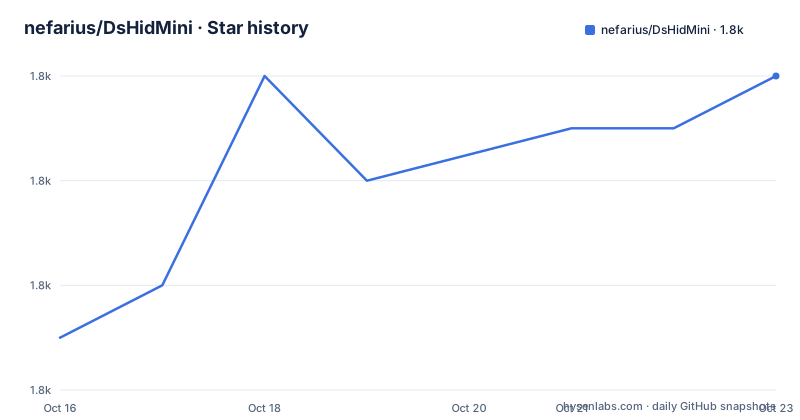
Star history
- nefarius/DsHidMini1,846 ★ · +5
| Repository | 2026-10-16 | 2026-10-23 |
|---|---|---|
| nefarius/DsHidMini | 1.8k | 1.8k |
5 Stars in the last 7 days, measured from the daily GitHub snapshot. Compare with other projects
Editorial analysis
DsHidMini's Windows controller compatibility
DsHidMini addresses a specific Windows compatibility problem: applications often expect a standard HID gamepad, DirectInput device, Raw Input device, or XInput controller, while a DualShock 3 presents a different USB and Bluetooth protocol. The project converts supported hardware into configurable, standard-compliant HID devices through a self-contained user-mode driver for Windows 10 and Windows 11.
The documented hardware scope includes Sony DualShock 3 and SIXAXIS controllers, Navigation controllers, ShanWan PS1 and PS2 USB adapters, and DS3-identity PS1 and PS2 USB adapters. The latter two categories are not interchangeable. The ShanWan adapter is identified as `VID_2563` / `PID_0575` and supports buttons, the hat, sticks, pressure, and rumble, but has no LEDs or motion. The DS3-identity adapter is identified as `VID_054C` / `PID_0268` with `bMaxPacketSize0 8`, and provides the DS3 protocol and rumble without LEDs, motion, or Bluetooth.
Navigation controllers are supported, but their feature set is narrower. The documentation records one LED and no rumble. This distinction matters when choosing a driver for a controller that is not a standard DualShock 3. The PlayStation Move Motion Controller is outside the project scope, and the Twin USB Joystick or GreenAsia-PantherLord adapter is left to the Windows inbox HID driver.
The intended audience is therefore narrower than a general controller-management audience. It is for Windows users who own one of the listed devices and need the controller to work with games or applications that depend on recognized HID or XInput interfaces.
How the user-mode driver changes controller input
The driver runs in user mode through the Windows UMDF model and presents supported hardware as standard HID devices. Games and applications can then address the controller through DirectInput, Raw Input, the Windows HID API, or XInput when the optional XInput Bridge is enabled. The repository layout places the UMDF implementation in `driver/`, while `XInputBridge/` contains a proxy DLL named `XInput1_3.dll` and an extended API for DS3 pressure data.
DsHidMini does not offer one fixed device profile. Its HID modes include a single gamepad with pressure-sensitive buttons, split or multi-device operation, Sony sixaxis emulation, DualShock 4 emulation for DS4Windows, Xbox or XInput emulation, and Common Gamepad, or CGP. CGP is a single DirectInput-friendly gamepad without pressure-sensitive button sliders, intended for older applications with limited axis support.
The CGS mode adds a standard gamepad together with HID Sensor accelerometer and gyrometer collections. The documentation says these collections are available to HIDAPI, Windows Sensors, and GameInput. Motion processing includes calibrated accelerometer and single-axis gyroscope data, live telemetry, and a viewer in ControlApp. Bluetooth motion reuses calibration cached by the controller's USB instance, which is an important dependency for users who want motion data without first establishing the same controller through USB.
Runtime controls also extend beyond button input. The driver exposes rumble as force feedback, provides LED player-index and battery bar-graph modes, supports charging animation and custom static or flashing patterns, and allows application-controlled output. Device management includes controller identification, capability reporting, pairing, Bluetooth disconnect, runtime rumble and LED commands, and wired USB power-off behavior.
Installing DsHidMini and completing the first setup
The README directs users to obtain the latest build from the GitHub releases page. It does not provide a package-manager command, a PowerShell installation command, or a copy-and-paste installer command, so this article does not invent one. The documented starting point is the releases page at `github.com/nefarius/DsHidMini/releases`.
1. Open the official DsHidMini GitHub repository and locate its releases page. 2. Download the current Version 3 release listed there. The README identifies Version 3 as the current stable release. 3. Run the downloaded installer and follow the installer interface. The repository describes the setup as an MSI installer built with WixSharp, but the README does not document unattended switches or installer flags. 4. Connect a supported controller through USB. Bluetooth support requires `BthPS3` version `2.0.144+`. 5. Open ControlApp, the configuration and motion-viewer application, and inspect the connected controller. 6. Choose the HID mode that matches the target application. Use the optional XInput Bridge when an application requires XInput rather than a standard HID profile. 7. Test the controller in the intended game or application, then revisit ControlApp if button, axis, motion, LED, or rumble behavior does not match the application's expectations.
The Bluetooth path has additional defaults documented by the project. Pairing can be configured, idle disconnect defaults to five minutes, and the quick-disconnect combo defaults to `L1 + R1 + PS` held for one second. These defaults are configuration behavior, not universal hardware guarantees, and can be changed through the supported configuration workflow.
The README does not document rollback, uninstall, or driver removal steps. Users who need a reversible deployment procedure should consult the official documentation before installing.
Choosing the correct HID mode for games and utilities
The most consequential choice is the HID mode, because DsHidMini can expose the same controller through different interfaces. A DirectInput-focused older game may be a better candidate for CGP than a mode that relies on pressure-sensitive button sliders or richer axis data. An application built around XInput may require Xbox or XInput mode, with the XInput Bridge installed and configured.
DualShock 4 emulation is documented for DS4Windows version `2.2.10+`, but that compatibility note does not mean that every DualShock 4 application is supported. The repository names PCSX2, RPCS3, RetroArch, x360ce, Dolphin, and DuckStation as compatibility references, and points to issue `#40` for XInput and DS4 notes. These references are useful starting points, not a blanket compatibility guarantee.
The driver also has an explicit pressure-data distinction. The single Gamepad mode includes pressure-sensitive buttons, while CGP omits pressure-sensitive button sliders. DS3-identity adapters do not expose LEDs or motion, and ShanWan adapters do not expose LEDs or motion either. Selecting a mode that expects those features cannot add hardware capabilities that the connected device does not have.
ControlApp is the documented configuration surface. It configures modes and device behavior, and the repository includes a .NET IPC SDK under `SDK/Nefarius.DsHidMini.IPC/` for reports, motion telemetry, and runtime commands. That separation between the UMDF driver and configuration tooling makes mode selection an operational decision rather than a hidden driver default.
Bluetooth, motion calibration, and hardware boundaries
Bluetooth support is provided through the separate BthPS3 project, not by treating Bluetooth as an undocumented feature of the USB path. The README specifies `BthPS3` version `2.0.144+` and lists pairing, idle disconnect, and the default quick-disconnect combo as configurable behavior. This dependency should be included in any deployment plan that expects wireless controllers.
Motion support is similarly hardware-specific. DsHidMini documents calibrated accelerometer and single-axis gyroscope processing, live telemetry, and a ControlApp viewer. The implementation notes state that Bluetooth reuses calibration cached by the controller's USB instance. In practical terms, the USB connection can therefore matter even when the intended use is wireless motion input. The README does not explain how to perform initial calibration, what calibration workflow is required, or how behavior changes when that cache is unavailable.
Navigation controllers have one LED and no rumble. DS3-identity adapters have no LEDs, motion, or Bluetooth. The Twin USB Joystick or GreenAsia-PantherLord PS1 and PS2 adapter is not handled by DsHidMini, and ControlApp warns when one is present. The PlayStation Move Motion Controller is also unsupported.
These boundaries are more useful than a broad compatibility label. They tell an adopter when a controller can receive input but not the full feature set, or when the project is the wrong component altogether. The repository's issue tracker is the documented place for known bugs and in-progress work, while the official documentation contains hardware-specific notes for Navigation controllers and third-party adapters.
Maintenance, releases, and BSD-3-Clause implications
The repository is not archived, and its last push was on 2026-10-16. Recent releases include `setup-v3.20.1` on 2026-10-02, `setup-v3.17.1-r1` on 2026-09-29, and `setup-v3.15.0` on 2026-09-24. The README identifies Version 3 as stable and lists ARM64 and Windows 11 support among its release highlights.
That release history does not remove upgrade work. DsHidMini is distributed as driver, configuration application, optional XInput bridge, SDK, and related components. A version change may therefore involve more than replacing one executable. The repository separates the UMDF driver in `driver/`, the WPF ControlApp in `ControlApp/`, the XInput proxy in `XInputBridge/`, and the.NET IPC SDK in `SDK/`. Users should read the release notes for the selected version before replacing an existing installation. The README does not document a rollback procedure or compatibility policy between every Version 3 release.
The project uses the BSD-3-Clause license. The license grants broad permission to use, modify, and redistribute the covered software under its terms, while retaining the copyright and license notices and including the disclaimer of warranty and limitation of liability. This is a practical licensing observation, not legal advice. Organizations distributing modified builds or incorporating components should review the actual license file and any component-specific notices.
Why BthPS3 and XInput Bridge are separate decisions
DsHidMini is not a single replacement for every part of a controller stack. Bluetooth support depends on BthPS3, and XInput support depends on the optional XInput Bridge. This separation gives the project a clearer deployment shape than bundling every controller path into one interface.
BthPS3 addresses the Bluetooth side and has its own version requirement in the README. DsHidMini then exposes the controller through its configured HID modes. For applications expecting Xbox-style input, the XInput Bridge supplies `XInput1_3.dll` and supports an extended API for DS3 pressure data. The bridge is therefore relevant when the target program is specifically XInput-oriented, not merely because a game accepts gamepads.
For comparison, a tool that only emulates a sixaxis device would not provide DsHidMini's documented set of HID modes, motion collections, LED controls, Bluetooth dependency, and runtime management commands. Conversely, a full XInput wrapper would not by itself address DsHidMini's supported DS3 hardware variants, USB adapters, or motion model. The meaningful alternative is an application-specific driver or wrapper approach that solves only the target interface, leaving out the rest of this project's hardware and configuration scope.
The trade-off is that users must select both the hardware path and the application interface correctly. Installing the driver does not guarantee that an application will use the mode it expects.
Editorial conclusion
DsHidMini fits Windows users who need a DualShock 3 or supported legacy adapter in applications expecting standard HID or XInput devices. It is not appropriate for PlayStation Move hardware or the GreenAsia-PantherLord adapter. Before adopting it, verify the controller model, selected HID mode, Bluetooth requirements, and the hardware-specific limitations documented for Navigation controllers and USB adapters.
Frequently asked questions
Does DsHidMini support Bluetooth DualShock 3 controllers?
Yes. Bluetooth support is provided through BthPS3, with the README specifying version `2.0.144+` or newer. Pairing, idle disconnect, and the quick-disconnect combo are configurable.
Can DsHidMini make a DualShock 3 work as an Xbox controller?
Yes. DsHidMini provides Xbox and XInput HID modes, and the optional XInput Bridge contains the `XInput1_3.dll` proxy used for XInput compatibility. The target application must support the selected interface.
Does DsHidMini support the PlayStation Move Motion Controller?
No. The PlayStation Move Motion Controller is explicitly listed as unsupported. DsHidMini also excludes the Twin USB Joystick or GreenAsia-PantherLord adapter, which is left to the Windows inbox HID driver.
Official sources
Add this badge to your README
If you maintain this project, the badge below links readers to this analysis and shows its maintenance status from the daily GitHub snapshot. Paste the markdown into your README; add ?metric=license or ?metric=stars to the image URL for a different field.

[](https://hysenlabs.com/projects/nefarius-dshidmini)Star history chart for your README
[](https://hysenlabs.com/projects/nefarius-dshidmini)Was this useful?