neilsonnn/image-blaster: turning one image into a 3D environment with Claude skills
An image-to-world skillset for Claude.
At a glance
- What is it?
- image-blaster is a Claude skillset that chains World Labs Marble, Hunyuan 3D and ElevenLabs through FAL to produce a meshed environment, dynamic object models and SFX from a single input image. The README claims under five minutes; the real constraint is that you need two API keys (World Labs and FAL) before anything renders.
- Who is it for?
- Adopt image-blaster if you already hold World Labs and FAL credentials and want concept-grade 3D environments seeded from reference images inside a Claude session. Skip it if you need a deterministic, scriptable pipeline, since the README drives everything through conversational confirmation and the repository ships no release history to pin.
- Can I use it commercially?
- Yes. MIT is a permissive licence: you can use, modify and sell software built on it, as long as you keep its copyright and licence notices.
- Is it still maintained?
- Activity is slowing. The repository last received commits 6 months ago.
- What is it written in?
- Mainly TypeScript, according to GitHub's language statistics.
Answers come from the project's GitHub data, last synced on November 15, 2026, and from our analysis. They are not legal advice.
Star history
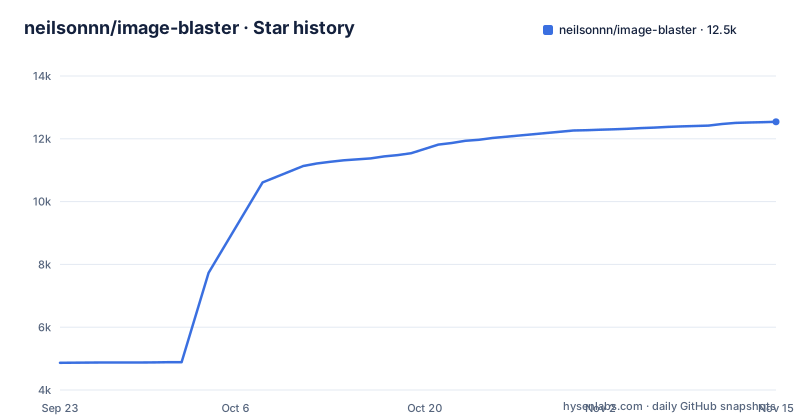
- neilsonnn/image-blaster12,540 ★ · +7,675
| Repository | 2026-09-23 | 2026-11-15 |
|---|---|---|
| neilsonnn/image-blaster | 4.9k | 12.5k |
7,675 Stars in the last 53 days, measured from the daily GitHub snapshot. Compare with other projects
Editorial analysis
The gap image-blaster fills between a reference image and a usable scene
Most image-to-3D tools stop at a single object. You upload a photo, you get back one mesh, and you still have to build the ground, the walls, the lighting and the sound yourself. image-blaster's README describes a different unit of output: it splits the input into dynamic objects and a static environment, then generates them with different models. Dynamic objects become .glb or .obj meshes through Hunyuan 3D. The static environment becomes a Gaussian splat in .spz format through World Labs' marble-1.1. Sound is generated separately as ambient loops and object-specific physics SFX in .mp3.
The audience is narrow and specific. You need to be comfortable running Claude in a terminal, holding API keys for World Labs and FAL, and working with game engines or DCC software on the receiving end. The README lists Unity, Unreal, Godot, Blender, 3DS Max, Maya, Three.js and Electron as places the output can be embedded. That list tells you what kind of user this is built for: someone producing level concepts, film location scouting references, architectural renderings or robot training environments, not someone shipping a finished asset to a store.
How the pipeline splits an image into splats, meshes and sound
The architecture is a Claude skillset wrapped around external generation APIs. The repository layout confirms this: a .claude/ directory holds the skill definitions, CLAUDE.md carries the instructions Claude reads, and a worlds/ directory sits alongside input/ and app/. The root package.json is a Bun workspace that delegates every script to the app/ subdirectory.
The generation models named in the README are marble-1.1 for the explorable environment, nano-banana as the default image edit preference for source cleanup and clean plates, gpt-image-2 as an alternate edit provider, hunyuan-3d for object meshes through FAL, and elevenlabs-sfx for audio. Two of those, nano-banana and gpt-image-2, are not generation steps in the final output at all. They exist to prepare the input: cleaning the source image and producing object reference images.
The Hunyuan parameters are exposed as flags. Face count defaults to 50000 even though Hunyuan's own API default is 500000, which is a deliberate choice toward lighter meshes. PBR material generation defaults to true. The generate type can be Normal, LowPoly or Geometry, and LowPoly additionally accepts a polygon type of triangle or quadrilateral.
Installing image-blaster and running a first blast
The README's quickstart is four steps and assumes you have a terminal and an image ready. First clone the repository and enter it, then start Claude in that directory. The README gives the install command for Claude itself.
git clone https://github.com/neilsonnn/image-blaster
cd image-blaster
claude
If Claude is not installed, the README points at a one-line installer. Run it before the step above.
curl -fsSL https://claude.ai/install.sh | bashOnce Claude is running in the directory, the README says to greet it and hand over your API keys for World Labs and FAL. The .env.example file in the repository root shows the two variable names you will need, and they are the only two listed there.
WORLD_LABS_API_KEY=your_world_labs_key_here
FAL_KEY=your_fal_key_here
With keys in place, drop an image into the input/ directory and tell Claude to blast it. The README's phrasing is `blast it and confirm each step with me`, and the confirmation clause matters: Claude is asked to check with you at each step.
The default run produces three things, according to the README: .glb and .obj models for dynamic objects, an .spz Gaussian splat for the static environment, and .mp3 files for ambient and object-specific sound. To adjust the mesh output, pass Hunyuan flags such as `--face-count`, `--enable-pbr`, `--generate-type` or `--polygon-type` when you ask for the model. The README states the whole sequence can take under five minutes, though that figure is the project's own claim and depends on queue times at both providers.
Where image-blaster breaks down or is the wrong choice
The dependency on two external platforms is the first limitation. There is no local fallback. If World Labs or FAL is unavailable, the pipeline stops at whichever stage needs that provider, and the README documents no retry or queue behaviour. The .env.example lists exactly two keys, so any additional provider you want to swap in is your problem to wire up.
Second, the output is not a finished asset. A Gaussian splat is a rendering primitive, not a mesh. It looks convincing from the angles it was trained on and degrades when you move far from them. The README does not state whether marble-1.1 produces collision geometry alongside the splat, and for a game engine you will need collision data that a splat does not provide. Treat the .spz as a visual backdrop, not a playable surface.
Third, the interface is conversational. The README's quickstart asks Claude to confirm each step, which is good for inspection and poor for automation. There is no documented CLI that runs the full pipeline non-interactively, and the repository has no published releases, so there is no version to pin if you need reproducible output across a team. The last push to the repository was on 2026-05-15.
Finally, face count defaults to 50000 against Hunyuan's 500000. That is sensible for real-time engines and wrong for hero assets or 3D printing, where you would want to raise `--face-count` toward the documented ceiling of 1500000.
How image-blaster differs from TripoSR-style single-mesh generators
The nearest comparison is a single-image mesh generator such as TripoSR or a hosted equivalent. Those take one image and return one mesh. The pipeline is one model, one output, and the whole scene is your responsibility afterward. image-blaster instead orchestrates several distinct models (marble-1.1, hunyuan-3d, elevenlabs-sfx and the image-edit models) and returns a layered result: a splat for the space, separate meshes for the movable objects, and audio.
That difference decides which tool fits. If you need a prop, a character or a single scanned object, a single-mesh generator is faster and cheaper, because you are not paying for environment reconstruction or sound you will discard. If you need a scene you can walk through with objects that can be animated independently, image-blaster's split is the point. The trade-off is coordination: several models means several failure points, and the README does not describe what happens when the object meshes do not align with the splat's scale or orientation.
Extensions, licence and what upgrades cost you
The README describes embedding the output under the assets of any game engine, DCC package or web app, and lists Unity, Unreal, Godot, Blender, 3DS Max, Maya, Three.js and Electron. The app/ directory holds a React viewer, and the development section notes that removing /app from the .claudeignore file lets Claude modify that viewer. That is the extension path: the viewer is editable, the generation skills are not documented as pluggable.
The repository is MIT licensed, so the code itself carries few obligations. That does not extend to the outputs. World Labs, FAL, ElevenLabs and the Hunyuan model each have their own terms, and the README says nothing about commercial rights over generated meshes, splats or audio. Check each provider's terms before shipping anything client-facing. This is not legal advice, just the boundary the repository does not answer.
Upgrade cost is low in code. The Bun workspace means `bun run dev`, `build`, `preview`, `test` and `typecheck` all forward into app/. Every blast calls the World Labs and FAL APIs, and there is no caching layer described in the README, so re-running after a parameter change calls the providers again.
Editorial conclusion
Adopt image-blaster if you already hold World Labs and FAL credentials and want concept-grade 3D environments seeded from reference images inside a Claude session. Skip it if you need a deterministic, scriptable pipeline, since the README drives everything through conversational confirmation and the repository ships no release history to pin. Before committing, verify that .env.example's two keys are the only ones your workflow needs and open app/ to see whether the React viewer covers your engine's import format.
Frequently asked questions
Can I turn an image into a 3D print with image-blaster?
The README does not describe print preparation, but the object meshes arrive as .glb or .obj files, which are formats slicers and DCC tools import. The default face count of 50000 is low for printing, and the `--face-count` flag accepts up to 1500000 if you need denser geometry.
How much does photo to 3D modeling with image-blaster cost?
The repository is MIT licensed and free to clone, but every blast calls World Labs and FAL, and the README does not publish prices for either. You need your own WORLD_LABS_API_KEY and FAL_KEY, so the cost depends on those providers' rates and how many times you re-run.
Can ChatGPT convert an image to a 3D model?
The README does not discuss ChatGPT. image-blaster runs inside a Claude session in your terminal and routes generation to World Labs Marble, Hunyuan 3D and ElevenLabs through FAL.
What software can I use to turn a picture into a 3D model?
image-blaster itself is the tool: you put an image in the input/ directory, ask Claude to blast it, and the README states it produces .glb and .obj object models, an .spz Gaussian splat of the static environment, and .mp3 sound effects. The output is then embedded in Unity, Unreal, Godot, Blender, 3DS Max, Maya, Three.js or Electron.
Official sources
Add this badge to your README
If you maintain this project, the badge below links readers to this analysis and shows its maintenance status from the daily GitHub snapshot. Paste the markdown into your README; add ?metric=license or ?metric=stars to the image URL for a different field.

[](https://hysenlabs.com/projects/neilsonnn-image-blaster)Star history chart for your README
[](https://hysenlabs.com/projects/neilsonnn-image-blaster)Was this useful?