Agent Memory Atlas: A Commit-Pinned Field Guide to Agent Memory Systems
Comparison of memory systems for agents
At a glance
- What is it?
- Agent Memory Atlas is a code-grounded comparison of memory systems for AI agents, linking every report to the exact Git commit analyzed. It is a reference for engineers choosing or building agent memory, with a clear methodology and a security screening step.
- Who is it for?
- Adopt Agent Memory Atlas if you are an engineer evaluating memory systems for an agent product and you value source-level evidence over vendor claims. The commit-pinned reports and the security screen give you a concrete starting point, but you must verify that the systems you care about are covered and that the comparison criteria match your workload.
- Can I use it commercially?
- Yes. MIT is a permissive licence: you can use, modify and sell software built on it, as long as you keep its copyright and licence notices.
- Is it still maintained?
- Yes. The repository last received commits 1 day ago.
- What is it written in?
- Mainly HTML, according to GitHub's language statistics.
Answers come from the project's GitHub data, last synced on October 21, 2026, and from our analysis. They are not legal advice.
Star history
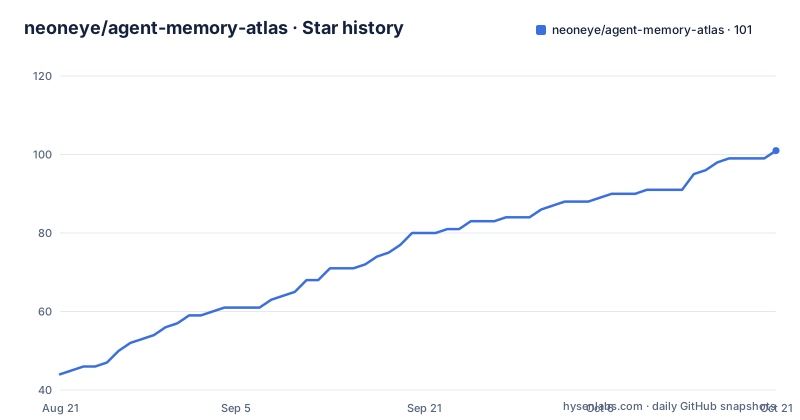
- neoneye/agent-memory-atlas101 ★ · +57
| Repository | 2026-08-21 | 2026-10-21 |
|---|---|---|
| neoneye/agent-memory-atlas | 44 | 101 |
57 Stars in the last 61 days, measured from the daily GitHub snapshot. Compare with other projects
Editorial analysis
What the Atlas Solves and Who It Serves
Agent memory is a fragmented space. Every framework has its own storage model, retrieval path, and correction semantics, and most comparisons stay at the marketing level. Agent Memory Atlas tries to fix that by grounding every report in source code. The README states that it compares memory units, storage models, write paths, retrieval mechanics, correction semantics, trust models, agent integrations, and operational risks. The audience is engineers who need to pick a memory system for an agent product, or who want to understand how existing systems differ. The project explicitly names sixteen systems that are not open source, rather than averaging them into a generic category. That is a deliberate stance: transparency about what is and is not analyzable. If you are evaluating a memory backend, this gives you a structured way to see the design space before you commit to code.
Commit-Pinned Evidence as the Core Mechanism
The key mechanism is the commit pin. Every report links to the exact Git commit that was analyzed. That is not a trivial detail. It means a reader can open the repository at that moment and verify every claim in the report. It also means the atlas is a snapshot, not a living document. When a system changes, the report does not automatically update. The README says the workflow pins the analyzed commit, scaffolds the report, and guides the code review. That process is repeatable, which is both a strength and a limitation. You can trust that the analysis matches a specific revision, but you cannot assume it matches the latest release. For a field that moves fast, that is a real trade-off. The alternative is a continuously updated wiki, which tends to drift from the source. The atlas chooses accuracy over freshness.
How the Repository Is Structured for Navigation
The repository layout is designed for humans and agents. Individual reports live in content/systems/, reusable patterns in content/patterns/, and a cross-system overview in content/overview.md. The methodology is in content/methodology/. The site/ directory holds the homepage and a Discord invite redirect. The docs/ directory contains the generated static site published via GitHub Pages. The AGENTS.md file is an entry point for an AI agent: it tells an agent what to read to build memory for a product, in what order, and what not to read. That is unusual. Most projects write documentation for humans; this one explicitly writes a guide for agents. The .agents/protocol/ directory adds machine-readable acceptance tests with stable ids, plus build-brief, closure-report, and lock-file formats. That suggests the project is serious about reproducible workflows, not just static content.
Getting It Running: Real Commands and Dependencies
Building the atlas locally requires Pandoc. The README gives two commands: npm run build and npm run serve. After that, you open http://localhost:4173. There is no mention of a package manager or Node version, so you need a working npm environment. The build likely runs Pandoc to convert Markdown content into HTML, then serves it with a local server. The README does not specify how to install Pandoc, so you must handle that yourself. There is also a security screening script: python3 scripts/screen_repo.py <path>. That script reports auto-executing hooks, build-time execution, and unpinned dependency surfaces without running anything from the tree. That is a smart safety step for a project that asks you to check out arbitrary repositories. If you want to add a new memory system, you are expected to run that screen first, then invoke a repository-local skill called $add-memory-system. That skill pins the commit, scaffolds the report, and integrates the comparison.
Security Screening as a First-Class Step
The security screen is a notable design choice. The README says every checkout passes a screen before it is read or run. The script screen_repo.py reports on auto-executing hooks, build-time execution, and unpinned dependency surfaces. It does not run anything from the tree, which is a safe approach. This matters because the atlas is about memory systems, which often involve code that you might integrate into your own agent. If you are going to read a repository's source, you want to know if checking it out could trigger a malicious hook. The script gives you a static analysis without execution. That is a concrete, practical feature that many similar projects lack. It is also a reminder that the atlas is not just a document; it is a workflow. The .agents/skills/ directory contains screen-repository, add-memory-system, and use-the-atlas skills, each with a defined procedure.
Limitations and Failure Modes
The most obvious limitation is the commit pin. A report can be outdated the day after it is written. The README does not mention any automated update mechanism, so freshness depends on manual contributions. Another limitation is coverage. The atlas names sixteen non-open-source systems, but it does not list them in the README. You have to visit the site to see which systems are actually covered. If the system you care about is not there, you cannot use the atlas directly. The methodology is described as 'review and synthesis formats', but the README does not detail the criteria. That means you cannot easily judge whether the comparison is biased or incomplete. The build requires Pandoc, which is an extra dependency; if you do not have it, you cannot generate the site. Finally, the atlas is a static comparison, not a benchmark. It does not provide performance numbers or runtime measurements. If you need to know which memory system is fastest, this will not tell you.
A Real Alternative: Direct Source Comparison
The alternative to using Agent Memory Atlas is to do your own source-level comparison. You could clone each memory system repository, read the code, and note the same dimensions: storage model, retrieval, correction, trust. That is what the atlas does, but manually. The difference is that you control the freshness and the criteria. You can also run your own benchmarks, which the atlas does not provide. The cost is time and expertise. The atlas gives you a structured starting point, but it is not a substitute for understanding the code yourself. Another alternative is to rely on framework documentation, which is often high-level and may not reflect the actual implementation. The atlas explicitly avoids that by pinning commits. So the real choice is between a curated, static snapshot and a self-maintained, live analysis. For a one-off decision, the atlas is efficient. For an ongoing dependency, you will likely need to re-check the source anyway.
Maintenance, Contribution, and License
The project is MIT licensed, which means you can use and modify it freely, with attribution. There are no recent releases, and the last push is unknown, so maintenance status is unclear. The README describes a contribution process with three useful contributions: correcting a report, proposing a system, and arguing with a pattern. That suggests an active review culture, but the absence of release tags means you cannot rely on stable versions. The build refuses certain things, according to CONTRIBUTING.md, but the README does not specify what those refusals are. The Discord invite is handled via a redirect page, so the invite code can be rotated without editing every shared link. That is a small but thoughtful detail. For maintenance cost, you should expect to rebuild the site whenever you update content, and you need to keep Pandoc installed. The scripts and skills are part of the repo, so they evolve with it, but there is no automated dependency update mentioned.
Editorial conclusion
Adopt Agent Memory Atlas if you are an engineer evaluating memory systems for an agent product and you value source-level evidence over vendor claims. The commit-pinned reports and the security screen give you a concrete starting point, but you must verify that the systems you care about are covered and that the comparison criteria match your workload. Do not use it as a final benchmark; it is a structured survey, not a performance test. Before relying on a report, check the linked commit and the methodology files to confirm the analysis is current. If you need runtime metrics or a maintained, automated comparison, this is the wrong tool. For a quick decision, the atlas is useful; for a production choice, treat it as one input among several.
Frequently asked questions
What does neoneye/agent-memory-atlas compare?
Memory units, storage models, write paths, retrieval mechanics, correction semantics, trust models, agent integrations and operational risks, across systems whose source is publicly readable. Every report links to the exact Git commit that was analyzed.
Does agent-memory-atlas only cover open source memory systems?
No. Most of the systems compared are open source, but sixteen are not, and the atlas names those sixteen rather than averaging them into the rest, so some entries are analyzed without public code to read.
What is the screen-repository skill in agent-memory-atlas for?
It is the security screen run on a checkout before it is read or run, required for new and re-pinned work. What has been screened and against which pin is recorded in notes/screening/screening.json and reported by scripts/check_screening_ledger.py.
Is every report in agent-memory-atlas security screened?
No. A large share of the older corpus predates the screening ledger and is unscreened, which the repository states directly. Screening is required for new work and for re-pinning existing entries.
How do I build the agent-memory-atlas site locally?
The build requires Pandoc. Run npm run build and then npm run serve, which serves the generated docs/ directory with python3 -m http.server on port 4173, then open http://localhost:4173. Node 20 or newer is expected by package.json.
Official sources
Add this badge to your README
If you maintain this project, the badge below links readers to this analysis and shows its maintenance status from the daily GitHub snapshot. Paste the markdown into your README; add ?metric=license or ?metric=stars to the image URL for a different field.

[](https://hysenlabs.com/projects/neoneye-agent-memory-atlas)Star history chart for your README
[](https://hysenlabs.com/projects/neoneye-agent-memory-atlas)