codex-chatgpt-web: download, MCP harness setup and the limits of running ChatGPT Web models inside Codex
Use ChatGPT Web (including Pro) as a native model in the Codex app, with context, tools, streaming and images beyond Codex usage limits.
At a glance
- What is it?
- codex-chatgpt-web is an MIT-licensed launcher and local Responses bridge that puts the ChatGPT Web models on your account into Codex's model picker. It works through your signed-in browser session, so your account's limits, workspace policies and context windows still decide what it can do.
- Who is it for?
- codex-chatgpt-web suits Codex users who already pay for a ChatGPT plan and want those Web models, including Pro, available in Codex's picker with access to local files and tools. It does not suit anyone expecting extra capacity beyond their ChatGPT account, or a workspace whose administrator blocks developer mode and write actions.
- Can I use it commercially?
- Yes. MIT is a permissive licence: you can use, modify and sell software built on it, as long as you keep its copyright and licence notices.
- Is it still maintained?
- Yes. The repository last received commits 2 days ago.
- What is it written in?
- Mainly TypeScript, according to GitHub's language statistics.
Answers come from the project's GitHub data, last synced on November 13, 2026, and from our analysis. They are not legal advice.
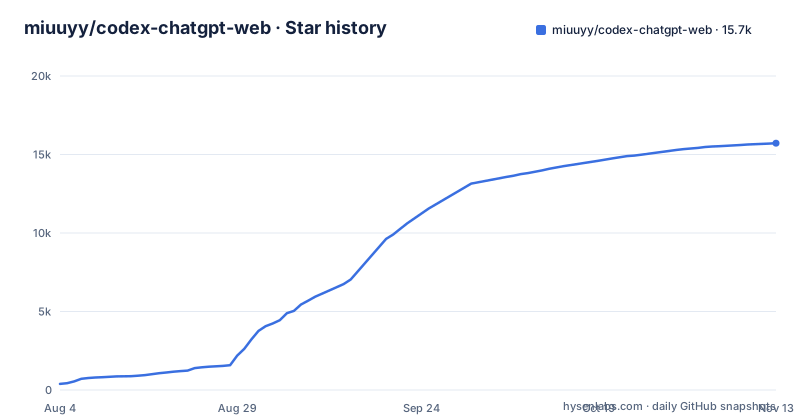
Star history
- miuuyy/codex-chatgpt-web15,720 ★ · +15,333
| Repository | 2026-08-04 | 2026-11-13 |
|---|---|---|
| miuuyy/codex-chatgpt-web | 387 | 15.7k |
15,333 Stars in the last 101 days, measured from the daily GitHub snapshot. Compare with other projects
Editorial analysis
A local bridge that drives your own signed-in ChatGPT session
The package describes itself as a focused local Responses bridge that runs Codex tasks through a user-authenticated ChatGPT web session. In practice, the launcher signs in to ChatGPT in an embedded browser, installs model entries into Codex, and relays Codex turns to the ChatGPT page. You keep Codex's interface, tasks, images and streaming.
The important boundary is that every message runs through your ChatGPT account and is subject to the limits applied to that account. Which models you see also depends on the account and workspace: Free and Go accounts get Luna and Think, while paid accounts get GPT-6 Sol and GPT-5.6 Sol with Instant through High, plus Extra High and Pro when available. If your plan does not expose a model on the web, the bridge cannot add it.
Four desktop builds and a checksum-verifying terminal installer
Release v6.1.17 links installers for Windows x64 (.exe), macOS Apple Silicon (mac-arm64 .dmg), macOS Intel (mac-x64 .dmg) and Linux x64 (.AppImage). The app bundles its own browser and runtime, so no separate Chrome, Node or Bun installation is needed. Linux on ARM is not among the linked builds.
For installs, updates and repair from a terminal, quit the launcher first, then run the script for your system. On macOS and Linux:
curl -fsSL https://github.com/miuuyy/codex-chatgpt-web/releases/latest/download/install-launcher.sh | shOn Windows PowerShell:
irm https://github.com/miuuyy/codex-chatgpt-web/releases/latest/download/install-launcher.ps1 | iexThese scripts pick the platform and architecture, verify the published checksums, and keep your ChatGPT profile and launcher settings. After installing, sign in to ChatGPT in the embedded browser, run the browser smoke test, install models and restart Codex once. Automatic models appear with names ending in (Web).
Full harness reaches local tools through OpenAI's tunnel-client
Browser-only mode sends messages automatically but gives ChatGPT no access to Codex's local tools. Full harness mode, labeled With Automation, connects ChatGPT's tool calls back to the current Codex task through MCP, so the model can work with the task's files, terminal, tools and approvals.
The connection uses the official OpenAI tunnel-client. The tunnel is outbound only: it does not expose a public IP, open an inbound port or need router forwarding. It uses your system proxy, explicitly set proxy environment variables take priority, and local connections stay local.
Setup has three steps. Open MCP in the launcher, create the Tunnel and a regular API key, and press Connect harness. In ChatGPT, enable Developer Mode and create a Tunnel connector named exactly Codex Native2, with Authentication: None and Allow all actions. Then run Verify runtime to confirm Codex Native2 is attached. A connector with any other name will not match.
Workspace policy can block write actions, and approvals fail closed
Full harness does not override ChatGPT's own controls. Write and modify actions require the ChatGPT workspace and its administrator policy to permit them, so on a managed business workspace that disallows them, the model can read through the connector but not change files.
Approval prompts are handled conservatively. An unexpected approval prompt fails closed, which stops the turn, unless `--auto-approve-tool-calls` is explicitly enabled. Even then the option clicks Allow once, never a permanent grant. The consequence is that long unattended runs can halt at a prompt you did not anticipate, and turning on auto-approval trades that interruption for less oversight of each tool call.
Zero Risk mode never touches the ChatGPT page
Zero Risk is the third mode, for users who do not want any automation of the ChatGPT page. In this mode the launcher does not read or operate the page at all. You choose the model and the Codex Zero Risk connector yourself in ChatGPT, paste the prepared prompt, send it manually, then confirm Sent in the launcher. Local Codex tools still work through a separate MCP connector.
The cost is obvious: every turn needs a person at the keyboard, so it cannot run a multi-step task on its own. Zero Risk keeps its own dedicated model entry in Codex, separate from the automatic (Web) entries.
Context windows depend on plan and effort, not on Codex
The usable context is set by the ChatGPT account and the selected effort. Plus at Medium or High uses a measured 90,000-token window. GPT-5.6 reaches up to 270,000 tokens with the experimental 3x context option enabled. GPT-6 Sol supports Bigger Context at Medium, High and available Extra High: 120,000 tokens on Plus with compaction at 110,000, and 240,000 on Pro with compaction at 220,000. GPT-6 Instant uses standard context, and Native Codex compaction is supported throughout.
Instant and each Pro version have separate model entries so each keeps its own context budget, and older saved entries keep their original fixed mode. Existing GPT-5.6 chats stay on GPT-5.6. For a large repository on a Plus plan, expect compaction to kick in well before the window sizes you may be used to elsewhere. Current message allowances for GPT-5.6 Sol Pro and GPT-6 Astra are tracked in the project's Limits discussion, number 309.
Temporary Chat is on by default, but memory may still apply
Settings, Temporary Chat is enabled by default and keeps new task conversations out of ChatGPT history. Turn it off to use ordinary saved chats, or if your connector is not available in that mode; an explicit choice to disable it survives updates. ChatGPT memory and custom instructions may apply in either mode, so personal instructions you set in ChatGPT can influence Codex turns. New browser chat for each turn is a separate setting that controls whether conversations are reused.
For troubleshooting, Activity gives safe local diagnostics and Settings, Run doctor checks end-to-end health. Settings can also cancel a retained browser turn or remove the Codex integration before uninstalling. Setting CODEX_CHATGPT_WEB_BROWSER_DIAGNOSTICS=1 captures a screenshot at every browser checkpoint, which is meant for deep debugging only. TROUBLESHOOTING.md links video walkthroughs of the setup.
Three releases in one day reflect a fast-moving Bun codebase
The project is a Bun TypeScript codebase (packageManager [email protected]) with source in src/, the launcher in launcher/, tests in tests/ and architecture notes in docs/architecture.md. Its scripts include smoke tests for the Codex catalog, cancel, interrupt, environment and subagents in both V1 and V2 forms, which matches the subagent setting: new installs use Compatibility V1 for cross-backend subagents.
Releases v6.1.15, v6.1.16 and v6.1.17 were all published on 2026-10-29, and the last push was on 2026-10-30. Because the bridge depends on the behavior of the ChatGPT web page and the Codex app, updates arrive often. Use the terminal installer to update in place, and rerun the doctor after each upgrade.
Editorial conclusion
codex-chatgpt-web suits Codex users who already pay for a ChatGPT plan and want those Web models, including Pro, available in Codex's picker with access to local files and tools. It does not suit anyone expecting extra capacity beyond their ChatGPT account, or a workspace whose administrator blocks developer mode and write actions. Before relying on it, check your account's message allowances on the project's Limits discussion, confirm your workspace permits MCP write actions, and run Settings, Run doctor after setup.
Frequently asked questions
How do I use codex-chatgpt-web?
Install the launcher for your system, sign in to ChatGPT in its embedded browser and run the smoke test, then install models and restart Codex once. Pick a model ending in (Web), and for coding with tools open MCP in the launcher to set up the Full harness.
Does codex-chatgpt-web bypass ChatGPT account limits?
No. Messages run through your signed-in ChatGPT Web session and are subject to the limits applied to that account, and available models depend on your account and workspace.
Does the codex-chatgpt-web Full harness open a port on my machine?
No. It uses the official OpenAI tunnel-client, which is outbound only and does not expose a public IP, open an inbound port or require router forwarding.
Official sources
Where developers are discussing it
Posts on Hacker News, dev.to and Lobsters that link to this repository, found by our scan of those communities. 0 in the last 30 days; newest first.
- Open-source project: Use ChatGPT Web models directly in CodexHacker News · Sep 14, 2026 · 1 points · 0 comments
Add this badge to your README
If you maintain this project, the badge below links readers to this analysis and shows its maintenance status from the daily GitHub snapshot. Paste the markdown into your README; add ?metric=license or ?metric=stars to the image URL for a different field.

[](https://hysenlabs.com/projects/miuuyy-codex-chatgpt-web)
[](https://hysenlabs.com/projects/miuuyy-codex-chatgpt-web)Star history chart for your README
[](https://hysenlabs.com/projects/miuuyy-codex-chatgpt-web)Was this useful?