Doughnut: A Zettelkasten PKM Tool That Adds Spaced Repetition and Team Sharing
Learning aide, note taking, team learning, etc.
At a glance
- What is it?
- Doughnut combines zettelkasten note-taking with spaced repetition and recall, and it lets you share knowledge bits with buddies and teams. The repository shows a TypeScript frontend with a Java backend, a Nix-based development environment, and a strong emphasis on end-to-end testing.
- Who is it for?
- Adopt Doughnut if you want a self-hosted PKM tool that explicitly combines zettelkasten capture with spaced repetition and team sharing, and you are comfortable with a Nix-based development setup and a Java/TypeScript stack. Do not adopt it if you need a mature, production-ready product with stable releases, or if you cannot run a Nix environment.
- Can I use it commercially?
- Yes. MIT is a permissive licence: you can use, modify and sell software built on it, as long as you keep its copyright and licence notices.
- Is it still maintained?
- Yes. The repository last received commits 1 day ago.
- What is it written in?
- Mainly TypeScript, according to GitHub's language statistics.
Answers come from the project's GitHub data, last synced on October 21, 2026, and from our analysis. They are not legal advice.
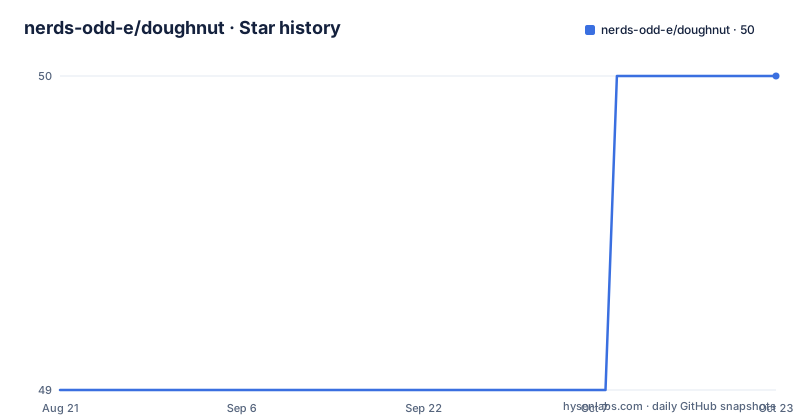
Star history
- nerds-odd-e/doughnut50 ★ · +1
| Repository | 2026-08-21 | 2026-10-21 |
|---|---|---|
| nerds-odd-e/doughnut | 49 | 50 |
1 Stars in the last 61 days, measured from the daily GitHub snapshot. Compare with other projects
Editorial analysis
What Doughnut Solves and Who It Is For
Doughnut is a personal knowledge management tool that targets people who want more than a flat note archive. It combines zettelkasten-style knowledge capture with spaced repetition and recall, and it adds the ability to share knowledge bits with other people, including buddies and teams. That combination is unusual. Most PKM tools stop at storage and search. Doughnut's pitch is that knowledge should be reviewed on a schedule and shared, not just filed away. The intended audience is individual learners, study groups, and teams that want a shared knowledge base with a structured retrieval practice. The README links to scholarship and learning resources, which suggests the design is informed by research on knowledge acquisition, though the repository itself does not present any evidence of efficacy.
The Architecture: TypeScript Frontend, Java Backend, and Mocked External Services
The repository is primarily TypeScript, but the backend is Java. The README mentions a backend with Spring Boot DevTools and Gradle continuous build, and a frontend with Vue and hot module replacement. The development environment uses Nix flakes, loaded automatically via direnv. The backend runs on port 9081 in the E2E profile. External services are mocked with Mountebank, which lets the full stack run locally without real third-party dependencies. The data flow is not fully documented in the material, but the presence of Mountebank implies that the real application depends on external services that are stubbed during development and testing. The architecture videos linked in the README would clarify this, but they are not included in the material.
Getting Started: Commands, Config, and a Nix-Heavy Setup
The README offers a CLI install for end users: on macOS, Linux, or WSL, run `curl https://doughnut.odd-e.com/install -fsS | bash`, then run `donut`. For developers, the setup is more involved. You need to configure git line endings with `git config --global core.autocrlf input` and `git add --renormalize .`. Then run `./setup-donut-dev.sh` to install Nix. You also need direnv, installed via your package manager, and you must add the direnv hook to your shell rc file. After that, `direnv allow` activates the Nix environment when you enter the directory. The README warns not to clone the source into a Windows directory like `/mnt/c/`; use the WSL2 home directory instead. It also warns that Nix and sdkman conflict, suggesting you move `~/.sdkman` aside. For the full development environment, run `pnpm sut`, which starts the backend, frontend, and Mountebank together. Alternatively, `pnpm backend:sut` starts only the backend.
Testing and Quality: Cucumber, Cypress, and a Pre-Commit Hook
Doughnut places a heavy emphasis on automated testing. The end-to-end tests use Cucumber Gherkin scenarios driven by Cypress, with Mountebank mocking external services. The README gives a typical workflow: start all services with `pnpm sut`, then open Cypress IDE with `pnpm cy:open` for interactive development, or run headless with `pnpm cypress run --spec <feature-path>`. There is also a pre-commit hook that formats all code before each commit, using `./scripts/run.sh pnpm format:all`. The hook is version-controlled in `scripts/git-hooks/` and installed with `./scripts/setup-git-hooks.sh`. This level of testing infrastructure is a strength for a project that is clearly still in development. It suggests the maintainers care about regressions, though it also adds complexity to the contributor workflow.
Limitations and Failure Modes
The most obvious limitation is the lack of a stable release. The repository has no recent releases listed, and the README is full of development setup instructions, not user documentation. That means the CLI install command may not give you a polished product; it might give you a development snapshot. Another limitation is the heavy reliance on Nix. If you are not familiar with Nix flakes or direnv, the setup will be a barrier. The README even includes a migration script for macOS Sequoia users who face Nix installation issues, which shows that the setup can break. Also, the project is not suitable for teams that need a simple, self-hosted solution without a complex build. The requirement to avoid cloning into `/mnt/c/` on WSL2 is a specific constraint that could trip up Windows users. Finally, the material does not describe how spaced repetition actually works in the product, so you cannot verify whether the core feature is effective without running it.
Alternatives: How Doughnut Differs from Other PKM Tools
The most common alternative is Obsidian, which also supports zettelkasten-style linking and has a large plugin ecosystem. Obsidian is a local-first Markdown editor; it does not have built-in spaced repetition, though plugins exist. Doughnut's difference is that spaced repetition and recall are core to its design, not add-ons. Another alternative is Anki, which is purely a spaced repetition flashcard system. Anki does not handle knowledge capture or team sharing as a primary function. Doughnut tries to combine both, but the trade-off is complexity: it is a full application with a backend, frontend, and external service mocks, whereas Obsidian and Anki are simpler to run. If you need just one of the two functions, a dedicated tool might be easier. If you need both, Doughnut is a candidate, but its maturity is unclear.
Maintenance and License Considerations
The project is licensed under the MIT license, which is permissive and allows commercial use, modification, and distribution, with no copyleft obligations. That is a plus for teams that want to fork or embed it. However, the maintenance status is mixed. The repository is not archived, and the last push is unknown from the material, but the README's detailed setup instructions and the presence of recent development commands suggest active development. There is no release history, so you cannot rely on semantic versioning or changelogs. The development environment is complex, which means upgrading the toolchain could be painful. The pre-commit hook and the use of Nix flakes indicate a disciplined approach, but they also lock contributors into a specific workflow. If you adopt this, you should plan to track the repository directly, since there are no stable releases to pin to.
Editorial conclusion
Adopt Doughnut if you want a self-hosted PKM tool that explicitly combines zettelkasten capture with spaced repetition and team sharing, and you are comfortable with a Nix-based development setup and a Java/TypeScript stack. Do not adopt it if you need a mature, production-ready product with stable releases, or if you cannot run a Nix environment. Before adopting, verify the current state of the repository, check recent commits and issues, and confirm that the team-sharing and spaced-repetition features are implemented as described in the README, since the material shows an active project with no recent releases.
Frequently asked questions
What is Donut used for?
Donut is a personal knowledge management tool that combines zettelkasten-style knowledge capture with spaced repetition and recall, and lets knowledge bits be shared with other people, for buddies and teams. Notes live as Markdown in a git repository.
How do I install the Donut CLI?
On macOS, Linux or WSL run curl https://doughnut.odd-e.com/install -fsS | bash. On Windows PowerShell run irm 'https://doughnut.odd-e.com/install?win32=true' | iex. The CLI is then invoked as donut.
What does donut notebook publish do with uncommitted changes?
It publishes the checkout's committed main only. If the checkout has staged, unstaged or untracked work, the command warns that those local changes are excluded and leaves them untouched. Pull is the stricter of the two, since it changes the checkout and requires a clean local main.
Can I install Donut's dependencies with npm?
No. The preinstall script runs npx only-allow pnpm, and the engines field requires Node 26.7 or newer with pnpm 11.28.2 or newer. A postinstall step runs syncpack fix to realign versions across the workspace.
How is the Donut frontend kept in sync with the backend?
Run pnpm generateTypeScript. It writes openAPI documentation from the backend service into ./open_api_docs.yaml, then generates TypeScript interfaces into frontend/src/generated. Skipping the first step fails a unit test and skipping the second fails CI through assert_generated_type_script_up_to_date.sh.
Official sources
Add this badge to your README
If you maintain this project, the badge below links readers to this analysis and shows its maintenance status from the daily GitHub snapshot. Paste the markdown into your README; add ?metric=license or ?metric=stars to the image URL for a different field.

[](https://hysenlabs.com/projects/nerds-odd-e-doughnut)Star history chart for your README
[](https://hysenlabs.com/projects/nerds-odd-e-doughnut)