HubCommander: a Slack bot for GitHub administration you do not have to hand out
A Slack bot for GitHub organization management -- and other things too
At a glance
- What is it?
- HubCommander is Netflix's Apache-2.0 licensed Python bot that lets a GitHub organisation's members perform privileged organisation tasks from a Slack channel, using a bot account that holds the privileges instead of individual administrators. It is plugin-driven, ships a Docker image, and can require Duo 2FA on the dangerous commands, but its newest release is from 2017 and its last push was on 2026-04-13.
- Who is it for?
- Adopt HubCommander if your organisation has Slack, a GitHub bot account you are willing to give owner level privileges, and members who need to run administrative tasks without being made administrators themselves, since the privilege model is the point and the command set covers repository creation, deletion, collaborators, deploy keys, topics and branch protection.
- Can I use it commercially?
- Yes. Apache-2.0 is a permissive licence: you can use, modify and sell software built on it, as long as you keep its copyright and licence notices.
- Is it still maintained?
- Activity is slowing. The repository last received commits 6 months ago.
- What is it written in?
- Mainly Python, according to GitHub's language statistics.
Answers come from the project's GitHub data, last synced on November 7, 2026, and from our analysis. They are not legal advice.
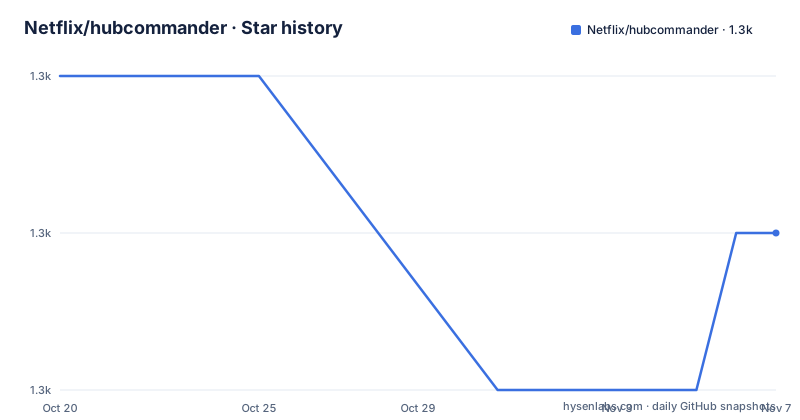
Star history
- Netflix/hubcommander1,319 ★ · -1
| Repository | 2026-10-20 | 2026-11-07 |
|---|---|---|
| Netflix/hubcommander | 1.3k | 1.3k |
-1 Stars in the last 18 days, measured from the daily GitHub snapshot. Compare with other projects
Editorial analysis
The privilege model is the whole point
HubCommander is a user-extendable Slack bot for GitHub organization management, and it provides a chat-ops means for managing GitHub organizations.
The specific problem it solves is stated in one sentence: it creates a simple way to perform privileged GitHub organization management tasks without granting administrative or `owner` privileges to your GitHub organization members.
That is a real and common operational problem. In a company of two hundred engineers, somebody has to create a repository, add an outside collaborator, change a default branch, or enable branch protection. Doing that through the GitHub web interface requires an owner, and owners are a scarce, privileged group. Handing out owner rights to solve it means the whole organisation is one compromised account away from losing control of its source code.
HubCommander inverts that. A single bot user holds the privileges, and the members interact with it in a chat channel. The audit trail is a chat log, the interface is the one people already have open, and the privilege set is one credential rather than many.
The intended user is therefore an organisation's platform or developer-experience team, the kind of group that ends up running the internal tooling nobody notices until it breaks. The stated prerequisites are modest and concrete: Python 3.5 or later, Slack and Slack credentials, a GitHub organization, and a GitHub bot user with ownership level privileges. A Docker image is also available to help get up and running quickly.
The licence is Apache-2.0, the primary language is Python, and the default branch is `develop`, with `master` carrying the release build badges for Travis CI.
The command surface, and how plugins extend it
The interaction is deliberately conventional. You type `!help`, and the bot will output a list of commands that the bot supports. Typing the name of the command, for example `!CreateRepo`, will output help text on how to execute the command.
That design has a property worth noticing. The bot is self-documenting through the chat interface, so a new member who has never seen the tool can discover what it does without a wiki, and the help text lives next to the code that implements the command.
The out of the box GitHub features are listed explicitly, and the list is what makes the tool credible: repository creation, repository deletion, repository description and website modification, granting outside collaborators specific permissions to repositories, repository default branch modification, repository PR listing, repository deploy key listing, creation and deletion, repository topics creation and deletion, and repository branch protection enabling and disabling.
Beyond that, HubCommander also features the ability to enable Travis CI on a GitHub repo and to safeguard commands with 2FA via Duo, which are the two features that push it beyond a convenience wrapper.
The extension mechanism is a plugin directory, and the README's example is inviting rather than technical: you can add additional commands by creating plugins, for example a plugin to invite users to your organizations. The repository layout shows how that is arranged, with `command_plugins/` for the commands themselves, `bot_components/` for the shared machinery, and `auth_plugins/` as a separate category for the authentication backends, which is where the Duo integration lives.
The plugin model is also the plugin risk. A plugin is code that runs inside the bot process with the bot's credentials, and the base image does not restrict what a plugin can do.
rtmbot underneath, and a substrate that has not moved in years
HubCommander is based on slackhq/python-rtmbot, currently dependent on release 0.4.0, and the packaging declares `rtmbot>=0.4.0` as a runtime dependency alongside `boto3>=1.4.3` for KMS support, `duo_client>=4.0`, `tabulate>=0.7.7` and `validators>=0.11.1`.
Two of those dependencies carry information. `boto3` is there for KMS support, which tells you the credential handling was designed with AWS Key Management Service in the picture, and the repository has a `decrypt_creds.py` module and a `config.py` at the root. The `duo_client` dependency is what makes the 2FA safeguard possible, and the `tabulate` dependency is what makes command output look like a table rather than a wall of text, which is the difference between a chat bot people use and one they avoid.
The rtmbot dependency is the significant one. The project pins a specific release, 0.4.0, and the Dockerfile downloads that exact tarball from GitHub and unpacks it into the image:
ARG RTM_VERSION="0.4.0"
ARG RTM_PATH="python-rtmbot-${RTM_VERSION}"
RUN curl -L https://github.com/slackhq/python-rtmbot/archive/${RTM_VERSION}.tar.gz > /${RTM_PATH}.tar.gz && tar xvzf python-rtmbot-0.4.0.tar.gz
The bot does not talk to the Slack API directly, it is built on a pinned rtmbot release whose own dependency set, `slackclient==1.0.5` in the test requirements, predates the modern Slack SDKs. Any organisation still on this needs to know that the Slack integration path is the oldest part of the stack, and that the pinned Slack client library is unlikely to be the one you would choose today.
The `tests/` directory and `test-requirements.txt` with `pytest==3.0.6` complete the picture of a project whose dependency set was frozen at the time of its last release.
Duo 2FA on the commands that matter
The feature list includes the ability to safeguard commands with 2FA via Duo, and it sits alongside a set of commands that can delete a repository, change branch protection or hand permissions to outside collaborators.
The reasoning is straightforward. A bot that holds owner privileges and accepts commands from a chat channel is a concentration of risk, and the mitigation is a second factor on the operations that cannot be undone. The repository has an `auth_plugins/` directory for exactly this, with the Duo configuration carried in the environment as `DUO_HOST`, `DUO_IKEY` and `DUO_SKEY`.
That design is worth contrasting with the more common pattern of protecting a chat-ops bot with a human approval step, where a second person has to approve the destructive command in a channel. Duo does the same job without a second person, by making the bot verify that the person typing is in possession of the second factor. For an organisation that already runs Duo, that is a good fit, and for one that does not, it is a reason not to deploy the destructive commands at all.
The same is true of the Travis CI integration, which can enable Travis on a repository and is configured through `TRAVIS_PRO_USER`, `TRAVIS_PRO_ID`, `TRAVIS_PRO_TOKEN` and the matching `TRAVIS_PUBLIC_*` variables. The existence of six environment variables for a CI service is a reminder of how much of the code's era the credentials reflect, and it is also a sign that a deployment of this code is not trivially portable to a different CI vendor.
The Docker image and the credentials it expects
The container image is the fastest route to a running bot, and the Dockerfile is unusually explicit about what it wants.
It is built `FROM ubuntu:xenial`, which is the Ubuntu 16.04 base image, and installs Python 3 with `python3-venv`, nano and curl. It then downloads the rtmbot tarball, copies the HubCommander tree into it, creates a virtual environment and installs the package into it, then moves the launcher script to the root of the image and makes it executable.
The credential list is the part to read before anything else, because the image defines every secret as a build-time environment variable with a placeholder:
ENV SLACK_TOKEN="REPLACEMEINCMDLINE" \
    GITHUB_TOKEN="REPLACEMEINCMDLINE" \
    TRAVIS_PRO_USER="REPLACEMEINCMDLINE" \
    TRAVIS_PRO_ID="REPLACEMEINCMDLINE" \
    TRAVIS_PRO_TOKEN="REPLACEMEINCMDLINE" \
    TRAVIS_PUBLIC_USER="REPLACEMEINCMDLINE" \
    TRAVIS_PUBLIC_ID="REPLACEMEINCMDLINE" \
    TRAVIS_PUBLIC_TOKEN="REPLACEMEINCMDLINE" \
    DUO_HOST="REPLACEMEINCMDLINE" \
    DUO_IKEY="REPLACEMEINCMDLINE" \
    DUO_SKEY="REPLACEMEINCMDLINE"
The comment above them says it directly: define your env vars for secrets here. The placeholders are literal `REPLACEMEINCMDLINE` strings, so the image ships with an obvious reminder that these must be replaced, and the `hubcommander.py`, `config.py` and `decrypt_creds.py` modules at the root of the repository are where the configuration and the credential decryption live.
For a deployment today, the sensible approach is to leave the image alone and supply the values at run time rather than baking them into a layer, since anything baked into a built image is in that image's history. The repository also has `launch_in_docker.sh` and `build_docker.sh` for the run and build steps, and `basic_install.sh` for a non-Docker install.
The licence file is `LICENSE.txt` and the package is published with `setup.py` rather than a modern build backend, which is consistent with the rest of the vintage of the dependency set.
A 2017 release against a 2026 branch
The maintenance state is the deciding fact for anyone considering this today.
The recent releases are 1.1 from 2017-11-03, 1.0 from 2017-07-24 and 0.2.0 from 2017-04-24. The last push to the default branch `develop` was on 2026-04-13, and the repository is not archived, and it carries the NetflixOSS active lifecycle badge in the README.
So the code is touched and the badges suggest activity, while the published versions are from 2017 and the runtime dependencies are from the same period. That combination is a specific kind of risk: the repository may be receiving changes, but there is no released artefact to install and the Slack client library it pins is from the era of `slackclient` 1.x.
The gap is worth understanding rather than judging. HubCommander was built at Netflix for a specific internal need, and the pieces it depends on have all moved on since: the Slack client library it pins has been superseded and the other runtime dependencies are of the same vintage. The `rtmbot` base it is built on is pinned to a single release.
For a security-adjacent tool that holds organisation owner privileges, that is the question to ask, and the README does not answer it. The repository is Apache-2.0 licensed, with an `AUTHORS` file and an `OSSMETADATA` file, and the `docs/` directory holds the installation and contributing guides. What the documentation does not contain is a statement about which Slack and GitHub API versions are supported, or a plan for the pinned dependencies.
The honest reading is that this is a well designed and well documented piece of chat-ops tooling whose runtime has aged out from under it, and that a deployment today is a fork-and-modernise project rather than an install.
Where HubCommander is the wrong tool
There are three cases where this is the wrong choice, and the first is the most common in practice.
The first is a small team where the owner can just do the task. If one or two people hold owner rights on the organisation, a chat bot that holds the same rights on their behalf adds a credential to protect, a service to run and a plugin surface to audit, in exchange for removing a click from a web form. The trade is only worth it when the number of people who need privileged actions is larger than the number of people who can safely hold the privilege, and that is the specific scale the tool is designed for.
The second is a GitHub environment that has moved on. GitHub now provides organisation roles, team-based repository roles, and its own REST and GraphQL APIs, and much of what HubCommander automates, adding a team to a repository, protecting a branch, listing pull requests, is available to a member of a team through the GitHub interface directly. The commands that remain genuinely valuable are the ones where GitHub's own permissions are too coarse, and a chat interface for those is a reasonable answer.
The third is any environment where the pinned runtime is a liability: a GitHub Enterprise instance with a strict allowlist of API versions, a Slack workspace on a modern plan with current token policies, or an organisation whose auditors ask which dependencies have a security patch path.
The alternative approach, for comparison, is a small script that uses a GitHub App rather than a bot user. A GitHub App is installed on the organisation with a defined permission set, it authenticates as itself, and it can be given narrower rights than owner, and the same command surface can be exposed through a bot without a personal access token sitting in an environment variable. The difference in approach is that HubCommander's model is a personal token in a bot account, while an App's model is a scoped installation, and the second is much easier to defend in a review today.
If you do deploy HubCommander, the mitigations the project already points at are the ones to insist on: Duo 2FA on the destructive commands, the plugin directory kept under review, and the credentials supplied at run time rather than baked into the image.
Editorial conclusion
Adopt HubCommander if your organisation has Slack, a GitHub bot account you are willing to give owner level privileges, and members who need to run administrative tasks without being made administrators themselves, since the privilege model is the point and the command set covers repository creation, deletion, collaborators, deploy keys, topics and branch protection. Do not adopt it for a new deployment, because the newest release is 1.1 from 2017 and the last push was on 2026-04-13, which is more than six months before today, and the runtime depends on a pinned rtmbot release from the same era. Verify three things first: that the Slack, GitHub, Travis and Duo credentials the container expects are all still valid and that Travis CI still exists as a service if you use the integration, that the Duo integration still authenticates the way the `auth_plugins/` code expects, and that the repository's own `basic_install.sh` and `docs/installation.md` still describe the procedure you intend to follow.
Frequently asked questions
What does HubCommander do for a GitHub organization?
It is a Slack bot that lets organisation members perform privileged management tasks, without granting administrative or owner privileges to those members. Out of the box it covers repository creation, deletion, description and website changes, outside collaborator permissions, default branch changes, pull request listing, deploy keys, topics and branch protection.
How do I add a new command to HubCommander?
You create a plugin, for example one that invites users to your organisations. The repository separates these into command_plugins/ for the commands themselves, bot_components/ for the shared machinery and auth_plugins/ for the authentication backends, including the Duo integration.
What does HubCommander need to run?
Python 3.5 or later, Slack and Slack credentials, a GitHub organization, and a GitHub bot user with ownership level privileges. A Docker image is also available, and the installation details are in docs/installation.md.
How is HubCommander protected against misuse of its privileges?
It can safeguard commands with 2FA via Duo, using the DUO_HOST, DUO_IKEY and DUO_SKEY settings, and it also supports enabling Travis CI on a repository. The 2FA path is the part that makes it defensible to give a chat bot owner level rights.
What is the maintenance status of HubCommander?
The recent releases are 1.1 from 2017-11-03, 1.0 from 2017-07-24 and 0.2.0 from 2017-04-24, and the last push to the develop branch was on 2026-04-13. The runtime depends on a pinned rtmbot 0.4.0 release and a slackclient 1.0.5 test dependency from the same period.
Official sources
Add this badge to your README
If you maintain this project, the badge below links readers to this analysis and shows its maintenance status from the daily GitHub snapshot. Paste the markdown into your README; add ?metric=license or ?metric=stars to the image URL for a different field.

[](https://hysenlabs.com/projects/netflix-hubcommander)Star history chart for your README
[](https://hysenlabs.com/projects/netflix-hubcommander)Was this useful?