n98-magerun2: a command line for the parts of Magento you cannot click
The swiss army knife for Magento developers, sysadmins and devops. The tool provides a huge set of well tested command line commands which save hours of work time. All commands are extendable by a module API.
At a glance
- What is it?
- n98-magerun2 is a PHP command line tool for Magento 2, Mage-OS and Adobe Commerce, distributed as a single PHAR that you can verify with a checksum or install through Composer. The command set covers cache, database, indexers, cron, configuration and admin users, and the whole thing is designed to be extended by modules.
- Who is it for?
- n98-magerun2 fits a Magento 2 shop where changes have to be scripted, repeatable and safe to run from a deployment pipeline, and where an admin session in a browser is too slow or too risky for the job. Skip it for a Magento 1 store, since the README states Magento 2 only and points to a separate tool for the older platform, and skip it if you are unwilling to run PHP tooling against a live database, because several command families write directly.
- Can I use it commercially?
- Check first. The repository uses a licence we do not classify automatically, so read its LICENSE file before any commercial use.
- Is it still maintained?
- Yes. The repository last received commits 1 day ago.
- What is it written in?
- Mainly PHP, according to GitHub's language statistics.
Answers come from the project's GitHub data, last synced on November 7, 2026, and from our analysis. They are not legal advice.
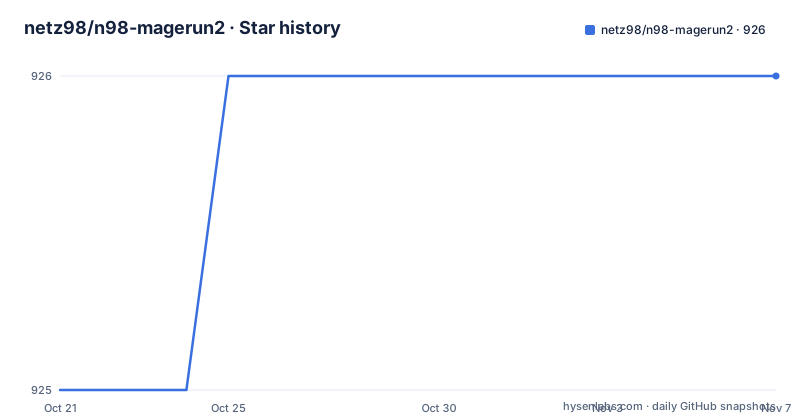
Star history
- netz98/n98-magerun2926 ★ · +1
| Repository | 2026-10-21 | 2026-11-07 |
|---|---|---|
| netz98/n98-magerun2 | 925 | 926 |
1 Stars in the last 17 days, measured from the daily GitHub snapshot. Compare with other projects
Editorial analysis
What the tool is for: operations that the admin panel cannot do well
The project describes itself as a swiss army knife for Magento developers, sysadmins and devops, providing a set of command line commands that save hours of work, with every command extendable through a module API. That positioning matters, because a Magento store has a large administrative surface that is awkward to drive by hand. Rebuilding an indexer across a large catalogue is a click in the admin and a command in a terminal. Creating a dozen admin accounts with the same role is a script. Taking a database dump before a deployment should be a line in a pipeline rather than a thing someone remembers to do. The tool supports Magento 2, Mage-OS and Adobe Commerce, and the README is explicit that it is Magento 2 only, with a separate project for the Magento 1 and OpenMage tool. The audience is the engineer or operator who already knows Magento and wants the terminal to be the interface.
Downloading the PHAR and checking what you downloaded
The recommended install is a single PHAR file, and the README gives a three line download and verification sequence:
curl -sS -O https://files.magerun.net/n98-magerun2.phar
curl -sS -o n98-magerun2.phar.sha256 https://files.magerun.net/sha256.php?file=n98-magerun2.phar
shasum -a 256 -c n98-magerun2.phar.sha256
The checksum step is not decoration. A PHAR is a PHP archive that runs with your PHP binary, so it is executable code fetched over the network, and the shasum check confirms the file you got matches what the project published. The download host is files.magerun.net and the checksum is served from the same host, so the check catches corruption and truncation rather than a compromised upstream. Once verified, the tool runs straight from the file:
./n98-magerun2.pharNo installation into the project, no global composer requirement, no PATH configuration. The whole tool is one file you can copy to a server, pin by checksum, and delete.
The dist package and the source build, side by side
There are two other routes. The dist package installs the PHAR directly into your project, which is a single Composer requirement:
composer require n98/magerun2-distThat is the right choice when the tool belongs to a specific store, because it is locked in composer.lock and travels with the project. Building from source is the route if you want to work on the tool itself or pin a commit. The README lists three steps:
git clone https://github.com/netz98/n98-magerun2.git
cd n98-magerun2composer install./build.shThe build script is in the repository root, along with box.json.dist for the PHAR packaging configuration and scoper.inc.php, which is the scoping configuration used to keep the tool's dependencies namespaced inside the archive. That last file is the interesting one technically, because a PHAR that vendors a large dependency tree without scoping will collide with the vendor directory of the Magento project it runs inside. The repository also carries a phpstan.neon.dist configuration, a phpunit.xml.dist for the test suite, a .php-cs-fixer.php file and a captainhook.json for commit hooks, so the project itself is held to a static analysis and style standard.
What the command families actually cover
The README documents the namespaces, and the table is a better map of the tool than any marketing sentence would be. The admin family manages admin user accounts and related settings with admin:user:list, admin:user:create and admin:user:change-password. The cache family covers Magento's various cache systems with cache:clean, cache:enable, cache:disable, cache:flush and cache:list. The config family handles store configuration and environment settings through config:store:get, config:store:set, config:env:set and config:search. The db family does database operations such as dumps, imports and queries with db:dump, db:import, db:query, db:create and db:info. The dev family covers developer tools including code generation and debugging, the eav family handles entity attribute value attributes, and the index family manages the indexers with indexer:list and indexer:trigger:recreate. There is also sys for system information and maintenance with sys:info, sys:check, sys:maintenance and sys:cron:list, plus customer, integration, giftcard, composer, routes, generation and install families. Every command is namespaced by colon, which is the convention the whole set follows.
The script command turns a terminal session into a file
Two commands are worth singling out because they change how the tool is used rather than what it can do. The first is script, described as a command for running sequences of n98-magerun2 commands from a file. That converts the tool from an interactive utility into something you can commit: a deployment script becomes a sequence of n98-magerun2 invocations rather than a list of things a human must remember to type in the right order. The second is the magerun family itself, with magerun:config:info and magerun:config:dump, which handle the tool's own configuration and environment settings, so you can inspect how the tool is wired to a store before you let it write anything. The system family also includes sys:maintenance, which puts the shop into maintenance mode, and sys:cron:list, which shows the scheduled jobs, so an operator can see what the store thinks it is going to do before it does it.
Modules are how the command set stays open
The project description states that all commands are extendable by a module API, and the README's own categories are documented as namespaces with per category documentation pages, which is the shape of a Symfony style console application with a service container behind it. That extension point is the strategic part of the design. A Magento installation differs from another in which third party modules it carries, which stores it has, which payment gateways are configured and which cron jobs exist. A tool that only knows the core commands will always be missing the one you need, so the extension API is what makes the tool usable in a specific shop rather than generically. The repository layout supports that kind of work, with src/ for the implementation, tests/ for the suite, docs/ for the command documentation and scripts/ for supporting tooling. The default branch is develop rather than main, which tells you the release line is cut from a development branch with a release process on top.
Licence, release rhythm and where the documentation lives
On the licence there is a small discrepancy worth naming. The licence field on the repository says Other, described as a custom licence GitHub cannot classify, while the README states MIT License and points at MIT-LICENSE.txt in the root. MIT-LICENSE.txt is present in the tree, so the substance looks like plain MIT, but if the file's contents differ from the standard text you should read it before shipping anything. The release rhythm is steady, with 10.1.0 published on 2026-10-07, 10.0.2 on 2026-08-27 and 10.0.1 on 2026-08-24, and the last push was on 2026-10-16 with the repository not archived. The full command documentation is not in the README but online at netz98.github.io/n98-magerun2/, with per namespace pages such as command-docs/cache/ and command-docs/db/, so the README is the map and the site is the manual. There is also a CHANGELOG.md, a CODE_OF_CONDUCT.md and a SECURITY.md in the tree.
Editorial conclusion
n98-magerun2 fits a Magento 2 shop where changes have to be scripted, repeatable and safe to run from a deployment pipeline, and where an admin session in a browser is too slow or too risky for the job. Skip it for a Magento 1 store, since the README states Magento 2 only and points to a separate tool for the older platform, and skip it if you are unwilling to run PHP tooling against a live database, because several command families write directly. Before adopting, run the sha256 check on the downloaded PHAR, decide between the dist package and a source build with ./build.sh, and confirm on a staging copy of the database what db:dump and db:import do against your own schema before pointing them at production.
Frequently asked questions
How do I install n98-magerun2?
The README gives three routes: download the PHAR with curl and verify it with shasum -a 256 -c, install the dist package with composer require n98/magerun2-dist, or build from source with git clone, composer install and ./build.sh. The PHAR then runs directly with ./n98-magerun2.phar.
Does n98-magerun2 support Magento 1?
No. The README states that the supported Magento is Magento 2 only, and points to a separate project for the Magento 1 and OpenMage tool. The current tool covers Magento 2, Mage-OS and Adobe Commerce.
Can n98-magerun2 run a sequence of commands from a file?
Yes. The script command is documented as running sequences of n98-magerun2 commands from a file, which lets you commit a deployment sequence instead of typing commands by hand. The magerun:config:info and magerun:config:dump commands report on the tool's own configuration.
Which licence applies to n98-magerun2?
The README states MIT License and links to MIT-LICENSE.txt, which is present in the repository root, while the licence field on the repository says Other, a custom licence GitHub cannot classify. Read MIT-LICENSE.txt for the actual terms before shipping anything based on it.
What are the most recent n98-magerun2 releases?
Version 10.1.0 was published on 2026-10-07, 10.0.2 on 2026-08-27 and 10.0.1 on 2026-08-24. The last push was on 2026-10-16, the repository is not archived, and the development branch is develop.
Official sources
Add this badge to your README
If you maintain this project, the badge below links readers to this analysis and shows its maintenance status from the daily GitHub snapshot. Paste the markdown into your README; add ?metric=license or ?metric=stars to the image URL for a different field.

[](https://hysenlabs.com/projects/netz98-n98-magerun2)Star history chart for your README
[](https://hysenlabs.com/projects/netz98-n98-magerun2)Was this useful?