disky finds the storage hogs on an Android phone
An android filesystem analyzer that can show you the usage of your storage!
At a glance
- What is it?
- disky is a small Kotlin app for Android that scans local filesystems and shows where storage went, released under GPLv3. It ships as a signed APK or on F-Droid, and its documentation is thin enough that the release history tells you more than the feature list does.
- Who is it for?
- disky suits an Android user who wants a dedicated view of what is consuming storage, especially one who already runs F-Droid and accepts granting a filesystem analysis permission to an installed APK. It is the wrong choice for a team that needs a documented reporting format, since the project describes no export or scripting interface, and it is a poor fit for a device where third-party storage access is already constrained by the platform.
- Can I use it commercially?
- Yes, with conditions. GPL-3.0 is a copyleft licence: if you distribute software that includes it, you must release that software's source code under the same licence. Running it internally without distributing it does not trigger that obligation.
- Is it still maintained?
- Yes. The repository last received commits 161 days ago.
- What is it written in?
- Mainly Kotlin, according to GitHub's language statistics.
Answers come from the project's GitHub data, last synced on November 7, 2026, and from our analysis. They are not legal advice.
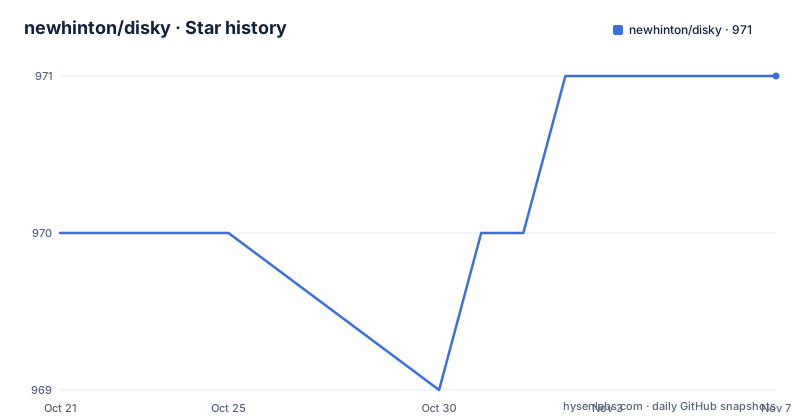
Star history
- newhinton/disky971 ★ · +1
| Repository | 2026-10-21 | 2026-11-07 |
|---|---|---|
| newhinton/disky | 970 | 971 |
1 Stars in the last 17 days, measured from the daily GitHub snapshot. Compare with other projects
Editorial analysis
A single-purpose analyzer for a phone that is out of space
disky answers one question: what is taking up the storage on this Android device. The project description calls it a filesystem analyzer that shows the usage of your storage, and the README headline is blunter, "Find your biggest diskspace thieves!". That is the entire scope. There is no cleaning tool, no cache sweeper, no duplicate finder described anywhere in the documentation.
The audience is an Android user, not a developer, though both are served. A user with a full phone wants to see the size of each app's data, each media folder and each leftover file rather than guess. A developer carrying a test device wants to know where a build artefact or a log dump ended up. The app is listed on F-Droid as de.felixnuesse.disky and carries a homepage at felixnuesse.de/disky, so it is distributed as a normal installable Android application rather than as a library or a command line tool.
The feature list is short and worth reading closely because it defines the boundaries. It claims speed, claiming even larger devices can be scanned in mere seconds, it claims multi storage, stating that all local filesystems are supported, and it claims the interface fits the device theme. That is three promises, and only the first two are functional. There is no documentation here about filtering, sorting, categories, historical comparisons or scheduled scans, which means the app is best understood as a viewer for a one-shot scan.
What the repository layout says about how the app is built
The source tree is a standard Gradle Android project with Kotlin as the primary language. The root holds `build.gradle.kts`, `settings.gradle.kts`, `gradle.properties`, the `gradle/` directory, the `gradlew` and `gradlew.bat` wrapper scripts and an `app/` module, plus a `fastlane/` directory that carries the store metadata and the phone screenshots used on the listing pages.
Two supporting directories sit alongside the usual Gradle files. A `.github/` directory holds the workflow that runs Android Lint against the `master` branch, which is the default branch for the repository, and a `.gitea/` directory points to a second hosted forge. The presence of both hosting configurations is a practical detail for anyone who wants to follow upstream activity rather than just download a release.
The dependencies listed in the README are user-facing additions rather than analysis engines. AppIntro provides the introductory walkthrough, Lottie handles the animation, and Undraw supplies the illustration set. Nothing in that list is a filesystem scanning library, so the scanning and tree-building code lives in the app module itself rather than being pulled from a dedicated library. That is a reasonable choice for a project this size, and it also means the traversal logic is not reusable outside the app.
Installation is a signed APK or an F-Droid entry
There is no command line installer and no package manager recipe in the documentation. The install instruction is to grab the latest signed APK from the releases page and install it on the phone. The F-Droid badge points at de.felixnuesse.disky, which gives a second route for anyone who prefers to track updates through F-Droid rather than from GitHub.
For people who want to build from source instead, the documented path is short. You clone the repository, then build with the Gradle wrapper, either from Android Studio or from a shell:
git clone https://github.com/newhinton/disky# build
./gradlew assembleThose two steps are everything the development section contains, and they are enough to produce an APK on a machine with the Android SDK configured. There is no mention of a required JDK version, Android SDK level or Gradle configuration, which means anyone building it will infer those from the project files rather than from documentation.
Note what the release feed shows about how this project evolves. The last three tagged versions are v2.2.0 with the tag name "Maintenance", v2.1.0 tagged "Permissions!" and v2.0.1 tagged "Speed!". The naming is informal, but it maps to a sensible sequence: the speed work landed in April 2026, a permissions-focused release followed in April, and a maintenance release in May 2026. The permissions release is the one to pay attention to, because it is the version where the app's access model changed.
The GPLv3 licence came after a packaging mistake
disky is licensed under GPLv3, and the README treats licence clarity as a project concern rather than a footnote. It states plainly that the entire repository is and was GPLv3, that this was also stated inside the app itself, and that older releases accidentally contained the wrong licence file, namely MIT. The root of the repository carries a `LICENCE` file alongside the README, and the release page carries a GPLv3 badge.
For anyone who wants to reuse the code, the practical points are narrow. The code is copyleft, so derived work carries the same obligation, and the documentation is unambiguous that the MIT label on those older builds was an accident rather than an alternative offer. Checking the `LICENCE` file in a given release, rather than trusting an old package listing, is the step that removes the ambiguity.
The project also lists the standard contribution and conduct files at the root, with a CONTRIBUTING.md, and the README states plainly that hate, discrimination and racism are not tolerated in the project. Funding is handled through PayPal, Liberapay and GitHub Sponsors, which matters less for adoption than for judging whether the project has a single maintainer carrying the load: the release cadence and the one-person project page both point that way.
Where disky stops short of what a storage audit needs
Three gaps are visible in the documentation, and none of them are addressed by the feature list.
The first is that there is no described output beyond the on-screen view. The README documents no export, no report file, no command line interface and no scripting hook, so disky is a tool for a human looking at one device. That is a reasonable boundary for an app, but it rules out the other common use case for filesystem analysis, which is running the same measurement across many devices or over time and comparing the results.
The second is the permission model. The v2.1.0 release was tagged "Permissions!", which confirms that how disky requests access to storage changed and that the change was significant enough to name the release after it. The documentation does not spell out which permissions the current version requests, how it behaves on a device running a recent Android release, or what the user sees when access is denied. Anyone assuming it can read a modern scoped-storage device the way a file manager with full access can should verify that on their own hardware before relying on the result.
The third is measurement precision. The scanner reports usage and reports it fast, but the documentation does not describe how sizes are calculated, whether it counts allocated blocks or apparent file size, or how it handles symlinks and permission-denied directories. A number that looks like a directory total can differ from what another tool reports for the same path, and the documentation gives no way to resolve which one is right.
How disky compares with reading storage from outside the phone
The alternative approach to the same question is to do it from a desktop, over a USB connection, with a file listing or a disk usage command against the mounted volume, or to read the same information from the system storage settings on the device itself. The difference is one of vantage point rather than of algorithm.
A desktop-side inspection produces output that can be kept, diffed and scripted, and it can see the mounted volume without needing an app installed on the phone. That is the stronger option when the goal is a record of disk usage over time or a comparison between devices. It also costs more setup: you need the device connected, the volume mounted and the right tooling on the host machine.
disky sits on the other side of that trade. It runs on the device, so it sees the filesystem as the phone's own user sees it, it needs nothing beyond an APK install, and it is available to someone standing next to the phone with no laptop. The gap it leaves is the record: a screenshot of a scan is not a report, and there is no documented way to have disky hand that data to a script.
The choice therefore comes down to what the measurement is for. A one-off answer to "what is filling this phone" is disky's use case. Anything that needs to be stored, tracked over time or compared is better served from outside the device.
The maintenance picture: last push on 2026-05-31
The repository is not archived, and the last push was on 2026-05-31, with the v2.2.0 release following the same day under the tag "Maintenance". Before that, v2.1.0 landed on 2026-04-19 and v2.0.1 on 2026-04-15. So the visible work is a burst of activity across April and May 2026, followed by a period since then without a new tagged release.
The wording of the release names tells you what the maintainer was doing during that burst: speed in v2.0.1, permissions in v2.1.0, and general upkeep in v2.2.0. That pattern reads as a maintainer who tidied up the app rather than one adding features, and the README's own feature list is correspondingly short. No roadmap, TODO or changelog detail is included in the documentation to say whether further work is planned.
For an adopter, the practical consequence is that this is a small project with a single visible maintainer and a thin documentation surface. The Android Lint workflow runs against the `master` branch, so the codebase is at least under some automated checking, but the guarantees a consumer gets come from the licence and the release artefacts rather than from a documented support commitment.
Editorial conclusion
disky suits an Android user who wants a dedicated view of what is consuming storage, especially one who already runs F-Droid and accepts granting a filesystem analysis permission to an installed APK. It is the wrong choice for a team that needs a documented reporting format, since the project describes no export or scripting interface, and it is a poor fit for a device where third-party storage access is already constrained by the platform. Before adopting, check the release you install against the permissions the version expects, confirm your device storage layout is one of the local filesystems the scan covers, and verify the last push date for the branch you build from, since the last push was on 2026-05-31.
Frequently asked questions
How do I install disky on my Android phone?
The README says to grab the latest signed APK from the GitHub releases page and install it on the phone. The app is also listed on F-Droid as de.felixnuesse.disky, which offers a second route for tracking updates.
Can disky free up space on my phone?
No. disky is described as a filesystem analyzer that shows storage usage, and nothing in the documentation describes deleting, cleaning or clearing files. It shows what is consuming space so you can decide what to remove yourself.
What licence is disky released under?
GPLv3. The README states that the entire repository is and was GPLv3, that it is also stated inside the app, and that older releases accidentally shipped the wrong licence file, namely MIT.
How do I build disky from source?
Clone the repository and run `./gradlew assemble`, either from Android Studio or from a shell. The documentation does not state a required JDK version or Android SDK level, so those come from the project files.
Does disky support phones with multiple storage locations?
The feature list claims multi storage support, stating that all local filesystems are supported, and the screenshots show several storage views. The documentation does not explain how per-app, per-folder and system partitions are separated in the output.
Official sources
Add this badge to your README
If you maintain this project, the badge below links readers to this analysis and shows its maintenance status from the daily GitHub snapshot. Paste the markdown into your README; add ?metric=license or ?metric=stars to the image URL for a different field.

[](https://hysenlabs.com/projects/newhinton-disky)Star history chart for your README
[](https://hysenlabs.com/projects/newhinton-disky)Was this useful?