Arya (markdown-online-editor): a Vditor-based online Markdown editor you can self-host
An online Markdown editor built with Vue2 and Vditor, supporting flowcharts, Gantt charts, sequence diagrams, task lists, ECharts, musical staff notation, PPT preview, video/audio parsing, and automatic HTML-to-Markdown conversion.
At a glance
- What is it?
- Arya is a Vue 2 and Vditor front end for writing Markdown in the browser, with diagrams, PPT preview and PDF or Word export. It is a static build, so the real decision is whether to use the hosted site or deploy the dist directory yourself.
- Who is it for?
- Adopt it if you want a browser Markdown editor with diagrams, PPT preview and styled PDF or Word export, and you are willing to pin Node 16.x and run a static build yourself. Do not adopt it if you need a server-side rendering pipeline, collaborative editing, or a build that works on current Node LTS without the --openssl-legacy-provider flag.
- Can I use it commercially?
- Yes. MIT is a permissive licence: you can use, modify and sell software built on it, as long as you keep its copyright and licence notices.
- Is it still maintained?
- Yes. The repository received new commits within the last day.
- What is it written in?
- Mainly CSS, according to GitHub's language statistics.
Answers come from the project's GitHub data, last synced on November 24, 2026, and from our analysis. They are not legal advice.
Star history
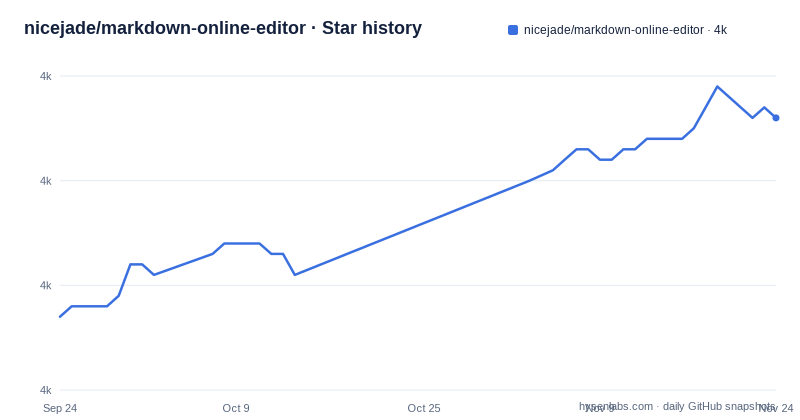
- nicejade/markdown-online-editor3,996 ★ · +19
| Repository | 2026-09-24 | 2026-11-24 |
|---|---|---|
| nicejade/markdown-online-editor | 4k | 4k |
19 Stars in the last 61 days, measured from the daily GitHub snapshot. Compare with other projects
Editorial analysis
What Arya solves, and who it is for
Most Markdown editors handle headings, lists and code fences. The gap Arya targets is the long tail: flowcharts, gantt charts, sequence diagrams, task lists, ECharts, staff notation, Reveal.js slide decks, and pasting HTML that should come out as Markdown. The README states the motivation plainly: existing editors were either incomplete or charged for advanced features, so the author built one on top of Vditor.
The audience is narrow but real. It is for people who write documents that mix prose with diagrams and want a single browser tab rather than a diagram tool plus a text editor plus an export step. It is also for teams that want that editor on their own domain, since the whole thing compiles to static files. It is not for people who need simultaneous editing, comments, or a database behind the content. There is no backend in the repository.
The Vditor core and what Vue 2 adds around it
Arya is a shell around Vditor, the browser-side Markdown editor from the b3log project. Vditor supplies the parsing, the three editing modes and most of the rendering. The repository adds the Vue 2 application around it: Element UI for the interface, html2canvas and canvg for image export, @turbodocx/html-to-docx for Word output, and Reveal.js for the PPT preview entry that lives in the settings panel.
The editing modes are exposed as keyboard shortcuts rather than a toolbar toggle, which is a deliberate choice worth noting. The README lists ⌘-⇧-M (Ctrl-⇧-M) to switch modes, then ⌘-⌥-7 for what-you-see-is-what-you-get, ⌘-⌥-8 for instant rendering, and ⌘-⌥-9 for split-screen rendering. WYSIWYG is the default. That default matters: instant rendering shows the raw Markdown source with inline preview, while split-screen keeps source and preview side by side. If you are used to a source-first editor, the first thing you will do is press Ctrl-alt-8.
The PPT preview is the feature most likely to disappoint on first contact. The README says the entry is in settings and warns that chart rendering is not supported there. Horizontal slides use --- and vertical slides use --, following the Reveal.js Markdown convention. So a deck can contain text and code, but a flowchart embedded in the same document will not appear in slide mode.
Installing and running markdown-online-editor with Docker
The fastest path is the published image. The README gives this command, mapping container port 80 to a port of your choice:
docker run -d -p 8866:80 nicejade/markdown-online-editor:latestAfter that, http://localhost:8866 serves the editor. The Dockerfile is three lines of substance: it starts from nginx:alpine, copies dist into /usr/share/nginx/html, copies nginx.conf over the default server config, and exposes port 80. Nothing is compiled inside the image, so the image you pull was built from a dist directory produced elsewhere.
If you prefer Compose, the README supplies this file. Note the fixed version key and the restart policy:
version: '3'
services:
  markdown-editor:
    image: nicejade/markdown-online-editor:latest
    ports:
      - '8866:80'
    restart: always
Running docker-compose up -d in the directory holding that file starts the same container in the background. For a build from source, the README requires Node.js >= 16.* and < 18.*, and recommends pnpm or yarn. The sequence is clone, yarn, then yarn start for development or yarn build for production output. The package.json prebuild script copies node_modules/@turbodocx/html-to-docx/dist/html-to-docx.browser.js into public/vendor before vue-cli-service build runs; if that copy fails, Word export will not work in the built app. Cloudflare Pages is also documented, with NODE_VERSION set to 18, YARN_NODE_LINKER set to node-modules, YARN_ENABLE_IMMUTABLE_INSTALLS set to false, and NODE_OPTIONS set to --openssl-legacy-provider.
The Node version constraint is the sharpest edge
The README states Node.js >= 16.* and < 18.* for development. That is an old window, and it collides with the Cloudflare Pages instructions, which set NODE_VERSION to 18 and pass --openssl-legacy-provider. The flag exists because the underlying build chain expects an OpenSSL API that Node 17 and later removed. So the two documented paths do not agree on the runtime, and the Pages path only works because of an explicit compatibility flag.
In practice this means a fresh clone on a current LTS release is likely to fail at build time, and the fix is either to install Node 16 or to add the legacy provider flag. Neither is documented as a troubleshooting step; the flag appears only inside the Pages environment variable list. Anyone deploying this should treat the Node version as a pinned dependency, not an incidental detail.
A second limitation is the PPT mode itself. Because chart rendering is excluded there, a document that works well in the editor can look incomplete as a slide deck. If slides are your primary use, the editor is the wrong tool for the diagram-heavy part of the content.
How it differs from HackMD and StackEdit
HackMD and StackEdit are the obvious comparisons, and the difference is architectural. Both of those are services with accounts, sharing links and collaborative editing, and both keep your notes somewhere you do not control unless you self-host a heavier stack. Arya has no account system and no collaboration layer in the repository. The README's storage claim is local storage for the current editing session, described as protection against accidental loss, not as a document library.
That cuts both ways. You get a single static bundle you can drop behind nginx or onto Cloudflare Pages, with no database and no user table. You give up link sharing, version history and multi-user editing. If your workflow is one person writing a document and exporting a PDF or a .docx, the trade is favorable. If your workflow involves three people commenting on the same draft, Arya does not attempt to solve that problem.
Maintenance, licence and upgrade cost
The last push to the repository was on 2026-09-23, and the repository is not archived. The version in package.json is 3.3.0, and the repository has no published releases, so versioning appears to move through commits and the package manifest rather than tagged releases. Upgrades are not a matter of bumping an image tag alone if you build from source: the prebuild copy step, the pinned Node range and the Vue 2 toolchain all move together, and the Cloudflare Pages environment variables are a second place where build behaviour is configured.
The licence is MIT, which permits commercial use, modification and redistribution provided the copyright notice and permission notice are included. Arya depends on Vditor, Vue 2, Reveal.js, Element UI, html2canvas and @turbodocx/html-to-docx, each under its own licence, and those obligations are separate from the MIT grant on this repository. That is a statement about what the licences say, not legal advice; if you redistribute the bundle commercially, check the dependency licences yourself.
Editorial conclusion
Adopt it if you want a browser Markdown editor with diagrams, PPT preview and styled PDF or Word export, and you are willing to pin Node 16.x and run a static build yourself. Do not adopt it if you need a server-side rendering pipeline, collaborative editing, or a build that works on current Node LTS without the --openssl-legacy-provider flag. Before committing, run yarn build locally on Node 16 and confirm the prebuild step copies public/vendor/html-to-docx.browser.js, because Word export depends on that file being present in dist.
Frequently asked questions
Can I self-host markdown-online-editor with Docker?
Yes. The README publishes an image on Docker Hub and gives the command docker run -d -p 8866:80 nicejade/markdown-online-editor:latest, after which the editor is reachable at http://localhost:8866. A docker-compose.yml example mapping port 8866 to container port 80 is also provided.
Which Node.js version does markdown-online-editor need to build?
The README states Node.js >= 16.* and < 18.* for development, and recommends pnpm or yarn. The Cloudflare Pages instructions instead set NODE_VERSION to 18 together with NODE_OPTIONS set to --openssl-legacy-provider, so the two documented build paths differ.
Can markdown-online-editor export to PDF and Word?
The README lists export of styled PDF, PNG and JPEG, plus Word (.docx) output based on html-to-docx, and a copy-to-WeChat feature. Word export depends on the prebuild script copying html-to-docx.browser.js into public/vendor.
Can you open Markdown in a browser?
Arya runs entirely in the browser and parses Markdown client side through Vditor, with three editing modes selected by shortcut: WYSIWYG on ⌘-⌥-7, instant rendering on ⌘-⌥-8 and split-screen rendering on ⌘-⌥-9. Local .md files can also be imported into the editor.
Official sources
Add this badge to your README
If you maintain this project, the badge below links readers to this analysis and shows its maintenance status from the daily GitHub snapshot. Paste the markdown into your README; add ?metric=license or ?metric=stars to the image URL for a different field.

[](https://hysenlabs.com/projects/nicejade-markdown-online-editor)Star history chart for your README
[](https://hysenlabs.com/projects/nicejade-markdown-online-editor)Was this useful?