Nmap: What the SVN Mirror on GitHub Actually Gives You
Nmap - the Network Mapper. Github mirror of official SVN repository.
At a glance
- What is it?
- Nmap is a C network mapper with a Lua scripting engine and a custom licence that is not GPLv2. The GitHub repository is a mirror of the official SVN tree, which changes what you can expect from pull requests.
- Who is it for?
- Adopt Nmap if you need a scriptable network mapper and can accept the custom licence, which permits free end-user use but is not GPLv2 and is not compatible with it. Do not adopt it if you need to redistribute it inside a product without a commercial licence, or if you expect a normal GitHub pull-request workflow, because this repository is described as a mirror of an SVN tree and points contributors at HACKING and CONTRIBUTING.md instead.
- Can I use it commercially?
- Check first. The repository uses a licence we do not classify automatically, so read its LICENSE file before any commercial use.
- Is it still maintained?
- Yes. The repository last received commits 2 days ago.
- What is it written in?
- Mainly C, according to GitHub's language statistics.
Answers come from the project's GitHub data, last synced on November 13, 2026, and from our analysis. They are not legal advice.
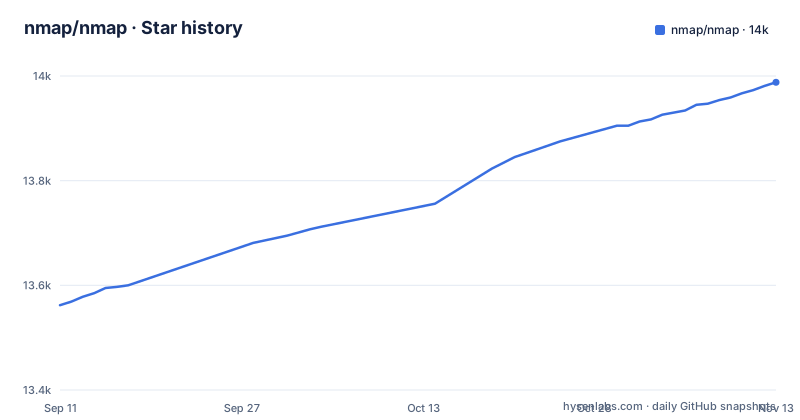
Star history
- nmap/nmap13,988 ★ · +426
| Repository | 2026-09-11 | 2026-11-13 |
|---|---|---|
| nmap/nmap | 13.6k | 14k |
426 Stars in the last 63 days, measured from the daily GitHub snapshot. Compare with other projects
Editorial analysis
The Problem Nmap Addresses and the Audience It Assumes
Nmap maps networks. The README describes it as the Network Mapper and gives a single starting command, nmap scanme.nmap.org, which is enough to see the shape of the tool: you point it at a host or a range and it reports what is reachable and what is listening. The repository bundles libraries that make that work, including libpcap/, libpcre/ and liblua/. The audience is therefore anyone who needs an inventory of live hosts and open services rather than a one-off connectivity check. Zenmap is named in the README as an included graphical front-end for users who prefer not to work from the shell. The licence section frames the second audience explicitly: end users get free usage, while companies that want to redistribute Nmap technology inside their own products are directed to a commercial licence. That split shapes who can adopt the code and who can only run it.
How the Scanner Is Put Together
The primary language is C, the core sources are .cc C++ files, liblua/ is bundled, and the build is the classic autotools sequence. The architecture implied by the bundled libraries is a core scanner that talks to the network through libpcap and raw sockets, with pcre available for pattern matching and Lua for scripting. A scanner that probes many hosts at once cannot block on a single slow target, so the design has to keep multiple probes in flight. Service discovery sits on top of that, taking the ports that answered and working out what is behind them. The Lua dependency is what turns Nmap from a fixed scanner into something you extend without recompiling C. The README does not describe the internal data flow beyond pointing at the man page and the documentation site. It does describe Zenmap as an included front-end.
Building and Running It
The README gives three commands for the ideal case: ./configure, make, then make install. It then sends you to the Nmap Install Guide for compilation, installation and removal notes, which is a signal that the three-command path is the simple case rather than the whole story. Running it is simpler than building it: nmap scanme.nmap.org is the documented first run, and running nmap with no parameters prints a list of the most common options. The README points at the man page for those options in depth. Binary installers for Windows, macOS and Linux RPM are available from the download page, so building from source is not the only route. This repository is described as a mirror of the official SVN repository, and the homepage field points at svn.nmap.org rather than at GitHub. That is the detail to internalise before you clone: the GitHub copy tracks the canonical tree, it is not the canonical tree.
The Licence Is Custom and Not GPLv2
The README is direct about this: Nmap is released under a custom licence which is based on, but not compatible with, GPLv2. It allows free usage by end users and offers a commercial licence for companies that wish to redistribute Nmap technology with their products. For an engineer choosing a dependency, that distinction decides the question. Free usage by end users is not the same permission as free redistribution inside a product, and the README routes the second case to a commercial licence rather than to the GPL. The repository metadata reports the licence as NOASSERTION, which matches a custom licence that no automated classifier recognises. The README points to the Nmap Copyright and Licensing page for full details, and that page is where the actual terms live. The README does not say how the commercial licence is priced or what it covers, so treat that as an open question to resolve with the project rather than something you can infer from the source tree.
Where the GitHub Mirror Constrains You
The repository description says it plainly: this is a GitHub mirror of the official SVN repository. The homepage is svn.nmap.org. If you open a pull request here expecting it to be reviewed and merged the way it would be on a project whose primary home is GitHub, the mirror model works against you. The README does not describe a pull-request workflow. It points contributors at the HACKING file and CONTRIBUTING.md for information about filing bug reports and contributing, and it names the nmap-dev mailing list as the place for questions and suggestions. Those are the channels the project documents. A mirror also means the commit history you see on GitHub is a copy of history authored elsewhere, so the authoritative record of a change is the SVN side. For someone who only wants to build and run Nmap, none of this matters. For someone who wants to land a patch, it changes where the work happens.
A Realistic Alternative: Masscan
If your actual requirement is sweeping a very large address space quickly, Masscan is the obvious comparison, and the difference is in the design goal rather than in the feature list. Nmap's strengths are service discovery, OS detection and the Lua scripting layer, which is why the README's first example is a single host and why Zenmap exists as a front-end for interactive work. Masscan is built around raw asynchronous transmission for internet-scale port sweeps. The trade is depth against breadth: you reach more addresses per unit time with a scanner designed for that, and you give up the service fingerprinting and scripting ecosystem that Nmap carries. The two are not mutually exclusive, and a common pattern is a fast sweep to find candidates followed by Nmap against the hosts that answered. Pick based on whether your bottleneck is the number of addresses or the amount you need to learn about each one.
Maintenance Cost and What to Verify First
The repository bundles libpcap, libpcre and liblua, plus a C toolchain and autotools. Those are widely packaged, which keeps the build cost low on Linux, but the README's own routing to the Install Guide for compilation and removal notes suggests the three-command path is not guaranteed on every platform. The last push timestamp on the repository is 2026-11-02, and the repository has no published GitHub releases; version history is in the CHANGELOG file. The licence is the maintenance cost that does not show up in a build log: if your product redistributes Nmap technology, the README's answer is a commercial licence, and that is a procurement question rather than an engineering one. Verify the build on your target platform before you standardise on it, and read the Copyright and Licensing page before you assume the GPL habits you have from other tools apply here. They do not.
Editorial conclusion
Adopt Nmap if you need a scriptable network mapper and can accept the custom licence, which permits free end-user use but is not GPLv2 and is not compatible with it. Do not adopt it if you need to redistribute it inside a product without a commercial licence, or if you expect a normal GitHub pull-request workflow, because this repository is described as a mirror of an SVN tree and points contributors at HACKING and CONTRIBUTING.md instead. Before you commit, verify two things: that the configure, make, make install path builds on your target platform, and that your redistribution plans match the terms on the Nmap Copyright and Licensing page.
Frequently asked questions
How do I install Nmap?
Nmap builds from source with the standard autotools sequence: run ./configure, then make, then make install. The Nmap Install Guide at nmap.org covers compilation and removal in more depth, and binary installers for Windows, macOS and Linux are published there rather than in this repository.
What are the Nmap commands?
The starting point the project gives is nmap scanme.nmap.org, scanning a host the project provides for exactly that purpose. Running nmap with no parameters prints a helpful list of the most common options, and the man page at nmap.org is the deeper reference.
What is the difference between Nmap and Zenmap?
Zenmap is the graphical front-end included in the project, and it drives the same scanning engine as the command line rather than implementing a separate one. Choosing the GUI changes the interface, not what goes out on the network.
Official sources
Add this badge to your README
If you maintain this project, the badge below links readers to this analysis and shows its maintenance status from the daily GitHub snapshot. Paste the markdown into your README; add ?metric=license or ?metric=stars to the image URL for a different field.

[](https://hysenlabs.com/projects/nmap-nmap)Star history chart for your README
[](https://hysenlabs.com/projects/nmap-nmap)Was this useful?