Universal Installer's backends decide what you actually get to control
A modern Android app for installing and managing APK packages with split APK support, silent install via Shizuku, and VirusTotal malware scanning.
At a glance
- What is it?
- A GPL-3.0 Kotlin package manager for phones, Android TV and Wear OS that installs split bundles, writes OBB data through three fallbacks, and checks files with VirusTotal. The parts worth reading first are the backend rules, the build flavor that needs a private json, and the LAN file server with an optional PIN.
- Who is it for?
- Read this project as two things that have to be checked separately: a GPL-3.0 Kotlin codebase whose full build path depends on a Google services file no contributor holds, and a sideloading front end whose real capability comes from whichever backend it is granted.
- Can I use it commercially?
- Yes, with conditions. GPL-3.0 is a copyleft licence: if you distribute software that includes it, you must release that software's source code under the same licence. Running it internally without distributing it does not trigger that obligation.
- Is it still maintained?
- Yes. The repository last received commits 1 day ago.
- What is it written in?
- Mainly Kotlin, according to GitHub's language statistics.
Answers come from the project's GitHub data, last synced on November 14, 2026, and from our analysis. They are not legal advice.
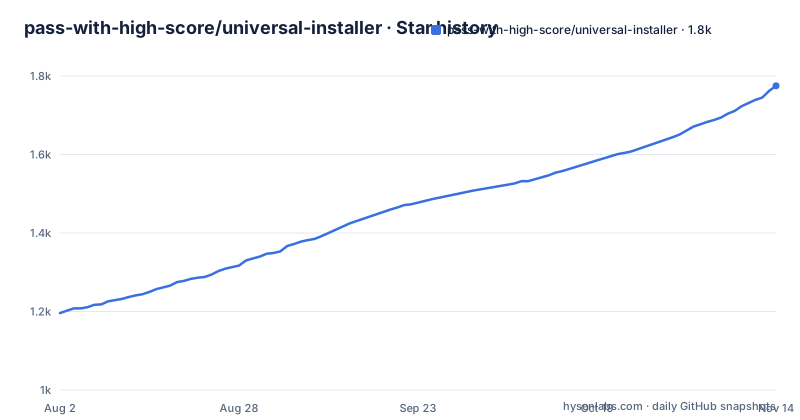
Star history
- pass-with-high-score/universal-installer1,775 ★ · +579
| Repository | 2026-08-02 | 2026-11-14 |
|---|---|---|
| pass-with-high-score/universal-installer | 1.2k | 1.8k |
579 Stars in the last 104 days, measured from the daily GitHub snapshot. Compare with other projects
Editorial analysis
The all-variant build command pulls in the flavor that needs a private json
The build section offers four commands, and one of them is a trap for anyone without a Google Cloud project:
# Build Phone app (open-source flavor)
./gradlew :app:assembleOpensourceDebug

# Build Android TV app
./gradlew :tv:assembleDebug

# Build Wear OS app
./gradlew :wearos:assembleDebug

# Build all debug variants
./gradlew assembleDebug
The phone module `:app` carries two flavors, `opensource` and `play`, and the note under the block says the `play` flavor requires `app/src/play/google-services.json`, described in `docs/FIREBASE.md`. A root `assembleDebug` matches every module, so it reaches the `play` flavor too and inherits that requirement. The two TV and Wear OS modules have no flavors, which is why their commands carry no qualifier. For a clone without the Google services file, `:app:assembleOpensourceDebug` is the only phone command in the block that resolves, and the flavor difference means the build you produce locally is not the build the Play Store link serves.
The Project Structure block stops at five modules and the tree holds more
The structure block names five directories: `app/`, `tv/`, `wearos/`, `core/` for the shared engine and `updater/` for in-app update checks. The repository root also holds `tv-baselineprofile/`, three separate fastlane directories named `fastlane/`, `fastlane_tv/` and `fastlane_wearos/`, a `Gemfile`, plus `plans/`, `scripts/`, `docs/`, `.claude/`, `GEMINI.md`, `.idea/` and `.vscode/`. Two things follow. Release automation is duplicated once per target in Ruby tooling that the build section never mentions, since all four documented commands are Gradle only, so nothing tells you how the release builds are actually driven. And the baseline profile module exists for TV alone: no phone or wear counterpart is listed, so that startup work covers one of the three form factors.
Three install backends decide which privileged controls you actually get
The backends are the standard system installer, Shizuku, and root through libsu. Silent install and silent uninstall without prompts are properties of the backend, not of the app: the stock system installer prompts every time, while Shizuku and root do not. The privileged controls are listed in one flat row: allow downgrade, bypass minimum SDK restrictions, grant permissions, install for all users, and spoof installer package names. Those last four are bound to installer privilege at the platform level, so on the system backend they are not available at all, Shizuku reaches them through shell level ADB power, and libsu reaches them through root. Because the controls appear as one undifferentiated list, the page reads as though every backend delivers all of them. On phones and tablets Porter can serve as the Shizuku engine instead of Shizuku itself, which means the same SDK is running against a third-party bridge, and the page does not say how that service is started or what happens to it after a reboot. Check each control per backend before you plan on it.
The pre-install VirusTotal check is a hash lookup, not a scan
Three separate things sit under the VirusTotal heading: an automatic SHA-256 hash lookup before install, an engine detection breakdown labelled malicious, suspicious and clean, and an on-demand file upload for packages that are not indexed, capped at 650 MB. The first two run against a hash, which means they can only report something about a file somebody else already submitted. A rebuild, a re-sign or a first upload produces a hash nobody has indexed, the lookup has nothing to return, and the pre-install step passes on a file it never examined. The upload path is the only one that looks at your copy, and it is opt-in and ships the APK to a third party, with a ceiling high enough that a single large expansion bundle can take the entire budget in one request. Nothing described here pins an expected hash or a signature for a build you trust, so the safety net is reputation keyed on file identity rather than provenance you control.
OBB expansion files ride a three-tier write fallback
The OBB handling has three parts: automatic extraction of `.obb` files out of XAPK and APKM archives directly into `Android/obb/<package>/`, attaching a standalone OBB file to an APK install, and what is called a multi-tier write strategy that tries Direct I/O first, then Shizuku, then the Storage Access Framework. A fallback chain is convenient until you want to know which branch ran. When a direct write is denied the app moves to the next tier rather than failing, and the page records nothing about the tier it used or surfaces a warning when it drops to a lower one. This matters because `.obb` data is read by the game rather than by the package manager, so an archive can install cleanly, report success, and still leave the title broken on first launch with an expansion file that landed somewhere the game will not look.
The local file server runs with the PIN switched off
Local sharing is a built-in HTTP server with a web dashboard for transferring APKs from a PC or a mobile browser, a QR code path for pushing packages straight to Android TV, and an optional PIN for local network access. Optional is the operative word: with no PIN set, anything that can reach the device on the same network gets a web surface that serves installable packages. The transfer runs over HTTP, so the dashboard and the files cross the network in the clear, and the file the browser fetches is the same file the app goes on to install. The TV module adds QR code pairing and remote receive, which is a second way in rather than a locked one. Turn the PIN on before the device joins any network you do not control, and keep in mind the dashboard is an unauthenticated web app whenever that PIN is off.
Spoofing the installer package rewrites the install source on the device
One of the privileged controls is to spoof installer package names, with Google Play, F-Droid, Aurora Store and Amazon given as examples. Android records which package installed an app and shows that as the source in the app list, and this control sets that recorded value to a label of your choosing. The consequences are worth stating plainly. Software that behaves differently depending on install source sees a store name, whether that is the app's own logic or an integrity service reading the package manager. Device management and inventory reporting sees a source that is not where the file came from. And the README's own download row, which points at the Play Store, F-Droid, IzzyOnDroid and GitHub releases, makes a spoofed value look entirely ordinary. The repository documents no log of which values were spoofed, so there is no record to inspect afterwards.
Four download links and three releases with no version labels
The download row offers the Play Store, F-Droid, an IzzyOnDroid index path, and GitHub releases. None of the four carries a version number on the page, and no update policy is described for any of them, so nothing here tells you which channel is on which build or how far behind a store copy runs. The release trail is short and dense: v1.16.0 on 2026-09-08, v1.17.0 on 2026-09-09 and v1.18.0 on 2026-09-16, with the last commit on 2026-09-28. The repository therefore sits twelve days past its newest tag, so main is ahead of anything a store link can hand you. That gap is ordinary practice, but it means a bug report filed against a store build and a fix sitting on main are not the same tree, and it is worth recording which of the two you tested.
Editorial conclusion
Read this project as two things that have to be checked separately: a GPL-3.0 Kotlin codebase whose full build path depends on a Google services file no contributor holds, and a sideloading front end whose real capability comes from whichever backend it is granted. Before installing anything with it, confirm which backend each privileged control needs, decide whether the local HTTP server will run with its PIN unset, find out what the VirusTotal hash lookup returns for a build nobody has uploaded, and remember that four store links plus main are five different code states. It is a reasonable tool for your own devices and a poor foundation for a fleet.
Frequently asked questions
What is Universal Installer on Android?
It is a Kotlin package manager for sideloading and managing APK packages, published under GPL-3.0 by Nguyen Quang Minh. It ships three applications, one for phones and tablets, one for Android TV and one for Wear OS, over a shared `core` engine and an in-app `updater` module.
Does Universal Installer need root to install APKs silently?
Silent install and uninstall without prompts come from the backend, not the app. The three backends are the standard system installer, which prompts, Shizuku, and root through libsu, and on phones and tablets Porter can supply the Shizuku engine instead.
Which package formats does Universal Installer accept?
Single `.apk` files, the split bundle formats `.apks`, `.xapk`, `.apkm` and `.apk+`, manual merges of several individual `.apk` files into one installation session, and automatic extraction plus background placement of `.obb` expansion files.
Does Universal Installer check APKs with VirusTotal before installing?
It runs an automatic SHA-256 hash lookup before install and reports an engine breakdown of malicious, suspicious or clean. A file upload scan is a separate on-demand step for packages that are not indexed, capped at 650 MB.
How do I build Universal Installer from source?
The stated prerequisites are Android Studio Ladybug or newer, JDK 17 or newer and Android SDK 36, and the build commands are Gradle tasks such as `./gradlew :app:assembleOpensourceDebug`. The `play` flavor additionally needs `app/src/play/google-services.json`, so without that file you build the `opensource` flavor.
Can Universal Installer send an APK to an Android TV?
Yes. It runs a built-in HTTP server with a web dashboard for transferring APKs from a PC or a mobile browser, and it pushes packages to Android TV by QR code, with PIN security for local network access described as optional.
Official sources
Add this badge to your README
If you maintain this project, the badge below links readers to this analysis and shows its maintenance status from the daily GitHub snapshot. Paste the markdown into your README; add ?metric=license or ?metric=stars to the image URL for a different field.

[](https://hysenlabs.com/projects/pass-with-high-score-universal-installer)Star history chart for your README
[](https://hysenlabs.com/projects/pass-with-high-score-universal-installer)Was this useful?