NuvioTV: A Playback-First Android TV Front End for the Stremio Addon Ecosystem
Project brief: Official Nuvio Android TV Repository. Stremio Addon ecosystem Android TV optimized Playback-focused experience About NuvioTV is a modern media player designed specifically for Android TV.
At a glance
- What is it?
- NuvioTV is a GPL-3.0 Kotlin app that turns Stremio addons into a polished Android TV library. It prioritizes playback experience over content discovery, but its beta status and thin documentation demand a careful look.
- Who is it for?
- Adopt NuvioTV if you are an Android TV user who already curates Stremio addons and wants a playback-focused interface that syncs your place across screens. Avoid it if you expect a full media manager with built-in content discovery or if you need stable production software, since it is still in beta.
- Can I use it commercially?
- Yes, with conditions. GPL-3.0 is a copyleft licence: if you distribute software that includes it, you must release that software's source code under the same licence. Running it internally without distributing it does not trigger that obligation.
- Is it still maintained?
- Yes. The repository received new commits within the last day.
- What is it written in?
- Mainly Kotlin, according to GitHub's language statistics.
Answers come from the project's GitHub data, last synced on November 14, 2026, and from our analysis. They are not legal advice.
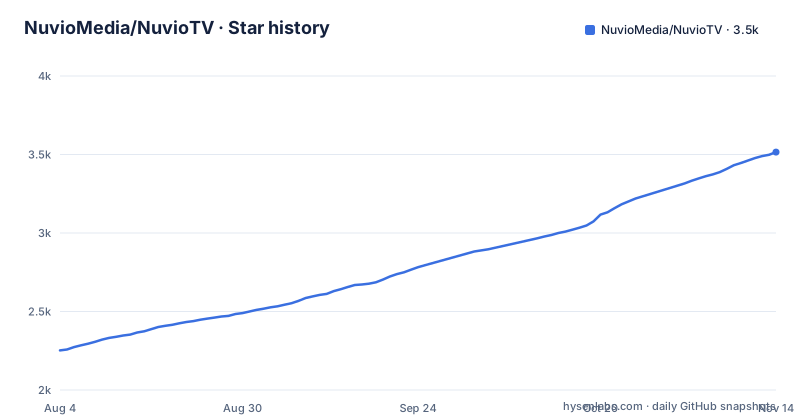
Star history
- NuvioMedia/NuvioTV3,515 ★ · +1,263
| Repository | 2026-08-04 | 2026-11-14 |
|---|---|---|
| NuvioMedia/NuvioTV | 2.3k | 3.5k |
1,263 Stars in the last 102 days, measured from the daily GitHub snapshot. Compare with other projects
Editorial analysis
What NuvioTV Actually Solves
NuvioTV addresses a specific gap: the Stremio addon ecosystem is powerful but its official Android TV experience can feel cluttered for users who care more about watching than browsing. The README describes NuvioTV as a 'modern media player designed specifically for Android TV' that turns your own sources into a library with artwork, ratings, subtitles, and saved playback position. The target user is someone who already knows how to set up Stremio addons and wants a leaner, playback-first front end on their TV. It is not a content provider. You bring the sources. NuvioTV is the shell that makes them look and behave like a native TV app. For a user who has a curated set of addons and hates digging through menus, this is a real convenience. For someone who expects a Netflix-like discovery engine, it is the wrong tool from the start.
How It Works: Stremio Addons as the Backbone
The repository description explicitly ties NuvioTV to the 'Stremio Addon ecosystem'. That is the core mechanism. Stremio addons are HTTP endpoints that expose catalogs, metadata, and streaming links in a standard JSON format. NuvioTV consumes those endpoints and renders them as a browsable library on Android TV. The app does not host any media itself. It relies on the addons to provide the content metadata and the actual video streams. The README mentions that NuvioTV is 'Android TV optimized' and 'Playback-focused', which suggests the UI prioritizes quick access to playback controls, resume points, and subtitle selection over catalog browsing. The data flow is straightforward: addon provides a list of items, NuvioTV fetches metadata like artwork and ratings, and when you select an item, the addon supplies a stream URL that Media3 plays. The architecture is deliberately thin, which is both its strength and its limitation. It means the app is only as good as the addons you connect, and if an addon changes its API or goes down, your library loses that source.
Getting It Running: Build Commands and Requirements
The README gives a clear path to run NuvioTV from source. You clone the repository, change into the directory, and run a single Gradle command: './gradlew :app:assembleFullDebug'. That produces a debug APK you can side-load on an Android TV device. The build requires Android Studio, a JDK, and the Android SDK. The 'Full' in the task name suggests there may be a stripped-down variant, but the README does not explain the difference. For users who do not want to build, there is a Google Play listing and a GitHub releases page that hosts APKs. The current release is 0.8.11-beta, dated 2026-08-29, which indicates an active development cycle. The app is built with Kotlin, Jetpack Compose, TV Material 3, and Media3. TV Material 3 is notable because it is a relatively new set of components tailored for the 10-foot interface. If you have used other Android TV apps built with the older Leanback library, NuvioTV's UI will feel different, and that is intentional.
The Playback-First Trade-Off
Calling NuvioTV 'playback-focused' is a design choice with real consequences. The app does not aim to be a comprehensive media manager. There is no mention of library organization, custom playlists, or advanced filtering beyond what the addons provide. The documentation is silent on features like search across all addons, live TV support, or offline downloads. That is a deliberate narrowing. By focusing on playback, the app can keep the UI simple and reduce the chance of bugs in the browsing layer. But it also means users who want a single app to manage a large local media collection will be disappointed. The README says 'your place saved on every screen', which implies cross-device resume, but it does not explain how that sync is implemented. Is it tied to a Nuvio account, or does it rely on the addon's own state? The README does not say. That lack of clarity is a red flag for users who depend on reliable resume behavior. If the sync mechanism is not robust, you could lose your place when switching between a phone and a TV, which defeats one of the app's core promises.
Beta Status and the Real Risks
The latest release is a beta, and the repository's default branch is 'dev'. That tells you the project is not yet stable. The release history shows three releases within five days: 0.8.9-beta, 0.8.10-beta, and 0.8.11-beta, with 0.8.9 labeled as a 'Hotfix'. That pace suggests rapid iteration, which is good for fixing bugs but also means features and behavior can change between updates. For a user who installs the APK and expects a rock-solid app, this is a risk. You might encounter crashes, UI glitches, or addon compatibility issues that are fixed in a later beta but not yet in the version you have. The README does not list known issues or a support channel, so troubleshooting is left to you. The GPL-3.0 license is another consideration. It is a strong copyleft license, which means if you distribute a modified version, you must make your source code available under the same license. That is fine for personal use, but it matters if you plan to customize the app and share it. The README does not mention any trademark or branding restrictions, so the main legal concern is the license itself.
Alternatives and How They Differ
The most direct alternative is the official Stremio Android TV app. Stremio is a mature, widely used app that also consumes addons and provides a full library experience. The key difference is that Stremio is a broader platform: it has its own discovery UI, a built-in catalog of addons, and a mobile companion app. NuvioTV is a focused player that aims to be lighter and more playback-centric. Another alternative is Kodi with the Stremio addon, which gives you deep customization but a much heavier and more complex interface. Kodi is a full media center, not a dedicated player. NuvioTV sits in between: it uses the Stremio addon protocol but strips away the extra layers. If you value simplicity and speed to playback, NuvioTV is the better fit. If you want a battle-tested app with a large community and a well-documented plugin system, Stremio is the safer choice. The trade-off is that Stremio's UI is not as tailored for the TV remote as NuvioTV claims to be, but it has years of bug fixes behind it.
Maintenance and Upgrade Cost
The project is actively maintained, with a release dated 2026-08-29 and a default branch that receives regular pushes. That is a positive sign. The upgrade cost depends on how you install it. If you use Google Play, updates are automatic. If you side-load APKs from GitHub, you have to manually download and install each new beta. Given the rapid release cadence, that could mean frequent updates. The build-from-source route adds the cost of maintaining a local Android development environment, but it also lets you track the dev branch and test new features before they are packaged. The README does not specify a minimum Android version or hardware requirements, so you should check the app's manifest or the Play Store listing to see if it supports your TV. The use of Media3 is a plus because it is the current standard for Android media playback, but it also means the app depends on the AndroidX media libraries, which can introduce breaking changes when they update. In short, the maintenance burden is moderate: the project is alive, but you must keep up with beta releases to stay current, and there is no stable release to rely on yet.
Editorial conclusion
Adopt NuvioTV if you are an Android TV user who already curates Stremio addons and wants a playback-focused interface that syncs your place across screens. Avoid it if you expect a full media manager with built-in content discovery or if you need stable production software, since it is still in beta. Before adopting, verify that your preferred addons work with the current 0.8.11-beta build, test subtitle rendering on your TV model, and review the GPL-3.0 implications if you plan to distribute modified versions. The project's focus on playback and its active release cadence make it a promising option, but the lack of a stable release and limited documentation mean you should be ready to build from source and debug issues yourself.
Frequently asked questions
How do I install NuvioTV?
Two routes are given: Android TV on Google Play under the package id com.nuvio.app, or the Android TV APK from the GitHub releases page. To build instead, clone the repository, change into the NuvioTV directory and run ./gradlew :app:assembleFullDebug, which needs Android Studio, a JDK and the Android SDK.
Can I watch Nuvio on Google TV?
The README gives Android TV distribution only, through Google Play and an APK, and names no Google TV specific instructions or requirements. What it does say is that you bring your own sources, and that Nuvio turns them into a library with artwork, ratings, subtitles and your place saved on every screen.
Can I use IPTV with NuvioTV?
Nothing in this repository mentions IPTV. The closest statement is that Nuvio is a media app where you bring your own sources, without any format, playlist or source type being specified.
What is the Nuvio Firestick code?
The repository says nothing about a Firestick code or any pairing code. The install paths it documents are the Google Play listing for Android TV and an APK from the releases page, with no device-specific activation step described anywhere.
How does NuvioTV compare to Stremio?
The repository contains no comparison. The repository description refers to a Stremio addon ecosystem, while the README never names Stremio and instead says you bring your own sources. No file here documents an addon manifest format or the identifiers one declares.
Official sources
Add this badge to your README
If you maintain this project, the badge below links readers to this analysis and shows its maintenance status from the daily GitHub snapshot. Paste the markdown into your README; add ?metric=license or ?metric=stars to the image URL for a different field.

[](https://hysenlabs.com/projects/nuviomedia-nuviotv)Star history chart for your README
[](https://hysenlabs.com/projects/nuviomedia-nuviotv)Was this useful?