Nornir Python Automation for Network Device Collections
Pluggable multi-threaded framework with inventory management to help operate collections of devices
At a glance
- What is it?
- Nornir is a pure Python automation framework for dispatching tasks across collections of network devices while managing inventory through plugins. It suits engineers who want Python control, built-in runners, and direct debugger access rather than a separate automation DSL.
- Who is it for?
- Adopt Nornir when automation logic should remain in Python and target devices are represented as an inventory. Do not choose it if you need a self-contained DSL or a complete connection stack, because the README says plugins are installed separately.
- Can I use it commercially?
- Yes. Apache-2.0 is a permissive licence: you can use, modify and sell software built on it, as long as you keep its copyright and licence notices.
- Is it still maintained?
- Yes. The repository last received commits 2 days ago.
- What is it written in?
- Mainly Python, according to GitHub's language statistics.
Answers come from the project's GitHub data, last synced on November 6, 2026, and from our analysis. They are not legal advice.
Star history
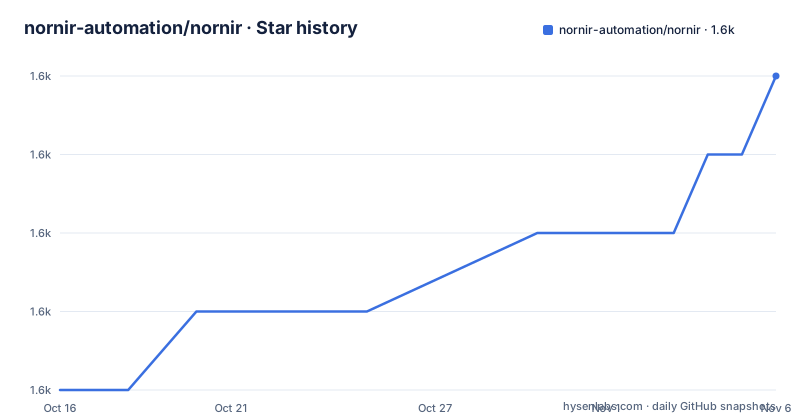
- nornir-automation/nornir1,635 ★ · +4
| Repository | 2026-10-16 | 2026-11-06 |
|---|---|---|
| nornir-automation/nornir | 1.6k | 1.6k |
4 Stars in the last 21 days, measured from the daily GitHub snapshot. Compare with other projects
Editorial analysis
Why Nornir Targets Device Collections
Nornir addresses a specific operational problem: applying automation logic to many network devices without rebuilding inventory handling and task dispatch for every script. The project description identifies it as a pluggable, multi-threaded framework with inventory management for operating collections of devices. Its intended users are engineers who work in Python and need repeatable device automation, especially where inventory is part of execution rather than an incidental list of hostnames.
The central design decision is direct use from Python. The README contrasts Nornir with automation frameworks that provide their own Domain Specific Language. Keeping the logic in Python preserves familiar language features and debugging tools. The README specifically gives `import pdb` and `pdb.set_trace()` as a troubleshooting example. This is useful for an engineer who wants to inspect a Python execution path instead of learning another automation language first.
Nornir does not prescribe every device connection, inventory source, or command interface in the documented setup. Plugins provide those extension points. The framework therefore fits organizations with existing Python connection libraries or specific inventory requirements, but installing the core package alone does not establish a complete automation environment.
Inventory, Runners, and Task Dispatch
The repository metadata exposes the core architecture through Python entry points. Two runner plugins are registered under `nornir.plugins.runners`: `SerialRunner` and `ThreadedRunner`. Serial execution is the ordered option, while the threaded runner corresponds to Nornir's multi-threaded design. The metadata confirms both runners, but the README does not document their configuration syntax or scheduling behavior.
Inventory is also exposed as a plugin entry point. The project registers `SimpleInventory` as `nornir.plugins.inventory.simple:SimpleInventory`. This gives a new installation a built-in inventory implementation to inspect, while the README says additional plugins can be installed with `pip`. Other inventory implementations can therefore be added without replacing the framework's central execution model, subject to each plugin's API.
The documented execution responsibility is concrete: Nornir handles inventory and dispatches tasks against nodes and devices. Python code defines what the tasks should do, while plugins handle integrations. The README does not show a complete task definition, result object, connection lifecycle, retry policy, or failure-handling example, so those details should be taken from the versioned documentation rather than inferred.
Installing Nornir for a Python Environment
The README gives a direct installation command for the published package. The project metadata requires Python `>=3.10` and lists support for Python 3.10 through 3.14. Install it in the environment where the automation package should be available:
pip install nornirThe README does not document a required configuration file, environment variable, or service for this first installation. It also states that Nornir does not ship with plugins beginning with version 3.0.0. A successful package installation should therefore not be treated as confirmation that a particular inventory source or connection plugin is available. Choose the relevant plugin packages from the community plugin list referenced by the project.
For a development checkout, the README says that `uv` is needed. That concerns cloning and installing the repository, rather than installing the published package. The repository also contains a `Dockerfile` and a `Makefile` with development targets for `uv sync`, tests, documentation, and Docker builds. The README does not give a complete application bootstrap using those files.
A First Python Debugging Entry Point
The README does not include a complete first automation script, so it does not support inventing a task class, inventory dictionary, runner argument, or device connection call. It does provide one concrete debugging action for Python code written through Nornir. Add Python's debugger where execution needs inspection:
import pdb
pdb.set_trace()
The README presents this as a way to troubleshoot when something goes wrong, using existing Python tools. A new adopter can place the breakpoint inside the Python automation code and inspect execution state at that location. The README does not state which Nornir object or task result should be examined, so the first complete script should come from the Nornir documentation rather than from unconfirmed APIs.
This is an important design boundary. The framework is not hiding automation logic behind a separate DSL, according to the README. That makes the Python debugging path direct, but it does not mean that Nornir supplies a ready-made example for connecting to a particular vendor, parsing a particular inventory format, or handling a failed task. Those choices depend on installed plugins and the engineer's environment.
Plugin Boundaries Limit Integration Defaults
The separation between the core package and plugins is the main adoption constraint. Since version 3.0.0, the README says that Nornir does not ship with plugins and that users rely on `pip` to install them. Project metadata registers `SerialRunner`, `ThreadedRunner`, and `SimpleInventory` as entry points, which identifies built-in registration but does not promise a full vendor integration.
A team operating devices through SSH, an API, or a network operating system library may use Nornir as an orchestration layer once an appropriate plugin is installed. A team expecting one package to provide inventory import, connection management, templating, transport, and task reporting will find the core project incomplete by design. Development dependencies include `napalm` and `nornir-napalm`, but their presence in `pyproject.toml` does not mean they are installed with every Nornir installation.
The README points to the community plugin list but does not publish a compatibility matrix. Package names and entry point identifiers are operationally significant because plugins are discovered through Python entry points. Before an upgrade, check the relevant plugin documentation and release notes. The repository contains `CHANGELOG.rst`, but its contents are not included, so release-specific migration notes cannot be summarized here.
Maintenance, Releases, and License
The repository is not archived. Its last push was on 2026-10-14. Recent releases include `v3.6.0` on 2026-08-02, `v3.5.0` on 2025-01-08, and `v3.4.1` on 2023-09-22. The project metadata identifies the current package version as `3.6.0` and requires Python `>=3.10`.
This release history provides concrete upgrade information, but it does not establish compatibility for every plugin. The README directs users to the community plugin list and does not document a compatibility matrix. An upgrade may affect core runner or inventory behavior while plugin compatibility remains dependent on separately installed packages. The repository also includes `SECURITY.md`, but its contents are not shown here, so no security procedure should be inferred.
The license is Apache-2.0, as stated in `pyproject.toml` and the repository `LICENSE`. That provides the project license information needed for an initial review, while dependencies and plugins still need separate license review. The README does not give legal interpretation or warranty terms beyond the repository's declared license.
Nornir Compared with a DSL-Oriented Framework
The clearest alternative is a network automation framework built around its own DSL. The README explicitly contrasts Nornir with that class of tool. A DSL-oriented framework may provide a standardized task vocabulary and a more declarative operating model. Its tradeoff is that users must learn and work within a separate automation language, which the README says can make troubleshooting more involved when Python debugging tools are unavailable.
Nornir takes the opposite approach. It leaves orchestration and task logic in Python, delegates inventory and integrations to plugins, and supplies serial and threaded runners. This is a better fit when automation shares code with existing Python services, when engineers need direct debugger access, or when a device integration depends on a specific Python library. It is a weaker fit when the desired operating model is a declarative configuration file with a framework-owned command vocabulary, or when the team wants all device integrations included in the core distribution.
The README and project metadata provide no benchmark or comparative claim about speed, reliability, or retry behavior. The decision should therefore be based on the execution model, available plugins, and the team's willingness to maintain Python automation code.
Editorial conclusion
Adopt Nornir when automation logic should remain in Python and target devices are represented as an inventory. Do not choose it if you need a self-contained DSL or a complete connection stack, because the README says plugins are installed separately. Review the inventory plugin, runner selection, connection method, and plugin documentation first.
Frequently asked questions
How do I install Nornir?
The README documents installing Nornir with `pip install nornir`. The project metadata requires Python `>=3.10`.
Does Nornir include plugins?
No. The README states that, since version 3.0.0, Nornir does not ship with plugins and that users rely on `pip` to install them. It points to a non-exhaustive community plugin list.
Can I debug Nornir automation with Python tools?
The README says that Nornir is intended to be used directly from Python and gives `import pdb` followed by `pdb.set_trace()` as a troubleshooting example. It does not document a separate Nornir debugging interface.
Official sources
Add this badge to your README
If you maintain this project, the badge below links readers to this analysis and shows its maintenance status from the daily GitHub snapshot. Paste the markdown into your README; add ?metric=license or ?metric=stars to the image URL for a different field.

[](https://hysenlabs.com/projects/nornir-automation-nornir)Star history chart for your README
[](https://hysenlabs.com/projects/nornir-automation-nornir)Was this useful?