Saber: a handwriting notes app that inverts the page and composites its own highlighter
The cross-platform open-source app built for handwriting
At a glance
- What is it?
- Saber is a cross-platform Dart notes app built around handwriting, with two features doing the heavy lifting: a dark mode that inverts the canvas so you write white on black, and a canvas-composited highlighter that survives overlapping strokes. Storage is Nextcloud, protection is a dual-password system, and every install and build instruction lives on the wiki rather than in the README.
- Who is it for?
- Saber fits students and anyone who reads and writes long-form by hand, on any of Android, iOS, Linux, macOS, or Windows, and it fits people who want their notes stored on infrastructure they choose. It does not fit anyone who needs the install or build steps in the repository itself, or who will not accept machine-translated interface text in a language they read.
- Can I use it commercially?
- Yes, with conditions. GPL-3.0 is a copyleft licence: if you distribute software that includes it, you must release that software's source code under the same licence. Running it internally without distributing it does not trigger that obligation.
- Is it still maintained?
- Yes. The repository received new commits within the last day.
- What is it written in?
- Mainly Dart, according to GitHub's language statistics.
Answers come from the project's GitHub data, last synced on November 13, 2026, and from our analysis. They are not legal advice.
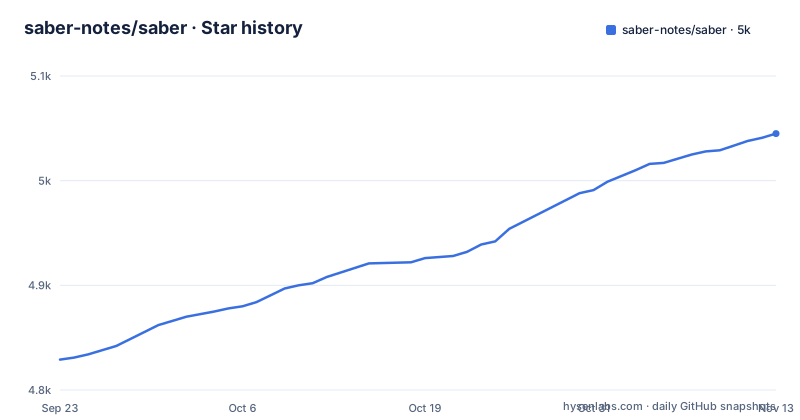
Star history
- saber-notes/saber5,045 ★ · +216
| Repository | 2026-09-23 | 2026-11-13 |
|---|---|---|
| saber-notes/saber | 4.8k | 5k |
216 Stars in the last 51 days, measured from the daily GitHub snapshot. Compare with other projects
Editorial analysis
Dark mode inverts the page, not the colour scheme
The most concrete thing this app does is flip the canvas. Rather than a dark interface with dark ink on it, the page itself inverts: you write with white ink on a black background, which the project argues is easier on the eyes in low light, the example being a classroom after the lights go down. The inversion does not stop at your strokes. Images and PDFs are inverted as well, so a scan of a printed handout or a page from a textbook stays readable under the same setting instead of sitting there as a glaring white block. The page names no file formats for that path beyond images and PDFs, so treat the scope as exactly those two.
The highlighter composites on a canvas instead of stacking
The highlighter is the second named feature, and the reasoning behind it is unusually specific. The author studies maths, where highlighting a multi-line equation is the everyday task, and names two complaints about other apps: a highlighter that changes colour where it overlaps itself, and a highlighter that renders on top of the text and fades it out. Saber's version uses canvas compositing, described as consistent with or better than traditional paper, handling overlaps and keeping colour steady. The practical effect is that the ink stays legible under the strokes.
Two passwords, and the server can be theirs or yours
Saber describes a dual-password system that protects notes from anyone but the owner, even from someone with complete control over the server. That claim is the design target: an operator with full control of the machine is treated as untrusted, not as an administrator to be trusted with the contents. Where the notes live is a choice rather than a fixed destination. They can sit on the official Saber server, on another server, or on one you host yourself, and the project publishes its own instance at a Nextcloud address in the README. Extra storage is sold through a pricing page kept in the repository, which is the commercial edge of an otherwise free client. The page is direct about who pays for the hosting: it asks for GitHub Sponsors, a PayPal donation, a star, and word of mouth, with buying capacity on that server as the paid route. Folders nest inside folders with no stated limit, and although a note can end up deep in the tree, the most recent notes stay on the home screen, so organisational depth does not cost you daily access.
Install, build, and maintainer steps all sit on the wiki
There are no commands in this README, and that is a division of labour rather than an oversight. Installing points at an Install Saber page on the project wiki, building from source points at a Build Saber page on the same wiki, and development notes point at a Maintainer notes page. The feature list is delegated as well: instead of describing what the app does, the Features section sends you to a discussion thread titled Saber progress on the issue tracker. What you read first is therefore a pitch with a distribution list and a support appeal attached, and every operational answer sits one hop away. Plan for that when you evaluate the project. Nothing here states which toolchain builds the Dart package, though the root does carry the usual manifest pair, pubspec.yaml and pubspec.lock, so the build page has something concrete to describe. Two of the badges on the page point outward instead of inward, one to a code coverage service for the repository and one to the translation host, so even the quality signals arrive from another site rather than from this page.
Six download badges, two of them pinned to v1.36.1
Distribution is wide, and the links defined on the page name the routes:
https://play.google.com/store/apps/details?id=com.adilhanney.saber
https://apps.apple.com/us/app/saber/id1671523739
https://flathub.org/apps/details/com.adilhanney.saber
https://f-droid.org/packages/com.adilhanney.saber/
https://github.com/saber-notes/saber/releases/download/v1.37.1/SaberInstaller_v1.37.1.exe
https://github.com/saber-notes/saber/releases/download/v1.37.1/Saber-1.37.1-x86_64.AppImage
The two direct downloads are version-pinned to v1.37.1: an installer executable for Windows and an AppImage whose filename ends in x86_64, which says the Linux build you fetch that way is 64-bit Intel or AMD. The store listings key on the package id com.adilhanney.saber, and the F-Droid metadata is tracked in the fdroiddata repository rather than produced by a release. Releases are v1.37.1 on 2026-10-28, v1.37.0 on 2026-10-26, and v1.36.4 on 2026-10-24, while the last push to the default branch is dated 2026-11-01, so those pinned files sit behind the tip.
Machine translation fills the gaps until a human arrives
Translations run through Weblate, and the page carries a warning that changes how you should read any non-English build. Gaps in a locale are not left empty: they are filled in by machine translation until a human contributor can take them, specifically so the app does not fall back to English. The practical effect is that an incomplete translation looks complete. A Traditional Chinese or Arabic reader can be shown fluent-looking interface text that no human has reviewed, and the only clue is that the string is not one the community wrote. Eight README languages are published: English plus Czech, German, Simplified and Traditional Chinese, Arabic, Vietnamese, and Indonesian. Localisation reaches past the README too, with a Czech pricing page sitting next to the English one, and the tree holds a slang.yaml file and a .weblate file for the tooling behind it.
The source tree is a Dart package with one directory per platform
The repository is a Dart package with its manifest at the root and a directory per target platform, matching the cross-platform claim in the project description:
pubspec.yaml
pubspec.lock
analysis_options.yaml
devtools_options.yaml
slang.yaml
android/
ios/
linux/
macos/
windows/
flatpak/
snap/
installers/
lib/
assets/
assets_raw/
shaders/
packages/
patches/
submodules/
scripts/
test/
test.sh
metadata/
pricing.md
pricing-cs.md
privacy_policy.md
Three entries earn attention. `assets/` sits next to `assets_raw/`, so shipped artwork is kept apart from what looks like its source form. `shaders/` and `scripts/` sit outside `lib/`, putting GPU programs and tooling away from the Dart library proper. And `submodules/` with a `.gitmodules` entry means part of the tree arrives through submodules instead of living in the repository, which is a build prerequisite the wiki page has to account for. Testing has both a `test/` directory and a `test.sh` script, the licence is GPL-3.0 in LICENSE.md, and the privacy policy is a repository file rather than a separate site.
Editorial conclusion
Saber fits students and anyone who reads and writes long-form by hand, on any of Android, iOS, Linux, macOS, or Windows, and it fits people who want their notes stored on infrastructure they choose. It does not fit anyone who needs the install or build steps in the repository itself, or who will not accept machine-translated interface text in a language they read. Before you commit, open the wiki install and build pages, check whether the platform you need has a current build rather than the v1.37.1 files the README links, and read the machine translation note before trusting a non-English locale.
Frequently asked questions
Which platforms can I install Saber on?
The download badges cover the Android store, the Apple App Store, Flathub, F-Droid, a Windows installer executable, and an AppImage. The store listings use the package id com.adilhanney.saber, and the AppImage linked in the README is x86_64 only.
How does Saber protect my notes?
It uses a dual-password system, described as protecting notes from anyone but the owner even when that person has complete control over the server. Notes can live on the official Saber server, another server, or one you host, and more storage is bought through the project's pricing page.
What does the Saber highlighter do that other apps get wrong?
It uses canvas compositing, so overlapping strokes keep a consistent colour and the highlighter does not render on top of the text. In dark mode the page is inverted, letting you write white ink on black, and images and PDFs are inverted with it.
Where do I find the install and build instructions for Saber?
Both are on the project wiki rather than in the README, which links an Install Saber page, a Build Saber page, and Maintainer notes. The README's feature section points at a Saber progress discussion instead of listing features.
How are Saber translations produced?
Translations are contributed through Weblate, and the README states that gaps in a locale are filled in by machine translation until a human can contribute them, so an incomplete translation may read as finished text rather than falling back to English.
Official sources
Add this badge to your README
If you maintain this project, the badge below links readers to this analysis and shows its maintenance status from the daily GitHub snapshot. Paste the markdown into your README; add ?metric=license or ?metric=stars to the image URL for a different field.

[](https://hysenlabs.com/projects/saber-notes-saber)Star history chart for your README
[](https://hysenlabs.com/projects/saber-notes-saber)Was this useful?