GitSync: a Flutter and Rust mobile Git client that syncs a folder in the background
Mobile Git client for syncing a repository between remote and a local directory
At a glance
- What is it?
- GitSync keeps a local folder on Android or iOS matched with a Git remote, using scheduled, widget, shortcut or app-open triggers and a full fetch, pull, commit and push cycle. Some triggers exist only on Android, and OAuth sign-in only works in builds that carry client secrets.
- Who is it for?
- GitSync suits people who want a folder on their phone, such as notes or configuration, kept in step with a Git remote without opening a terminal, and who are happy with HTTPS, SSH or OAuth sign-in. It is a weaker fit if you rely on app-open or quick-tile triggers on iOS, or if you build it yourself and still need OAuth, since that needs your own client secrets.
- Can I use it commercially?
- Yes, with conditions. GPL-3.0 is a copyleft licence: if you distribute software that includes it, you must release that software's source code under the same licence. Running it internally without distributing it does not trigger that obligation.
- Is it still maintained?
- Yes. The repository last received commits 17 days ago.
- What is it written in?
- Mainly Dart, according to GitHub's language statistics.
Answers come from the project's GitHub data, last synced on November 15, 2026, and from our analysis. They are not legal advice.
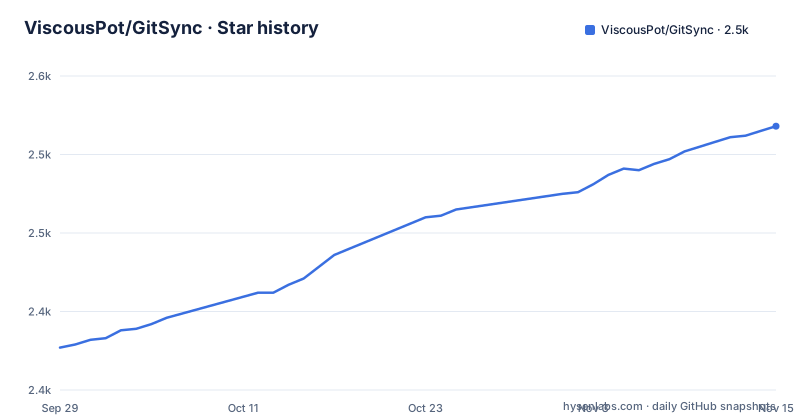
Star history
- ViscousPot/GitSync2,518 ★ · +141
| Repository | 2026-09-29 | 2026-11-15 |
|---|---|---|
| ViscousPot/GitSync | 2.4k | 2.5k |
141 Stars in the last 47 days, measured from the daily GitHub snapshot. Compare with other projects
Editorial analysis
Background sync runs on triggers, and several triggers are Android only
GitSync is a cross-platform Git client for Android and iOS that aims to simplify syncing a folder between a Git remote and a local directory. It works in the background after a one-time setup, and offers several ways to start a sync. On a schedule works on both platforms, as do a home screen widget and a custom intent for advanced use. An iOS shortcut or automation covers iOS.
Some triggers are labelled Android only: syncing when an app is opened or closed, and syncing from a quick tile. So an iOS user cannot tie a sync to opening a notes app, and has to use a shortcut, a schedule or a widget instead. The supported platforms are Android 5 or newer and iOS 13 or newer.
One sync is a full cycle with conflict handling and network retry
A sync is not a single Git command. The app can fetch, pull, stage, commit and push, resolve merge conflicts, and retry automatically when the network returns. That is the practical difference between GitSync and running git pull by hand: the whole cycle runs as one action, with a generated commit.
Repository settings shape the cycle. You can enable signed commits, customise the sync commit message, set author details, and edit .gitignore and .git/info/exclude. Because a sync commits for you, review the commit message template and author fields before pointing it at a shared repository. You can also manage multiple repositories through containers, and add, rename, delete and set the URL of several remotes.
Three sign-in methods, and OAuth needs secrets that source builds lack
Authentication works over HTTP or HTTPS, SSH, or OAuth for GitHub, GitLab and Gitea. The official store builds include the OAuth configuration. If you build the app yourself, the OAuth providers need client IDs and secrets, and the repository ships only a template, which you copy into place:
cp lib/constant/secrets.dart.template lib/constant/secrets.dartThen set oauthRedirectUrl to gitsync://auth. Without these values the OAuth sign-in flows will not work, but HTTPS Basic and SSH still do. The consequence is that a self-built copy is fully usable for plain Git hosting over SSH or a token, while the GitHub and GitLab issue and pull request features, which depend on OAuth sign-in, stay unavailable until you register your own OAuth apps.
The app doubles as a small Git browser, with extras that need OAuth
Inside the app there is a file explorer with a code editor and an image viewer, recent commits with file, line and commit diffs, and branch management: create, rename, delete and check out. That makes it possible to fix a typo on the phone without a separate editor.
With an OAuth sign-in to GitHub or GitLab you also get issue and pull request features: view, comment on and create issues, view, comment on and create pull requests, and view GitHub Actions workflow runs. These are conveniences on top of the sync engine, not replacements for a desktop client, and they are tied to the providers named. A Gitea server gets OAuth sign-in, but the README names issue, pull request and workflow features only for GitHub and GitLab.
AI chat, a wand and an agent can be switched off globally
The app includes AI features: a chat about your repository, a wand that auto-completes text fields such as commit messages, and an agent that can run repository actions for you. Model selection is separate for chat, tools and the wand, and a global toggle hides all AI features.
The agent is the part to approach carefully, because actions on a repository can include commits and pushes. If you sync a repository with other people, decide whether the agent should be allowed near it, and use the global toggle if the answer is no. Text you send to a hosted model leaves the device, so avoid enabling chat on a repository that holds secrets unless you know where the selected model runs.
Building from source needs Flutter 3.35.2, Rust and generated bindings
GitSync is a Flutter app with a Rust core connected through flutter_rust_bridge. The Flutter version is pinned in .fvmrc, currently 3.35.2, and the repository is set up for FVM. Rust comes from a stable rustup toolchain, and the crate in the rust directory cross-compiles to aarch64, armv7, x86_64 and i686 Android targets. iOS needs Xcode 15 or newer, three Rust iOS targets and CocoaPods.
git clone https://github.com/ViscousPot/GitSync.git
cd GitSync
fvm flutter pub get
The bindings are regenerated when the Rust API changes:
cargo install flutter_rust_bridge_codegen --version 2.12.0
flutter_rust_bridge_codegen generate
Then run with fvm flutter run. The minimum Android SDK is 21. A mismatch between the codegen version and the bridge library is the first thing to check if the build fails after changing Rust code.
Five distribution channels, a GPL license and localization-only requests
The README links Google Play, the App Store, IzzyOnDroid, F-Droid and an Obtainium configuration, and says that if you only want to try the app, download a release from an official platform. The license is GPL-3.0. Recent releases are v1.8.65 on 2026-09-11, v1.8.64 on 2026-09-10 and v1.8.63 on 2026-08-19, and the last push was on 2026-10-29.
The maintainer says code contributions are not needed anywhere in particular, but asks for help with localization. Translators edit lib/l10n/app_en.arb, which is the English source, and the matching file for their language, then submit a pull request or open an issue. Support goes to a listed email address or the issue tracker, and a wiki holds further documentation.
Editorial conclusion
GitSync suits people who want a folder on their phone, such as notes or configuration, kept in step with a Git remote without opening a terminal, and who are happy with HTTPS, SSH or OAuth sign-in. It is a weaker fit if you rely on app-open or quick-tile triggers on iOS, or if you build it yourself and still need OAuth, since that needs your own client secrets. Treat the AI agent and the per-repo option to disable SSL verification with care.
Frequently asked questions
What is GitSync?
GitSync is a cross-platform Git client for Android and iOS that syncs a folder between a Git remote and a local directory in the background, after a one-time setup.
Is GitSync free?
The source code is licensed under GPL-3.0 and you can build it yourself. The README links official store releases and a GitHub Sponsors page, and it states no price.
What is the difference between "git pull" and "git sync"?
In GitSync, one sync runs the whole cycle: fetch, pull, stage, commit and push, with merge conflict resolution and automatic retry when the network returns. A plain git pull only brings remote changes in.
is gitsync safe
The code is open source under GPL-3.0, and releases come from official platforms. It supports SSH and HTTPS sign-in, but each repository also has an option to disable SSL verification, which you should leave on.
Official sources
Add this badge to your README
If you maintain this project, the badge below links readers to this analysis and shows its maintenance status from the daily GitHub snapshot. Paste the markdown into your README; add ?metric=license or ?metric=stars to the image URL for a different field.

[](https://hysenlabs.com/projects/viscouspot-gitsync)Star history chart for your README
[](https://hysenlabs.com/projects/viscouspot-gitsync)Was this useful?