react-native-compressor for React Native media workflows
🗜️Compress Image, Video, and Audio same like Whatsapp 🚀✨
At a glance
- What is it?
- react-native-compressor is a React Native package for compressing images, videos, and audio before upload, with background upload, download, thumbnail, and media utility APIs. It suits mobile apps that need predictable media handling without manually configuring compression algorithms.
- Who is it for?
- Adopt react-native-compressor when your React Native application needs device-side image, video, or audio compression with straightforward JavaScript calls and Android and iOS support. Do not adopt it when you require the fine-grained codec control associated with FFmpeg or when your app cannot include native modules.
- Can I use it commercially?
- Yes. MIT is a permissive licence: you can use, modify and sell software built on it, as long as you keep its copyright and licence notices.
- Is it still maintained?
- Yes. The repository last received commits 5 days ago.
- What is it written in?
- Mainly Kotlin, according to GitHub's language statistics.
Answers come from the project's GitHub data, last synced on November 6, 2026, and from our analysis. They are not legal advice.
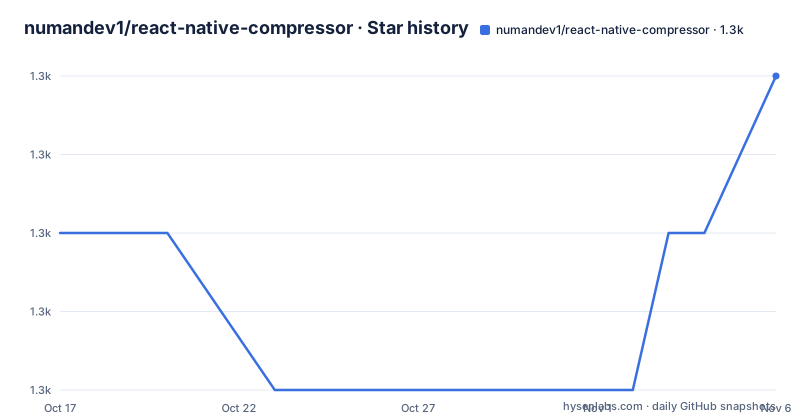
Star history
- numandev1/react-native-compressor1,345 ★ · +2
| Repository | 2026-10-17 | 2026-11-06 |
|---|---|---|
| numandev1/react-native-compressor | 1.3k | 1.3k |
2 Stars in the last 20 days, measured from the daily GitHub snapshot. Compare with other projects
Editorial analysis
What react-native-compressor Changes Before Upload
react-native-compressor addresses a recurring mobile application problem: media captured on a device can be too large for a quick upload or an expensive transfer. The package provides APIs for compressing images, videos, and audio before an upload workflow sends them elsewhere. Its stated positioning is similar to WhatsApp compression, with an automatic mode that does not require the application developer to choose or understand the underlying compression algorithm.
The package is aimed at React Native developers who need media processing in JavaScript while relying on native Android and iOS implementations. The repository includes TypeScript source, Android and iOS directories, and examples for bare React Native and Expo. Automatic linking is documented for React Native 0.60 and later, while older React Native versions require the older linking command. This installation distinction matters because the native package must be connected to the application before its JavaScript API can run.
The README also positions the package against FFmpeg. It claims that react-native-compressor adds about 50 KB to an APK, compared with more than 9 MB for FFmpeg, and says that the package avoids manually specifying image, video, and audio size and quality values. Those are project claims, not independently verified measurements. The project presents react-native-compressor as a lightweight, media-oriented alternative for WhatsApp-like compression.
Automatic and Manual Image Compression
The image API accepts a local `file://` path or a remote URL. In automatic mode, the application supplies the source and can optionally receive download progress through a callback. The documented automatic call is short because the package selects the compression behavior described as WhatsApp-like compression. The returned `result` is the output of the native operation, although the README excerpt does not specify the full returned object shape.
Manual mode exposes dimensions and quality. The README example sets `maxWidth: 1000` and `quality: 0.8`, which gives the caller direct control over the image's target width and quality level. This is more appropriate when an application has a stable image policy, such as a consistent avatar or feed upload size. Automatic mode is more appropriate when the application wants the package's default behavior without selecting those values itself.
The image API is asynchronous, so callers must handle completion and failure around the promise. The README does not specify error types, cancellation behavior for image compression, or the exact relationship between input format and output format. Those details should be checked against the API documentation before relying on a particular error-handling strategy. The repository's image comparison spreadsheet is linked by the README, but the README does not reproduce its measurements or test conditions.
Video Compression, Progress, and Cancellation
Video compression follows a source-to-result flow, but the documented call includes a progress callback. The method accepts a local video path, an options object, and a callback that receives compression progress. This gives an upload screen a way to show progress while the native side processes a large file.
The README lists cancellation under the video API, so video processing is not limited to a fire-and-forget promise. Cancellation matters for media workflows because a user may leave a screen, replace a selected file, or cancel an upload before compression finishes. The README does not show the exact cancellation method or explain whether cancellation stops an already running native task, removes a temporary file, or only changes the returned promise. Those implementation details should not be assumed.
The package's topic list and README place video thumbnail generation in the same utility family. An application can therefore compress a video, create a representative thumbnail, and upload the resulting assets through a coordinated workflow. The README does not specify thumbnail timing, supported video formats, thumbnail dimensions, or cache behavior in enough detail to promise a particular result. A React Native app should verify the output on both Android and iOS before building user-facing progress or retry logic around it.
Installing react-native-compressor in React Native and Expo
For a current bare React Native project, the README starts with Yarn installation:
yarn add react-native-compressorReact Native 0.60 and later use automatic linking on Android and iOS, so the package does not require a separate manual linking command in that setup. The older linking path is documented for versions below 0.60:
react-native link react-native-compressorFor a managed Expo project, install the package with Expo, add the plugin to `app.json`, `app.config.json`, or `app.config.js`, run prebuild, and create a new binary build. The README gives this plugin configuration:
{
  "name": "my app",
  "plugins": ["react-native-compressor"]
}
Then run the documented native preparation commands:
expo install react-native-compressor
expo prebuild
 eas build
The command is `eas build`; the leading space shown before it in the README is not part of the command. Expo requires a new binary because the package includes native code and the plugin modifies the native project configuration. The repository contains `examples/bare` and `examples/expo`, which are useful locations to inspect when choosing the matching setup.
A First Image Upload Flow
The first real use can be an automatic image compression call followed by handling of the returned result. The README's example imports `Image` from the package and passes a local file URI:
import { Image } from 'react-native-compressor';

const result = await Image.compress('file://path_of_file/image.jpg');
The application must pass the returned result to its next upload stage, but the README excerpt does not document the exact result fields or show a complete upload request. It would therefore be inaccurate to invent a property such as `result.uri` in a review. The implementation should inspect the installed package's TypeScript declarations or API documentation for the return type before constructing the upload body.
For a remote image, the documented call also accepts a `downloadProgress` callback:
const result = await Image.compress('https://path_of_file/image.jpg', {
  progressDivider: 10,
  downloadProgress: (progress) => {
    console.log('downloadProgress: ', progress);
  },
});
This path demonstrates that compression can involve fetching a remote source before producing the output. The README does not define the units or exact timing of `progress`, nor does it document retry or cancellation. A first-use test should verify a local file first, then test remote input and confirm the output format and size on representative files.
Audio, Uploads, Downloads, and File Utilities
The package extends beyond compression. The README lists background upload, cancellation for background uploads, file download, video thumbnail creation, thumbnail cache clearing, image metadata, video metadata, real path retrieval, and temporary file path retrieval. These APIs place the library around several points in a media pipeline rather than limiting it to reducing file size.
Background upload is relevant to large video files because compression and network transfer can take time. The README does not show the complete background upload example in the available excerpt, so the exact options, progress events, task identifiers, and retry behavior cannot be reproduced here. The README confirms the capability, but it does not establish whether uploads survive process termination, how authentication headers are supplied, or how conflicts with operating-system background limits are handled.
The distinction between real paths and temporary paths also matters in React Native. A file returned by a native media operation may be temporary, cached, or copied. The presence of utilities for both path types indicates that callers may need to account for lifecycle and cleanup. The repository layout includes platform-specific source, but the README does not document storage guarantees. Applications should avoid assuming that every returned path remains permanent unless the relevant API documentation says so.
Native Architecture, License, and Upgrade Cost
The repository describes support for React Native's New Architecture through a Turbo Module. The package metadata identifies `src` as the React Native and source entry point, while the repository also contains Android, iOS, C++, and Nitrogen-related directories. This is a native bridge package, not a JavaScript-only encoder. Native compilation, platform permissions, file handling, and binary size therefore belong in the adoption assessment.
The repository is not archived, and its last push was on 2026-07-25. Recent releases include v2.0.3 on 2026-07-25 and v2.0.2 on 2026-06-16. Those dates show recent project activity, but they do not establish compatibility with every React Native, Android, or iOS release. The README does not publish a migration guide for upgrades. Version changes should be checked against `package.json`, native build output, and the API differences between installed versions.
The project uses the MIT license. That permits use, modification, and distribution subject to the license terms, but this review is not legal advice. There is no separate paid dependency or service requirement stated in the README. The APK-size comparison is attributed to the project and should be checked for the application's actual ABI, Android packaging method, and native dependencies.
Compared with FFmpeg, react-native-compressor offers a narrower, higher-level API aimed at application uploads and media utilities. FFmpeg requires applications to specify image, video, and audio size and quality manually. Choose the smaller package when the documented WhatsApp-like defaults and the listed utilities match the product workflow. Choose FFmpeg or another native media stack when exact encoder settings, unsupported formats, or advanced transformations are primary requirements.
Editorial conclusion
Adopt react-native-compressor when your React Native application needs device-side image, video, or audio compression with straightforward JavaScript calls and Android and iOS support. Do not adopt it when you require the fine-grained codec control associated with FFmpeg or when your app cannot include native modules. Verify automatic versus manual output on your target devices and confirm that the Expo configuration and binary build steps match your project before shipping.
Frequently asked questions
How do I install react-native-compressor in a React Native project?
For a current React Native project, the README gives `yarn add react-native-compressor`. Automatic linking is documented for React Native 0.60 and later on Android and iOS; older versions use `react-native link react-native-compressor`.
Does react-native-compressor support Expo?
Yes. The README documents `expo install react-native-compressor`, adding `react-native-compressor` to the Expo plugins, running `expo prebuild`, and creating a new binary with `eas build`.
Can react-native-compressor compress images, videos, and audio?
Yes. The package description and README list compression APIs for images, videos, and audio. Image and video examples are documented in the README; the README names the audio capability but does not include a full audio call.
Official sources
Add this badge to your README
If you maintain this project, the badge below links readers to this analysis and shows its maintenance status from the daily GitHub snapshot. Paste the markdown into your README; add ?metric=license or ?metric=stars to the image URL for a different field.

[](https://hysenlabs.com/projects/numandev1-react-native-compressor)Star history chart for your README
[](https://hysenlabs.com/projects/numandev1-react-native-compressor)Was this useful?