ViPE estimates camera poses and depth from raw video, and its long-video mode trades the full pipeline for a pose ledger
ViPE: Video Pose Engine for Geometric 3D Perception
At a glance
- What is it?
- NVIDIA's Video Pose Engine recovers intrinsics, camera motion and dense near-metric depth from pinhole, wide-angle and 360-degree footage. It needs CUDA to install, and a different license applies to one bundled model.
- Who is it for?
- Use ViPE if you need camera poses and depth annotations for a pile of videos and you already run a CUDA machine with PyTorch. Skip it for a quick CPU-only experiment, because setup.py asserts a CUDA build of PyTorch.
- Can I use it commercially?
- Yes. Apache-2.0 is a permissive licence: you can use, modify and sell software built on it, as long as you keep its copyright and licence notices.
- Is it still maintained?
- Yes. The repository last received commits 2 days ago.
- What is it written in?
- Mainly Python, according to GitHub's language statistics.
Answers come from the project's GitHub data, last synced on November 7, 2026, and from our analysis. They are not legal advice.
Star history
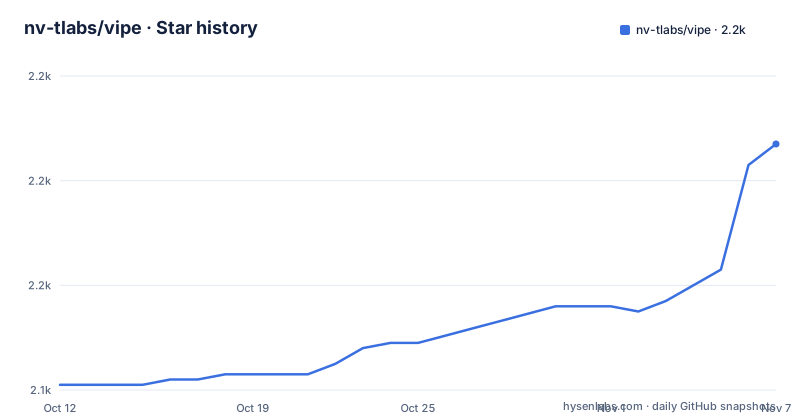
- nv-tlabs/vipe2,187 ★ · +46
| Repository | 2026-10-12 | 2026-11-07 |
|---|---|---|
| nv-tlabs/vipe | 2.1k | 2.2k |
46 Stars in the last 26 days, measured from the daily GitHub snapshot. Compare with other projects
Editorial analysis
Intrinsics, motion and depth from unconstrained video, including 360-degree panoramas
ViPE, short for Video Pose Engine, takes raw video and produces three things: camera intrinsics, camera motion and dense near-metric depth maps. The input does not have to come from a standard lens. The README names pinhole, wide-angle and 360-degree panorama footage as supported.
The project grew in steps. The initial release came in August 2025. September 2025 added a pipeline for Lyra, October 2025 added wide-angle video, January 2026 integrated Depth-Anything 3 for depth estimation through the dav3 pipeline, and May 2026 merged the panorama estimation pipeline and bumped the version to 1.0.0. Releases v1.0.0, v1.1.0 and v1.2.0 followed on 15 May, 22 May and 9 June 2026.
The last push was on 10 September 2026. The project page sits on NVIDIA's research site, and the code is distributed on PyPI as nvidia-vipe.
Setup needs a CUDA build of PyTorch and conda for the native dependencies
Installation has two routes. The package install is a single command, and the source install uses conda for the CUDA and native dependencies and uv for the Python environment:
# From PyPI
pip install nvidia-vipe

# From source (conda for CUDA/native deps, uv for the Python env)
conda env create -f envs/cu128.yml
conda activate cu128
uv sync
uv run vipe infer YOUR_VIDEO.mp4
The environment file is named cu128.yml, which points to CUDA 12.8. setup.py is stricter than the README. It imports torch, reads torch.version.cuda, and asserts that the value is not None, with the message that PyTorch CUDA is required for this installation. If PyTorch is missing, it raises an error asking you to install it first.
A CPU-only PyTorch therefore cannot build the package. pyproject.toml requires Python at least 3.11 and below 3.15, and pins gtsam-develop to the development build 4.3a2.dev202609030306. Details for the dev and docs dependency groups are in docs/installation.md.
vipe infer runs a pipeline over one video, selected by -p
The entry point is the vipe command, and the README example is uv run vipe infer YOUR_VIDEO.mp4. The default pipeline uses a fixed-size keyframe buffer. Other pipelines are chosen with the -p flag, and -o sets the output directory.
The pipelines named in the README are pose_only_long, a dav3 pipeline for Depth-Anything 3 depth, and the Lyra pipeline. A configs directory sits at the top level, and setup.py copies it into the built package as vipe/_configs, raising a RuntimeError if the source directory is missing. That tells you configuration is shipped inside the wheel and not read from your working directory.
The README does not list the output files of the default pipeline, and it names only one output path pattern, which belongs to the long-video mode. For the default run you would have to inspect the results directory or the docs site to learn what is written.
pose_only_long retires old keyframes so memory stays flat as video length grows
The default pipeline keeps a fixed-size keyframe buffer, which makes very long videos a problem. The pose_only_long pipeline streams instead. It retires old keyframes into a compact trajectory ledger, so GPU and CPU memory are bounded by a sliding keyframe window rather than growing with the number of frames. The README describes the result as roughly constant memory.
The September 2026 news item adds that it uses the MoGe v2 keyframe-depth prior, model name moge2-l, by default. Single video and folder usage are:
# Single video
uv run vipe infer YOUR_LONG_VIDEO.mp4 -p pose_only_long -o vipe_results/

# A folder of videos: every .mp4 in the folder is processed in turn, through a single
# loaded model instance, writing each video's trajectory to vipe_results/pose/<name>.npz
uv run vipe infer YOUR_VIDEO_FOLDER/ -p pose_only_long -o vipe_results/
Pointing it at a folder processes every .mp4 in turn through one loaded model instance, so you pay the model loading cost once. Each video's trajectory lands in vipe_results/pose/<name>.npz.
The long mode writes trajectories, not depth maps, and handles only .mp4 folders
The name pose_only_long says what it drops. The output described for it is a trajectory file per video, an .npz under vipe_results/pose. The README does not say that this pipeline writes dense depth maps, so if you need depth on a long video, this mode as documented does not give it to you. The keyframe depth prior exists to support the pose estimate.
Folder processing is limited to .mp4 files. A folder with other containers has those files skipped by the documented behavior, since the README states that every .mp4 in the folder is processed. Convert other formats first.
The bounded memory also has a design implication. Old keyframes are retired to a ledger of the trajectory, so anything you wanted from retired keyframes beyond the poses is gone once the window moves on. Plan the outputs you need before starting a multi-hour video.
Version 1.2.0 claims a 2.7x speed-up from fused kernels and caching
The June 2026 news item announces ViPE 1.2.0 with a 2.7x speed-up and no loss of accuracy. The README credits CUDA fused kernels, model and pipeline caching, prefetching and other optimizations. That is the project's own claim, and the README gives no hardware or video details for it.
The CUDA kernels explain the build step. The csrc directory holds the native code, setup.py imports CUDAExtension and BuildExtension from torch.utils.cpp_extension, and the mypy override list mentions vipe_ext and vslam as modules without type stubs. The repository also vendors MoGe-2 inference code under vipe/priors/depth/moge2, kept verbatim from upstream per VENDORED.md with only import paths rewritten.
A vendored model plus compiled extensions means installs from source take longer and break more easily than a pure Python package. The PyPI package is the shorter path if it matches your CUDA setup.
One part is BY-NC-SA 4.0 and every downloaded model has its own license
The license situation is split. The source code is released under Apache 2, except the Unik3D part, which is under BY-NC-SA 4.0. The BY-NC-SA 4.0 license has a noncommercial condition, so a commercial product that uses the Unik3D part cannot rely on the Apache 2 grant. The GitHub license field shows NOASSERTION, and pyproject.toml declares Apache-2.0 with the LICENSE file, so neither field tells you about the exception.
There is a second layer. ViPE downloads and installs additional third-party models and software. NVIDIA does not distribute them, and the README tells you to review their license terms before use. THIRD_PARTY_LICENSES.md sits at the top level for that purpose.
For research use this is manageable. For anything shipped to customers, list each model the pipeline you choose pulls in, such as MoGe v2 or Depth-Anything 3, and read its license before you commit.
Editorial conclusion
Use ViPE if you need camera poses and depth annotations for a pile of videos and you already run a CUDA machine with PyTorch. Skip it for a quick CPU-only experiment, because setup.py asserts a CUDA build of PyTorch. Before you adopt it in a product, read the license terms of every downloaded model and check the Unik3D part, which is under BY-NC-SA 4.0 while the rest of the source is Apache 2.
Frequently asked questions
What does ViPE estimate from a video?
ViPE estimates camera intrinsics, camera motion and dense near-metric depth maps from unconstrained raw videos. It handles pinhole, wide-angle and 360-degree panorama footage.
How do I install ViPE?
Run pip install nvidia-vipe, or build from source with conda env create -f envs/cu128.yml and uv sync. A CUDA build of PyTorch is required.
How does ViPE handle very long videos?
The pose_only_long pipeline retires old keyframes to a trajectory ledger, so GPU and CPU memory stay bounded by a sliding keyframe window. It writes each video's trajectory to vipe_results/pose/<name>.npz.
Official sources
Add this badge to your README
If you maintain this project, the badge below links readers to this analysis and shows its maintenance status from the daily GitHub snapshot. Paste the markdown into your README; add ?metric=license or ?metric=stars to the image URL for a different field.

[](https://hysenlabs.com/projects/nv-tlabs-vipe)Star history chart for your README
[](https://hysenlabs.com/projects/nv-tlabs-vipe)Was this useful?