NemoClaw: NVIDIA's Reference Stack for Sandboxed AI Agents on OpenShell
Run agents like Hermes, LangChain Deep Agents, and OpenClaw more securely inside NVIDIA OpenShell with managed inference.
At a glance
- What is it?
- NemoClaw wraps OpenClaw, Hermes, and LangChain Deep Agents in OpenShell sandboxes with managed inference and network policy. It is an alpha-stage reference stack that trades flexibility for guided, safer agent operations, with an express install preset for supported DGX and WSL hosts.
- Who is it for?
- Adopt NemoClaw if you run OpenClaw, Hermes, or LangChain Deep Agents on a supported DGX or WSL host and want a guided path to sandboxing, managed inference, and network policy without building your own orchestration. Skip it if you need production stability or custom agent integrations, because this is an alpha project with best-effort support.
- Can I use it commercially?
- Yes. Apache-2.0 is a permissive licence: you can use, modify and sell software built on it, as long as you keep its copyright and licence notices.
- Is it still maintained?
- Yes. The repository received new commits within the last day.
- What is it written in?
- Mainly TypeScript, according to GitHub's language statistics.
Answers come from the project's GitHub data, last synced on November 13, 2026, and from our analysis. They are not legal advice.
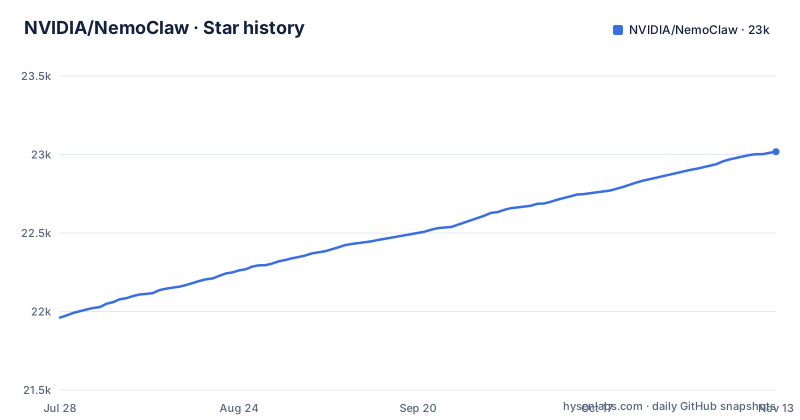
Star history
- NVIDIA/NemoClaw23,018 ★ · +1,057
| Repository | 2026-07-28 | 2026-11-13 |
|---|---|---|
| NVIDIA/NemoClaw | 22k | 23k |
1,057 Stars in the last 108 days, measured from the daily GitHub snapshot. Compare with other projects
Editorial analysis
What NemoClaw actually does
NemoClaw is not another agent runtime. It is a wrapper that runs three specific agents, OpenClaw, Hermes, and LangChain Deep Agents Code, inside NVIDIA OpenShell sandboxes. The README calls it a reference stack, which means it encodes a particular way of combining sandboxing, inference, and network control into a repeatable setup. The target user is someone who already uses one of those agents and wants a more controlled environment than running them directly on a host. The value is not new agent capabilities; it is the surrounding lifecycle: guided onboarding, managed inference, network policy, OpenShell-backed state persistence, and lifecycle operations through the NemoClaw CLI. If you do not use one of the three supported agents, NemoClaw has nothing to offer you.
The OpenShell dependency is the core design choice
NemoClaw sits on top of OpenShell, which is NVIDIA's sandboxing layer. The documentation pages listed in the README describe a host CLI, an agent integration layer, a blueprint, sandbox lifecycle, and protection layers. The blueprint appears to be the template that defines how a sandbox is constructed for a given agent. This is a deliberate architectural decision: instead of letting each agent manage its own environment, NemoClaw centralizes sandbox creation and teardown. The trade-off is that you cannot use NemoClaw with any sandboxing technology you already have. You adopt OpenShell as a dependency, and that constrains where and how you can run the stack. The prerequisites page is explicitly called out; the README names supported DGX and WSL hosts for the express install and points to the Prerequisites page for supported platforms.
Installation is interactive and opinionated
The README describes an express install path that asks one question: `Run express install with these settings? [Y/n]:`. Pressing Enter accepts the recommended preset for the platform and installs OpenClaw by default. Typing `n` switches to an interactive flow where you pick Hermes or LangChain Deep Agents Code, a sandbox name, an inference provider, and a model. This is a guided onboarding, not a declarative config file. The installer also handles a Hermes-specific detail: when connecting from a light terminal, it may install a managed `nemoclaw-light` Hermes skin for readable output, then remove that skin state when the terminal no longer needs it, while preserving any user-selected skin. That behavior shows the project cares about terminal UX, but it also means the installer mutates agent state beyond just creating a sandbox. For a security-focused tool, that is a surprising amount of runtime intervention in the agent's own configuration.
Managed inference and network policy are the security backbone
The README lists managed inference and network policy as core capabilities. The documentation pages cover choosing an inference provider, validation, and routed inference configuration, plus baseline rules, operator approval flow, and egress control. The network policy piece is the most concrete security mechanism described: the sandbox does not get unrestricted outbound access. Instead, there is a baseline set of rules, and changes go through an approval flow. The README also references sandbox hardening measures like capability drops and process limits. Together these form a layered approach: the sandbox constrains the agent's system access, the network policy constrains where it can send data, and managed inference routes model calls through a controlled provider. For an agent that can execute code and browse the web, that combination addresses the two biggest risk surfaces. What is less clear from the README is how the operator approval flow works in practice, and whether it blocks all egress or just specific domains. The documentation page would need to be read for that detail.
Alpha status and support are the main risks
The README explicitly labels NemoClaw as an alpha project. Maintainers review issues, discussions, and pull requests on a best effort basis without guaranteed response timelines. The last push was on 2026-11-01, and the most recent release tag is ci-native-podman-e2e-2026-10-01. As an alpha, the project may change rapidly, and you should not expect stable APIs or a predictable upgrade path. The CLI commands and configuration are likely to shift between versions. For a tool whose entire purpose is security and lifecycle management, that instability is a genuine concern: a change in network policy syntax or sandbox blueprint format could break your existing sandboxes.
Getting started as a contributor versus an end user
The README separates the contributor path from the end-user installer. For contributors, the command is `./scripts/dev-setup.sh`, which prepares a source checkout without creating a runtime sandbox. The package.json also defines a dev:doctor script that runs `scripts/dev-setup.sh --doctor`. This separation is well thought out, but it also means that running NemoClaw as an end user and developing on it are two different workflows. The README also offers a contributor-onboarding skill that a compatible coding agent can use to prepare the machine for a first PR.
The alternative is OpenShell alone or manual agent setup
The README links to an ecosystem page that explicitly contrasts NemoClaw with OpenShell alone. OpenShell provides the sandboxing primitives, but without NemoClaw you would have to configure the sandbox, inference routing, and network policy yourself for each agent. That is the real alternative: using OpenShell directly and writing your own orchestration, or skipping OpenShell entirely and running the agents with their native setups and your own firewall rules. The difference is automation and opinionation. NemoClaw gives you a guided, repeatable flow, but it locks you into its supported agent list and its platform prerequisites. If you need to run an agent that NemoClaw does not support, or you want fine-grained control over the sandbox configuration, you are better off with OpenShell and your own scripts. The trade-off is between speed of setup and flexibility of control.
Licence and practical adoption considerations
NemoClaw is licensed under Apache-2.0, which is permissive and allows commercial use, modification, and distribution, provided you preserve the copyright and license notices. That is a low-legal-friction licence for most organizations. The practical consideration is that the project is alpha, so the licence gives you freedom but not stability. You can fork it, but you may need to maintain your own patches as the upstream API changes. The README also references a SECURITY.md file and says security vulnerabilities should go through its private channels, not public issues. Before adopting, you should read that file and the documentation pages on security best practices and sandbox hardening. The documentation site is the authoritative source for the full feature list, and the README points to it repeatedly. Do not rely on the README alone for security decisions.
Editorial conclusion
Adopt NemoClaw if you run OpenClaw, Hermes, or LangChain Deep Agents on a supported DGX or WSL host and want a guided path to sandboxing, managed inference, and network policy without building your own orchestration. Skip it if you need production stability or custom agent integrations, because this is an alpha project with best-effort support. Before adopting, verify your host meets the prerequisites, review the network policy approval flow, and read the CLI Commands and Troubleshooting pages before relying on the managed lifecycle.
Frequently asked questions
What does NemoClaw do?
It is an open source reference stack for running supported AI agents more safely inside NVIDIA OpenShell sandboxes, providing guided onboarding, managed inference, network policy, managed integrations, OpenShell-backed state persistence and lifecycle operations through the NemoClaw CLI and its agent specific aliases. The supported agents are OpenClaw, Hermes and LangChain Deep Agents Code.
Is Nvidia NemoClaw free?
The package manifest and the repository LICENSE are both Apache-2.0, so the code carries an open source license. No pricing, quota or cost information for managed inference appears in the repository, and the project is described as an alpha reviewed on a best effort basis.
Can I use NemoClaw with Claude Code?
Claude Code is named as one of the coding agents that can install NemoClaw with you through the starter prompt, alongside Cursor, Codex and Copilot. It is not one of the three agents NemoClaw sandboxes, which are OpenClaw, Hermes and LangChain Deep Agents Code.
What are the key differences between OpenClaw and NemoClaw?
OpenClaw is the default supported agent and the one express install mode installs by default. NemoClaw is the stack around it: OpenShell sandboxes plus guided onboarding, managed inference, network policy, managed integrations, OpenShell-backed state persistence and lifecycle operations, and it can also host Hermes or LangChain Deep Agents Code instead.
how to install nemoclaw on mac
The express install prompt is documented for a supported DGX or WSL host; check the Prerequisites page for the supported platforms. Where that host is supported, pressing Enter at Run express install with these settings? [Y/n]: applies the recommended preset settings for the platform and installs OpenClaw, while entering n selects the agent, sandbox name, inference provider and model interactively.
how to use nemoclaw with ollama
Check the inference provider documentation for local providers. Inference is either taken from the express install preset or chosen interactively from a list of providers during install, and the choose an inference provider documentation page covers supported providers, validation and routed inference configuration.
Official sources
Add this badge to your README
If you maintain this project, the badge below links readers to this analysis and shows its maintenance status from the daily GitHub snapshot. Paste the markdown into your README; add ?metric=license or ?metric=stars to the image URL for a different field.

[](https://hysenlabs.com/projects/nvidia-nemoclaw)Star history chart for your README
[](https://hysenlabs.com/projects/nvidia-nemoclaw)Was this useful?