NVIDIA OpenShell puts each AI agent in a kernel-enforced sandbox and makes policy changes wait for review
OpenShell is the safe, private runtime for autonomous AI agents.
At a glance
- What is it?
- OpenShell is NVIDIA's Apache-2.0 Rust runtime that runs autonomous agents inside isolated sandboxes, checks every file access, system call and network connection against a declared policy, and holds back risky policy changes for a human. It is alpha software on a 0.1.x release train, and its installer leaves you with an empty sandbox rather than a working agent.
- Who is it for?
- OpenShell fits teams that already let agents read files, install packages and call APIs with real credentials, and want those actions bounded by a written policy plus a review step for anything new. It does not fit someone looking for a finished agent, a native Windows desktop tool, or a Kubernetes cluster whose CNI ignores NetworkPolicy.
- Can I use it commercially?
- Yes. Apache-2.0 is a permissive licence: you can use, modify and sell software built on it, as long as you keep its copyright and licence notices.
- Is it still maintained?
- Yes. The repository received new commits within the last day.
- What is it written in?
- Mainly Rust, according to GitHub's language statistics.
Answers come from the project's GitHub data, last synced on November 13, 2026, and from our analysis. They are not legal advice.
Star history
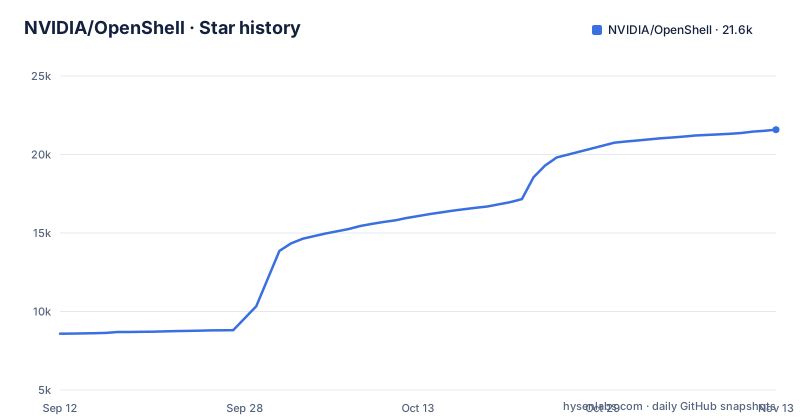
- NVIDIA/OpenShell21,580 ★ · +12,995
| Repository | 2026-09-12 | 2026-11-13 |
|---|---|---|
| NVIDIA/OpenShell | 8.6k | 21.6k |
12,995 Stars in the last 62 days, measured from the daily GitHub snapshot. Compare with other projects
Editorial analysis
A policy file decides what each agent may touch, and the kernel enforces it
The core idea in OpenShell is that you write down what an agent is allowed to do and the runtime refuses everything else. Each agent runs in its own isolated sandbox. Kernel controls confine which files the agent can open and which system calls it can make, and every outbound network connection passes a policy check before it leaves the sandbox. Policies cover three areas: filesystem, network and process rules.
Credentials are handled separately from the agent. The agent never sees the real secret; OpenShell attaches it only to requests headed for endpoints the policy approves. The project calls these credential holders providers, and inference endpoints are one kind of provider. The consequence for you is that an agent tricked into exfiltrating a token has no token to send, but it also means every API the agent legitimately needs has to be listed as an approved endpoint first, or its calls will be blocked.
The prover flags new access, but a person still has to approve it
OpenShell does not treat a policy edit as a simple config reload. Before a change is approved, it runs formal verification over the new policy to find access the change would grant that the old one did not. The examples NVIDIA gives are reaching a new host with credentials or calling a new API method. Changes like that are held for human review instead of being applied automatically. Two tools sit around this step: an advisor and a prover, both described in the Policies section of the documentation, and the examples/policy-advisor/ directory in the repository shows the flow.
What the prover cannot do is decide for you. It flags risky additions; it does not judge whether your business needs them. If nobody is assigned to review flagged changes, agents that ask for new access will sit blocked. Teams running fleets of agents should plan for that review queue the same way they plan for code review.
The installer sets up a gateway and an empty Ubuntu sandbox, not an agent
The quickstart is two commands:
curl -LsSf https://raw.githubusercontent.com/NVIDIA/OpenShell/main/install.sh | sh
openshell sandbox create --name demo
The script installs the openshell CLI and a local gateway. The gateway is the control plane for sandboxes, policy and access; the sandbox is where the agent runs. Running sandbox create gives you a sandbox built from the default image, which is minimal Ubuntu with no agent installed. People expecting a ready coding agent after the second command will find an empty shell.
To get something useful running, NVIDIA points to the Run Your First Agent guide, which runs OpenCode against a free OpenRouter model and walks through approving new access as the agent asks for it. Prerelease and development builds, including the latest commit on main, are installed through a separate path in the installation docs.
Windows runs through experimental WSL 2 or a separate MXC branch
The supported hosts are Linux, macOS on Apple Silicon, and Windows with WSL 2, which is marked experimental. On top of the OS you need Docker, Podman, or host virtualization to run sandboxes. macOS on Intel is not in that list. The Python package classifiers name only POSIX Linux and macOS as operating systems.
Native Windows support goes through Microsoft MXC and lives on a separate windows branch, documented in WINDOWS.md, which covers setup and its current limitations. For a reader on Windows 10 or Windows 11 the consequence is plain: there is no Windows installer in the quickstart, the main path is WSL 2 and it is experimental, and the native route sits off the main branch. Anyone searching for OpenShell skins, Start menu settings or EFI use is looking at a different kind of software; NVIDIA's OpenShell is a sandbox runtime for agents and has none of those.
SDKs connect to a gateway and do not install the CLI
OpenShell ships client SDKs in four languages. They let an application talk to an existing gateway; none of them installs the CLI or a gateway, so you still need the installer or a Kubernetes deployment somewhere.
uv add openshell
npm install @nvidia/openshell-sdk
go get github.com/NVIDIA/OpenShell/sdk/go@latest
cargo add openshell-sdk --git https://github.com/NVIDIA/OpenShell --tag <release-tag>
The TypeScript package is published through GitHub Packages. The Rust crate is pulled from the Git repository at a release tag you supply. The Python package needs Python 3.11 or newer, with classifiers for 3.11 through 3.14, and depends on grpcio, protobuf, httpx and cloudpickle. NVIDIA asks you to use the same OpenShell release for the SDK and the gateway when possible, so the Go command's @latest is a poor fit for a pinned gateway; pin it to your gateway's tag instead.
Kubernetes deployments depend on a CNI that enforces NetworkPolicy
Beyond the local gateway, OpenShell can deploy its gateway to Kubernetes with Helm. The stated requirement is that your CNI must enforce NetworkPolicy. Clusters whose network plugin does not enforce it fail that requirement, so check the CNI before planning a cluster rollout rather than after.
The gateway also exposes an extension surface: middleware, interceptors and compute drivers. The repository's examples directory shows what that looks like in practice, with folders such as governance-interceptor, supervisor-middleware-content-guard, isolation-backend-v8, spiffe-token-exchange-demo, private-ip-routing and transparent-tcp-redis. For contributors running several gateways side by side, the .env.example file sets OPENSHELL_DOCKER_GATEWAY_NAME, OPENSHELL_GATEWAY and OPENSHELL_SERVER_PORT (18080 in the example), and warns that names and ports must be unique per worktree when using mise run gateway:docker.
Telemetry stays on until you disable it at the gateway
OpenShell collects anonymous telemetry by default, limited to operational categories and counts. NVIDIA states it does not collect sandbox names, hostnames, file paths, prompts, credentials, provider or model names, or user content. Published usage trends sit under telemetry/ in the repository.
The switch lives on the gateway, not on each sandbox. Set OPENSHELL_TELEMETRY_ENABLED=false on the gateway, or server.telemetryEnabled=false for Helm installs. You can also compile telemetry out entirely when building from source. For an organization whose policy forbids outbound usage reporting from developer machines, this means the default install reports until someone changes the gateway setting, so add it to your install script rather than relying on users to remember.
Alpha status on a weekly 0.1.x release train
The Python package is classified as Development Status 3, Alpha. The 0.1.x line introduced a stable release cadence, new isolation primitives, an expanded extension surface and new APIs, and there is a dedicated 0.1.0 upgrade guide for moving from earlier versions. Recent tags are v0.1.5 on 2026-10-20 and v0.1.6 on 2026-10-27, a week apart, plus a rolling dev build. The last push to main was on 2026-11-02, so the project is under active development.
That pace has a cost. Because SDKs should match the gateway release, every gateway upgrade is also an SDK upgrade across your Python, TypeScript, Go or Rust clients. The workspace builds with Rust 1.94 on the 2024 edition, which matters if you plan to compile it yourself. Coding agents can learn the CLI through a public skills package, installed with:
npx skills add NVIDIA/OpenShellThose skills cover driving the CLI, writing sandbox policies and debugging gateways and inference routing, and they work without a source checkout.
Editorial conclusion
OpenShell fits teams that already let agents read files, install packages and call APIs with real credentials, and want those actions bounded by a written policy plus a review step for anything new. It does not fit someone looking for a finished agent, a native Windows desktop tool, or a Kubernetes cluster whose CNI ignores NetworkPolicy. Before adopting it, confirm your platform is on the Support Matrix, decide who will approve flagged policy changes, pin the SDK to the same release as the gateway, and decide whether to switch off telemetry.
Frequently asked questions
What is nvidia OpenShell?
NVIDIA OpenShell is an Apache-2.0 runtime, written in Rust, that runs autonomous AI agents in isolated sandboxes. You declare in a policy which files, system calls and network endpoints each agent may use, and OpenShell enforces it at the kernel level.
Is OpenShell safe to use?
OpenShell is built to limit what agents can reach: agents never see real credentials, every network connection is policy-checked, and risky policy changes wait for human review. It is still classified as alpha, and it sends anonymous telemetry unless you set OPENSHELL_TELEMETRY_ENABLED=false on the gateway.
How do I download OpenShell for Windows 11?
NVIDIA OpenShell runs on Windows through WSL 2, which is experimental, with Docker, Podman or host virtualization. Native Windows support through Microsoft MXC is on a separate windows branch described in WINDOWS.md.
how to install nvidia openshell
Run curl -LsSf https://raw.githubusercontent.com/NVIDIA/OpenShell/main/install.sh | sh to install the CLI and a local gateway, then openshell sandbox create --name demo. The default sandbox is minimal Ubuntu with no agent, so follow the Run Your First Agent guide next.
Official sources
Where developers are discussing it
Posts on Hacker News, dev.to and Lobsters that link to this repository, found by our scan of those communities. 2 in the last 30 days; newest first.
- Agents should never hold your API keys. NVIDIA just open-sourced the runtime that enforces itdev.to · Oct 23, 2026 · 19 points · 53 comments
- OpenShell – A safe, private runtime for fleets of autonomous AI agentsHacker News · Oct 22, 2026 · 500 points · 217 comments
- Nvidia/OpenShell: Safe, private runtime for autonomous AI agentsHacker News · Oct 2, 2026 · 2 points · 0 comments
Add this badge to your README
If you maintain this project, the badge below links readers to this analysis and shows its maintenance status from the daily GitHub snapshot. Paste the markdown into your README; add ?metric=license or ?metric=stars to the image URL for a different field.

[](https://hysenlabs.com/projects/nvidia-openshell)
[](https://hysenlabs.com/projects/nvidia-openshell)Star history chart for your README
[](https://hysenlabs.com/projects/nvidia-openshell)Was this useful?