Observal sells the case for a registry by naming the two failures
Observal is self-hosted registry for your coding agent extensions with a built in insight engine. Setup Observal, define the scope and share your Skills, MCPs and Agents with your peers.
At a glance
- What is it?
- Observal is a self hosted registry for the Skills, MCP clients, hooks, prompts and agents an organisation writes for its own developers, with a web server and a CLI, and a stated purpose beyond distribution: turning silent AI failures into usage data. It generates per harness configuration for nine coding tools, and its environment file separates boot time infrastructure from settings moved into an admin UI.
- Who is it for?
- Observal suits an organisation that has accumulated a dozen internal agent components in scattered repositories and has no way to tell which ones are used. It does not suit a single developer with three prompts, since the cost is a server, two databases and a Redis.
- Can I use it commercially?
- Yes. Apache-2.0 is a permissive licence: you can use, modify and sell software built on it, as long as you keep its copyright and licence notices.
- Is it still maintained?
- Yes. The repository last received commits 2 days ago.
- What is it written in?
- Mainly Python, according to GitHub's language statistics.
Answers come from the project's GitHub data, last synced on November 13, 2026, and from our analysis. They are not legal advice.
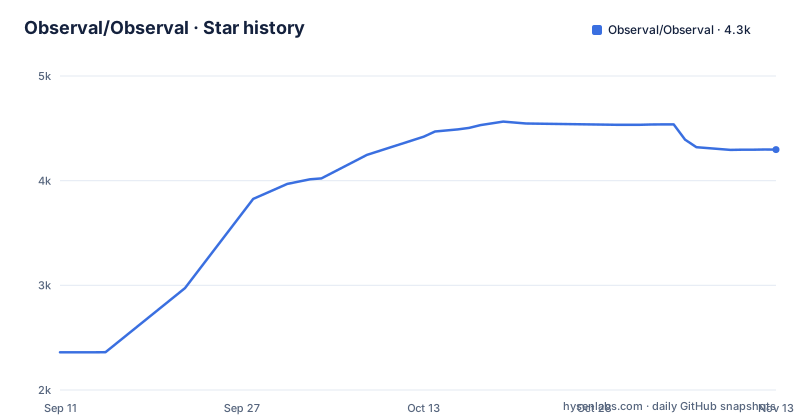
Star history
- Observal/Observal4,297 ★ · +1,937
| Repository | 2026-09-11 | 2026-11-13 |
|---|---|---|
| Observal/Observal | 2.4k | 4.3k |
1,937 Stars in the last 63 days, measured from the daily GitHub snapshot. Compare with other projects
Editorial analysis
The argument starts with duplicated work, not with distribution
The README states the problem in two parts and both are about adoption rather than publishing. The first is a lack of a discoverability layer: organisations store their components and agents in siloed git repositories with little or no documentation, so users cannot locate what already exists and several developers end up building the same component again. The second is a missing feedback loop: usage patterns are not understood, and the distinctive part is that AI failures do not produce static error codes. A component that hallucinates or answers something subtly wrong returns a successful response, so the user has no signal and the author has no data. The stated remedy is a centralised discovery layer plus insight into usage patterns, with the phrase that turns silent failures into actionable feedback. That framing is what makes the insight engine the headline rather than an add-on.
Nine harnesses, one install command, generated config
The supported harness table is the compatibility statement. It lists Claude Code, Kiro, Cursor, Pi, Copilot, Codex, OpenCode, Antigravity and Goose, with the description line saying it also supports other tools. The promise attached to that list is one command to install any agent into any supported harness, with the configuration files generated per harness automatically. The reasoning is stated in the reasons section: maintaining separate setup instructions for every harness is the work nobody wants, so the registry renders the right file instead. That is the difference between a package index and a registry, and it is why the component model includes hooks, prompts and sandboxes alongside skills and MCP servers: the unit is whatever a harness needs to run something.
Agents can call each other over an open discovery standard
One row in the reasons list goes beyond installation. Every approved resource is described as discoverable over an open standard for agent resource discovery, and a running agent can hand part of its task to another approved agent, whether that agent lives in the registry or is a remote service speaking the agent to agent protocol. The two ideas are separate: the registry is where components are published and approved, while the remote protocol is how a call leaves the machine. That combination is what turns a list of components into a fleet, and the governance row is where it is kept honest, since an agent can only reach what has been approved. Centralising everything is the companion decision, with Skills, MCP clients, hooks, prompts, agent files and sandboxes stored in one registry.
The server is a Compose stack behind a loopback binding
Installation is split into two parts, a server and a CLI, and the server install is one line that requires Docker Engine 24 or newer with Compose v2:
curl -fsSL https://raw.githubusercontent.com/AgenticResourceRegistry/AgenticResourceRegistry/main/install-server.sh | bashWhat that script does is described in detail, and two details matter operationally. It generates operator owned secret files with access restricted to the container group, and it binds published ports to loopback by default, so a fresh install is not exposed to the network before anyone has configured a proxy. It pulls images from the GitHub container registry rather than building. With a terminal attached it runs a guided setup; without one it applies safe defaults automatically, which is the behaviour that makes the same command work in a provisioning script.
Three datastores and a secret you must generate yourself
The example environment file is headed as version 1.0 configuration and says explicitly that only boot time infrastructure variables belong there. Everything else moved: evaluation models, security policies, SAML and retention are configured through a settings page in the admin interface, restricted to a super administrator. The infrastructure block names three connections: Postgres through an async driver, ClickHouse on port 8123, and Redis. The security block carries one value that must be changed before anything works in production, a secret key with a minimum length of 32 random characters, and the file gives the one line to generate it. The file also states that no incremental upgrade from a pre-1.0 deployment is supported.
The environment file holds two databases and one cache
That triple is unusual and the documentation for databases is listed as its own deployment page, alongside migrations and retention. A team running this therefore operates three data stores before it gets a single metric, which is the real cost of the insight engine. The upgrade page, covering safe upgrade and rollback, is linked from the same list and is worth reading before the first production deploy rather than after it.
The Makefile treats fuzzing and adversarial tests as ordinary targets
The target list is the clearest statement of what the project considers worth testing. Alongside lint, format and the pre-commit check there are ordinary unit tests run under a parallel executor, then three that are not ordinary: an adversarial suite, an evaluation completeness suite and a fuzz suite, and an aggregate target that runs them together. There is a separate fuzz directory at the root, so fuzzing is a layout decision rather than a script. Migration handling is exposed as its own set of targets, including generating a new migration and checking that migrations are consistent, which is the usual way a schema change stops being reviewed by hand. The lint and format targets pin ruff to an exact version, 0.15.10, and observability has its own lifecycle targets for bringing up, resetting and reading logs for both Prometheus and the observability stack.
Release automation is versioned too, and the CLI version lags
Supply chain files are unusually prominent for a project of this size. There is a release configuration file, a commit linter, a secrets scanner configuration, a dependency update configuration, a contributor licence agreement file, a reuse specification with a licences directory, a security policy, a governance document, a maintainers file, a roadmap, an AI policy, a coderabbit configuration, and an agent instructions directory. The README links release verification documentation that covers verifying checksums and provenance, which tells you the project expects consumers to check artefacts rather than trust a download. One detail is worth noting: the CLI package metadata on main reads version 1.17.0-dev.0 while the newest release tag is v1.16.0, published on 2026-10-29, so a manifest pin and a tag pin give you different code.
Editorial conclusion
Observal suits an organisation that has accumulated a dozen internal agent components in scattered repositories and has no way to tell which ones are used. It does not suit a single developer with three prompts, since the cost is a server, two databases and a Redis. Before deploying, read the database document and the upgrade flow, generate the secret key as the example file instructs rather than shipping its placeholder, and note that the CLI package version on main (1.17.0-dev.0) is ahead of the newest release tag (v1.16.0), so pin the release rather than the manifest.
Frequently asked questions
What problem does Observal solve?
Two, both about internal AI components rather than distribution. There is no discoverability layer, so components sit in siloed repositories and developers rebuild what already exists, and there is no feedback loop, because AI failures return successful responses rather than error codes, so neither the user nor the author learns what went wrong.
Which coding harnesses does Observal support?
The table lists Claude Code, Kiro, Cursor, Pi, Copilot, Codex, OpenCode, Antigravity and Goose. One command installs an agent into any supported harness, and the configuration files are generated per harness automatically.
How do I deploy the Observal server?
With Docker Engine 24 or newer and Compose v2, run the piped install script. It downloads a Compose package, generates operator owned secret files with restricted container group access, binds published ports to loopback by default, pulls images from the GitHub container registry and starts the stack, running guided setup when a terminal is attached.
What do I have to configure in Observal's environment file?
Only boot time infrastructure: the Postgres, ClickHouse and Redis connection strings and a secret key that must be at least 32 random characters in production. Evaluation models, security policies, SAML and retention are set in the admin interface settings page as a super administrator instead.
Can one agent hand work to another through Observal?
Yes. Every approved resource is discoverable over an open agent resource discovery standard, and a running agent can hand part of its task to another approved agent, whether that agent lives in the registry or is a remote service speaking the agent to agent protocol.
Official sources
Add this badge to your README
If you maintain this project, the badge below links readers to this analysis and shows its maintenance status from the daily GitHub snapshot. Paste the markdown into your README; add ?metric=license or ?metric=stars to the image URL for a different field.

[](https://hysenlabs.com/projects/observal-observal)Star history chart for your README
[](https://hysenlabs.com/projects/observal-observal)Was this useful?