opam for OCaml: source builds, compiler switches, and Git workflows
opam is a source-based package manager. It supports multiple simultaneous compiler installations, flexible package constraints, and a Git-friendly development workflow.
At a glance
- What is it?
- opam installs OCaml packages from source and supports multiple compiler installations, package constraints, and development from Git repositories. Its source build adds dependency and bootstrap requirements, especially on native Windows.
- Who is it for?
- opam is appropriate for OCaml developers who need compiler switches, constrained dependencies, or packages tracked from Git. It is less suitable for users seeking a native Windows build without Cygwin or teams that cannot accept source builds and a custom license.
- Can I use it commercially?
- Check first. The repository uses a licence we do not classify automatically, so read its LICENSE file before any commercial use.
- Is it still maintained?
- Yes. The repository last received commits 19 days ago.
- What is it written in?
- Mainly OCaml, according to GitHub's language statistics.
Answers come from the project's GitHub data, last synced on November 7, 2026, and from our analysis. They are not legal advice.
Star history
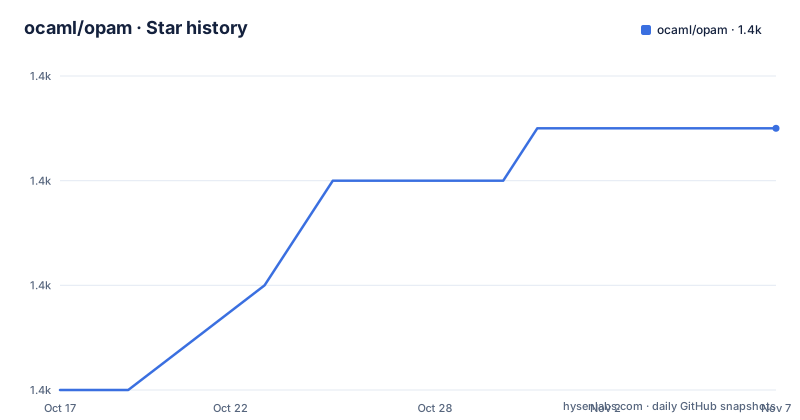
- ocaml/opam1,387 ★ · +5
| Repository | 2026-10-17 | 2026-11-07 |
|---|---|---|
| ocaml/opam | 1.4k | 1.4k |
5 Stars in the last 21 days, measured from the daily GitHub snapshot. Compare with other projects
Editorial analysis
Why opam addresses OCaml's compiler-dependent packages
opam solves a specific OCaml distribution problem: packages may need different compiler versions or tightly related dependency versions. Its source-based model lets the package manager resolve packages against a selected OCaml installation rather than assuming one compiler and one environment suit every project. The README identifies support for multiple simultaneous compiler installations and flexible package constraints.
This makes opam relevant to OCaml library developers, application maintainers who need controlled dependency selections, and teams moving between compiler versions. A developer can keep separate compiler installations available at the system level, while opam selects an installation for its operations. The README does not describe the exact compiler-switch command, so it would be unsafe to invent its syntax. It points new users to the Usage guide and the command-specific output of `opam <command> --help`.
The Git-friendly workflow is another defining use case. According to the README, opam can pin a package to a local checkout with `opam pin add .`, or to the repository URL with `opam pin add git+https://github.com/ocaml/opam`. Pinning is therefore part of the documented path for developing opam itself. The README does not explain the complete pin lifecycle, including how pins are updated or removed, so those operations need to be checked in the usage guide before automating a development workflow.
opam's repository components and build mechanism
The repository layout separates concerns that are often coupled in package managers. It contains `opam-client.opam`, `opam-core.opam`, `opam-devel.opam`, `opam-format.opam`, `opam-installer.opam`, `opam-repository.opam`, `opam-solver.opam`, and `opam-state.opam`. Those names expose separate package, repository, solving, installation, and state components. The Makefile also defines separate `opam` and `opam-installer` build targets, with `all` producing both.
The build uses Dune. If `DUNE` is not supplied through the environment, the Makefile bootstraps `src_ext/dune-local/_boot/dune.exe` from `boot/bootstrap.ml`. The main Dune build uses the release profile by default and builds the `@install` target. This is a source-tree build, not a packaged binary release, so the compiled components have to exist before `make install` can place them under the configured prefix.
The dependency boundary is explicit. A normal source build requires GNU make, OCaml 4.11 or newer, and a C++ compiler. A build without the solver can omit the C++ requirement by using `./configure --without-mccs`. If the remaining OCaml dependencies are not already installed, `./configure --with-vendored-deps` downloads and builds them locally. The README does not expose the internal solver algorithm or package database schema, so those implementation details cannot be inferred from the component names alone.
Building and installing opam from a checkout
The following is the README's Unix-style source-build path. It assumes GNU make, OCaml 4.11 or newer, and a C++ compiler. This procedure builds the repository itself and does not require an existing opam installation.
The vendored dependency option asks configure to obtain missing OCaml dependencies locally:
./configure --with-vendored-depsAfter configuration succeeds, compile both principal executables and install them under the configured prefix:
make
make install
If the system prefix is being changed, no root installation should be assumed. The README says installation under the unchanged system prefix may require `sudo`, and warns that `sudo` does not propagate environment variables. It gives this specific preservation form:
sudo -E "PATH=$PATH"That command belongs to the documented system-prefix installation caveat, not to the normal build sequence. A user without permission to write the system prefix should choose the configure options appropriate to that prefix, although the README excerpt does not provide a specific option for changing it. The project also offers a cold-build route that compiles OCaml and bootstraps opam, but even that route requires GNU make.
A first local-package workflow with opam pin
The clearest first use documented by the README is connecting a local checkout to an existing opam installation. From an already working opam environment, run this in the repository directory:
opam pin add .The command pins the current checkout as a package source. That is a development operation rather than merely printing help. The repository build documentation also supports a remote Git form when no local checkout is being used:
opam pin add git+https://github.com/ocaml/opamAfter installing a built opam executable, users can inspect the command surface through the documented help entry point:
opam --helpFor a specific operation, the README prescribes the same pattern with a placeholder command name:
opam <command> --helpThe first invocation lists available commands, while the second displays help for a selected command. The README does not provide a complete first-package installation example, output transcript, repository initialization command, or package search query. It directs users to the Usage guide for those parts. Pin registration is the only package-development operation that can be reproduced exactly from the README.
Developers who intend to link `opam-lib` into another tool have an additional path. The README requires `ocamlfind`, `ocamlgraph`, `cudf` at least 0.11~rc1, `dose3` at least 6.1, `re` at least 1.9.0, and `opam-file-format`. It ends this integration build with `make libinstall`.
Native Windows imposes a Cygwin build boundary
Native Windows support is conditional and substantially different from the Unix source-build path. The README states that Cygwin is always required to build opam on Windows. Required Cygwin packages include `make`, `patch`, `autoconf`, `curl`, and the MinGW C++ compilers, unless the build uses MSVC.
The documented Cygwin installer command selects those build dependencies and disables desktop and Start Menu shortcuts:
setup-x86_64 --root=C:\cygwin64 --quiet-mode --no-desktop --no-startmenu --packages=make,mingw64-i686-gcc-g++,mingw64-x86_64-gcc-g++,patch,autoconf,curlThe README recommends building outside Cygwin's root, under a path such as `/cygdrive/c/...`, and adding `noacl` to the `/cygdrive` entry in `/etc/fstab`. That change prevents Cygwin from emulating POSIX permissions over NTFS. Cygwin terminals must be restarted after the file is edited.
Windows can also be bootstrapped without a preinstalled OCaml compiler. The documented target selects an OCaml port through `OCAML_PORT`:
make compiler [OCAML_PORT=mingw64|mingw|msvc64|msvc|auto]Here, `auto` asks the build system to guess the port. The README says `auto` is assumed when the native C compiler for Cygwin is not installed. For MSVC ports, it requires Microsoft Windows SDK 7 or later, or Microsoft Visual Studio. This setup cost is the clearest reason not to choose the source repository as the simplest native Windows installation route.
Solver removal, cold builds, and upgrade costs
opam offers `./configure --without-mccs` for builds that omit the solver. The README identifies GNU make as still necessary for the no-OCaml route and gives this command to compile OCaml and bootstrap opam:
make cold CONFIGURE_ARGS="--prefix ~/local"A second command installs that cold-built result:
make cold-installThese options show that the bootstrap path is a supported design concern, not an accidental limitation. They also create more moving parts than installing an ordinary prebuilt executable. Toolchain users should distinguish the core build from developer integration. Building the `opam-lib` interface for related tools adds several packages, another configure pass, and a final `make libinstall` step.
Upgrade cost cannot be quantified from the README because it gives no migration notes for version 2.6.0 or 2.6.1. It also does not document rollback, cache behavior, offline installation, or the effect of changing compilers on an existing package selection. Those are material adoption questions, but the answer must come from the dedicated documentation rather than assumptions.
The repository is not archived, and its last push was on 2026-10-14. Releases 2.6.1, 2.6.0, and 2.6.0-rc1 were published in October and September 2026. That establishes recent repository activity, but it does not answer release-specific migration or compatibility questions. The repository declares a custom license that GitHub cannot classify; its exact obligations must be read from the `LICENSE` file rather than summarized as a standard open source license.
Editorial conclusion
opam is appropriate for OCaml developers who need compiler switches, constrained dependencies, or packages tracked from Git. It is less suitable for users seeking a native Windows build without Cygwin or teams that cannot accept source builds and a custom license. Verify the supported compiler and dependency requirements, Windows build path, and LICENSE file before adoption. On systems matching the documented Unix build prerequisites, opam 2.6.1 is a practical package manager for this workflow.
Frequently asked questions
What is opam used for in OCaml development?
opam is a source-based package manager for OCaml. It supports multiple simultaneous compiler installations, package constraints, and Git-based development workflows.
What dependencies are required to build opam from source?
The normal build requires GNU make, OCaml 4.11 or newer, and a C++ compiler. Missing OCaml dependencies can be handled with `./configure --with-vendored-deps`.
Can opam be built on native Windows?
Yes, but the README states that Cygwin is always required for the Windows build. It also provides a Windows OCaml compiler target with selectable `OCAML_PORT` values.
Official sources
Add this badge to your README
If you maintain this project, the badge below links readers to this analysis and shows its maintenance status from the daily GitHub snapshot. Paste the markdown into your README; add ?metric=license or ?metric=stars to the image URL for a different field.

[](https://hysenlabs.com/projects/ocaml-opam)Star history chart for your README
[](https://hysenlabs.com/projects/ocaml-opam)Was this useful?