offerPilot keeps your job search on your machine, and hands the AI half to whoever you configure
Open-source, local-first AI job-search workspace and application tracker with resume management, practice questions, mock interviews, interview reviews, offer comparison, and salary negotiation guidance.
At a glance
- What is it?
- A local-first job application tracker built as a Python backend with a React frontend, deployed either through a two-stage Dockerfile or from source with uv. Core tracking needs no model. Every AI feature sends your material to a third-party service you point it at, and the AGPL grant does not cover the Live2D runtime the desktop mascot rides on.
- Who is it for?
- Treat offerPilot as two products sharing one repository. The tracker half, the board, the stage list, job descriptions and the offer comparison table, is plain local software with no account and no key, and on that half the project is unusually clear about what it will not do for you, which is submit anything or message a recruiter.
- Can I use it commercially?
- Yes, with strict conditions. AGPL-3.0 is a network copyleft licence: if people use a modified version over a network, for example as a hosted service, you must offer them its source code under the same licence.
- Is it still maintained?
- Yes. The repository received new commits within the last day.
- What is it written in?
- Mainly Python, according to GitHub's language statistics.
Answers come from the project's GitHub data, last synced on November 25, 2026, and from our analysis. They are not legal advice.
Star history
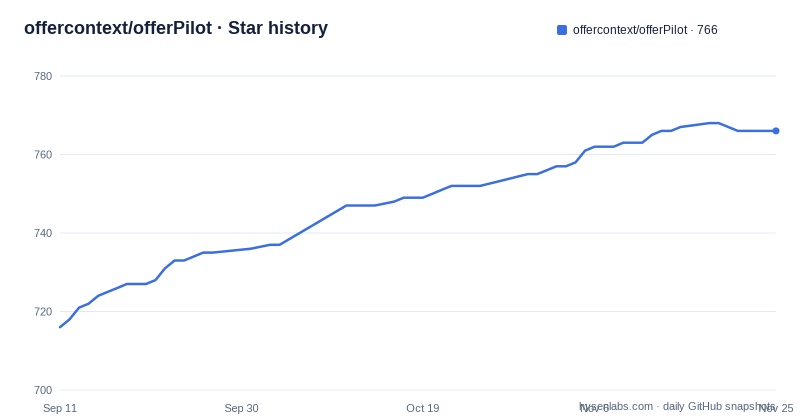
- offercontext/offerPilot766 ★ · +50
| Repository | 2026-09-11 | 2026-11-25 |
|---|---|---|
| offercontext/offerPilot | 716 | 766 |
50 Stars in the last 75 days, measured from the daily GitHub snapshot. Compare with other projects
Editorial analysis
The board is usable before any model is configured
The onboarding order is deliberate and worth copying into any evaluation. First run records one job. Open the application board, add a company and a position, enter the detail view and save the job description. No API key, no provider, no model name appears anywhere in that path. Recording applications, saving job descriptions and editing material by hand all work the same way, which the FAQ states plainly: material generation, mock question practice and AI analysis are the features that need a model service configured first.
Configuration is a four-step path that is easy to lose track of because the last step is not in the dialog. Settings leads to AI and models, then to configure AI. You fill in the model service details, test the connection, apply the entry to the Provider list, and only then click Save at the top of the page. Applying to the Provider list and saving are separate actions, so a filled-in form that was never applied leaves the rest of the application without a usable provider and no error to explain why.
The rest of the flow follows the shape of a job search rather than a generic tracker. Stages run from to-apply through applied, written test, interview, offer and closed on one board. A scheduled interview becomes a practice session or a quick mock, and independent practice deliberately does not require a real application or a scheduled interview to exist first.
Local storage stops at the model boundary and the documentation says so
The privacy section answers its own marketing question in the negative. Local deployment keeps business data on your device. When an AI feature runs, the relevant material is sent to the model service you configured, model calls may cost you money with that provider, and local storage does not mean all AI processing happens locally. The FAQ repeats it without softening: local saving is not the same as local computation.
This is the honest framing, and it has a practical consequence. The one field in the packaging file that explains the whole provider arrangement is litellm, pinned to a range from 1.91.0, which is the library that turns one configured provider entry into calls against many model services. Everything else in the dependency list is infrastructure for a local application: a web framework, a database layer, a PDF reader, an image library, a tokenizer, a terminal interface library and one exactly pinned JSON Schema validator at 4.26.0.
Recording behaves differently from the rest. Mock interview audio exists only on the current page, is neither uploaded nor persisted, and the offline transcription model is fetched from Hugging Face into the browser cache only after you click to get it. So the most sensitive raw input in the interview flow never touches the network, while the text that follows it does.
The image listens on every interface and the run command is the only thing stopping that
The runtime stage sets the container's default behaviour:
FROM python:3.12-slim AS runtime
ENV PYTHONUNBUFFERED=1 \
    OFFERPILOT_DATA=/data
...
USER offerpilot
EXPOSE 8080
VOLUME ["/data"]
ENTRYPOINT ["oc"]
CMD ["start", "--host", "0.0.0.0", "--port", "8080"]
That last line asks the server to bind all interfaces. The run command in the documentation then narrows it back down:
git clone https://github.com/offercontext/offerPilot.git offerpilot
cd offerpilot

docker build -t offerpilot .
docker run --rm -p 127.0.0.1:8080:8080 -v offerpilot-data:/data offerpilot
The safety here lives entirely in the loopback address on the left of the port mapping. Anyone who changes it to expose the application to the network, whether for a phone on the same wifi or a hosted demo, is relying on a command line rather than on anything the image enforces.
The rest of the image is careful. The application runs as an unprivileged user created with a disabled password, the data directory is created and owned by that user, the environment variable that names the data location matches the declared volume, and the CLI is symlinked into the path. The build stage installs with frozen lockfile resolution and with development dependencies excluded, so tests are not runnable inside the container and the lockfile must be in step with the packaging file or the image build fails. No health check is defined.
Two build versions and one declared minimum, stated separately on purpose
The documentation separates the two startup routes by what they require rather than by which is better. The Docker route needs Git and a working Docker environment, with no separate Python or Node.js installation, because the multi-stage build compiles the React frontend on node:20-alpine and installs the backend on python:3.12-slim. The source route needs Git, uv, Python and Node.js with npm, and it makes you build the frontend yourself before starting:
uv sync
cd web
npm ci
npm run build
cd ..
uv run oc start
The packaging file declares `requires-python = ">=3.10"`, and the README is explicit that the container's Python 3.12 and Node.js 20 are build versions and not the minimum for running from source. The tooling configuration agrees with the declared floor rather than the container: ruff targets py310 with a line length of 100, mypy runs strict against python_version 3.10, and the package is built by hatchling from src/offerpilot with a console entry point named oc.
Data location also differs by route, which matters when you move between them. Source startup writes under `~/.offerpilot` in your home directory and can be redirected with `OFFERPILOT_DATA`. The documented Docker command writes into a named volume called offerpilot-data mounted at /data. Nothing in the documentation migrates data between the two locations.
The AGPL grant stops at the Live2D runtime on the dashboard mascot
The project is AGPLv3, and the licence section immediately qualifies it. The desktop widescreen Pilot board mascot uses the paid version of Live2D's official sample character Haru together with Cubism Core. The character, its model data and the runtime belong to Live2D Inc., and none of it is inside the AGPLv3 grant. Anyone using or redistributing that build also has to satisfy the Live2D sample model terms and the Live2D SDK licence, which is a second set of conditions sitting on top of the copyleft one.
This matters most for distribution rather than for private use. The in-app side is handled by a switch: Pilot is the built-in assistant, Haru is an optional character entry, and hiding Haru does not affect Pilot's behaviour. A binary you ship to another person, however, is a different question from a preference in a settings screen.
The repository also carries an AI-assisted authoring setup at its root, with CLAUDE.md, AGENTS.md and a .claude directory alongside artifacts, contracts, docs and tests, none of which the user-facing document explains. Version 0.1.0 in the packaging file and no published releases mean the hosted Hub and the local build are separate things with separate histories.
Offline transcription is pinned to one commit and kept out of the repository
The optional offline speech path is the most precisely pinned part of the project. Transcription runs through the Hugging Face transformers library under Apache-2.0, ONNX Runtime Web, and the onnx-community/whisper-small model. That model is fixed to a single revision hash, `461d552a09349d5d0d0779b40dd79800eaa3e35a`, so every installation downloads the same weights. The weights are not committed to Git and not packaged into the build; the browser fetches them into its own cache when the user asks for them, and the notice at web/public/offline-whisper-NOTICE.md is where the details live.
Three separate licences therefore apply to one installation: AGPLv3 for the project's own code, Apache-2.0 for the transformers library, and Live2D's terms for anything drawn with Cubism Core. The documentation does not merge them into one notice, which is arguably the correct choice, since the obligations differ.
The recording itself has the shortest retention described anywhere in the project. Mock interview audio sits on the current page, is not uploaded and is not persisted. That is a stronger privacy property than the rest of the application offers, and it applies to the one input that cannot be un-sent once a model has read it.
The hosted Hub and the local build have no stated bridge between them
The document points at an online service, offerContext Hub, and then draws a line. That repository describes the local deployment version. The hosted service's features and data handling follow the descriptions on its own site, and they are not assumed to be consistent with the local version or to interoperate with it.
The wording matters more than it looks. A job search workspace accumulates the two things people are most sensitive about, a record of which employers rejected them and the text of their resume. If a local installation and a hosted account are not connected, then moving to the hosted version means either re-entering everything or exporting it by hand, and the direction of travel is not documented either.
Pilot, the built-in assistant, is the surface where that separation would show first. It is described as querying your application records, analysing material, drafting content and proposing revisions against reference material shown beside the conversation. Each of those actions reads the data you have stored locally, and each of them therefore leaves through whatever provider you configured.
Editorial conclusion
Treat offerPilot as two products sharing one repository. The tracker half, the board, the stage list, job descriptions and the offer comparison table, is plain local software with no account and no key, and on that half the project is unusually clear about what it will not do for you, which is submit anything or message a recruiter. The AI half is a different arrangement: your resumes and job descriptions leave the machine the moment you use it, the bill goes to the provider you picked, and nothing in the repository tells you which provider that will be until you configure one yourself. Check three things before adopting it. Whether your provider's terms tolerate sending a resume and an employer name to an inference endpoint. Whether the Live2D terms, which sit outside the AGPL grant, matter to your distribution, since they bind anyone who ships a desktop build. And whether the online Hub at hub.offercontext.cn holds the data you accumulate locally, because the project states the two are not assumed to match or interoperate.
Frequently asked questions
Can I use offerPilot without configuring an AI model service?
Yes for the core work. Recording applications, saving job descriptions and editing material by hand do not require a model service. Material generation, mock interview practice and AI analysis do, and the configuration path is Settings, then AI and models, then configure AI, where you enter the service details, test the connection, apply the entry to the Provider list and save from the top of the page.
Does offerPilot send my job search data to a model provider?
It does when you use an AI feature. Business data is kept in the local workspace, but material sent for AI processing goes to the model service you configured, and those calls may incur provider charges. Mock interview recordings are the exception: they exist only on the current page and are neither uploaded nor persisted.
How do I deploy offerPilot, and where does the data go?
Either route serves http://localhost:8080. Docker needs only Git and Docker and uses a named volume offerpilot-data mounted at /data. Running from source needs Git, uv, Python and Node.js with npm, builds the frontend with npm run build, starts with uv run oc start, and writes under ~/.offerpilot, redirectable with OFFERPILOT_DATA.
Will offerPilot submit applications or contact recruiters for me?
No. It manages the search, prepares material and organises suggestions, and it does not submit anything to an employer or send messages on your behalf. Changes to key application records need your confirmation by default, so a system confirmation card is the last checkpoint before a change lands.
Is the Live2D mascot covered by the offerPilot AGPLv3 licence?
No. The board mascot uses the paid version of Live2D's sample character Haru with Cubism Core, and the character, model data and runtime stay with Live2D Inc. outside the AGPLv3 grant. Using or redistributing that build also means following the Live2D sample model terms and the Live2D SDK licence.
Official sources
Add this badge to your README
If you maintain this project, the badge below links readers to this analysis and shows its maintenance status from the daily GitHub snapshot. Paste the markdown into your README; add ?metric=license or ?metric=stars to the image URL for a different field.

[](https://hysenlabs.com/projects/offercontext-offerpilot)Star history chart for your README
[](https://hysenlabs.com/projects/offercontext-offerpilot)Was this useful?