whishper's current branch is frozen while a rewrite happens on another
Transcribe any audio to text, translate and edit subtitles 100% locally with a web UI. Powered by whisper models!
At a glance
- What is it?
- whishper is a fully local transcription and subtitling suite with a web interface, a subtitle editor and machine translation, all assembled from containers. The banner at the top of its page says the branch you are reading will get no more releases while a rewrite proceeds elsewhere, and the compose file it ships with contains default database credentials.
- Who is it for?
- whishper suits someone who needs transcripts and subtitles produced on their own machine without uploading audio anywhere, and who wants an editor rather than a command line. Three things to check before you run it.
- Can I use it commercially?
- Yes, with strict conditions. AGPL-3.0 is a network copyleft licence: if people use a modified version over a network, for example as a hosted service, you must offer them its source code under the same licence.
- Is it still maintained?
- Yes. The repository last received commits 2 days ago.
- What is it written in?
- Mainly Svelte, according to GitHub's language statistics.
Answers come from the project's GitHub data, last synced on November 15, 2026, and from our analysis. They are not legal advice.
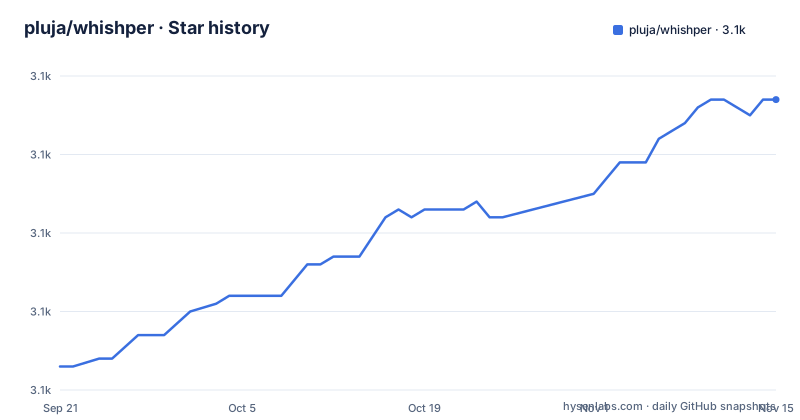
Star history
- pluja/whishper3,107 ★ · +34
| Repository | 2026-09-21 | 2026-11-15 |
|---|---|---|
| pluja/whishper | 3.1k | 3.1k |
34 Stars in the last 55 days, measured from the daily GitHub snapshot. Compare with other projects
Editorial analysis
A construction banner sits above the feature list
The first thing on the page, above the description and above the features, is a notice about the project's own direction.
It says the author is working on a complete rewrite, that progress can be seen on a different branch, and that the branch you are reading will therefore receive no new releases and no updates.
Everything below that banner describes the current branch: the feature list, the project structure, the development setup, the screenshots. None of it is forward looking, and the page does not say when the rewrite will land or what it will look like.
The release list agrees with the banner rather than contradicting it. The newest published release is from September 2024, the one before it from January 2024, and the most recent push to the branch is from July 2026. So the branch has had commits in the last two months and a release nearly two years ago, which is exactly the shape a frozen release line takes when someone is working elsewhere.
For a user, the practical question is which branch to deploy. The page answers it by omission rather than by recommendation, and the two branches are named differently enough that mixing them is easy.
Six components under a sentence that says three
The project structure section is the most useful part of the page, and it has a counting error in its first sentence, which says there are three main pieces and then lists six.
Three of them are the project's own. The first is the transcription service, which is what actually runs the faster speech-to-text backend, and it lives in its own directory. The second is the backend, described as the piece that coordinates frontend calls, the database and the tasks. The third is the frontend, which is the web interface.
The other three are named as third-party. One is a translation container. One is the document database that stores the information about your transcriptions. And the third is a reverse proxy, described as the thing that allows everything to run from a single domain.
That last one deserves a second look, because it explains the architecture. An application that claims to be entirely local would not obviously need a proxy, so the reason for one is that the browser, the backend and the three services behind them have to be reachable on one origin for the interface to talk to them without cross-origin negotiation.
The single-domain design is also why the published port count is low, which matters more than it looks.
Default database credentials are committed in the compose file
The compose file defines three services and one of them ships a password in the repository.
The database service reads an environment file and sets its initial root user and password from two variables that both fall back to the same literal word:
MONGO_INITDB_ROOT_USERNAME: ${DB_USER:-whishper}
MONGO_INITDB_ROOT_PASSWORD: ${DB_PASS:-whishper}
So a deployment that copies the example environment file and starts the stack gets a database whose administrator credentials are the project name. It is a development default and it is conventional for compose files, but it is published, and the environment file it reads is a template rather than a generated secret.
Two things limit the exposure. The database service only exposes its port to the other services on the internal network and does not publish it on the host. And the application service is the only one that publishes anything, on port 8082.
The translation container is configured defensively in the same file: its web interface is disabled and model updates are enabled, and it is given a health check that runs the image's own script every two seconds with a short timeout and five retries, which is what the application waits on before starting.
So the shape is one published port, two internal services, and a password in the repository.
The default profile is CPU even though a GPU path exists
The feature list claims both hardware paths, and the build files support both, but the default configuration asks for the slow one.
The application's environment in the compose file names the profile explicitly as cpu and sets the thread count to four. Separately, the repository carries a second compose file and a second build file for GPU use, and the feature list says an NVIDIA card gets faster transcription and that there is no problem without one.
The backend being used is the part that makes the CPU claim credible rather than apologetic: the page credits a faster speech-to-text backend and says it delivers much faster transcription times on CPU. That is the whole reason a browser-free local suite is viable at all on a machine with no accelerator.
Two smaller details in the same service. The image reference uses a version variable that falls back to a rolling tag, combined with a pull policy that re-pulls on every start, so an update lands without you asking for one. And the environment has separate variables for the internal API address, the public API address and the translation API address, which is how the same build serves a laptop and a shared deployment.
The four-thread default is the part most likely to be changed first by anyone running this on a machine with more cores.
The build fetches its downloader from a rolling address
The image build is a chain of stages, and one of them reaches the network for something that is not pinned.
The first stage uses a Go image, installs a downloader, and then fetches the project's release binary from a URL that ends in the word latest. That means every image build takes whatever version of the downloader tool was newest that day, and the repository records no version for it.
That tool is what makes URL input work, since the feature list says transcription from a URL supports any source the downloader handles. So the least reproducible part of the build is also the part that reaches out to other people's servers.
The rest of the build is tighter. The backend is compiled with cgo disabled and then compressed with a binary packer, which is why the runtime stage only needs to copy one file. The frontend is built in a Node image with the package manager enabled through corepack, using cache mounts so repeated builds reuse the store, and a separate stage installs production-only dependencies so the shipped tree does not carry the development ones. Both set an environment variable that lifts a request body limit to zero.
The runtime stage is a slim Python image with a handful of packages installed: the media tool, a downloader, Node, the proxy and a process supervisor. The size discipline is real; the pinning is not.
A proxy and a supervisor inside one container
The root of the repository carries a proxy configuration and a process supervisor configuration, which tells you how the pieces are assembled.
The proxy is what the structure section calls the piece that allows everything to run from a single domain. The supervisor is what keeps the several services alive inside the one application container, since the runtime image installs it alongside the proxy and Node rather than running one process per container.
That is a defensible choice for this application. Transcription is a long-running, stateful job: uploads land on a volume, models live in their own directory, and the backend coordinates tasks that outlive a request. Splitting every one of those into its own container would buy isolation the workload does not need and cost a lot of orchestration.
The quick start comes as two files, a shell script and a Windows batch file, which tells you the project expects Windows users too, and there are four compose files in total: the default, one for development, one for GPU, and one named after a different tool entirely, which the page does not explain.
Between the two quick start scripts, the four compose files, the two build files and the supervisor configuration, the operational surface is wider than the feature list suggests.
The subtitle editor is what the project is actually for
Most of the feature list is plumbing, and one item is the reason to use this rather than a command line transcriber.
The editor highlights the transcription against the current position in the media, so you can see which line belongs to which moment. It warns about reading speed, in characters per second, which is the constraint that actually makes a subtitle file unwatchable when it is wrong. It can split a segment and insert a new one, and it lets you choose the subtitle language.
Around that sit the exports: plain text, JSON, the WebVTT format, the SubRip format, or copying the raw text to the clipboard. Four formats and a clipboard is the right set, because the first thing you do with a transcript is paste it somewhere.
The local claim is stated twice, once as a feature and once as a summary: transcription, translation and subtitle editing all happen on your machine, and it can work offline. The translation step is the one part that is a separate container rather than built in, so the offline claim depends on that container being present locally too, which it is.
Support is three addresses and two credited projects
The closing sections are short and worth reading for what they reveal.
The support section lists a Monero address, a Bitcoin address, and a lightning payment link through a funding service. No amount is requested and no currency rationale is given. For a project that stores your audio and your transcripts on your own machine, funding in currencies that are conventionally associated with circumventing payment rails is a choice a reader is entitled to notice.
Then the credits, which name exactly two projects: the faster speech-to-text backend and the translation project. Both are also the two things this project depends on for its two headline capabilities, which is the correct shape for a credits section and a reminder that the interesting code here is the interface around other people's models.
The roadmap is the last substantive thing on the page, and it is a list of open items rather than a plan: a local folder as media input, full-text search across transcriptions, user authentication, recording audio from the browser, and an optional alternative backend. One item is struck through as delivered, with a sub-item still open asking whether non-NVIDIA acceleration is possible.
That authentication item connects back to the compose file's published database credentials, and it is the gap a self-hosted deployment should close first.
Editorial conclusion
whishper suits someone who needs transcripts and subtitles produced on their own machine without uploading audio anywhere, and who wants an editor rather than a command line. Three things to check before you run it. Decide which branch you want, because the page tells you the current one is done and the rewrite lives elsewhere. Change the database credentials before the first start, since the compose file's defaults are published in the repository. And accept that the build is not reproducible, because the downloader it fetches at image build time resolves to whatever the newest release is on that day.
Frequently asked questions
What is the pluja whisper project?
It is an open source, fully local audio transcription and subtitling suite with a web interface, licensed under AGPL version 3. It transcribes uploaded files or URLs handled by a downloader tool, exports text, JSON, WebVTT and SubRip, translates through a LibreTranslate container, and includes a subtitle editor with reading-speed warnings and segment splitting.
Which branch of whisper should I deploy?
The page states that the author is working on a complete rewrite on a separate branch and that the current branch will receive no new releases or updates. The newest published release is from September 2024 while the branch itself has commits from July 2026, so the two branches are at very different stages.
What are the components of the whisper stack?
Three of its own: a transcription service running the faster speech-to-text backend, a backend coordinating frontend calls, the database and tasks, and the frontend web interface. Plus three third-party containers: a translation service, a document database storing your transcriptions, and a reverse proxy that lets everything be reached from one domain.
How do I run whisper?
With its compose file, which defines three services: the database, the translation container and the application. Only the application publishes a host port, on 8082. Quick start scripts are provided for both shells and Windows, and separate compose and build files exist for GPU use and for development.
Does whisper need authentication on the web interface?
Not yet: user authentication is an open item on the project's roadmap. The compose file ships default administrator credentials for the document database, both defaulting to the project name, so a deployment should override them from the environment file before the first start.
Is the whisper container build reproducible?
No. The downloader tool used for URL input is fetched during the image build from a release address that resolves to the newest version, and the application image is pulled with a policy that re-pulls on every start. The rest of the build pins its stages, including the frontend lockfile.
Official sources
Add this badge to your README
If you maintain this project, the badge below links readers to this analysis and shows its maintenance status from the daily GitHub snapshot. Paste the markdown into your README; add ?metric=license or ?metric=stars to the image URL for a different field.

[](https://hysenlabs.com/projects/pluja-whishper)Star history chart for your README
[](https://hysenlabs.com/projects/pluja-whishper)Was this useful?