graham-essays builds an EPUB of Paul Graham's writing
📚 Download the full collection of Paul Graham essays in EPUB, PDF & Markdown for easy reading.
At a glance
- What is it?
- This repository is a small pipeline that fetches every essay published on Paul Graham's site from the RSS feed and assembles them into a single EPUB, a PDF and a Markdown file, with a release published for each day's batch. The whole thing is a Makefile over a Python script, and the build dependencies are pandoc and calibre rather than a publishing toolchain.
- Who is it for?
- graham-essays fits a reader who wants the whole body of Paul Graham's writing as one file for offline reading, since the collection is published daily and the EPUB is a single download rather than a site to visit.
- Can I use it commercially?
- Not without permission. GitHub finds no licence file in the repository, and without a licence all rights are reserved by default: you may read the code but not reuse it. Check the README, or ask the authors, before using it.
- Is it still maintained?
- Yes. The repository last received commits 55 days ago.
- What is it written in?
- Mainly Python, according to GitHub's language statistics.
Answers come from the project's GitHub data, last synced on November 7, 2026, and from our analysis. They are not legal advice.
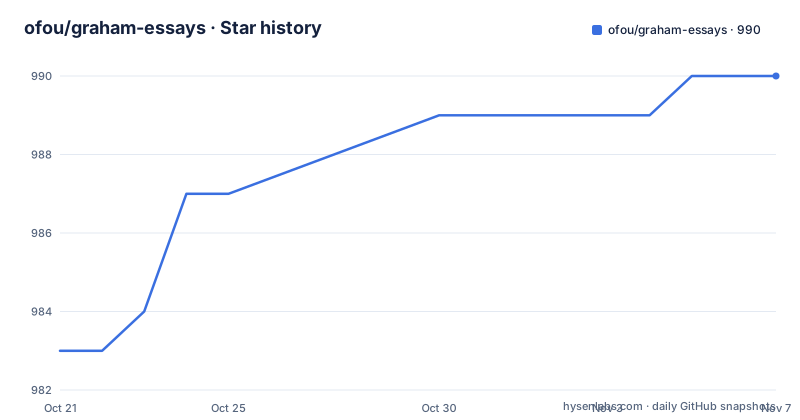
Star history
- ofou/graham-essays990 ★ · +7
| Repository | 2026-10-21 | 2026-11-07 |
|---|---|---|
| ofou/graham-essays | 983 | 990 |
7 Stars in the last 17 days, measured from the daily GitHub snapshot. Compare with other projects
Editorial analysis
One file instead of a website
The project downloads the complete collection of more than two hundred essays from Paul Graham's website and exports them in EPUB and Markdown for easy reading, and the author notes the collection turned out to be a whooping five hundred thousand words. The output formats are three. The EPUB is the primary artefact, there is a PDF built from it, and there is a plain Markdown file for reading away from an ebook reader. The releases page is described as the place to get the latest build, updated daily, and the release names carry their own metadata, with the latest three being 2026-09-14 with 235 essays, 2026-08-25 with 234 essays and 2026-06-15 with 233 essays. That naming is more useful than a version number, because it tells you how much material a given file contains and when it was assembled.
The source is the RSS feed
The acquisition path is described in the README. The author used the RSS feed originally made by Aaron Swartz and shared by Paul Graham himself, and the data cleaning and acquisition was done with the feedparser, html2text, htmldate and Unidecode libraries. That is the whole scraper, one Python script named graham.py, and the other data files in the repository are the book's metadata rather than the content. There is a metadata.yaml for the EPUB metadata, a cover.png for the cover image, an epub.css for the stylesheet, and a scripts/ directory that holds a fix_epub_ibooks.py script run after the EPUB is built, which is the kind of detail that only matters if you have actually opened a generated EPUB in Apple Books and found it rendered badly. The result of the fetch step is a directory of Markdown files, one per essay, and every later stage of the build works on that directory.
The Makefile is the pipeline
There is no Python packaging, no application server and no configuration file. The build is a Makefile, and the default target names the whole chain:
all: dependencies clean venv fetch merge epub wordcountEach stage has a target of its own. The clean step removes the essays directory, the virtual environment and the generated files. The venv target creates the environment with uv and installs the requirements, and the fetch step is the one that runs the Python script:
python3 graham.pyThe merge step then joins the per-essay Markdown into one file with pandoc, and the epub target depends on it and produces the ebook with a table of contents, the cover image, the stylesheet and the metadata file, before running the iBooks fix script over the result. The pdf target depends on the epub one and converts it with ebook-convert, which is the calibre tool, so the PDF is a conversion of the EPUB rather than a separate render. The last stage is a word count, which is both a report and a check that the fetch actually produced files.
Two package managers, one error for anything else
The Makefile branches on the operating system at the top, and the branch is the interesting part of the file. On Darwin the package manager is brew and the virtual environment is activated with source, and on Linux it is apt with a dot prefix, and anything else raises an explicit error saying that the operating system is unsupported. The dependencies target then installs what the build needs, and the list tells you the toolchain: python, pandoc, calibre and uv on macOS, and on Linux python3-pip, python3-venv, pandoc and calibre from apt, with uv installed by a curl pipe to shell from the astral.sh install script. The README notes that on macOS you need brew in order to install the dependencies listed in the Makefile. So the practical requirement is a Mac or a Linux machine with a package manager, and the build will not run on Windows as written.
The requirements tell you what the cleaner needed
The requirements file is long for a script that downloads a feed, and it explains what turning a web page into a book actually involves. The fetching and parsing side is requests with urllib3, certifi, idna and charset-normalizer underneath, and the HTML side is beautifulsoup4 with lxml, plus cssutils for the stylesheet handling in the EPUB. The text cleaning uses html2text to turn the article markup into Markdown and Unidecode to strip the non-ASCII characters that would otherwise end up in the file names, with htmldate and dateparser plus python-dateutil, pytz, tzdata, tzlocal and the pytz deprecation shim for the date handling, and regex for the pattern work. The dependency mix is a good illustration of how much of a scraper is not the download but the normalisation afterwards.
Daily builds, and a licence that is not recorded
The project is a working habit rather than a versioned library, and the release cadence shows it. The three most recent releases are dated builds with an essay count attached, and the README says the latest build is updated daily, which means the artefacts are the product and the repository is the factory. The repository is not archived and the last push was on 2026-09-14, the same day as the newest release, and there are two continuous integration workflows visible in the badges, one general and one for Ubuntu, which is where a build that installs system packages would be exercised. There is also an AGENTS.md for coding agents and a WakaTime badge, which are the small signs of an active individual project. The one thing missing is a licence. The project listing records the licence as unknown, so if you want to redistribute the generated EPUB or the Markdown collection, that is a question for the copyright of the essays rather than for the repository, and the more interesting question is whether Paul Graham's own site terms allow it. The release assets are linked from the README, including the EPUB and a CSV list of the essays.
Editorial conclusion
graham-essays fits a reader who wants the whole body of Paul Graham's writing as one file for offline reading, since the collection is published daily and the EPUB is a single download rather than a site to visit. It does not fit someone who wants a live feed, since the artefacts are rebuilt from the archive on a schedule, and it does not fit a reader who needs the text to be authoritative, since the pipeline is a scraper of someone else's site with no licence recorded in the repository. Before you run it, read the Makefile, because it installs system packages with sudo on Linux and expects pandoc, calibre and uv to be present, and note that the release naming tells you the shape of the collection, with the latest build carrying 235 essays.
Frequently asked questions
What does the graham-essays project do?
It downloads the complete collection of more than two hundred Paul Graham essays from the site's RSS feed and exports them as a single EPUB, a PDF and a Markdown file, and the collection is stated to run to around five hundred thousand words.
How do I build the essay collection?
Run make in the root directory. The default target chains dependencies, clean, venv, fetch, merge, epub and wordcount, and it needs pandoc, calibre and uv, with brew on macOS and apt on Linux.
Where does the text come from?
From the RSS feed originally made by Aaron Swartz and shared by Paul Graham, parsed with feedparser, and cleaned with html2text, htmldate and Unidecode before the per-essay Markdown files are merged by pandoc.
How often are new versions published?
The releases page is described as updated daily, and the release names carry a date and an essay count, with the latest builds being 2026-09-14 with 235 essays, 2026-08-25 with 234 and 2026-06-15 with 233. The last push to the repository was on 2026-09-14.
Can I redistribute the generated book?
The repository does not record a licence, and the essays themselves belong to their author, so the rights to redistribute the EPUB or the Markdown collection are a separate question from the code that builds them. The release assets are linked from the README, including the EPUB and a CSV list of the essays.
Official sources
Add this badge to your README
If you maintain this project, the badge below links readers to this analysis and shows its maintenance status from the daily GitHub snapshot. Paste the markdown into your README; add ?metric=license or ?metric=stars to the image URL for a different field.

[](https://hysenlabs.com/projects/ofou-graham-essays)Star history chart for your README
[](https://hysenlabs.com/projects/ofou-graham-essays)Was this useful?