comic-translate: three setup steps are bare URLs, the update block re-runs project init, and GPU work is source-only
AI comic and manga translator app/browser extension for automatically translating comics, manga, manhwa, BDs, fumetti, and more in multiple languages and formats (Images, PDF, EPUB, CBR, CBZ etc).
At a glance
- What is it?
- A comic and manga translation tool whose packaged Windows and macOS builds both require telling the operating system to run them anyway, whose accelerator support exists only when built from source, whose source guide lists three websites inside shell code fences, and whose requirement list carries a Python 2 compatibility shim alongside a Photoshop file library.
- Who is it for?
- comic-translate suits someone who reads comics in a language their tools do not cover and wants a local pipeline rather than a hosted one, because the default OCR and translation models are ones you supply or run yourself, and the format list covers the archive containers people actually have comics in. Verify four things first.
- Can I use it commercially?
- Yes. Apache-2.0 is a permissive licence: you can use, modify and sell software built on it, as long as you keep its copyright and licence notices.
- Is it still maintained?
- Yes. The repository last received commits 14 days ago.
- What is it written in?
- Mainly Python, according to GitHub's language statistics.
Answers come from the project's GitHub data, last synced on November 23, 2026, and from our analysis. They are not legal advice.
Star history
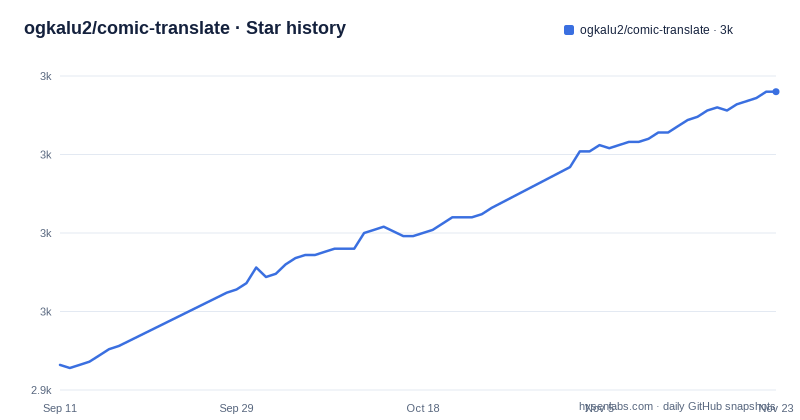
- ogkalu2/comic-translate3,020 ★ · +87
| Repository | 2026-09-11 | 2026-11-23 |
|---|---|---|
| ogkalu2/comic-translate | 2.9k | 3k |
87 Stars in the last 73 days, measured from the daily GitHub snapshot. Compare with other projects
Editorial analysis
Both packaged platforms require telling the operating system to run the app anyway
The download section gives a desktop app for Windows and macOS, and then two blockquoted instructions, one per platform. On Windows the instruction is to ignore the Smart Screen warning by clicking for more information and running anyway. On macOS it is to open the system privacy and security settings, scroll down, and click to open anyway. Both are the standard path for an application that is not signed in the way each vendor expects, and the readme presents them as normal first-run steps rather than as caveats. That is a fair thing for a project distributed outside the app stores to do, and it is also the first thing a security-conscious reader should weigh, because the override is a decision to run code the platform has not vouched for. The browser extension is the route that avoids the question entirely, since it installs through the browser's own store.
Accelerator support exists only on the source route
One note sits directly under the download instructions: accelerator support is currently only available when running from source. That single sentence splits the project into two performance tiers. Anyone who takes the packaged app gets whatever the default compute path gives them, and anyone who clones the repository and builds locally gets the option of hardware acceleration. The source guide spells out what that option requires, and the requirement is conditional on the hardware you own: if you have an NVIDIA card, it recommends installing the GPU build of the inference runtime as a separate step. So the fast path is also the path that asks you to install four things by hand, pick a specific Python version, and initialise a package manager project, and the readme never quantifies the difference the acceleration makes.
Three of the source setup steps are websites pasted into shell code fences
The from-source section is a numbered walkthrough of what to install first. Three of those steps are rendered as shell commands, and each command is a bare web address.
https://www.python.org/downloads/The other two are a version control site and a package manager's installation page, in the same fenced format. They are links wearing the costume of commands, and a reader who selects the block and pastes it into a terminal gets three attempts to execute a URL. The fence language is set to shell, which is what makes them look runnable. The block that follows them is real: a clone, a directory change, and a package manager init call pinned to the Python version the section specified. So the guide mixes three unrunnable placeholders and one runnable block in a single list, which is the kind of formatting slip that costs a newcomer fifteen minutes.
The update procedure re-runs project initialisation inside a copy-pasteable block
Updating is presented as its own fenced block, and the block has a different shape from the install block above it.
git pull
uv init --python 3.12 (Note: only run this line if you did not use uv for the first time installation)
uv add -r requirements.txt --compile-bytecode
Two things are wrong with it as a copy-paste target. The package manager init call is one the install section already ran, and re-running initialisation is not the same operation as pulling new code. And the caveat about when to run it is embedded inside the command line itself, in parentheses, so a reader who selects the block and runs it gets a syntax error unless they edit the line first. The note is also inverted in spirit: it tells you the line is usually unnecessary, while leaving the line in the block where everyone will run it. A separate note above the block does say the command is only for people who did not use the package manager originally, which makes the parenthesis below it redundant as well as unrunnable.
Archive and comic formats depend on an extractor the project does not install
The tips section is where the format support meets the outside world. Archive container extraction needs a supported helper, and three are named as acceptable. On Windows the instruction is to install one of them and add its folder to the path, with an example path given for a common install location. On macOS the desktop app is said to check the standard package manager locations automatically when launched from the file browser. Then comes the failure mode, and it is not a message a user would want to see: if no supported extraction tool is present, the application raises an exception carrying a short sentence about not finding a working tool. So the project's advertised format list, which includes two archive containers, is conditional on a third-party binary that nothing in the installation guide installs and nothing in the requirement list can provide.
The requirement list carries a Python 2 compatibility shim and a Photoshop file library
The dependency file has twenty-two entries and no upper bounds anywhere, so a fresh install resolves to whatever is current. Two entries are out of place for a project that requires a single recent Python version. One is a compatibility library whose entire purpose is code written against Python 2 and the first years of Python 3, which a project pinned to a recent interpreter has no use for. The other is a library for reading and writing a desktop image editor's native file format, which is a different kind of outlier: not obsolete, but a surprising thing to find in the dependency set of a translation tool. There are three more that describe the format support better than the prose does, since two separate archive libraries and one PDF rendering library appear side by side. The list also mixes a shell-out download helper with an HTTP client library, and it pins the certificate bundle to a floor dated in the current year.
Five pipeline stages, two checkpoints for one of them, and a manual escape hatch
The how-it-works section is the most useful part of the file. Speech bubbles and text are found by a detection model trained on eleven thousand comic images spanning three styles, and the text is then segmented algorithmically from the boxes that model returns. Optical character recognition is chosen per language by default, with one engine for Japanese, one for Korean, and a third for everything else, plus two optional hosted engines usable for any language. Removal of the old text uses two separate models for the same job, one a checkpoint finetuned on manga and anime imagery and one built on a different architecture. Translation supports three models, and every one of them is fed the text of the entire page rather than a single bubble, with an option to also send the image. Rendering then wraps the new text into the boxes that came out of the first stage. Automatic mode is not the only path: a manual mode exists for the three failures the readme names, and it is reached by undoing the image and toggling a switch.
Editorial conclusion
comic-translate suits someone who reads comics in a language their tools do not cover and wants a local pipeline rather than a hosted one, because the default OCR and translation models are ones you supply or run yourself, and the format list covers the archive containers people actually have comics in. Verify four things first. Accelerator support exists only on the source route, so performance depends on which install you took. The packaged Windows and macOS builds both require overriding an operating system security prompt, which is a signal about how they are signed. Archive handling depends on an extractor the project does not install, and its failure mode is a raised exception rather than a graceful message. And the documented update path re-runs project initialisation inside a block you are meant to paste whole.
Frequently asked questions
How do I install comic-translate?
Three routes. A desktop app for Windows and macOS, a browser extension for Chromium-based browsers, or from source, which needs a recent Python version, git, and a specific package manager, followed by a clone, an init call pinned to that Python version, and adding the requirement file. The requirement file has no upper bounds and includes a GPU build of the inference runtime as a separate optional step for people with an NVIDIA card.
Which languages can comic-translate read?
Eleven source languages are named: English, Korean, Japanese, French, Simplified Chinese, Traditional Chinese, Russian, German, Dutch, Spanish, and Italian. The readme says it can translate into those and more without counting the rest, so the output side is not enumerated the way the input side is.
Which OCR engines does comic-translate use?
By default one engine for Japanese, one for Korean, and a third for everything else. Two optional hosted engines are also listed as usable for any of the supported languages. Separately, the translation stage names three models, so recognition and translation are chosen independently.
What context does comic-translate send to a translation model?
All the LLMs are fed the entire page text to aid translations, rather than one bubble at a time, and there is an option to also provide the image itself for further context. Both of those choices affect what leaves the machine and what the provider sees.
Why does comic-translate report that it cannot find a working tool?
Because archive container extraction needs an external helper and none was found. The readme names three acceptable helpers, says on Windows to install one and add its folder to the path, and says the macOS desktop app checks two package manager locations automatically. The failure surfaces as a raised exception rather than as a setup message.
Does the packaged comic-translate app use my graphics card?
No. A note under the download instructions says accelerator support is currently only available when running from source, and the source guide recommends installing the GPU build of the inference runtime only if you have an NVIDIA card. The readme does not say what the packaged app falls back to.
Official sources
Add this badge to your README
If you maintain this project, the badge below links readers to this analysis and shows its maintenance status from the daily GitHub snapshot. Paste the markdown into your README; add ?metric=license or ?metric=stars to the image URL for a different field.

[](https://hysenlabs.com/projects/ogkalu2-comic-translate)Star history chart for your README
[](https://hysenlabs.com/projects/ogkalu2-comic-translate)Was this useful?