WR.DO: short links, Cloudflare-backed domain email, subdomains and S3 storage in one Next.js app, with a bootstrap admin you must remove after first login
An all-in-one domain services platform integrating short link generation, unlimited domain email, file storage and subdomain management, with an admin panel and self-hosting support.
At a glance
- What is it?
- WR.DO is an MIT-licensed Next.js and Prisma platform that combines short links, unlimited-address domain email, DNS subdomain management, S3 file storage and a small open API behind one admin panel. Self-hosting needs PostgreSQL, a long AUTH_SECRET, and a first-run admin that the README tells you to retire.
- Who is it for?
- Run WR.DO if you own domains on Cloudflare and want short links, receive-and-send domain email, subdomain hand-outs and S3 uploads under one admin panel, and you can operate PostgreSQL yourself. Do not choose the public Docker image if you need to change client-side NEXT_PUBLIC values, because those are baked in at build time and you would have to build from source.
- Can I use it commercially?
- Yes. MIT is a permissive licence: you can use, modify and sell software built on it, as long as you keep its copyright and licence notices.
- Is it still maintained?
- Yes. The repository last received commits 10 days ago.
- What is it written in?
- Mainly TypeScript, according to GitHub's language statistics.
Answers come from the project's GitHub data, last synced on November 7, 2026, and from our analysis. They are not legal advice.
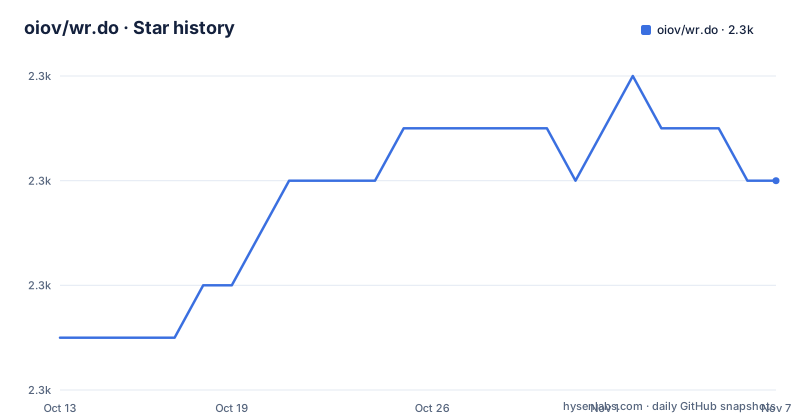
Star history
- oiov/wr.do2,290 ★ · +3
| Repository | 2026-10-13 | 2026-11-07 |
|---|---|---|
| oiov/wr.do | 2.3k | 2.3k |
3 Stars in the last 25 days, measured from the daily GitHub snapshot. Compare with other projects
Editorial analysis
Five services share one Prisma database and one admin panel
WR.DO is an all-in-one domain services platform. Its five modules are short links, domain email, subdomain management, file storage and an open API, and an admin module sits over all of them. The stack is Next.js, React and TypeScript, Tailwind CSS for styling, Prisma as the ORM, Next-Intl for internationalization, Resend for mail and Cloudflare as the main cloud infrastructure. Vercel is the recommended deployment platform.
Short links can be custom, carry a generated QR code, sit behind a password, expire at a set time, and be created through an API. Visit statistics include a live log and map views. The geographic data comes from a GeoLite2 City database that the Docker image fetches from npm at build time, so no MaxMind account or manual mount is needed. Vercel does not need that database.
The README is written in Chinese, with an English version in README-en.md at the repository root.
Two extra files describe how the pieces are run. docker-compose-localdb.yml sits beside docker-compose.yml at the root, and vercel.json configures the Vercel path. The prisma directory holds the schema that package.json points to, and the locales and i18n directories carry the translations.
Unlimited email addresses depend on a Cloudflare Email Worker for receiving and Resend for sending
The email module can create any number of mailboxes with custom prefixes and receive unlimited mail, but receiving depends on a Cloudflare Email Worker. Sending depends on Resend. Without those two services the headline claim of unlimited addresses has nothing behind it.
The feature list also names a Catch-All configuration, filtering to unread mail, Telegram push to multiple channels or groups, and API calls to create a mailbox or fetch inbox messages. The compose file and .env.example show the sending settings: RESEND_API_KEY, BREVO_API_KEY, EMAIL_FROM and EMAIL_FROM_NAME, with EMAIL_FROM defaulting to [email protected] in the example file. A separate NEXT_PUBLIC_EMAIL_R2_DOMAIN holds a Cloudflare R2 custom domain for stored mail.
The practical limit is that the receiving path lives in Cloudflare, not in the app container. Inbound mail therefore needs the domain on Cloudflare.
Subdomain handouts run on DNS records across several Cloudflare accounts, with an approval queue
The subdomain module manages DNS records for multiple domains spread over multiple Cloudflare accounts. It can create several record types, including CNAME, A and TXT. A request mode lets users submit an application and an administrator approve it, and email notifications tell both sides the status of a domain application.
That makes WR.DO suitable for offering free subdomains on a domain you own, with a human in the loop. The listed capabilities stop there: the feature list names no record validation beyond the record types, no rate limiting and no automatic expiry of handed-out names. If you run a public service, those policies are yours to write.
The admin module adds user management with permissions and usage quotas, an option to disable users, and a management view of all short links, mailboxes and subdomains created by every user.
Storage talks to any S3 API provider, with several buckets per channel
File storage supports multiple S3 API channels, such as Cloudflare R2, AWS S3 and OSS. One channel can hold several buckets. The upload size limit is configurable dynamically, uploads work by drag and drop, in batches or by paste, and files can be deleted in batches.
From a stored file you can quickly produce a short link or a QR code, and some file types preview in the browser. The dependencies include the AWS SDK S3 client and presigner, which is how the S3 compatibility is implemented.
The open API group is separate. It returns website metadata, a website screenshot, a QR code for a site and a Markdown or text conversion of a page, and the admin can generate user API keys for third-party calls. The screenshot service is pointed at by SCREENSHOTONE_BASE_URL, which .env.example sets to https://shot.wr.do, so a self-hosted install depends on that external service until you change it.
Docker Compose pulls a prebuilt image from GitHub Container Registry and refuses to start without AUTH_SECRET
The official image is published at ghcr.io/oiov/wr.do/wrdo:main, and latest also works. Nothing needs to be built on your server. Create a folder, download docker-compose.yml and .env.example from the repository, and rename the second to .env. Have PostgreSQL ready, fill in DATABASE_URL and AUTH_URL, and generate AUTH_SECRET with `openssl rand -base64 32`. Then:
docker compose pull
docker compose up -d
The compose file maps port 3000, sets NODE_ENV to production and marks AUTH_SECRET as required with a message that it must be a random value of at least 32 bytes, so the stack will not start without it. The container is named wrdo, joins a bridge network called wrdo-network and uses restart: unless-stopped.
After editing server-side variables in .env, run `docker compose up -d --force-recreate`. Changing runtime variables does not take effect until the container is recreated. Do not swap AUTH_SECRET on a live instance, since existing login sessions stop working.
The compose file passes through the OAuth settings for Google, GitHub and LinuxDo, the mail keys, SCREENSHOTONE_BASE_URL, GITHUB_TOKEN, SKIP_DB_CHECK and SKIP_DB_MIGRATION, plus MAXMIND_DB_PATH, which defaults to /app/geoip/GeoLite2-City.mmdb, and GEO_TRUST_FORWARDED, which defaults to false. Login methods are chosen from the admin panel: Google, GitHub, email verification, account and password, or LinuxDO.
The bootstrap admin must be created once and then taken out of .env
A first deployment needs BOOTSTRAP_ADMIN_EMAIL, which should be a personal address, and BOOTSTRAP_ADMIN_PASSWORD of at least 16 characters containing at least 8 distinct characters. Instances that already have a usable administrator do not need either. On Vercel the admin is initialized automatically during the build, and set DATABASE_URL, AUTH_URL and a random AUTH_SECRET there too.
Once the first administrator exists, remove BOOTSTRAP_ADMIN_PASSWORD from .env and recreate the container.
Upgrading has one trap. An [email protected] account that still uses the factory password is disabled on upgrade, and accounts with a changed password are untouched. If that was your only administrator, set the two bootstrap variables before upgrading, or you are locked out. The package scripts run bootstrap-admin.js with a check-secret flag before dev, start and start-server, so a missing secret stops the server at launch.
NEXT_PUBLIC values are fixed at build time, so the public image cannot take custom URLs or names
Next.js writes NEXT_PUBLIC_* variables into the browser code during the build. A prebuilt public image therefore cannot pick up new client-side values from the .env you provide at container start. If a deployment needs a custom site URL, a custom name or other client configuration, build from source and supply those variables before running `pnpm run build`.
The README is blunt that it cannot currently guarantee that the public image alone can complete those client-side settings. The docker-compose.yml still lists NEXT_PUBLIC_APP_URL, NEXT_PUBLIC_EMAIL_R2_DOMAIN and NEXT_PUBLIC_GOOGLE_ID, which reads as if they were adjustable, but the warning says otherwise for the client bundle.
The Dockerfile uses node:20-alpine, installs pnpm 9.15.9, runs pnpm test:auth and pnpm test:geo before the build, and downloads the GeoLite2 City file with npm pack at version 1.0.329 of @maxminddatabase/geolite2. A failing auth or geo test stops an image build.
Local setup is three commands plus a database push, and the project ships a hosted edition beside the open one
For local development, copy .env.example to .env, then:
git clone https://github.com/oiov/wr.do
cd wr.do
pnpm install
Initialize the database with:
pnpm postinstall
pnpm db:push
pnpm bootstrap-admin
After that, pnpm dev serves the app on localhost:3000. AUTH_SECRET must be at least 32 random bytes. The db:push script runs npx prisma migrate deploy.
The README separates two editions. The open-source demo at likedo.vercel.app is paused, so you must deploy it yourself. The operated edition at wr.do adds an AI Agent for managing site resources, which the self-hosted description does not claim.
The latest release is v1.1.8 on 2026-10-06, after v1.1.7 on 2025-11-14 and v1.1.6 on 2025-10-16. The repository is not archived, and its last push was 2026-10-17.
Beyond the app, the README links a sync workflow for forks that is manual by default, a Discord server and a WeChat group, so support runs through community channels and the issue tracker.
Editorial conclusion
Run WR.DO if you own domains on Cloudflare and want short links, receive-and-send domain email, subdomain hand-outs and S3 uploads under one admin panel, and you can operate PostgreSQL yourself. Do not choose the public Docker image if you need to change client-side NEXT_PUBLIC values, because those are baked in at build time and you would have to build from source. Before exposing it, set a real AUTH_SECRET, create the admin from the two bootstrap variables, then delete BOOTSTRAP_ADMIN_PASSWORD from .env.
Frequently asked questions
What does WR.DO include?
WR.DO bundles short links with QR codes and statistics, domain email, DNS subdomain management over Cloudflare, S3-compatible file storage and an open API, with an admin panel.
How do I self-host WR.DO?
Deploy to Vercel, or download docker-compose.yml and .env.example, set DATABASE_URL, AUTH_URL and AUTH_SECRET, then run docker compose pull and docker compose up -d. PostgreSQL is required.
Does WR.DO email need Cloudflare?
Receiving unlimited email depends on a Cloudflare Email Worker, and sending depends on Resend. The subdomain module manages DNS records on Cloudflare accounts.
Which WR.DO version is current?
The latest release is v1.1.8, published on 2026-10-06. The previous releases are v1.1.7 from 2025-11-14 and v1.1.6 from 2025-10-16.
Official sources
Add this badge to your README
If you maintain this project, the badge below links readers to this analysis and shows its maintenance status from the daily GitHub snapshot. Paste the markdown into your README; add ?metric=license or ?metric=stars to the image URL for a different field.

[](https://hysenlabs.com/projects/oiov-wr-do)Star history chart for your README
[](https://hysenlabs.com/projects/oiov-wr-do)Was this useful?