Rythm.js ships sixteen dance types and a test script that runs nothing
GitHub describes it as A javascript library that makes your page dance.. The repository metadata lists JavaScript as its primary language. The metadata lists the GPL-3.0 license. This article stays within the project description and details documented in the GitHub repository README.
At a glance
- What is it?
- Okazari/Rythm.js is a browser JavaScript library that scales, shakes and colours DOM elements in time with audio. Its API surface is documented down to each default value, its build is a rollup bundle, and its npm test command prints a placeholder and exits successfully, so nothing in the pipeline would catch a regression.
- Who is it for?
- Rythm.js suits a page that needs one decorative audio reactive element and nothing more, where adding a class name and an audio file is the whole integration, and where the sixteen built-in dances already cover what is wanted. It does not suit a team that wants a maintained dependency: the last push to the default branch is dated 2024-07-30 and the newest tagged release is v2.2.5 from June 2019.
- Can I use it commercially?
- Yes, with conditions. GPL-3.0 is a copyleft licence: if you distribute software that includes it, you must release that software's source code under the same licence. Running it internally without distributing it does not trigger that obligation.
- Is it still maintained?
- Probably not. The repository last received commits 27 months ago, on July 30, 2024.
- What is it written in?
- Mainly JavaScript, according to GitHub's language statistics.
Answers come from the project's GitHub data, last synced on October 22, 2026, and from our analysis. They are not legal advice.
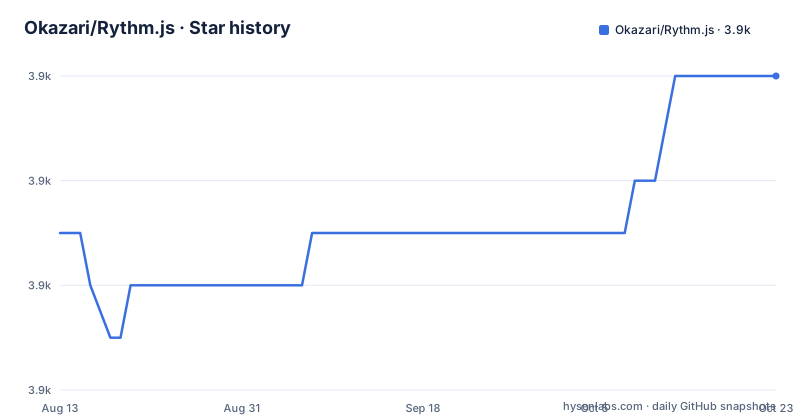
Star history
- Okazari/Rythm.js3,930 ★ · +3
| Repository | 2026-08-13 | 2026-10-22 |
|---|---|---|
| Okazari/Rythm.js | 3.9k | 3.9k |
3 Stars in the last 70 days, measured from the daily GitHub snapshot. Compare with other projects
Editorial analysis
The manifest says 2.2.6 and the newest release tag is 2.2.5
Three numbers describe this library and they do not agree. The version field in the package manifest is 2.2.6, the heading at the top of the README also reads 2.2.6, and the CDN link in the installation section points at a versioned file with 2.2.6 in its path. The newest tagged release, however, is v2.2.5, published in June 2019, and the two before it are v2.2.4 from October 2018 and v2.2.3 from February 2018. So the version people install from npm is one ahead of anything GitHub has released, which means the release page is not a reliable place to check what npm is serving. The last push to the default branch is dated 2024-07-30. That date is the honest measure of how current the code is: the project is not archived, but nothing has landed on the branch in more than two years, and the repository carries no claim of active development.
The test script prints a placeholder and exits zero
The test entry in the manifest is a single line that echoes a message and succeeds:
"test": "echo \"No test specified\" && exit 0"Whatever pipeline this repository is part of, running its tests proves nothing, because the command cannot fail. The dev dependencies tell the same story from the other direction: there is a test framework of any kind absent from the list, while there are several tools that only matter for producing a bundle. A maintainer reading the scripts has to conclude that there is no automated coverage of the sixteen dance types, of the frequency splitting, or of the reset path that custom dances have to implement. For a library whose entire behaviour is a set of transform calculations applied to elements, that means every visual effect is verified by looking at the demo page rather than by asserting anything.
The one runtime dependency is a static file server
The dependencies block contains a single entry, and it is not something the library needs at runtime to make elements dance:
"dependencies": {
  "watch-http-server": "^0.7.6"
}
That package serves files over HTTP and reloads them when they change, and it is what the start script runs alongside a watch mode on the build. Everything else a developer needs is filed under devDependencies, which is the correct split for a bundled browser library, but it means the published dependency list is not a description of what the code touches. The declared files array is two entries, the unminified build and the minified build, and the main field points at the unminified one. A consumer bundling this library therefore ships the larger file by default unless it overrides the entry, and it also ships a static file server in its dependency tree for no runtime benefit.
Two lockfiles sit beside a rollup build and a gulp serve script
The repository root holds both a package-lock.json and a yarn.lock, so two package managers have been used to resolve the same tree and neither has been retired. The build is rollup with babel: the script is a single call to a build script at the root of the repository, the babel configuration enables the ES2015 preset and the class properties transform, and uglify runs through a rollup plugin. A live-reload server is started by running a watch mode on that build next to a watch-http-server process, with both wrapped in concurrently so one dying kills the other. There is also a separate serve script that calls gulp. Two of those three mechanisms serve the same purpose, which tells you the project changed its tooling at least once and kept the older path alive. Linting is prettier for formatting plus eslint, and a precommit hook runs lint-staged, which formats staged JavaScript and CSS and then stages the result.
The two frequency arguments to addRythm are not explained
Making a custom class listen to a band of the audio means passing a class name, a dance name and two numbers:
+ `addRythm('rythm-bass', 'pulse', 0, 10)`
+ `addRythm('rythm-medium', 'pulse', 150, 40)`
+ `addRythm('rythm-high', 'pulse', 500, 100)`
The prose above those lines says the function makes a class listen to specific frequencies, and nothing further defines what the two numbers are or which is which. Reading the values, the first number rises with the class and the second falls, which is consistent with a lower and an upper bound on the band, but that is inference from three examples rather than something the documentation states. The three built-in classes are named bass, medium and high and each gets its own band, so a page with all three classes has three elements reacting to three different slices of the same track.
A custom dance must supply a reset function or the element never returns to normal
The extension point is the second argument of the same registration function, and it takes an object rather than the name of a built-in dance. The object has to carry two functions. The first is the dance itself, receiving the element, the current pulse value as a number between zero and one, and the options object a caller passed:
const pulse = (elem, value, options = {}) => {
  const max = options.max || 1.25
  const min = options.min || 0.75
  const scale = (max - min) * value
  elem.style.transform = `scale(${min + scale})`
}
The second is the reset function, which receives only the element and is called to restore its style. The worked example clears the transform outright by assigning an empty string. The requirement is not optional in practice: a dance that writes an inline style and no reset leaves the element stuck at whatever the last frame set, and a library with no test suite will not catch that.
Sixteen dances, and the demo page is the only way to see them
The built-in list runs to sixteen names, and each one is documented with the CSS property it writes and the default for every option. Pulse scales the element, jump translates it vertically, shake translates it horizontally and takes a direction, twist rotates it, and vanish drives opacity between zero and one with a reverse flag. BorderColor, color and fontColor interpolate between two RGB triples given as arrays of integers between zero and two hundred and fifty five. Radius, blur, kern, borderWidth and fontSize each write their own property with a minimum, a maximum and, where it makes sense, a reverse flag, while swing takes a curve, a direction and a radius instead of a range. The documentation then says to go to the demo to see each effect. That is the whole verification story: sixteen documented effects, and one page to look at.
The font size dance is documented as changing font width
Small inconsistencies in the option reference are worth knowing before you rely on it. The entry for changing element size is named fontSize, and its two options are described as the minimum and maximum value given to font-width, with defaults of 0.8 and 1.2. The two names do not refer to the same CSS property, so a reader has to decide which one is the typo, and the library's own worked example for a custom dance writes to the transform property rather than to either. The tilt entry has the same shape of problem in its range: a minimum of 20 and a maximum of 25, which is a narrow band compared with the swing radius default of 20 measured as a distance. The prose around the scale parameters is also loose, describing the pulse ratio as the maximum additional scale, with the formula given as the starting scale plus the pulse ratio times the current pulse, and the starting scale defaulting to 0.75 against a pulse ratio of 0.30.
Editorial conclusion
Rythm.js suits a page that needs one decorative audio reactive element and nothing more, where adding a class name and an audio file is the whole integration, and where the sixteen built-in dances already cover what is wanted. It does not suit a team that wants a maintained dependency: the last push to the default branch is dated 2024-07-30 and the newest tagged release is v2.2.5 from June 2019. It does not suit a project that relies on continuous integration to protect behaviour, because the test script is a placeholder that always passes. Before adopting it, decide whether a GPL-3.0 library belongs in the bundle, copy the two files the package declares into the repository rather than depending on npm, and check the version you get, since the manifest says 2.2.6 while the newest release tag is 2.2.5.
Frequently asked questions
How do I make an element dance with audio in Rythm.js?
Import the package, create a Rythm object, point it at an audio file and call the start function. The element needs one of the built-in classes, such as rythm-bass, rythm-medium or rythm-high, or a class registered through the addRythm function with a frequency range.
Does Rythm.js need a test suite to be used safely?
There is no test suite to run. The npm test script is a placeholder that prints No test specified and exits successfully, so it cannot fail, and no test framework appears among the development dependencies. Behaviour is documented option by option and shown on the demo page.
Is the spelling with an R or without one?
The project name is spelled with a y: the npm package is rythm.js, the module is imported as `import Rythm from 'rythm.js'`, and the class constructor is Rythm. The word has no other spelling anywhere in the package or the class names.
Official sources
Add this badge to your README
If you maintain this project, the badge below links readers to this analysis and shows its maintenance status from the daily GitHub snapshot. Paste the markdown into your README; add ?metric=license or ?metric=stars to the image URL for a different field.

[](https://hysenlabs.com/projects/okazari-rythm-js)Star history chart for your README
[](https://hysenlabs.com/projects/okazari-rythm-js)