sql-server-samples: Microsoft's sample database warehouse, and how to avoid cloning all of it
Azure Data SQL Samples - Official Microsoft GitHub Repository containing code samples for SQL Server, Azure SQL, Azure Synapse, and Azure SQL Edge
At a glance
- What is it?
- The official sample repository for SQL Server and Azure SQL, organized as a folder per sample, with prebuilt database releases that save you building them from scripts.
- Who is it for?
- This repository is best understood as a download destination rather than a codebase. The releases carry prebuilt databases, so the common mistake is spending twenty minutes restoring a backup you could have fetched, or worse, cloning several gigabytes of samples to read one script.
- Can I use it commercially?
- Check first. The repository uses a licence we do not classify automatically, so read its LICENSE file before any commercial use.
- Is it still maintained?
- Yes. The repository last received commits 1 day ago.
- What is it written in?
- Mainly PowerShell, according to GitHub's language statistics.
Answers come from the project's GitHub data, last synced on October 22, 2026, and from our analysis. They are not legal advice.
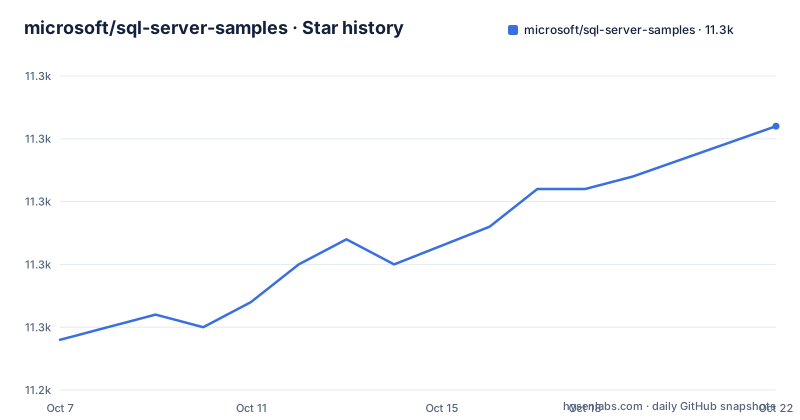
Star history
- microsoft/sql-server-samples11,266 ★ · +17
| Repository | 2026-10-07 | 2026-10-22 |
|---|---|---|
| microsoft/sql-server-samples | 11.2k | 11.3k |
17 Stars in the last 15 days, measured from the daily GitHub snapshot. Compare with other projects
Editorial analysis
A folder per sample, with a README the author must supply
The repository's organizing rule is stated plainly in the contribution guide. Each sample goes in its own folder with a README file that follows a template, and that template is itself committed as `README_samples_template.md`. Pull requests go into the `master` branch and are reviewed by an approver.
The `samples/` directory is where all of this lives, and it is subdivided by purpose rather than by product version. The visible directories are `applications/`, `containers/`, `databases/`, `demos/`, `development-frameworks/`, `extensibility/`, `features/`, `manage/`, and `tutorials/`, plus its own README. That taxonomy is the fastest way to find something: a query optimizer feature belongs under features, a full application under applications, a container image under containers, and the machine learning and database design material under tutorials.
One rule in the contribution guide is easy to miss and saves reviewers trouble. Generated files such as `.exe` or `.bacpac` and user settings such as `.user` should not be committed. A `.bacpac` in particular is a SQL Server dacpac deployment artifact, and checking one in would be shipping build output into a repository that already ships prebuilt outputs as release attachments instead.
The primary language detected for the repository is PowerShell, which fits a repository whose main tooling problem is driving a database engine rather than building an application.
Releases exist so you do not build the databases yourself
The README is explicit about why the releases section is there: releases provide convenient downloads of sample databases and applications, eliminating the need to build them from source code. That single sentence changes how you should approach the repository, because the databases themselves are large and the scripts that generate them take real time to run.
Four releases are highlighted. Wide World Importers sample database v1.0 is described as the main sample for SQL Server 2016 and Azure SQL Database, and it contains both an OLTP and an OLAP database. AdventureWorks is a sample database with OLTP, data warehouse, and lightweight options. In-Memory OLTP Performance Demo v1.0 illustrates the performance benefits of the In-Memory OLTP technology built into SQL Server and Azure SQL Database. IoT Smart Grid sample v1.0 shows SQL Server ingesting data from IoT devices and sensors and running analytics over it.
The releases list extends past those four. The newest one carries sample databases for the SQL Server Machine Learning Services and Language Extensions tutorials, including NYC taxi trip data and TPCx Big Bench sample data, each with its own attribution to the NYC Taxi and Limousine Commission and to TPC's fair use policies. There is also a release for the Azure SQL database design tutorial and one for developing applications with PHP and Azure SQL.
Two of those names will be familiar if you have worked with SQL Server at all. AdventureWorks and Wide World Importers are the reference schemas that documentation and books use for examples, and having them as release downloads means you can attach a realistic dataset to a query without hand-building one.
Sparse checkout for reading code without the payload
The repository anticipates the obvious problem with a sample archive, which is that cloning it in full is slow. The README gives a PowerShell recipe that clones without checking out a working tree, turns on sparse checkout, and then appends only the paths you want to a pattern file.
git clone -n https://github.com/Microsoft/sql-server-samples
cd sql-server-samples
git config core.sparsecheckout true
echo samples/features/*| out-file -append -encoding ascii .git/info/sparse-checkout
echo samples/demos/*| out-file -append -encoding ascii .git/info/sparse-checkout
git checkout
The `-n` flag on clone is the key detail. It fetches without checking out a working tree, so the delay moves to after the patterns are configured. The checkout at the end then materialises only what matched. Two things about this script are worth knowing before adapting it.
First, it is PowerShell, using the `echo` alias for `Write-Output` and the `|` pipe into `Out-File` with `-append` and ASCII encoding, which is how you write a pattern file in Windows PowerShell. The README links out to a Stack Overflow thread on Windows sparse checkout errors for the cases where the working directory comes up empty, which is the usual symptom of the pattern file not matching the repository layout.
Second, it is a starting point rather than a fixed recipe. If you only want one sample, replace the two patterns with the single directory you care about. If you want the databases themselves, you are better served by the release attachments than by the source tree.
What the repository covers, and the edition caveat that trips people up
The README describes the contents as code samples demonstrating how to use Microsoft's Azure Data products, naming SQL Server, Azure SQL Database, Azure Synapse, and Azure SQL Edge. The GitHub description for the repository says close to the same thing with a slight variation in wording, listing SQL Server, Azure SQL, Azure Synapse, and Azure SQL Edge.
That near-match is worth pausing on, because the two phrasings do not promise identical coverage. Azure SQL on its own can mean the managed database, a managed instance, or the server product, and the repository's own directory layout is the more reliable guide to what is actually present than either summary line.
The caveat the README raises immediately is about editions. Specific features such as In-Memory OLTP are edition-specific for SQL Server, and they are only available if you run the sample on an edition that supports them. This is the single most common reason a sample from this repository appears broken. Nothing is wrong with the code. You are running it on Express or Standard where the feature requires Enterprise, or on a managed database tier where the engine feature does not exist at all.
A related detail shows up in the release notes for Wide World Importers, which identifies itself as the sample for SQL Server 2016 and Azure SQL Database. That dates the schema to a particular engine generation, so if you are on a much newer server and something in the restore scripts behaves unexpectedly, the version gap between the sample and your instance is a reasonable first thing to check.
Licensing, contribution mechanics, and the odd corners of the tree
Two licensing facts sit side by side and it is worth keeping them distinct. GitHub does not identify a license for the repository, and there is no license type detected from the metadata. The README says all samples and templates are licensed under the MIT license and directs you to `license.txt` in the root. So the repository's own stated terms are MIT, while the machine-readable field GitHub displays is unfilled, which is a common state for repositories that ship a license file without adding a `LICENSE` file at the root or setting the license metadata. There is a `LICENSE` file in the tree, and a separate `license.txt`. If you are redistributing a sample in a product, read `license.txt`, since that is the file the README points you to.
The contribution path is a fork and pull request, not a CLA. The README lists three steps: visit the repository and fork it, work in the forked repository, and submit a pull request into the `master` branch of `sql-server-samples`, where one of the approvers will review it and accept or reject it. Questions go by email to [email protected], and the project has adopted the Microsoft Open Source Code of Conduct, with `[email protected]` as the contact for questions about it.
The root directory has some entries that do not fit the samples story. There is a file literally named `clone the fork`, a `manage-payg-transition/` directory, a `runnow.ps1` script, a `sql-server-samples.code-workspace` file for Visual Studio Code, a `.vscode/` directory, and `composer.json` with `composer.lock` and `phpcs.xml.dist`, which belong to the PHP samples. There is also a `Northwind-major8.png` entity diagram, and the README notes that the releases list now includes one for Northwind to help visual learners. Northwind is an older schema than AdventureWorks and appears to be kept around for exactly that kind of teaching use.
Editorial conclusion
This repository is best understood as a download destination rather than a codebase. The releases carry prebuilt databases, so the common mistake is spending twenty minutes restoring a backup you could have fetched, or worse, cloning several gigabytes of samples to read one script. Two habits cover almost everything. Use the releases when you want AdventureWorks or Wide World Importers as a running database, and use sparse checkout against `samples/features` and `samples/demos` when you want to read code. Remember that edition-specific features such as In-Memory OLTP only exist on editions that license them, which the README calls out as a caveat on every sample that needs it. The last push was on 2026-09-11, and questions go to [email protected] rather than the issue tracker.
Frequently asked questions
How do I get the AdventureWorks or Wide World Importers sample database?
Both are release downloads rather than something you build from the source tree. The README states that releases exist to provide convenient downloads of sample databases and applications, eliminating the need to build them from source. Wide World Importers v1.0 carries both an OLTP and an OLAP database, and AdventureWorks offers OLTP, data warehouse, and lightweight options.
Why does a sample from this repository fail on my SQL Server instance?
Check your edition first. The README warns that features such as In-Memory OLTP are edition-specific for SQL Server and only work when you run the sample on an edition that supports them. If you are on Express or Standard, the feature may simply not exist there, which makes the sample look broken when nothing is wrong with the code.
Can I clone only part of the sql-server-samples repository?
Yes, using git sparse checkout. The README gives a PowerShell script that clones with `-n`, enables core.sparsecheckout, appends `samples/features/*` and `samples/demos/*` to `.git/info/sparse-checkout`, then runs git checkout. Replace those two patterns with whichever single directory you actually need.
What license are the SQL Server samples released under?
The README states that all samples and templates are licensed under the MIT license and points to `license.txt` in the repository root. GitHub's own license metadata for the repository is not filled in, so the file the README names is the one to read if you intend to redistribute a sample inside a product.
How do I contribute a new sample?
Fork the repository, work in your fork, then submit a pull request into the `master` branch of `sql-server-samples`, where an approver will review it. Each sample belongs in its own folder with a README that follows the committed template, README_samples_template.md. Generated files such as .exe or .bacpac and user settings such as .user should not be committed.
Official sources
Add this badge to your README
If you maintain this project, the badge below links readers to this analysis and shows its maintenance status from the daily GitHub snapshot. Paste the markdown into your README; add ?metric=license or ?metric=stars to the image URL for a different field.

[](https://hysenlabs.com/projects/microsoft-sql-server-samples)Star history chart for your README
[](https://hysenlabs.com/projects/microsoft-sql-server-samples)Was this useful?