geo-sleuth: locating photos with map geometry and elevation data
An agent skill that finds where a photo was taken — OpenStreetMap geometry, elevation skylines, satellite imagery and street view — and shows its work. Works with Claude Code, Codex, Cursor, Gemini CLI, OpenCode and GitHub Copilot.
At a glance
- What is it?
- geo-sleuth is an Agent Skill that asks an AI coding agent to narrow down a photo's camera position using OpenStreetMap, elevation data, satellite imagery, and street view. It suits geolocation workflows where readable clues are absent, but its results depend on external map coverage and visual interpretation.
- Who is it for?
- Adopt geo-sleuth when an engineering workflow needs an auditable photo-location attempt across several evidence sources and is prepared to inspect the generated commands, coordinates, error radius, and evidence files. Do not adopt it as a standalone geolocation engine, for images covered by weak map data, or when a definitive answer is required without validation.
- Can I use it commercially?
- Yes. MIT is a permissive licence: you can use, modify and sell software built on it, as long as you keep its copyright and licence notices.
- Is it still maintained?
- Yes. The repository received new commits within the last day.
- What is it written in?
- Mainly Python, according to GitHub's language statistics.
Answers come from the project's GitHub data, last synced on October 23, 2026, and from our analysis. They are not legal advice.
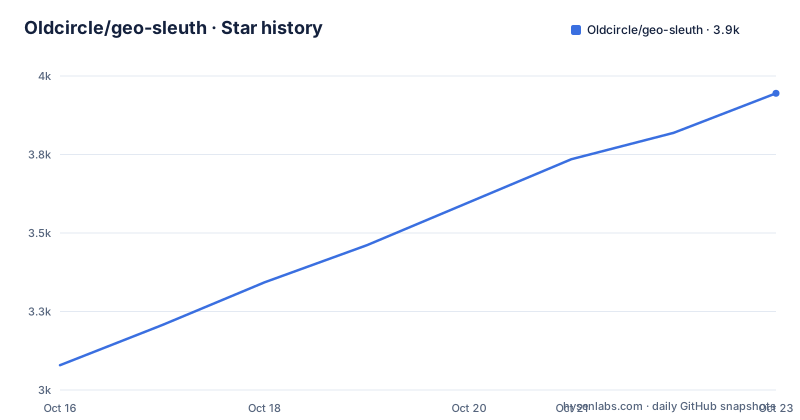
Star history
- Oldcircle/geo-sleuth3,945 ★ · +866
| Repository | 2026-10-16 | 2026-10-23 |
|---|---|---|
| Oldcircle/geo-sleuth | 3.1k | 3.9k |
866 Stars in the last 7 days, measured from the daily GitHub snapshot. Compare with other projects
Editorial analysis
Why geo-sleuth exists for clue-free photo searches
geo-sleuth targets a specific problem: finding the camera position in a photograph that contains no useful text, plates, or unmistakable landmark. Its intended audience is users who already work with agent environments such as Claude Code, Codex, Cursor, Gemini CLI, OpenCode, and GitHub Copilot. They want those agents to perform a structured image-geolocation workflow rather than answer from visual impression alone.
The README describes the interaction as "one photo, one sentence." After installation, a user gives the agent a photo and asks it to find where the photo was taken. According to the README, the expected result includes a camera position, the direction the camera faced, a satellite evidence image, and a confidence assessment expressed with an error radius. That output contract is more useful for review than an unsupported place name because it exposes the location estimate and the image used to support it.
The project is not limited to visible signs or reverse-image search. Its documented evidence sources include OpenStreetMap geometry, elevation-based horizon calculations, satellite tiles, and street view. This makes it relevant to scenes whose identifying information is physical: bridge spans, utility poles, road shapes, tree placement, ridge profiles, and shadows. It also makes the workflow data-dependent. A detailed geographic claim is useful only if the relevant map geometry, elevation samples, imagery, and street-view coverage exist.
The README says every claim should point to a file and to a command that ran in the agent session. Population or fame is explicitly rejected as evidence. That is a useful interface for engineering review because it gives a user something concrete to inspect instead of asking them to trust the agent's final sentence.
Inside geo-sleuth's candidate-generation and ranking pipeline
geo-sleuth follows the Agent Skill structure: a `SKILL.md` file instructs an agent, while plain Python scripts perform narrow operations. The README summarizes the division of labor as "Scripts rank, the model judges." In other words, scripts search, score, and sort candidates, while the model selects among the strongest results and explains the evidence.
The documented rice-paddy case shows the pipeline more concretely. The agent first interprets visual features such as electrified railway catenary masts, estimates bridge-pier spacing, and identifies the apparent distance to a mountain. It then scans railway bridge geometry from OpenStreetMap. The case reports 27,335 sampled segments, followed by elevation-derived horizon checks that left 171 sites. Candidate camera positions are then placed around those sites, producing 14,372 positions for skyline fitting. This is a narrowing process, not a direct reverse lookup.
Other examples use comparable clues. The desert case names power lines, skyline alignment, and a phone tilt as inputs. The Vancouver case names street-tree open data, shadows, and street view. These cases show that the workflow can combine several constraints rather than relying on one visual clue.
The README does not publish every script parameter or a universal scoring formula, so a particular precision or candidate-ranking implementation cannot be confirmed. What is documented is that scripts generate and rank candidates, the agent judges a smaller set, and the final answer is expected to include an error radius rather than only coordinates.
Installing geo-sleuth and checking the first-use prerequisites
The README uses the `skills` runner through `npx` for installation. Run this in the environment where you manage agent skills:
npx skills add Oldcircle/geo-sleuthThe README says to select the desired agents when prompted. After installation, give the agent a photo and make a direct request:
find where this photo was takenThe README identifies Python 3.10 or later as a project requirement. It also instructs first-time users to run `doctor.py` from the installed skill's `scripts/` folder and address failed checks. The README excerpt does not give the exact invocation or the individual diagnostic messages, so an invented command would be misleading. The documented first-use path is the installation command followed by the photo request.
The README also says users who prefer to copy the folder themselves should consult its Installation section. It does not provide a manual destination path or copy command in the displayed installation documentation, so those details are left unstated. The standard `SKILL.md` layout is the common integration point: agents that can read `SKILL.md` and execute shell commands can use the folder.
Evidence files and reviewable geolocation output
The defining design choice is traceability. The README says each conclusion should name the command executed in the session and the file produced. It also says the final response should contain coordinates with a radius, camera heading, an evidence image, and graded confidence. For an engineering team, that makes the result inspectable rather than merely plausible.
The documented rice-paddy workflow shows how visual interpretation becomes testable data. Pier spacing is treated as a distance ruler, although the case explicitly marks the assumed 32 m span as an assumption. Elevation data is sampled at intervals along candidate bridge segments, and a 360-degree horizon is calculated at sampled points. Candidate sites are filtered for surrounding terrain conditions before camera positions are rendered and compared against the ridge line. This approach exposes where uncertainty enters the analysis. The bridge-span assumption, terrain representation, and camera orientation all matter.
Satellite imagery serves as an evidence image for the proposed location. Street view can provide another view for comparison. The README does not identify a particular provider, nor does it specify coverage, caching, attribution handling, or behavior when a provider is unavailable. Those omissions matter when integrating the skill into an automated pipeline.
The repository includes example directories named `examples/desert-roll-fix/`, `examples/orientation-check/`, and `examples/rail-skyline-session/`. Their names indicate that orientation and correction workflows are part of the project, but the README does not document their contents. It would therefore be premature to describe a rollback process or a complete session-resumption protocol.
Where geo-sleuth can fail as a geolocation tool
The first limitation is evidence coverage. If the relevant OpenStreetMap feature is missing or incomplete, the region scan may omit the correct candidate. Sparse elevation data can produce an inaccurate horizon. Satellite tiles or street view may be unavailable for the area. The README does not state that geo-sleuth substitutes for any of these sources, so a missing upstream dataset is a genuine boundary rather than a solved edge case.
The second limitation is ambiguity. Repeated terrain, generic infrastructure, or visually similar road layouts can survive several filters. The method also relies on user-provided interpretation such as camera tilt and apparent object scale. The rice-paddy example calls its 32 m bridge span assumed, not proven. The README's graded confidence and error radius help communicate uncertainty, but they do not turn a candidate ranking into a guarantee.
geo-sleuth is therefore the wrong tool when the requirement is immediate forensic attribution, legal proof, or operation on imagery too low-resolution for skyline matching. It is also a poor fit when users expect a reverse-image search against indexed web pages, because the documented workflow is based on map geometry, elevation, imagery, and street-view comparison. The project does not identify itself as a replacement for a dedicated reverse-image-search service.
There is another operational concern. Because an agent selects and judges among top candidates, model behavior and prompt execution still matter. Script ranking narrows the search, but the README does not claim to eliminate model interpretation. Reviewers should inspect the actual command history and generated files rather than relying on the prose conclusion alone.
geo-sleuth compared with reverse-image search and manual map analysis
A real alternative is reverse-image search. That approach submits or queries an image through services organized around indexed web images. It can be useful when the original photograph or a near-duplicate has already been published. geo-sleuth takes a different route: it treats physical features as spatial constraints, searches mapped infrastructure, compares elevation-derived skylines, and checks satellite or street-view evidence.
Manual map analysis offers another alternative. A person can inspect roads, bridges, vegetation, and imagery by hand, adding interpretation at each step. geo-sleuth formalizes part of that process into scripts that sample large regions and rank candidate positions. Its distinction is not exclusive access to imagery. It is a repeatable path from image features to coordinates and evidence files.
The approaches overlap when a photo contains a distinctive indexed landmark, but they fail in different ways. Reverse-image search depends on indexed copies, while geo-sleuth depends on spatial datasets and feature interpretation. Manual analysis can use sources beyond the skill's documented workflow, but it is slower and less systematic for broad regional scans. Neither comparison removes the need to verify the proposed camera position.
MIT licensing and the current maintenance signal for geo-sleuth
The repository is licensed under MIT. That permits use, modification, distribution, and sublicensing subject to the license terms, while preserving the copyright and license notice. This is a repository-level licensing fact, not legal advice. Teams embedding the skill in a larger agent workflow should inspect the complete `LICENSE` file and preserve the required notice.
The repository is not archived. Its last push was on 2026-10-16. That is a recent maintenance signal, but the repository has no GitHub releases. The README does not document a release cadence or versioned migration record.
The primary implementation language is Python, and the README states that the skill consists of `SKILL.md` plus plain Python scripts. Upgrading by copying a newer skill folder may change agent instructions, candidate-generation logic, requirements, or script behavior. The README does not document an upgrade command, compatibility matrix, or rollback procedure, so those operational details need verification before an unattended deployment depends on them.
Editorial conclusion
Adopt geo-sleuth when an engineering workflow needs an auditable photo-location attempt across several evidence sources and is prepared to inspect the generated commands, coordinates, error radius, and evidence files. Do not adopt it as a standalone geolocation engine, for images covered by weak map data, or when a definitive answer is required without validation. The first project-specific check is whether a successful `doctor.py` run passes the setup requirements.
Frequently asked questions
What is geo-sleuth used for?
geo-sleuth is an Agent Skill for finding the camera position of a photo, especially when it has no text, plates, or obvious landmark. The documented workflow uses OpenStreetMap geometry, elevation data, satellite imagery, and street view.
How do I install geo-sleuth?
The README gives `npx skills add Oldcircle/geo-sleuth` as the quick-start command. Select the desired agents when prompted, then ask the agent to find where the supplied photo was taken.
Does geo-sleuth need external setup before its first search?
The README says first-time users should run `doctor.py` from the installed skill's `scripts/` folder and address failed checks. It also identifies Python 3.10 or later as a requirement.
Can geo-sleuth locate a photo that contains no readable text?
Yes, according to the README. The documented evidence includes structural geometry, bridge spacing, shadows, ridge lines, elevation-derived horizons, satellite tiles, and street view.
What output does a geo-sleuth result include?
The README says the response includes a camera position, the direction the camera faced, a satellite evidence image, graded confidence, and coordinates expressed with an error radius.
Official sources
Add this badge to your README
If you maintain this project, the badge below links readers to this analysis and shows its maintenance status from the daily GitHub snapshot. Paste the markdown into your README; add ?metric=license or ?metric=stars to the image URL for a different field.

[](https://hysenlabs.com/projects/oldcircle-geo-sleuth)Star history chart for your README
[](https://hysenlabs.com/projects/oldcircle-geo-sleuth)Was this useful?