knowledge-garden: an Obsidian vault with its editor config committed, and two releases three years apart
My second brain and digital garden, written using the Obsidian bidirectional-linking note-taking app.
At a glance
- What is it?
- A personal second brain published as a web garden, where the README is itself a note with wikilink frontmatter, the vault's Obsidian settings travel with it, and the author states that ninety percent of the notes are written for himself.
- Who is it for?
- knowledge-garden fits someone who wants to see a working note system rather than read about one: the configuration, the plugins and the daily workflow are all in the repository, and the two-year gap between releases tells you the value is in the notes rather than in the tooling. Three things to know before you clone it.
- Can I use it commercially?
- Yes. MIT is a permissive licence: you can use, modify and sell software built on it, as long as you keep its copyright and licence notices.
- Is it still maintained?
- Yes. The repository last received commits 1 day ago.
- What is it written in?
- Mainly TypeScript, according to GitHub's language statistics.
Answers come from the project's GitHub data, last synced on November 15, 2026, and from our analysis. They are not legal advice.
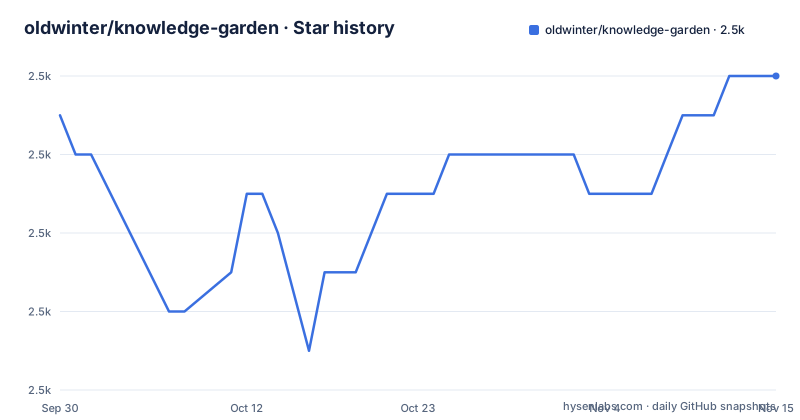
Star history
- oldwinter/knowledge-garden2,466 ★ · +1
| Repository | 2026-09-30 | 2026-11-15 |
|---|---|---|
| oldwinter/knowledge-garden | 2.5k | 2.5k |
1 Stars in the last 46 days, measured from the daily GitHub snapshot. Compare with other projects
Editorial analysis
The README is itself a note inside the vault
The file opens with frontmatter rather than a heading, and it is the same frontmatter every note in the vault uses. Four fields are visible: a publish flag set to true, a creation date of 2022-08-06, a modification date of 2025-07-12, a title, and a category whose value is a wikilink to another note in the repository.
That last field is the one that explains the whole project. The README you read on GitHub is a note in the system it is describing, its category is expressed as a link into the vault, and the body below is full of the same link syntax. A reader arriving through a repository browser sees the raw working format rather than a rendered manual.
So the front door is an artefact of the method. If you were looking for a documentation site explaining how to organise notes, this is not that: the documentation is the thing the repository contains, and the README is a note that happens to point at it.
The editor configuration travels with the notes
The repository root contains an Obsidian configuration directory, which means the vault's plugins, settings and appearance are committed alongside the notes. That is the mechanism behind the README's claim to be a complete snapshot of the plugins and workflow in daily use, and behind its instruction to download the repository as a template and open it.
The claim is checkable in one step: clone it, open the folder in Obsidian, and the configuration is already there. Nothing has to be installed from a list before you see what the notes look like.
The one alternative editor gets an explicit caveat in a footnote. Using VS Code is offered as an option, and the note says it needs an extra plugin installed before it will understand the wikilink syntax the vault is written in. So the vault is portable to a different editor, but the syntax support is not automatic there.
Ninety percent for the author, ten percent for the reader
The project describes itself in three parts, and the ratios in them are the most quotable part of the file.
The first is bidirectional notes as a best practice: a complete snapshot of the notes, plugins and workflow the author uses every day, written as a gradual progression from beginner to mastery so a reader can follow the same path. The second is a second brain shown honestly: the complete and current process and results of daily reading, note taking and writing, with ninety percent of the notes written for the author, kept as evergreen notes for future use. The third is an ungroomed digital garden, which avoids over-editing articles into something presentable, keeps the real detail, and states that ten percent of the notes are written for an audience.
Those two numbers together are the design statement. A reader is not the intended user of most of the material, and the author says so rather than presenting a curated feed. What you get is a working system with its rough edges intact.
Two releases, and the second one is called a revival
The release history has two entries and a large gap. Version 1.0 was tagged on 2022-10-13, roughly two months after the creation date in the README's frontmatter. Version 2.0 was tagged on 2025-07-11, and its release title names a digital graveyard and says it has been revived.
The gap is the interesting part, and the repository does not explain it. A vault that sat between an initial tag and a revival more than two and a half years later is a personal project on the scale its author actually keeps personal projects.
Two details follow from that. The README's own modification date, 2025-07-12, sits one day after the version 2.0 tag, so the file was revised immediately after the release. And the version 2.0 announcement tells readers to download the vault from the releases page, which makes the release archive, rather than a clone of the default branch, the distribution channel the author intends.
Contributions of notes are declined in the first person
The contribution section is short and blunt. Anyone who wants to contribute is told, apologetically, that this is currently a personal notes vault and that for the time being it cannot accept other people's notes being merged in.
Questions and requests to have gaps filled faster go to the repository's discussions page instead, with a promise that the author will reply as soon as he sees them. So the answer to a proposed pull request is available in advance, and it is no.
Set against that, the root of the repository carries agent instruction files for three different assistants, plus ignore files for two of them. The tooling assumes automated assistance, while the content is deliberately closed to outside contributions. Both of those are defensible positions for a personal archive, and together they tell you what kind of project this is: a portfolio you can learn from rather than a community you can join.
The folder scheme is the argument
The structure section links to a single note describing the organisation method the vault uses, given a name of its own in caps. Everything else in the root is a directory with a name that states its job: an atlas, a calendar, cards, extras, sources, spaces, an inbox, and a folder that serves as the garden guide and holds the onboarding documents.
Cards as a top level directory is the one that matches the claims in the README, since card notes are named there as one of the two things the published site is meant to demonstrate.
The published site is built to be wandered rather than searched. The quick start says to visit it and roam using the backlink panel at the bottom or right of the page, and calls the guide note the map. So the navigation model of the web version is the same as the navigation model of the editor: follow a link, see what links back.
One published site, and a guide to how it is built
Three destinations are linked from the top of the file. The primary one is the published site, which serves the notes on the web. The second is this repository. The third is the author's profile on a Chinese social platform.
The quick start then offers three ways in, and the third is the unusual one. It states that everything you see, including the text, the images and the websites, is fully open source, and it points at a publishing guide that explains how the flow from a local vault to the web actually works. Alongside it sits a note explaining why the notes are open sourced in the first place.
So the repository documents its own distribution pipeline, which is what makes it reusable rather than merely readable. Someone who wants the same setup can read how the site is produced from the vault, not just what the notes look like afterwards. A sponsorship badge at the foot of the file credits a free virtual machine service for open source projects, which is the hosting arrangement behind that pipeline.
Editorial conclusion
knowledge-garden fits someone who wants to see a working note system rather than read about one: the configuration, the plugins and the daily workflow are all in the repository, and the two-year gap between releases tells you the value is in the notes rather than in the tooling. Three things to know before you clone it. Distribution is by release archive, so take the version the README points at rather than assuming the default branch matches what the website serves. The vault is a Chinese-language personal archive, so if you want to reuse the structure you are reusing a folder scheme and a configuration, not the content. And contributions of notes are declined in the first person, with questions directed to the discussions page instead, which is the right thing for a personal vault to say and the thing that tells you this is a portfolio rather than a community project.
Frequently asked questions
What is the oldwinter knowledge-garden repository?
A personal digital garden and second brain written with Obsidian, described in its own README as bidirectional notes best practice, an honest second brain, and an ungroomed digital garden. Ninety percent of the notes are written for the author and ten percent for readers.
Does knowledge-garden include its Obsidian configuration?
Yes. An Obsidian configuration directory is committed at the repository root, so the plugins and settings travel with the notes. VS Code is offered as an alternative but needs an extra plugin before it understands the wikilink syntax.
Which version of knowledge-garden should I download?
The releases page. Version 1.0 was tagged on 2022-10-13 and version 2.0 on 2025-07-11, and the README's version 2.0 announcement tells readers to download the vault from releases rather than to clone the default branch.
Can I contribute notes to knowledge-garden?
Not at the moment. The README states apologetically that this is currently a personal notes vault and cannot accept other people's notes for merges for the time being. Questions and gap reports go to the repository's discussions page.
How is the knowledge-garden website built from the notes?
The README states that everything published, including text, images and websites, is open source, and links to a publishing guide explaining the flow that produces the web version, plus a note on why the notes are open sourced.
Official sources
Add this badge to your README
If you maintain this project, the badge below links readers to this analysis and shows its maintenance status from the daily GitHub snapshot. Paste the markdown into your README; add ?metric=license or ?metric=stars to the image URL for a different field.

[](https://hysenlabs.com/projects/oldwinter-knowledge-garden)Star history chart for your README
[](https://hysenlabs.com/projects/oldwinter-knowledge-garden)Was this useful?