U8glib: a monochrome display library that stopped being maintained
Arduino Monochrom Graphics Library for LCDs and OLEDs
At a glance
- What is it?
- U8glib is a C graphics library for monochrome LCDs and OLEDs, covering controllers from SSD1306 to T6963 over software SPI, hardware SPI and 8-bit parallel, with fonts, a mouse cursor and orientation support. Its README now points new users at u8g2.
- Who is it for?
- U8glib fits an existing project that already uses it and wants to keep the current code working, and it fits someone reading older tutorials that reference its API. It is a poor fit for anything new, because the project states there will be no more development and directs users to u8g2, so a new build would start against a frozen dependency.
- Can I use it commercially?
- Check first. The repository uses a licence we do not classify automatically, so read its LICENSE file before any commercial use.
- Is it still maintained?
- Yes. The repository last received commits 172 days ago.
- What is it written in?
- Mainly C, according to GitHub's language statistics.
Answers come from the project's GitHub data, last synced on November 6, 2026, and from our analysis. They are not legal advice.
Star history
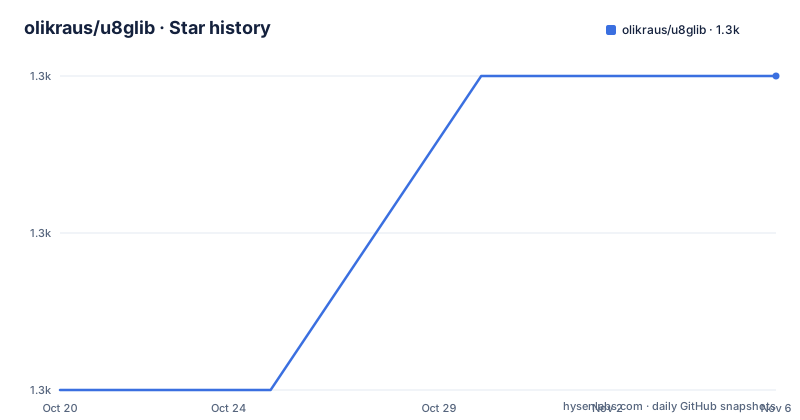
- olikraus/u8glib1,313 ★ · +2
| Repository | 2026-10-20 | 2026-11-06 |
|---|---|---|
| olikraus/u8glib | 1.3k | 1.3k |
2 Stars in the last 17 days, measured from the daily GitHub snapshot. Compare with other projects
Editorial analysis
The first line of the README says the project is finished
U8glib is a graphics library with support for many different monochrome displays, and the very first thing in the README is a notice: there will be no more development for U8glib, and you should use u8g2 instead, with a link to that project's wiki.
That single line changes what this repository is for. It is not a library you start a new project with. It is a library that existing code depends on, kept in place so that the dependency still resolves and the code still compiles, with the successor named for anyone who has a choice.
So the audience is narrow. It is a maintainer of an embedded project that already calls U8glib functions and needs to keep them working. It is also a reader of old tutorials and old code, because the API in this repository is the one those references describe, and the successor is not a drop-in rename.
The underlying problem U8glib addresses is a real one. Monochrome LCD and OLED panels are cheap and common, but each one has its own controller chip with its own command set for setting a pixel, choosing a page and a column, and turning the display on. The library's stated design goal is a well-defined interface to the device subsystem, so that application code does not have to know which controller is on the other end of the bus.
It is a library written for Arduino-class hardware, which in practice means 8-bit and 32-bit microcontrollers with a few kilobytes of RAM, where a frame buffer for a 128 by 64 pixel display is a meaningful fraction of the memory available.
Fifteen controllers and three ways to talk to them
The supported device list in the README is the clearest statement of the coverage: SSD1325, ST7565, ST7920, UC1608, UC1610, UC1701, PCD8544, PCF8812, KS0108, LC7981, SBN1661, SSD1306, SH1106, T6963 and LD7032.
The two displays in the README's own pictures are from the two ends of that range. On the left is an NHD-2.7-12864 OLED using an SSD1325, and on the right is an EA DOGS102 LCD using a UC1701. One is an OLED panel, the other an LCD panel, and both run through the same interface.
The interface choices are listed as COM interfaces: software SPI, hardware SPI, and 8Bit parallel. That third option matters for a class of displays that have no serial interface at all, and it is the reason the library supports controllers like the T6963, which are typical of larger character and graphic LCD panels rather than small OLEDs.
The buses are named as interfaces rather than as hardware assumptions, which is what makes the library portable across the very different boards it targets. A sketch written against one controller can be moved to another by changing the initialisation, and the drawing code above that layer does not change.
The supported environments are Arduino on ATMEGA and ARM, plain AVR on ATMEGA, and ARM with an example given for the LPC1114, and the nonarduino directory in the repository is the one that covers use outside the Arduino IDE. For someone working on a bare microcontroller with a cross compiler, the same library is expected to be usable without the Arduino abstraction layer on top.
Fonts, a mouse cursor, and both orientations
The feature list is short, and three of the entries are the ones that show what kind of library this is.
There is a large number of fonts, with a wiki page listing the font sizes, and both monospaced and proportional fonts are supported. On a 128 pixel wide display a proportional font makes a text label narrower, but a monospaced font is what you want for a numeric readout that does not jitter as the digits change, so the library carries both rather than choosing.
There is mouse-cursor support. On a monochrome display driven by a microcontroller there is no mouse, so this is about drawing a pointer and letting the application move it, which is how a menu or a small editor can be navigated with a rotary encoder or a couple of buttons. The M2tklib graphical user interface library is named separately in the list, available from its own project, and it is the layer that turns the cursor into an interface.
There is portrait and landscape mode, which for these panels is not a rotation of the framebuffer but a different set of page and column dimensions, since the controller itself is programmed for one geometry. Supporting both means the same drawing code can target a 96 by 64 panel in one orientation and the same physical panel turned on its side in the other, which is a hardware reality rather than a preference.
The Arduino version of the library is available in the Library Manager, and there is also a downloadable Arduino version from GitHub releases, so the two installation routes are the standard one and a manual one for people who want the latest code or need the release archive.
The source tree is a generator with the generated output checked in
The repository layout explains how a library that supports this many controllers and fonts is maintained at all.
There are parallel source directories, csrc and cppsrc, which is the convention of a C library that also offers a C++ interface. Then the font sources: fntsrc for the standard fonts and sfntsrc for the scalable or special ones. There is a dogmsrc directory, which corresponds to the DOG display series, the one in the README's own DOGS102 picture. The prj directory holds the project files for the different toolchains, sys holds the system level pieces, tools holds the tooling, and doc the documentation.
Alongside that sits a full autotools build: configure.ac, Makefile.am, autogen.sh and autoclean.sh. That is a Unix build system rather than an Arduino library manager only, and it is how the project is compiled for the nonarduino environments and for a native host.
The presence of fntsrc next to the compiled fonts is the point. Fonts are the part of a display library that grows without bound, and a font source format plus a generator in tools means a new font is added once as data and then compiled into the library for every controller. The ChangeLog at the root records the history, and the license.txt is the licence file, which GitHub cannot classify as one of the standard identifiers.
The tooling also explains the hackable claim in the feature list. Adding a device means adding a driver source and a configuration entry, and the font pipeline means you can supply your own glyphs.
What a new user should actually do
The practical advice for anyone arriving at this repository from a search result is short: use u8g2. The README names it directly, and the successor's wiki is the linked destination. Everything in this repository is a compatibility surface at this point.
If you are here because you inherited code that uses U8glib, the situation is different. The library still works, the device list is still broad, and the API is the one your code already calls. The things worth checking are whether the specific controller in your design is in the supported list, since a display added after the project's last development stopped will not be there, and whether your bus is one of the three supported, since a controller with an unusual interface may need one of the 8-bit parallel paths.
The other thing to check is the licence, because it is a custom one. The file is license.txt at the repository root, and the metadata says GitHub cannot classify it, so read it rather than assuming a permissive licence. That matters for a library you link into firmware, because the obligations attach to the distributed binary.
On maintenance, the repository is not archived, and the last push was on 2026-05-19, so occasional commits still land. The project has no published GitHub releases, so the version of the library you get is the tip of the master branch, or whatever the Arduino Library Manager serves.
The gallery linked from the README is worth a look before you decide anything, because it shows the same code driving a range of physically very different panels, and that breadth is the one thing this library has always done well.
Editorial conclusion
U8glib fits an existing project that already uses it and wants to keep the current code working, and it fits someone reading older tutorials that reference its API. It is a poor fit for anything new, because the project states there will be no more development and directs users to u8g2, so a new build would start against a frozen dependency. Before choosing it, read the u8g2 wiki that the README points to, check that your controller is in the supported device list, and read license.txt in the repository root, since the licence is a custom one that GitHub cannot classify.
Frequently asked questions
Is U8glib still being developed?
No. The first line of the README states that there will be no more development for U8glib and directs users to u8g2. The repository is not archived and the last push was on 2026-05-19, so occasional commits still land, but the library is frozen.
Which display controllers does U8glib support?
The supported list is SSD1325, ST7565, ST7920, UC1608, UC1610, UC1701, PCD8544, PCF8812, KS0108, LC7981, SBN1661, SSD1306, SH1106, T6963 and LD7032, and the library presents a well-defined interface to that device subsystem so application code does not depend on the controller.
What interfaces does U8glib support?
The COM interfaces are software SPI, hardware SPI and 8Bit parallel, the last of which covers controllers such as the T6963 that have no serial interface. The supported environments are Arduino on ATMEGA and ARM, plain AVR on ATMEGA, and ARM with an example for the LPC1114.
Does U8glib support fonts and a mouse cursor?
Yes. There is a large number of fonts, with both monospaced and proportional variants, plus mouse-cursor support for drawing a pointer that an application can move. A separate graphical user interface library, M2tklib, is named for building the interface on top of that cursor.
How do I install U8glib for Arduino?
The latest version for Arduino is available in the Library Manager, and an Arduino version can also be downloaded from the GitHub releases. The library also builds outside Arduino through its autotools setup, with configure.ac, Makefile.am and autogen.sh at the repository root.
Official sources
Add this badge to your README
If you maintain this project, the badge below links readers to this analysis and shows its maintenance status from the daily GitHub snapshot. Paste the markdown into your README; add ?metric=license or ?metric=stars to the image URL for a different field.

[](https://hysenlabs.com/projects/olikraus-u8glib)Star history chart for your README
[](https://hysenlabs.com/projects/olikraus-u8glib)Was this useful?