DSH Better Sidebar's install instructions are a seven row version table
Open sidebar foundation, supports third-party extensions to register new sidebar pages. Built-in file rendering/editing, terminal, side chat, Git, and sub-agent pages.
At a glance
- What is it?
- omdsh-dev/DSH-better-sidebar turns DSH's right column into an editable file tree, a changes view, a task list and a side chat, and opens a registration service to other plugins. The hard part is not the sidebar, it is the table mapping host versions to plugin pins.
- Who is it for?
- Read this plugin as version arithmetic wrapped around a sidebar. It is worth installing on DSH 0.2.1-rc.1 or newer, which the current release requires, where the file tree, editor, Git view and task list sit in the native right column.
- Can I use it commercially?
- Yes. MIT is a permissive licence: you can use, modify and sell software built on it, as long as you keep its copyright and licence notices.
- Is it still maintained?
- Yes. The repository received new commits within the last day.
- What is it written in?
- Mainly TypeScript, according to GitHub's language statistics.
Answers come from the project's GitHub data, last synced on November 15, 2026, and from our analysis. They are not legal advice.
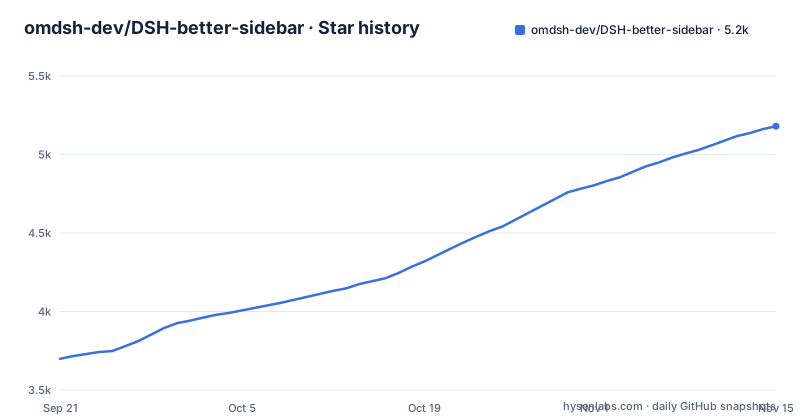
Star history
- omdsh-dev/DSH-better-sidebar5,180 ★ · +1,481
| Repository | 2026-09-21 | 2026-11-15 |
|---|---|---|
| omdsh-dev/DSH-better-sidebar | 3.7k | 5.2k |
1,481 Stars in the last 55 days, measured from the daily GitHub snapshot. Compare with other projects
Editorial analysis
The peer floor moved to 0.2.0 and the argument for it is a diff
The current release, v0.28.2, requires DSH 0.2.1-rc.1 or newer. As of 2026-10-26, DSH's npm `latest` is 0.2.1-rc.2, so the plain install command installs the compatible v0.28.2.
The README notes that the two packages' `latest` tags are independent.
A caret range across a host minor bump is disabled without a message
The README warns that the marketplace installer picks the plugin's `latest` regardless of host version, so an old host gets a version-rejection error; the fix is to upgrade the host or pin the version explicitly. Every older host line therefore gets its own exact pin rather than a range.
dsh plugin --profile web add [email protected]
dsh plugin --profile web add [email protected]
DSH 0.1.7-rc.1 to 0.1.7 stable users are told to pin `[email protected]`, and 0.1.6 and earlier, including the 0.1.5 line, pin 0.19.1; newer rows pin 0.24.1 for 0.2.0-rc.1, 0.26.1 for 0.2.0-rc.2, 0.28.0-alpha.0 for 0.2.1-alpha.5 and 0.28.2 for 0.2.1-rc.1 and newer. The 0.1.7 alpha line is the awkward one: the table states there is no installable version and that the host has to be upgraded to rc.1 first. The rule under the table is to pin exact versions for older releases, because `latest` moves forward with each new stable.
Since v0.19.0 the right column belongs to the host, not to the plugin
The architectural decision worth knowing is that the plugin stopped painting its own right panel. The right column is DSH's native sidebar, and a plugin registers each tab type as a native tab instead of drawing a side panel of its own. What the plugin still paints is the bottom workbench, which splits by dragging and persists per session, and it can sit open alongside the native column. What remains genuinely its own is the service: `ctx.betterSidebar` is opened to every plugin, for registering new sidebar tabs and file viewers. Startup is also split: about 325KB of core is pulled at launch, with heavy chunks loaded on demand.
Two sidebars on screen means the same loader got mounted twice
The most reported layout problem has a named cause and a named error. A leftover manual mount line in the profile's bundle patch file, `~/.dsh/profiles/web/cordis.patch.yml`, in the form below, mounts the plugin a second time:
- insert: ... better-sidebar ...Mounting the same id twice makes the loader report `duplicate loader entry id` outright. Aggregate bundles are the subtler case: a package such as `@linxin666/dsh-web-ui-all` mounts this same package under a different id, so nothing errors and you simply get two sidebars. From 0.13.x onward the plugin's own bundle patch stands down when it detects an already enabled mount of the same package name, and if the doubling persists anyway the check to run is whether the aggregate package's bundle order comes before `dsh-better-sidebar`. The patch file is not something you are meant to hand edit: the manifest points its bundle patch straight at the `cordis.patch.yml` in the repository root, so the mount ships as package metadata and the cleanup script treats old manual lines as idempotent work.
Preferences moved off settings.yaml and onto the mount line
DSH 0.1.7 deleted the namespace that plugins used to register settings under, so an upgrade can make a plugin look like it forgot your preferences. The destination is the mount line itself, in the profile, with the default entry id `better-sidebar`, and no longer `~/.dsh/settings.yaml`. The migration is handled once, on first start: the plugin reads the old file that the host has already renamed to `settings.yaml.imported`, moves the `dsh-better-sidebar` section across, and then stops. Two limits make that safe. Only fields the current schema still declares are migrated, so anything the plugin no longer understands is left behind rather than resurrected. And the move happens only where the mount line has no value of its own yet, so a preference you set after upgrading is never overwritten by an old number from the imported file. That ordering is the whole point: a migration that clobbered current values would be worse than one that dropped them.
The terminal went back to DSH, and node-pty left the dependency list
This release depends on no package that needs a build script, which is why the install is described as one step with nothing to compile. The README's FAQ states that this plugin itself has no build-script dependencies, while its bottom workbench still offers multiple terminal tabs. Two package manager friction points still show up, both documented as host side issues rather than plugin ones. pnpm 11 can block a transitive dependency's build script and report `Ignored build scripts`, which is cleared in the profile directory by approving builds:
pnpm approve-buildsA second error, `minimum release age`, appears when the version you asked for was published less than 24 hours ago. The documented workarounds are to wait or to run the command again, since pnpm adds the exclusion entry on the repeat.
Three install paths, a hard refresh, and a Playwright mount check
The supported path is a single add against a named profile, where `web` is your own profile name:
dsh plugin --profile web add dsh-better-sidebar@latestAfterwards you hard refresh the browser (Cmd/Ctrl+Shift+R). A second path hands the job to any DSH session, by pasting a prompt:
Install the dsh-better-sidebar plugin (a sidebar workbench for DSH):
1. Confirm DSH is 0.2.1-rc.1 or newer, then run dsh plugin --profile web add [email protected]
2. Remind me to hard-refresh the browser (Cmd/Ctrl+Shift+R) afterwards
If something fails, check the FAQ table in https://github.com/omdsh-dev/DSH-better-sidebar README first.
The third path clones the repository and runs `bash scripts/install.sh 0.28.2`, which works on macOS, Linux and Windows Git Bash, with `./scripts/install.ps1 -Version 0.28.2` for native Windows; it handles installation and bundle registration together. To update, re-run the install command, then hard-refresh the browser. If the `dsh` command is missing entirely, the documented fallback avoids installing anything:
npx -y --package @deepseek-ai/dsh dsh plugin --profile web add dsh-better-sidebar@latestFor contributors there is a real mount smoke test in the repository's Makefile, which builds, packs the tarball, installs Playwright's Chromium and runs `pnpm test:mount`, plus a second target for the aggregate double mount regression. The same file aggregates the quality gate as typecheck, then lint, then build, then test, then a consumer type check, and it forwards every target to the scripts declared in `package.json` rather than duplicating them.
Four export paths resolve to three client files
The published surface is narrower than the feature list suggests. The manifest is version 0.28.2, matching the newest release, marked as an ES module, requires Node 20 or newer, declares pnpm 11.8.0 as its package manager, and publishes publicly. The root export resolves to `lib/index.js` with types at `lib/types/index.d.ts`, and `./icon` resolves to `icon.svg`. Under `./client` the entry is `lib/client.js` with types at `lib/types/client/index.d.ts`, and both `./client/service` and `./client/api` point at that same `lib/client.js`, sharing one type file at `lib/types/client/service.d.ts`. So the API surface and the service surface are two names for one module. Raw sources stay reachable through `./src/*`, and `./package.json` plus `./locale/*.json` are exported for tooling that has to read the manifest or the translation files. Inside the `dsh` block the bundle patch points at the root `cordis.patch.yml`, the client injects five `@deepseek-ai/dsh-client-*` packages covering locale, UI slots, the conversation surface, the right sidebar and modules, the platform is `web`, and the manifest version is 1. The `files` array then lists the built entry points the package ships.
Editorial conclusion
Read this plugin as version arithmetic wrapped around a sidebar. It is worth installing on DSH 0.2.1-rc.1 or newer, which the current release requires, where the file tree, editor, Git view and task list sit in the native right column. It is not worth installing on a 0.1.7 alpha, where the table admits there is no installable version, and an old host given the plugin's `latest` gets a version-rejection error. Before you install, check three things: your DSH version against the table, since the two packages' `latest` tags are independent; whether an aggregate bundle already mounts this same package under a different id, which would give you two sidebars; and whether your old preferences were already moved out of `settings.yaml`, because that migration runs once and will not overwrite a value you set after upgrading. An English README.md and a Chinese README_ZH.md sit side by side in the root.
Frequently asked questions
Which DSH version does dsh-better-sidebar 0.24.1 need?
The README's table pins [email protected] for DSH 0.2.0-rc.1; newer hosts take newer releases, up to 0.28.2 for DSH 0.2.1-rc.1+. Users on the 0.1.7 line are told to fix version 0.22.1.
Why am I seeing two sidebars after installing dsh-better-sidebar?
Two mount paths are loading the same package. A leftover manual line in ~/.dsh/profiles/web/cordis.patch.yml with the same id makes the loader report duplicate loader entry id, while an aggregate bundle mounting this package under a different id gives you two sidebars with no error. From 0.13.x the plugin's own patch steps aside when it sees another enabled mount of the same package.
Where did dsh-better-sidebar settings go after DSH 0.1.7?
DSH 0.1.7 removed the settings namespace plugins could register, so preferences now live on the mount line in the profile, with the default entry id better-sidebar. The plugin migrates the old settings.yaml once, from the copy the host renamed to settings.yaml.imported, moving only fields the current schema still declares and only where the mount line has no value of its own.
Does dsh-better-sidebar still ship its own terminal?
Yes. The repository description lists a built-in terminal, the bottom workbench offers multiple terminal tabs, and the package ships lib/client-terminal.js; the README's FAQ notes the plugin itself has no build-script dependencies.
How do I install dsh-better-sidebar when the dsh command is missing?
Install DSH first, or use the one shot form given in the plugin's own troubleshooting table, which runs the add command through npx without a global install: npx -y --package @deepseek-ai/dsh dsh plugin --profile web add dsh-better-sidebar@latest.
Official sources
Add this badge to your README
If you maintain this project, the badge below links readers to this analysis and shows its maintenance status from the daily GitHub snapshot. Paste the markdown into your README; add ?metric=license or ?metric=stars to the image URL for a different field.

[](https://hysenlabs.com/projects/omdsh-dev-dsh-better-sidebar)Star history chart for your README
[](https://hysenlabs.com/projects/omdsh-dev-dsh-better-sidebar)Was this useful?