River: one sample at a time, a Rust extension, and a warning about batch learning
🌊 Online machine learning in Python
At a glance
- What is it?
- River is the merged creme and scikit-multiflow library for online machine learning in Python, where prediction, scoring and learning happen in a fixed order on every incoming sample. It ships pip wheels plus a compiled Rust core, and its own guidance says batch learning is usually the better answer.
- Who is it for?
- River earns its place when the stream is the only copy of the data you will ever have, and the project says plainly that batch learning wins in most other cases. Before you commit, check two things: whether your Python is 3.11 or newer, and whether anything beyond learn_one and predict_one needs the pandas extra.
- Can I use it commercially?
- Yes. BSD-3-Clause is a permissive licence: you can use, modify and sell software built on it, as long as you keep its copyright and licence notices.
- Is it still maintained?
- Yes. The repository received new commits within the last day.
- What is it written in?
- Mainly Python, according to GitHub's language statistics.
Answers come from the project's GitHub data, last synced on November 13, 2026, and from our analysis. They are not legal advice.
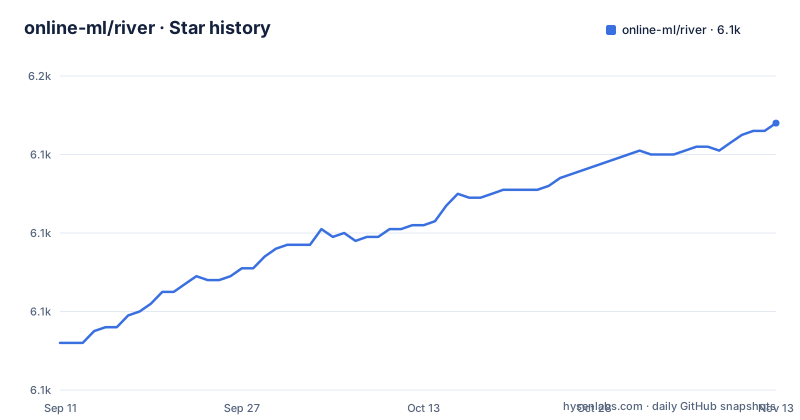
Star history
- online-ml/river6,148 ★ · +56
| Repository | 2026-09-11 | 2026-11-13 |
|---|---|---|
| online-ml/river | 6.1k | 6.1k |
56 Stars in the last 63 days, measured from the daily GitHub snapshot. Compare with other projects
Editorial analysis
One sample, three calls in a fixed order
River treats a dataset as an iterator over `(x, y)` pairs, and nothing happens until you pull the next item. The phishing example makes that concrete. The first observation comes back as a plain dictionary of nine numeric features (`age_of_domain`, `anchor_from_other_domain`, `empty_server_form_handler`, `https`, `ip_in_url`, `is_popular`, `long_url`, `popup_window`, `request_from_other_domain`) paired with the boolean label `True`.
The streaming loop then makes three calls per observation, and the order is the point: `predict_one` runs first, the metric is updated with that prediction, and only then does `learn_one` absorb the row. The metric therefore scores the model as it stood when the sample arrived, never as it stands after the sample was folded in. Printing the metric at the end gives `Accuracy: 89.28%`.
>>> from river import compose
>>> from river import linear_model
>>> from river import metrics
>>> from river import preprocessing

>>> model = compose.Pipeline(
...     preprocessing.StandardScaler(),
...     linear_model.LogisticRegression()
... )

>>> metric = metrics.Accuracy()

>>> for x, y in dataset:
...     y_pred = model.predict_one(x)      # make a prediction
...     metric.update(y, y_pred)           # update the metric
...     model.learn_one(x, y)              # make the model learn

>>> metric
Accuracy: 89.28%
Each sample crosses the scaler exactly once, so the `preprocessing.StandardScaler()` sitting in front of `linear_model.LogisticRegression()` never gets a second look at a row it already consumed. That single pass is the contract. Everything else in the library, from drift detectors to recommender systems, is layered on the same per-sample call.
Pip wheels cover three operating systems, git installs want Rust
River targets Python 3.11 and above, and the packaging metadata spells it out as `requires-python = ">=3.11"`. The ordinary install is one line, and wheels are published for Linux, MacOS and Windows, so compiling from source is not the default path for anyone:
pip install riverTwo further variants exist for people who want the tip of main rather than the published wheel. Both upgrade an existing install, one over HTTPS and one over SSH, and both require Cython and Rust to be installed on your machine before they will work:
pip install git+https://github.com/online-ml/river --upgrade
pip install git+ssh://[email protected]/online-ml/river.git --upgrade  # using SSH
That toolchain requirement is the real cost of the git route. The wheel route costs nothing but a pinned version, and the classifiers advertise Linux, MacOS and Windows alongside an Emscripten entry and a Rust entry. Release numbering is compact: 0.25.0 landed on 31 May 2026, then 0.26.0 and 0.26.1 both shipped on 21 August 2026, and the project still describes itself with the `Development Status :: 4 - Beta` classifier.
pandas is opt-in and the mini-batch names depend on it
The two core calls, `learn_one` and `predict_one`, carry no pandas dependency. The mini-batch interface does: `learn_many`, `predict_many`, `predict_proba_many` and `transform_many` are built on pandas and only exist once you install the extra. The split is visible in the dependency declarations:
dependencies = [
    "scipy>=1.14.1,<2",
    "numpy>=2.2.5,<3",
    "narwhals>=2.28.0",
][project.optional-dependencies]
pandas = [
"pandas>=3.1,<4",
]So the runtime floor for a pure streaming user is scipy 1.14.1 and numpy 2.2.5 plus narwhals 2.28.0, and pandas 3.1 only enters the picture when you call the batch-shaped names. Small datasets travel inside the built artifacts rather than being fetched at runtime, since the build configuration bundles `river/datasets/*.csv`, `river/datasets/*.gz`, `river/datasets/*.zip` and `river/drift/datasets/*.csv` into both the source distribution and the wheel. The heavier sets are left out on purpose, and a `download-datasets` Makefile target pulls Elec2, SMSSpam, CreditCard, Music, CriteoAds and the bandit NewsArticles data on request.
The compiled half forbids unsafe code and denies warnings
River is not pure Python. The build backend is maturin with `python-source = "."`, and the compiled module is named `river._river_rust`, with the Rust tree living in `rust_src/lib.rs` and the Cargo target declared as both `cdylib` and `rlib`. PyO3 does the binding work at version 0.29.2, next to bincode 1.3.3 for serialization, serde, serde_json, ordered-float 3.9 and libm 0.2.
[package]
name = "river"
version = "0.1.0"
edition = "2021"

[lib]
name = "river"
path = "rust_src/lib.rs"
crate-type = ["cdylib", "rlib"]

[lints.rust]
unsafe_code = "forbid"
warnings = "deny"
Those two lint settings are the ones to know before touching that code. Unsafe code is forbidden outright, and warnings are errors, including during a local `uv sync` or `maturin develop`, so dead code and unused imports stop the build instead of scrolling past in CI logs. There is also an `abi3` feature that targets the CPython stable ABI for 3.11 and up, but it is enabled only for the fallback wheel in CI while the default per-version wheels are built without it for full-speed native code. One inconsistency is easy to trip over: the Python package declares version 0.26.1 while the crate in `Cargo.toml` still says 0.1.0.
Progressive validation and drift detection ship beside the model
The breadth of the algorithm list is easy to over-read. The families River claims for streaming are linear models with a wide array of optimizers, decision trees and random forests, approximate nearest neighbors, anomaly detection, drift detection, recommender systems, time series forecasting, bandits, factorization machines, imbalanced learning, clustering, bagging, boosting, stacking and active learning. Alongside them sit feature extraction and selection, online statistics and metrics, preprocessing, built-in datasets, progressive model validation and model pipelines.
Progressive model validation has the same shape as the core loop: metrics update while data arrives, so there is no moment at which training ends and evaluation begins. The repository’s Makefile provides a benchmark target that runs pytest with CodSpeed. Run it through Make so that its optional `K` filter is expanded by Make rather than interpreted as shell substitution:
make benchmarkThe project's own answer is that batch learning is usually enough
River ships the strongest argument against itself. Its guidance asks whether you need online machine learning at all and answers that in most cases batch learning does the job just fine. Only three situations are named as fitting: a model that must learn from new data without revisiting the past, a model that has to hold up under concept drift, and development that mirrors an event-based production system.
Outside those three cases, none of the streaming affordances help you. The documented entry points are `learn_one`, `predict_one` and the pandas-gated batch names, and no batch fit over a historical table appears in the quickstart or the installation text. If your rows already exist as a single immutable history that will not keep changing, the streaming shape buys you a smaller set of modelling tools and a different mental model, not accuracy.
Clarity is the stated priority, and the speed claim is per sample
River says it focuses on clarity and user experience more so than performance, and the quickstart puts the performance point narrowly: very fast at processing one sample at a time. That is a claim about per-sample overhead, not about batch throughput, and the packaging supports the narrow reading, since anything that takes a frame goes through the pandas extra you may not have installed.
The measurement setup is scoped the same way. The Rust half declares codspeed benchmarks, among them stats_bench, adwin_bench, rolling_metrics_bench, sorted_window_bench, covariance_bench and expected_mutual_info_bench. These time the primitives, such as online statistics and drift detection internals, rather than end-to-end model training runs.
The documentation tooling has its own prerequisites. Rendering the site parses notebooks first, then hands off to zensical:
doc: render-notebooks
	python docs/parse river --out docs --verbose
	zensical build
So contributors need jupyter, graphviz, mypy, pytest and prek from the development dependency group before any of that runs. One small oddity: the `fomo` target is a byte-for-byte copy of `rebase`, since both simply fetch and rebase onto origin/main.
Editorial conclusion
River earns its place when the stream is the only copy of the data you will ever have, and the project says plainly that batch learning wins in most other cases. Before you commit, check two things: whether your Python is 3.11 or newer, and whether anything beyond learn_one and predict_one needs the pandas extra. The 0.26.x line was released on 21 August 2026 and the main branch was pushed to on 2 November 2026, so pin the version before you build on top of it.
Frequently asked questions
Do I need pandas to use River?
No for the core interface. The README states that learn_one and predict_one have no pandas dependency, and that learn_many, predict_many, predict_proba_many and transform_many are built on pandas and opt in through pip install "river[pandas]".
Which Python versions does River support?
Python 3.11 and above. The packaging metadata sets requires-python to >=3.11, and the project is marked with a Development Status :: 4 - Beta classifier.
How do I install a development version of River, and what does it need?
Two forms are documented, git+https and git+ssh, both with --upgrade. Both require Cython and Rust to be installed on your machine, since River ships a compiled Rust extension module built by maturin.
Why do the Python package version and the Rust crate version differ?
The Python project declares version 0.26.1 in pyproject.toml while the crate in Cargo.toml is still declared as version 0.1.0, so the two manifests version the same code independently.
When is River the wrong choice?
The project's own guidance is blunt: ask whether you need online machine learning, because most of the time batch learning does the job just fine. River also states that it optimizes for clarity and user experience more than for performance.
Official sources
Add this badge to your README
If you maintain this project, the badge below links readers to this analysis and shows its maintenance status from the daily GitHub snapshot. Paste the markdown into your README; add ?metric=license or ?metric=stars to the image URL for a different field.

[](https://hysenlabs.com/projects/online-ml-river)Star history chart for your README
[](https://hysenlabs.com/projects/online-ml-river)Was this useful?