link-preview-js: pulling OpenGraph metadata out of a URL on the server
⛓ Extract web links information: title, description, images, videos, etc. [via OpenGraph], runs on mobiles and node.
At a glance
- What is it?
- link-preview-js fetches a page and returns its title, description, images and videos by reading OpenGraph tags, with a Node build that defends against SSRF and a separate build for React Native and Cordova.
- Who is it for?
- link-preview-js fits backends that need a title, image and description for a user supplied link, where the server can reach the target and is authorised to fetch it. Custom headers and redirect options can help with compatible sites but do not guarantee access to protected or bot-blocked pages.
- Can I use it commercially?
- Yes. MIT is a permissive licence: you can use, modify and sell software built on it, as long as you keep its copyright and licence notices.
- Is it still maintained?
- Yes. The repository last received commits 4 days ago.
- What is it written in?
- Mainly TypeScript, according to GitHub's language statistics.
Answers come from the project's GitHub data, last synced on November 7, 2026, and from our analysis. They are not legal advice.
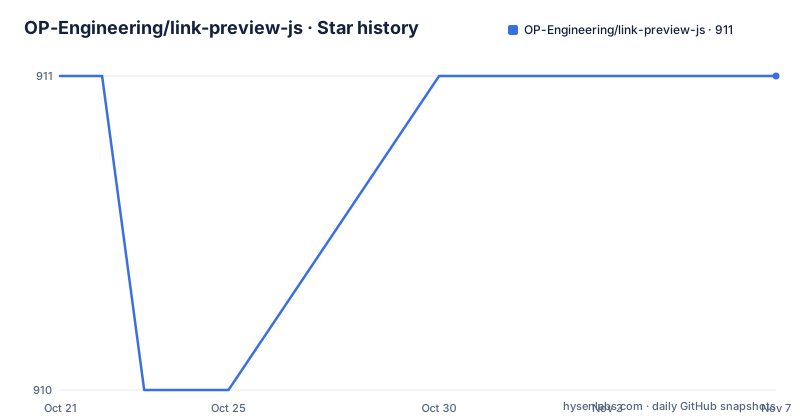
Star history
- OP-Engineering/link-preview-js911 ★ · +0
| Repository | 2026-10-21 | 2026-11-07 |
|---|---|---|
| OP-Engineering/link-preview-js | 911 | 911 |
0 Stars in the last 17 days, measured from the daily GitHub snapshot. Compare with other projects
Editorial analysis
A link preview is a metadata scrape, not a screenshot
link-preview-js answers a narrow question: given a URL, what title, description, image and video should I show for it. The mechanism is plain enough that the project states it almost as a warning in the issue guidance, describing the library as very simple because it fetches HTML, parses HTML, and searches for OpenGraph HTML tags.
That simplicity is the reason the library exists as a separate package rather than a feature of a larger framework. Any application that accepts a pasted link and wants to render a rich card for it needs the same three steps, and the same three failure modes, which are worth naming up front. The README says that if the target website redirects you to a login page the preview will fail, because the parser will read the login page. If the target website has no OpenGraph tags, the preview will most likely fail, since there are some fallbacks but in general it will not work. And the library cannot fetch another web page from your web page, which the project calls an intentional security feature of browsers called CORS.
So the users are backend developers building chat clients, link sharing features, bookmark managers or link to text converters. The output is a plain object of metadata fields, not a rendered card, and the caller decides what to do with it.
Two build targets, split by what the runtime can resolve
The package ships two variants and the split is not cosmetic. The default entry, also reachable as link-preview-js/node, is the full featured build for Node.js servers, and it includes the resolveDNSHost SSRF and DNS rebinding protection, which works by pinning HTTPS connections at the TCP layer via undici. The second entry, link-preview-js/mobile, targets React Native, Cordova and other non-Node, non-browser runtimes, and it has no undici or node:net dependency so it will not break bundlers that cannot resolve Node-only modules.
The import path is the only difference you have to remember:
// Node.js server (default import, same as "link-preview-js/node")
import { getLinkPreview } from "link-preview-js";

// React Native / browser / other non-Node runtimes
import { getLinkPreview } from "link-preview-js/mobile";
The package.json export map backs this up with separate require and import conditions for the dot, ./node and ./mobile specifiers, each pointing at its own compiled file in build/. The mobile entry also drops the resolveDNSHost option entirely, and the README gives the reason: mobile apps do not sit in front of a private network of internal services the way a server does, so there is no loopback or localhost target worth protecting against on-device. That is a deliberate scope decision, and it means the security posture of the two builds is not identical.
Installing the package and taking a first preview
Installation is a single npm command, given at the top of the README:
npm i link-preview-jsThe package requires Node 22 or newer, according to the engines field in package.json. The published files are the compiled output only, and the build step is a TypeScript compile driven by tsconfig.build.json.
The main entry point is getLinkPreview, and it is forgiving about its argument. You pass a string, and it does not matter whether that string is a bare URL or a piece of prose that happens to contain one, because the library parses the text and returns the info for the first valid HTTP or HTTPS URL it finds.
import { getLinkPreview, getPreviewFromContent } from "link-preview-js";

// pass the link directly
getLinkPreview("https://www.youtube.com/watch?v=MejbOFk7H6c").then((data) => console.debug(data));
The second export, getPreviewFromContent, is the one to reach for when you already have the bytes. It accepts a pre-fetched Response-like object and needs a data property holding the response content, a headers property that includes content-type, and a url property holding the resolved url.
// pass a pre-fetched response object
// The passed response object should include, at minimum:
// {
//   data: '<!DOCTYPE...><html>...',     // response content
//   headers: {
//     ...
//     // should include content-type
//     content-type: "text/html; charset=ISO-8859-1",
//     ...
//   },
//   url: 'https://domain.com/'          // resolved url
// }
That second form is the one that solves the CORS problem on the server side, since the fetch happens in your code and the library only parses the result.
Headers, timeouts and the redirect default that surprises people
Everything about the request is tunable through an options object. The headers option adds request headers to the fetch call, and the README gives the example of a googlebot user-agent together with an Accept-Language of en-US. This matters more than it looks, because the library acts as if the user would visit the page, so sites might redirect you to sign-up pages or consent screens. The README suggests trying to change the user-agent header with google-bot or with Twitterbot, and admits you have to work around those issues yourself.
The timeout option sets the timeout for the request to fail. The followRedirects option is the one that deserves attention because of its default. For security reasons, the library does not automatically follow redirects, and the default value is 'error'. The documented values are 'error', 'follow' and 'manual', and the reasoning is given plainly: a malicious agent can exploit redirects to steal data. If you set it to 'manual' you then have to pass a handleRedirects function that validates the redirect yourself.
The imagesPropertyType option narrows which images are collected, fetching images only with the specified property, using a selector of the form meta[property='${imagesPropertyType}:image']. Leaving it unset takes the images the page offers.
A practical consequence: on a site behind a login or a consent wall, the fix is usually a combination of headers, timeout and followRedirects rather than any single setting.
The browser problem the project refuses to work around
The README is unusually blunt about this. Browser scripts can read cross-origin responses only when the target permits the requesting origin under its CORS policy. Because many arbitrary pages do not grant that access, browser-only link previews are unreliable. The project provides Node.js and mobile builds for the supported runtime environments.
There is also a security warning in capitals above the fold: do not fetch content directly from a users device, only run this in your server and sandbox it if you can. The reasoning given is that while browser access to cross-origin responses is constrained by CORS, you might be clever and run this in React Native, and the project calls that a bad idea because you are exposing the device user to potentially malicious links.
That warning deserves to be taken seriously rather than read as boilerplate. A preview fetch on a device means the device visits a URL an attacker chose, from a network that may be a private one, on a platform where there is no server side rate limit and no isolation. Running the fetch on your own server, with the resolveDNSHost protection in the node build, keeps that request in a place where you can see it and constrain it.
SSRF and DNS rebinding are the reason the node build differs
The security architecture of the node entry is worth separating from the parsing logic, because it changes what the library can reach. The resolveDNSHost protection is described as SSRF and DNS rebinding protection, and it works by pinning HTTPS connections at the TCP layer via undici. The undici package is a runtime dependency of the library, listed in package.json at version ^8.6.0, and it exists for this purpose.
The underlying problem is a familiar one for any server that fetches URLs chosen by users. A request to a public hostname can resolve, at the socket level, to a private address such as 127.0.0.1 or an address inside your own network, and the DNS answer can change between the check and the connection, which is the rebinding half of the problem. Pinning the connection at the TCP layer closes the gap between what was validated and what is actually dialled.
Two limits are visible in the facts. First, this protection exists only in the node build, since the mobile build has no undici or node:net dependency and no resolveDNSHost option. Second, the documentation does not document a way to allowlist or denylist hosts, so the control you have is the transport level pinning rather than a configurable policy list. If your threat model needs a per-tenant allowlist, you would be building that layer yourself on top of the option.
Cheerio does the parsing, and the source layout says so
The repository root is small and flat, and the file names explain the design. There is index.ts, node.ts, mobile.ts, shared.ts and constants.ts, alongside a __tests__ directory and the build configuration. The split maps directly onto the two published entrypoints: shared.ts holds what both builds need, and node.ts and mobile.ts hold the build specific pieces, such as the resolveDNSHost wiring that only the node side can use.
The HTML parsing itself is done by cheerio, pinned as a dependency at version 1.0.0-rc.11, with a matching @types/cheerio in the dev dependencies. The version is a release candidate, which is worth knowing before you pin this library, since a pre-release can change behaviour between upgrades. The main entry in package.json points at build/index.js with types at build/index.d.ts, so the published artefact is compiled JavaScript with type declarations rather than source.
The toolchain is not the usual npm one. The scripts run bun test for both the local and CI test commands, and the repository carries a bun.lock file, with @types/bun in the dev dependencies. Linting and formatting are handled by oxlint and oxfmt, and the TypeScript dependency is itself a 7.0.1-rc release candidate, with mise.toml at the root presumably pinning the tool versions for contributors.
Version 5.0.x landed in July and October 2026
The repository is not archived and the last push was on 2026-10-14. The recent release history shows 5.0.1 on 2026-10-14, 5.0.0 on 2026-07-31 and 5.0.0-beta.0 on 2026-07-03, so the major version landed in July 2026 after a beta in the same month, with a patch following in October. The release notes in the repository are titled only Release 5.0.1 and Release 5.0.0, so the changelog detail behind the major bump is not visible in what the project publishes at the top level.
For an adopter, that means two things to check. A 5.x to 6.x jump would be a major version move and worth reading the diff for, since the two entrypoint build split and the default of 'error' for followRedirects are exactly the kind of behaviour that a major release is used to change. The pre-release dependencies on cheerio and typescript are the other: they are pinned to release candidates in package.json, so an upgrade of those packages inside your own lockfile can change parsing or type output without any release of this library at all.
The licence field on the repository says MIT. That permits use in closed source products and in mobile applications without additional terms, and it places no obligation on how you run the fetch, which leaves the policy decisions about which URLs your users may target entirely to you.
Editorial conclusion
link-preview-js fits backends that need a title, image and description for a user supplied link, where the server can reach the target and is authorised to fetch it. Custom headers and redirect options can help with compatible sites but do not guarantee access to protected or bot-blocked pages. Browser-only previews are limited by the target's CORS policy, and the mobile build lacks the Node build's resolveDNSHost protection. Before adopting it, check that the target sites actually publish OpenGraph tags, confirm your server can reach the target and not only the client, and decide whether redirects should be followed, since the default is to error. The last push was on 2026-10-14, release 5.0.1 landed the same day, and the licence field on the repository says MIT.
Frequently asked questions
How do I install link-preview-js and get a preview for a URL?
Run npm i link-preview-js, then import getLinkPreview from "link-preview-js" on a Node 22 or newer server and pass a URL or a string containing one. The promise resolves with the metadata parsed from the OpenGraph tags.
Why does link-preview-js fail in the browser?
Browsers block the request because it targets a different origin, which the README describes as an intentional browser security feature called CORS. The library is meant to run on a Node.js server or on a mobile runtime such as React Native or Cordova.
What is the difference between link-preview-js and link-preview-js/mobile?
The node build is the full featured one for servers and includes the resolveDNSHost SSRF and DNS rebinding protection, which pins HTTPS connections at the TCP layer via undici. The mobile build has no undici or node:net dependency so it works with bundlers that cannot resolve Node-only modules, and it has no resolveDNSHost option.
How do I make link-preview-js follow redirects?
Pass the followRedirects option with the value 'follow', since the default is 'error' for security reasons. Setting it to 'manual' instead requires you to pass a handleRedirects function that validates each redirect yourself.
Can I use link-preview-js with content I have already fetched?
Yes, use getPreviewFromContent and pass an object that includes data with the response content, headers including content-type, and url with the resolved url. This is the path to use when the fetch is done by your own code, for example on a server behind a proxy.
Official sources
Add this badge to your README
If you maintain this project, the badge below links readers to this analysis and shows its maintenance status from the daily GitHub snapshot. Paste the markdown into your README; add ?metric=license or ?metric=stars to the image URL for a different field.

[](https://hysenlabs.com/projects/op-engineering-link-preview-js)Star history chart for your README
[](https://hysenlabs.com/projects/op-engineering-link-preview-js)Was this useful?