yingzao: a poster skill that fixes one compositional fault and hands the model three images
A Claude Code / Codex skill that transforms Chinese architecture, cultural places and travel photos into art-directed editorial posters with GPT Image.
At a glance
- What is it?
- A Claude Code and Codex skill for turning Chinese architecture, shop, object and food photos into art-directed editorial posters. Deterministic Python gates run before the image model is called, one image read runs after it, and the second quota is never spent without your feedback.
- Who is it for?
- This skill has one job: editorial posters of real Chinese architecture, historic streets, shops, objects and food, produced by handing an image model one corrected original, one dominant reference and a sparse layout underlay. It is not a retouching tool, and product photography, exposure work and invented historic buildings are excluded on purpose.
- Can I use it commercially?
- Not without permission. GitHub finds no licence file in the repository, and without a licence all rights are reserved by default: you may read the code but not reuse it. Check the README, or ask the authors, before using it.
- Is it still maintained?
- Yes. The repository last received commits 72 days ago.
- What is it written in?
- Mainly Python, according to GitHub's language statistics.
Answers come from the project's GitHub data, last synced on November 14, 2026, and from our analysis. They are not legal advice.
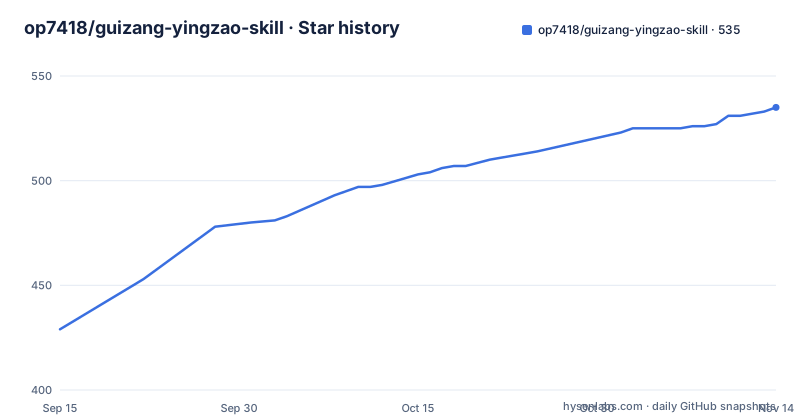
Star history
- op7418/guizang-yingzao-skill535 ★ · +106
| Repository | 2026-09-15 | 2026-11-14 |
|---|---|---|
| op7418/guizang-yingzao-skill | 429 | 535 |
106 Stars in the last 60 days, measured from the daily GitHub snapshot. Compare with other projects
Editorial analysis
Three tree entries, one Chinese README, and no license stated
The repository is unusually small at the top level. The whole tree is `.gitignore`, `README.md` and a single `yingzao/` directory, and there are no GitHub releases. Everything of substance lives inside that one directory.
The documentation is Chinese only. No English README is present, so the install command, the gates, the workflow and the scope exclusions are all written in Chinese, and the example prompts given to an agent are Chinese sentences. That is not incidental to the design: the skill designs Chinese display type, and the type work is described in terms of glyph metrics, counters and vertical writing order.
The directory listing explains itself in comments. `SKILL.md` is the entry point and a lightweight main flow, `agents/openai.yaml` holds skill display metadata, and `assets/` splits into `reference-plates/` for dominant references fed to the image model against `reference-thumbnails/` for lightweight browsing. `references/` carries five documents. The listing stops partway through the comment on the `scripts/` line, so what lives in there is only partly named in the tree.
One install command, and an instruction not to clone into a private directory
Installation is a single command:
npx skills add https://github.com/op7418/guizang-yingzao-skill --skill yingzaoThe README also offers a prompt you can hand to an agent so it installs the skill itself. That prompt names three things to do after the command lands: read the skill's SKILL.md, run the dependency check first, and do not clone the repository into a specific agent's private directory. That last clause is the interesting one, since it rules out the reflex most agents have and keeps the skill discoverable by other agents in the same environment.
Once installed, you invoke it by name in ordinary language, in a agent that supports Skills and can generate images. A representative request, in Chinese, asks for a 3:4 editorial poster from a photograph of Datong's old city and leaves the place name and title to the skill. Another asks for a Shanhua Temple caisson ceiling poster where the subject must dominate and the text must not intrude on the ceiling's core pattern.
Exactly one compositional fault gets repaired, and identity anchors are protected
The first thing the skill does with a photograph is classify it: frontal elevation, upward view, diagonal, framed view, partial component, or environmental narrative. Once classified, it repairs only one compositional problem, and only one that genuinely affects the image. The stated rationale is blunt: fixing everything produces a flatter result, and the more you correct the less the picture has to say.
The second constraint is identity. Roof slope, flying eaves, plaque inscriptions, silhouette and asymmetry are treated as anchors to protect. The instruction is explicit that a real building must not be optimized into a different building, which is the failure mode image models reach for when asked to improve a photograph.
Fact boundaries are set at the same stage. If the place, the hall name or the history is uncertain, the agent is asked to search first, and only verified, photograph-visible or user-confirmed information goes into the poster. There is also an explicit out-of-scope item that matches this: fictional historic architecture with no real place or subject basis is listed as unsuitable.
Four domains get proposed before any reference image is opened
The order of operations is deliberate. Before looking at any reference, the skill proposes a creative proposition across four domains: subject, background, image-text interaction, and a typographic action. The stated reason is that stacking more references makes the output worse rather than better, so the direction has to be committed to before reference images can dilute it.
Only then does it select one dominant reference from the built-in Recipe set and the real reference plates. The instruction against mechanically threading dozens of style words into the prompt is the same idea seen from the other side: the reference is supposed to carry a complete visual mechanism, not a list of adjectives.
The type work is where the specificity sits. Display characters are designed on width, center of gravity, stroke contrast, stroke endings, counters, rhythm and surface medium, and small text may fall back to a different conventional family to establish hierarchy. Subjects get semantically extracted, displaced, and given material per zone, with real contours and titles set to interlock by occlusion, shared edges or negative space. Multi-image requests extract a subject from each photo and rebuild one scene with shared perspective, light direction, contact shadows and edge language.
Three images go into the call, and S1, B1 and T1 tie prompts to regions
Every highly stylized task uses three visual inputs with distinct jobs. A corrected original carries identity, one dominant reference carries the full visual mechanism, and a sparse layout underlay fixes text extent, common axis, action zones and occlusion relations.
The selected Recipe is compiled into subject, background, font and interaction actions for the specific photograph. Those actions go two places at once: into the final ImageGen prompt, and into the underlay as region markers such as `S1`, `B1` and `T1`, so each instruction points at a concrete area rather than a vague intent. A handoff checklist verifies that every enabled Token actually reached the model input before the three images and the full prompt are locked together.
One detail shows the author has watched image models misread typography. Titles marked `reinterpret` use character slots rather than large ordinary font outlines, specifically so a Song typeface underlay is not mistaken for the final glyph. The model is asked to fuse the inputs, not to re-render a web layout that happens to be in front of it.
Seven deterministic gates before the call, one image read after it
Before any paid call, the skill runs checks it can perform without a model. Photo fit, roll and safely fillable regions. Fact and text boundaries. Compatibility between the dominant reference and the target geometry. Whether the subject, background and interaction domains are each visibly resolved. Whether Recipe Tokens reached both model actions and underlay markers. Font cmap coverage and fallback. And the typographic contracts: real glyph surfaces, common axis, collisions, no-go zones, vertical writing order and the subject-over-text rule.
After generation there is exactly one low-cost image read. It checks whether subject handling, active background, glyphs, image-text interaction and the reference mechanism are genuinely visible, then reports the most obvious problems. It does not regenerate and does not spend a second quota.
Further changes wait for your feedback, and the feedback is triaged by cost. Local glyph or edge faults get edited on the current image. Structural faults, meaning subject, background, main layout or the image-text relationship, go back to the original photo and redo the direction. That split is what keeps iteration affordable, since the expensive path is reserved for the faults an in-place edit cannot fix.
check_dependencies.py hunts for a .venv instead of touching global Python
The runtime floor is Python 3.10 or newer, with Pillow, NumPy, OpenCV and fontTools, inside an agent that can read local images and call image generation or editing tools. First use runs one script:
python3 yingzao/scripts/check_dependencies.pyThe behavior when packages are missing is the point. The script looks for a compatible `.venv` in the caller's directory and uses it, and it will not silently install anything into the global interpreter. Preparing that environment by hand takes two commands:
python3 -m venv .venv
.venv/bin/python -m pip install -r yingzao/requirements.txt
Two of the four required libraries do real measuring rather than generation. fontTools is what makes cmap coverage, counters, stroke contrast and vertical writing order checkable before the model runs, and OpenCV handles the geometry and collision work. The stated design principle is that rules are not better for being numerous, so the program is used where it is actually good, and the image model is left semantic extraction, spatial reconstruction, material, light and image-text relations.
Four categories are ruled out before the scope list starts
The exclusions are as specific as the inclusions. Suitable work is ancient architecture, historic streets, vernacular dwellings, gardens and local spaces; cultural shops, warm interiors, handicrafts and regional food; travel covers, single-image editorial posters and multi-image shared scenes; and anything needing Chinese display type designed against the subject.
Ruled out are ordinary product advertising and e-commerce main images. Ruled out is routine retouching, named as exposure adjustment, blemish removal, sharpening and sky replacement. Ruled out is invented historic architecture without a real place or subject. And ruled out is any task that only needs a deterministic collage with the text pasted on afterwards, because that job needs no image model at all.
That last exclusion explains the whole architecture. If a deterministic pipeline and a font can place the title, nothing here is worth the cost. The skill earns its place only when semantic extraction, spatial reconstruction and figure-ground interplay are genuinely required, which is also why the underlay stays sparse and why the glyph design brief precedes the call.
Editorial conclusion
This skill has one job: editorial posters of real Chinese architecture, historic streets, shops, objects and food, produced by handing an image model one corrected original, one dominant reference and a sparse layout underlay. It is not a retouching tool, and product photography, exposure work and invented historic buildings are excluded on purpose. Before running it, confirm your agent can read local images and call an image model, and that Python 3.10 or newer has Pillow, NumPy, OpenCV and fontTools, because the dependency check hunts for a sibling .venv rather than touching your global interpreter. One more thing to settle yourself: the repository lists no LICENSE file and its license field is empty, so there is no stated grant to rely on.
Frequently asked questions
What does the yingzao skill need before it will run?
An agent that supports Skills, reads local images and can call image generation or editing tools, plus Python 3.10 or newer with Pillow, NumPy, OpenCV and fontTools. Start with `python3 yingzao/scripts/check_dependencies.py`.
How is yingzao installed?
With `npx skills add https://github.com/op7418/guizang-yingzao-skill --skill yingzao`. The agent-facing prompt also tells the agent to read the skill's SKILL.md, run the dependency check first, and not clone the repository into a specific agent's private directory.
Does yingzao regenerate the poster if the first result is poor?
No. After generating, it reads the image once at low cost and reports the most obvious problems, then stops. It does not regenerate or consume a second quota until you give feedback.
What three images does yingzao pass to the image model?
A corrected original that carries identity, one dominant reference that carries the complete visual mechanism, and a sparse layout underlay fixing text extent, common axis, action zones and occlusion. Region markers such as `S1`, `B1` and `T1` connect prompt actions to those areas.
What is the yingzao skill explicitly not for?
Ordinary product advertising and e-commerce main images, routine retouching such as exposure, blemish removal, sharpening or sky replacement, fictional historic architecture with no real basis, and tasks needing only a deterministic collage with text pasted afterwards.
Official sources
Add this badge to your README
If you maintain this project, the badge below links readers to this analysis and shows its maintenance status from the daily GitHub snapshot. Paste the markdown into your README; add ?metric=license or ?metric=stars to the image URL for a different field.

[](https://hysenlabs.com/projects/op7418-guizang-yingzao-skill)Star history chart for your README
[](https://hysenlabs.com/projects/op7418-guizang-yingzao-skill)Was this useful?