Gitagent: the npm manifest, the install line and the release title tell three different stories
A universal git-native AI agent framework. Your agent lives inside a git repo — identity, rules, memory, tools, and skills are all version-controlled files.
At a glance
- What is it?
- Gitagent stores an AI agent as plain files in a git repo and ships it as two npm packages. Underneath that sits a set of mismatches worth reading first: two Node floors, a token passed in argv, ten OpenTelemetry dependencies with no telemetry section, and a Rust engine that appears only in a release title.
- Who is it for?
- Read Gitagent if you want an agent whose personality, rules and memory are ordinary version controlled files you can branch and diff, and if you are willing to read the source for the parts the documentation does not cover.
- Can I use it commercially?
- Yes. MIT is a permissive licence: you can use, modify and sell software built on it, as long as you keep its copyright and licence notices.
- Is it still maintained?
- Yes. The repository last received commits 17 days ago.
- What is it written in?
- Mainly Rust, according to GitHub's language statistics.
Answers come from the project's GitHub data, last synced on November 25, 2026, and from our analysis. They are not legal advice.
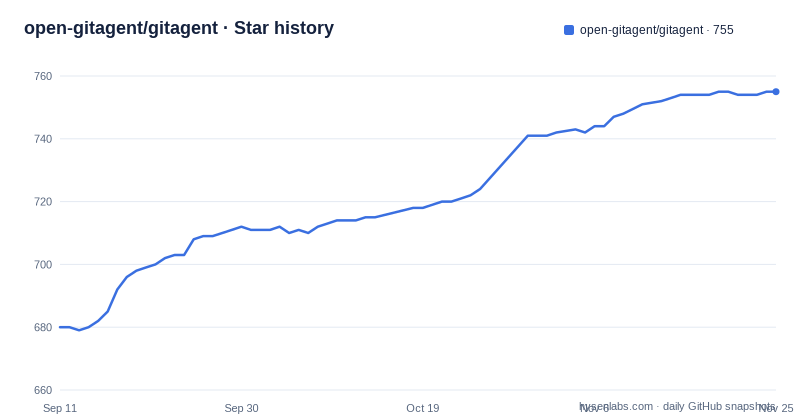
Star history
- open-gitagent/gitagent755 ★ · +75
| Repository | 2026-09-11 | 2026-11-25 |
|---|---|---|
| open-gitagent/gitagent | 680 | 755 |
75 Stars in the last 75 days, measured from the daily GitHub snapshot. Compare with other projects
Editorial analysis
Two Node floors, and the installer checks neither
Two different runtime floors sit in the same repository. The install section prints one line of requirements: Node.js 18+, npm, git. The package manifest that npm actually reads declares "engines": { "node": ">=20" }. A user on Node 18 can still fetch and run the installer, and npm will report the engine mismatch as a warning rather than refusing. The recommended path is a remote script piped into bash, with a timestamp appended purely as a cache buster:
bash <(curl -fsSL "https://raw.githubusercontent.com/open-gitagent/gitagent/main/install.sh?$(date +%s)")That one line installs both npm packages globally, walks through API key setup in either Quick or Advanced mode, and opens a voice UI at http://localhost:3333. Export GITAGENT_SLIM=1 first and the voice half is skipped. Nothing in that sequence reports which Node version it decided you have, and nothing checks the manifest floor before writing to a global prefix. Three labels also circulate for one project: the GitHub repository description calls it a universal git-native AI agent framework, while package.json and the README subtitle both call it a universal git-native multimodal always learning AI Agent, with the parenthetical name TinyHuman. Only the latter pair claims multimodal, and no visible setting gives vision or audio a switch, since audio lives in the separately installed voice package.
The documented fast path puts a GitHub token in argv
Local repo mode is the part with teeth: it clones a repository, runs the agent, then auto-commits and pushes to a session branch. The first example hands the token on the command line.
gitagent --repo https://github.com/org/repo --pat ghp_xxx "Fix the login bug"Resuming needs the same shape plus the branch name the previous run created:
gitagent --repo https://github.com/org/repo --pat ghp_xxx --session gitagent/session-a1b2c3d4 "Continue"The environment alternative arrives second:
export GITHUB_TOKEN=ghp_xxx
gitagent --repo https://github.com/org/repo "Add unit tests"
The flag table also accepts GIT_TOKEN and GITHUB_TOKEN as fallbacks for --pat. The session branch is not free text either: the resume example names it gitagent/session-a1b2c3d4, a fixed prefix plus eight hex characters, which is what a generated identifier looks like rather than a label you pick. Whichever way the token arrives, the write side is the same: the agent's commits land on a branch under that prefix and get pushed. A token in argv is readable from the process table and lands in shell history, so the ordering of these three examples matters more than it looks.
The repo keeps its own agent at the top level, minus tools and hooks
The pitch is that an agent is a repository: agent.yaml for model and runtime config, SOUL.md for personality, RULES.md for constraints, memory/ with git history, tools/ as declarative YAML, skills/ as composable modules, and hooks/ as lifecycle scripts. The project's own root is the test case. Its top level holds agent.yaml, SOUL.md, RULES.md, memory/, skills/, tsconfig.json, package.json, install.sh, src/, rust/, test/, docs/, examples/ and a directory called agents/. The two file names that carry the agent's identity, SOUL.md and RULES.md, sit next to LICENSE and README.md, exactly where the layout says they belong. The two directories the layout leans on hardest, tools/ and hooks/, are not at the top level of this repository at all, and a directory named agents/ appears instead, with no description in the visible text. Alongside them sit gaps.md, Documentation.md, CONTRIBUTING.md and GitAgent_Redesigned.pptx, which is a working repository rather than a curated one.
Ten OpenTelemetry packages and two YAML libraries in one list
The runtime dependency list is where the framework's real weight shows. Ten entries carry the @opentelemetry prefix: api, exporter-metrics-otlp-http, exporter-trace-otlp-http, instrumentation, instrumentation-undici, resources, sdk-metrics, sdk-node, sdk-trace-node and semantic-conventions. Both metric and trace exporters are OTLP over HTTP, and node-cron and undici instrumentation sit alongside them, which points at scheduled and HTTP-driven agent work. None of that has a section in the visible documentation, no environment variable for an OTLP endpoint appears, and no flag configures it. Two YAML parsers also ship together: js-yaml at ^4.1.0 and yaml at ^2, while the advertised tool format is declarative YAML files. Alongside those sit the agent core at pi-agent-core and pi-ai, both ^0.70.2, the Model Context Protocol client SDK at ^1.29.0, and typebox for schemas. MCP client support is what the v2.1.0 release of 2026-08-09 added, and the visible text does not explain how to point that client at a server, name a transport, or list the servers an agent may reach.
The published tarball is a tsc build, and the Rust engine lives in a release title
What npm hands you is a TypeScript compilation. The build script is tsc, the type field is module, main is ./dist/exports.js, types is ./dist/exports.d.ts, and the gitagent binary is ./dist/index.js, with a ./cli subpath that re-exports the same file. The version field reads 2.2.0, which matches the newest tag, so there is no number skew here. The repository, though, is Rust-first: rust/ and src/ both sit at the top level next to a tsconfig.json, and the v2.2.0 release of 2026-08-20 is titled for a Rust engine and a Lyzr Edgespace desktop app, published on the same day as the last push. Nothing in the visible text connects that Rust layer to the JavaScript entry points npm resolves. The published file list also keeps two exclusions from the old single bundle, !dist/voice and !dist/composio, even though voice now lives in its own package.
Supply-chain scanners blocked the bundle, and the answer was a curl into bash
The migration note is the most honest paragraph in the documentation, and it is also the one that explains the install method. As a single bundle the package was being rejected by some supply-chain scanners, which flagged a 3,800-line dist/voice/ui.html and an unused baileys dependency. Splitting voice out moved the slim core tarball from roughly 180 kB to roughly 85 kB and removed those triggers. So the fix was to publish a second package, and the documentation now recommends a manual install for exactly the environments that rejected the first one:
# Slim CLI + SDK (recommended in sandboxed/CI environments where supply-chain
# scanners reject larger bundles)
npm install -g @open-gitagent/gitagent

# Add voice mode + web UI (the same web UI install.sh launches at :3333)
npm install -g @open-gitagent/voice
The scanners objected to bundle size and an unused dependency. The documented remedy for those complaints is still to execute a script fetched over the network at the moment you paste the command.
Eight flags in the table, and --voice missing from it
The option table lists eight rows: --dir with -d for the agent directory defaulting to the current directory, --repo with -r for a GitHub URL to clone and work on, --pat with no short form, --session with no short form, --model with -m taking a provider:model string such as anthropic:claude-sonnet-4-5-20250929, --sandbox with -s for running in a sandbox VM, --prompt with -p for a single shot that skips the REPL, and --env with -e for environment config. Three of them are underspecified in ways that matter. --sandbox names no VM, image or requirement. --env names no file, though agent.yaml is the obvious candidate and the text never links the two. And --voice, described elsewhere as dynamically loading the separate voice package and printing an install hint when it is missing, has no row in the table at all. Two of the eight rows also carry short forms and six do not, and the positional prompt used in the first-run example has no flag of its own, so a caller who reaches for --prompt and a caller who appends bare text are two routes to the same input with no statement of what happens if both are supplied.
The visible documentation ends inside a hooks example
The navigation row at the top of the README promises Install, Quick Start, SDK, Architecture, Tools, Hooks, Skills and Plugins. The visible text carries Install, Quick Start, the SDK and the start of Hooks, then stops in the middle of a hook body, on a line that begins a write-tool argument check and never finishes. Architecture, Tools, Skills and Plugins have no visible section behind them. So the hook contract is half readable: the preToolUse callback can return { action: "block", reason: "Destructive command blocked" } for a cli call whose command contains rm -rf, and the text says arguments can be modified on the way through, but the rest of the lifecycle surface is not there to read. Three example files exist alongside the text, examples/local-repo.ts, examples/lyzr-sdk.ts and examples/sdk-demo.ts, and the lyzr one points at the same Edgespace product named in the v2.2.0 release. A docs/ directory and a .github/ directory sit at the top level as well, so the page is a summary of a larger repository rather than the whole of it. The dependency list in the manifest has its own ending, stopping partway down the yaml entry without a devDependencies block after it, which leaves the question of what the test tooling pulls in open at the same place.
Editorial conclusion
Read Gitagent if you want an agent whose personality, rules and memory are ordinary version controlled files you can branch and diff, and if you are willing to read the source for the parts the documentation does not cover. Before you build on it, settle four things for yourself: which Node floor your environment really is, because the manifest and the install text disagree; where the GitHub token lives, because the documented fast path puts it in argv and session branches get pushed automatically; what the Rust engine in v2.2.0 actually replaces, since the published entry points are still a tsc build; and how the agent files behave when two branches diverge, which the branching pitch invites and the visible text never addresses. The repository carries 53 open issues, so treat undocumented behaviour as likely to change.
Frequently asked questions
What Node version does Gitagent require?
Two answers. The install section states Node.js 18+, npm and git as the requirements, while the package manifest declares engines.node as >=20. Nothing in the installer resolves the difference for you.
How do I keep a GitHub token out of the command line in Gitagent?
Export GITHUB_TOKEN or GIT_TOKEN before running the command instead of passing --pat, since the flag table accepts both environment names as fallbacks. The first example in the docs passes --pat ghp_xxx directly.
What does install.sh do when Gitagent runs it?
It installs gitagent globally through npm, walks you through API key setup in Quick or Advanced mode, and launches the voice UI at http://localhost:3333. Setting GITAGENT_SLIM=1 first skips the voice half.
Why was voice mode moved into its own npm package?
Supply-chain scanners were rejecting the single bundle over a 3,800-line dist/voice/ui.html and an unused baileys dependency. Splitting voice out cut the slim core tarball from about 180 kB to about 85 kB.
Which Gitagent package gives me the CLI and SDK without voice?
npm install -g @open-gitagent/gitagent, which is the slim CLI plus SDK. The voice mode and web UI are a separate global install of @open-gitagent/voice.
What files make up a Gitagent agent?
agent.yaml for model, tools and runtime config, SOUL.md for personality and identity, RULES.md for behavioural constraints, memory/ committed to git, tools/ for declarative YAML tools, skills/ for composable modules and hooks/ for lifecycle scripts.
Official sources
Add this badge to your README
If you maintain this project, the badge below links readers to this analysis and shows its maintenance status from the daily GitHub snapshot. Paste the markdown into your README; add ?metric=license or ?metric=stars to the image URL for a different field.

[](https://hysenlabs.com/projects/open-gitagent-gitagent)Star history chart for your README
[](https://hysenlabs.com/projects/open-gitagent-gitagent)Was this useful?