The benchmark table mixes measured and estimated rows
Task-oriented AI Agent productivity platform
At a glance
- What is it?
- PilotDeck is an agent workspace platform built around per-project isolation of files, memory and skills. Its two cost tables are the most interesting document in the repository, and one of them lists an estimated baseline in the same column as two measured ones.
- Who is it for?
- PilotDeck suits someone running several agent projects in parallel who wants per-project memory, per-project cost visibility, and background execution that keeps working after they stop watching. Four things to check before you rely on it.
- Can I use it commercially?
- Yes, with strict conditions. AGPL-3.0 is a network copyleft licence: if people use a modified version over a network, for example as a hosted service, you must offer them its source code under the same licence.
- Is it still maintained?
- Yes. The repository last received commits 2 days ago.
- What is it written in?
- Mainly TypeScript, according to GitHub's language statistics.
Answers come from the project's GitHub data, last synced on November 15, 2026, and from our analysis. They are not legal advice.
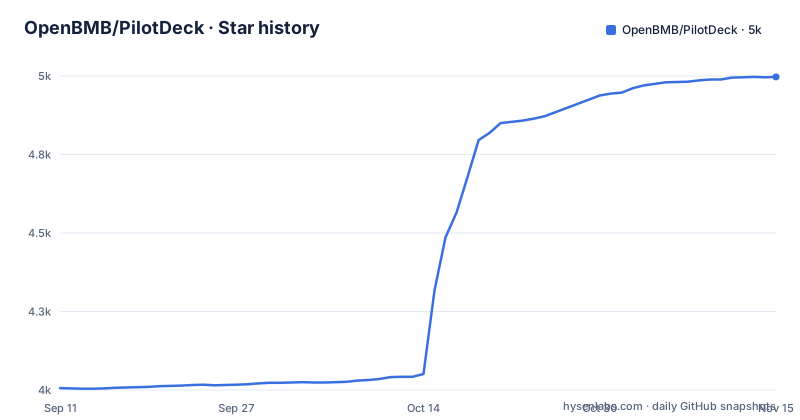
Star history
- OpenBMB/PilotDeck4,997 ★ · +991
| Repository | 2026-09-11 | 2026-11-15 |
|---|---|---|
| OpenBMB/PilotDeck | 4k | 5k |
991 Stars in the last 65 days, measured from the daily GitHub snapshot. Compare with other projects
Editorial analysis
One cost table puts an estimate in the same column as two measurements
The first table compares three configurations on a social-media workload. Smart routing on, with a flagship model as main and a lighter one as sub, is listed at a cost of 2.83 dollars with a multiplier of 1.1. Routing off, everything on the flagship model, is listed at 12.58 with a multiplier of 5.0. The third row is a single flagship model in one long reasoning pass, and its cost is marked as an estimate. Reading the cost column directly, routing on costs about a fifth of routing off and about a quarter of the estimated single-model figure. Two observations. The estimate is labelled, which is more than most marketing tables bother with, and at 12.20 dollars it sits slightly below the measured routing-off row at 12.58. Separately, the README says routing demotes simple polishing and layout tasks to a sub-agent and invokes the expensive model only at planning checkpoints, so the saving comes from a scheduling policy, not from a smaller model doing everything.
The second table scores three setups on seven tasks and the winner wins by one point
The second table is the more interesting one because it claims a quality result alongside the cost one. Seven complex tasks are described, covering things like multilingual podcast production, multi-source reporting, domain literature review and codebase architecture documentation. A single mid-tier agent scores 37.1 at 1.90 dollars. The README says the "strong main + light sub" routing setup matches or beats the frontier single-model setup at about a sixth of the cost.
The container image pins three things and explains each pin
The container build is unusually well commented, and the comments are where the interesting decisions live. The base image is pinned to a Node major with a named distribution rather than to a bare tag. The package manager is installed at an exact version, with a comment explaining that this is so continuous integration builds do not pick up stricter build-script policy changes before the lock file and workspace configuration are updated. That is a real and specific concern: package managers have tightened their handling of install scripts, and an image that floats on the package manager version breaks in a way that looks like a security tool misfiring. The install itself uses the frozen lock file mode and filters to two workspaces, with a comment noting that the web image needs neither the desktop workspace nor its dependencies. A separate comment explains that one memory component is consumed as a local dependency and must be copied before install so the package manager can snapshot its sources and types. That ordering constraint is the kind of thing that breaks a build the moment someone reorganises the copy instructions.
The engine range allows one Node version, and a script checks it before anything runs
The package manifest declares an engine range with a lower bound and an upper bound that excludes the next major, so the supported set is effectively a single major version. Several scripts in the manifest call a runtime check before doing anything: the dev server, the built server, and a pre-build hook. The check has its own script file. That is a defensible arrangement, and it also means a developer on the wrong version gets a clear message from a purpose-built script rather than an obscure failure inside a native module. But it is worth being clear that the range is narrower than it looks: the upper bound is not a minimum recommendation, it excludes the newer major outright. The project also compiles native modules, listing four of them by name in the container build, including a terminal emulator, an image library, a hashing library and a SQLite driver, with a compiler toolchain installed for that purpose. So a Node major upgrade is not a version bump for this project; it is a port. Anyone tracking releases should read the engine range as the real compatibility contract.
Two more install paths exist and neither is mentioned in the main navigation
The navigation bar links to a quick start, highlights, use cases and community. Separately, the repository root holds a container readme in two languages, a source-install readme in two languages, a shell installer, a PowerShell installer, a container compose file and a container entrypoint script. The readmes come in two languages, English and Chinese. There is a website, a live demo and a tutorial link, so the documentation is not missing, it is distributed: the operational detail lives in separate container and source-install files. The compose file does helpfully carry comments explaining each volume and every commented-out environment variable, including where to mount an existing configuration file instead of generating one, and how to expose a host workspace to agents running in the container.
Authentication is off by default in the container, and the switch is one commented line
Look at the compose file's environment block and there is a comment reading that authentication can be uncommented to require login, with a single variable underneath it set to zero. That is the entire authentication story for a containerised deployment of a platform whose stated purpose includes agents running in the background and landing files on disk. There is a volume comment listing what gets persisted, which is unusually thorough: generated configuration, an authentication database, permissions, sessions and projects, memory, skills and plugins, and router statistics. All of that state lives in one directory, and if authentication is off by default, then the permissions and authentication database are persisted but not enforced. The default is probably reasonable for a local tool, and the variable is discoverable. But the combination to be careful about is mounting a host workspace into the container while leaving login off, because that hands an unauthenticated service a path to your filesystem. Set both before exposing the port anywhere but your own machine.
The memory layer is a local package with its own name, built separately
One directory inside the source tree is not part of the main build. It is copied in on its own before install, built on its own after the source is copied, and the main build's pre-build step enters that directory and runs its build before the main compile. Its name does not match the project's, which suggests it is vendored from elsewhere or was once a separate project. The container comment confirms it is consumed as a local file dependency rather than from a registry. The memory layer is the part of the system the project's White-box Memory pillar rests on, and it is the part built by a separate toolchain step. If you are evaluating the memory claims rather than the routing claims, that is where the integration risk lives.
Editorial conclusion
PilotDeck suits someone running several agent projects in parallel who wants per-project memory, per-project cost visibility, and background execution that keeps working after they stop watching. Four things to check before you rely on it. Read the routing tables as indicative rather than settled, since the seven-task scoring method is not given in the overview and one baseline row is explicitly an estimate. Treat the engine range as a port trigger rather than a version bump, because it excludes the next Node major outright and the project compiles four native modules. Enable authentication before you expose the container, since login is off by default and the persisted state includes an authentication database, permissions and memory. And note that the memory layer is a separately built local package, which is where the integration risk for the third pillar actually sits.
Frequently asked questions
What is OpenBMB PilotDeck?
It is an open-source agent operating system built around the idea of a WorkSpace, where each project gets its own file system, memory store and skill set. It is jointly developed and open-sourced by a university natural language processing lab, ModelBest, OpenBMB and AI9Stars, and targets general-purpose multi-task scenarios rather than a single programming task.
How do I install PilotDeck?
The repository contains several paths: a container readme and a compose file, a source-install readme, a shell installer and a PowerShell installer, each of the readmes in two languages. The package manifest requires Node 22.13 or newer but below 23, and several scripts check the runtime before doing anything. The quick start is linked from the main README.
What are PilotDeck's three pillar capabilities?
White-box memory, where memory generation, extraction, storage and retrieval are visible end-to-end so a wrong entry can be pinpointed and edited, with idle-window consolidation and one-click rollback. Smart routing, which detects task difficulty and sends complex calls to flagship models while simpler ones go to lighter ones. And always-on execution, where the agent keeps discovering candidate tasks and long-horizon monitors after you sign off and lands deliverables as local files.
What licence is PilotDeck released under?
The GNU Affero General Public Licence. The licence file is linked from the README header, and the project was open-sourced on 2026-05-28 according to the news entry at the top of the file.
Does PilotDeck work with the Model Context Protocol?
Yes. The README states that the entire system natively supports the Model Context Protocol, and links the protocol's site in the header alongside the project links. The same statement also says the system behaves consistently across web, command line and instant-messaging front-ends.
Official sources
Add this badge to your README
If you maintain this project, the badge below links readers to this analysis and shows its maintenance status from the daily GitHub snapshot. Paste the markdown into your README; add ?metric=license or ?metric=stars to the image URL for a different field.

[](https://hysenlabs.com/projects/openbmb-pilotdeck)Star history chart for your README
[](https://hysenlabs.com/projects/openbmb-pilotdeck)Was this useful?