Crabbox: running a working tree on a box that is not your laptop
Crabbox: warm a box, sync the diff, run the suite.
At a glance
- What is it?
- Crabbox is a Go CLI that syncs your checkout to local containers, SSH hosts or cloud VMs, runs a command there and returns its exit code. It is built for developers who test code they have not committed yet, and its install channels deliver noticeably different capabilities.
- Who is it for?
- Crabbox earns its place when the code you are editing only builds on Linux, on a GPU box, or on hardware you do not own, and when pushing a throwaway commit just to run a suite is not acceptable. Skip it if your tests already pass locally in seconds, since the sync and pull costs buy you nothing there.
- Can I use it commercially?
- Yes. MIT is a permissive licence: you can use, modify and sell software built on it, as long as you keep its copyright and licence notices.
- Is it still maintained?
- Yes. The repository received new commits within the last day.
- What is it written in?
- Mainly Go, according to GitHub's language statistics.
Answers come from the project's GitHub data, last synced on October 23, 2026, and from our analysis. They are not legal advice.
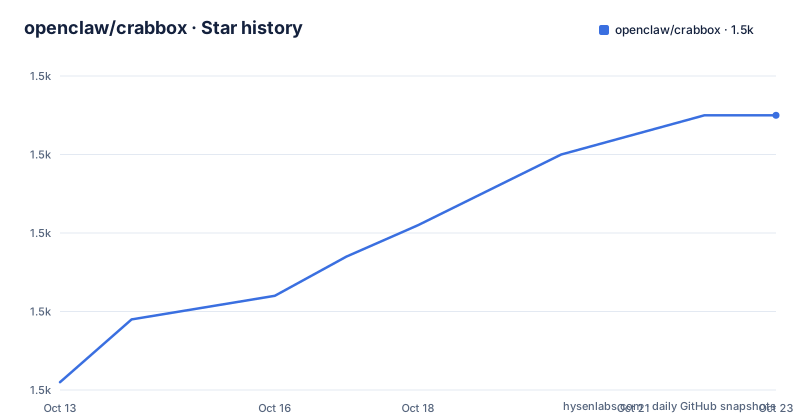
Star history
- openclaw/crabbox1,495 ★ · +34
| Repository | 2026-10-13 | 2026-10-23 |
|---|---|---|
| openclaw/crabbox | 1.5k | 1.5k |
34 Stars in the last 10 days, measured from the daily GitHub snapshot. Compare with other projects
Editorial analysis
Uncommitted files cross the wire, not a commit
The unit Crabbox moves is the working tree, not a commit. That single choice is what separates it from CI. When you point `crabbox run` at a provider and pass a command after the double dash separator, the tool syncs your checkout to the target, executes, streams output back and returns the command's exit code. Uncommitted changes and nonignored files are included, so a red test that only exists on your machine can be reproduced elsewhere without pushing anything. Dependency and build directories are excluded from that transfer.
The target is chosen with `--provider`. Values documented in the quick start are `docker` and `local-container` for a local engine, plus SSH hosts, cloud VMs and delegated execution providers. `crabbox doctor` checks a provider before you commit to it, and every one of the 7 commands repeats the `--provider` flag, so there is no ambient default box to get wrong. The repository ships a `.crabbox.yaml` at its top level for per-project settings, and the 3 GitHub topics tag the project as an agent skill, a herdr plugin and a remote test runner.
The tool set is small enough to read in full: `run`, `warmup`, `prewarm`, `stop`, `ssh`, `doctor`, `lo`. Streaming means a long suite shows progress rather than sitting silent, and the exit code propagation is what lets a script or an agent treat the remote result as a local one.
The default box is bare, and that is the first surprise
A box created by Crabbox contains the sync and run prerequisites and nothing of yours. It does not carry your Node, Go or Python packages, and Crabbox will not install them for you. The quick start makes you swap a placeholder command for your real one only after handling this yourself, and the first startup also pays for an image pull and a bootstrap step.
For a Node repository with a `package-lock.json` and an `npm test` script, the documented path is to pick an image that already has Node and let the shell install the dependencies on the box:
crabbox run --provider local-container \
  --local-container-image node:22-bookworm \
  --shell 'npm ci && npm test'
Other environment sources named are the repository's own setup scripts, a devcontainer, Nix, or mise/asdf, and Crabbox can reuse supported setup steps from GitHub Actions, with the caveat that full Actions semantics require the documented runner path. That is the same choice a devcontainer makes, arrived at from a different direction. A devcontainer commits the environment definition into the repository, so every contributor and every CI job gets the same image hash with no runtime install step. Crabbox borrows an image you name at the command line and installs dependencies inside the run, which keeps the run disposable but puts the environment in the shell command rather than in version control. If your team already standardises on devcontainer or Nix, the argument for Crabbox reduces to reusing an SSH host or a VM you already have.
Leases turn a container into an edit and run loop
One-shot runs clean up after themselves, which suits verification. Iteration needs the opposite, so `warmup` creates a reusable lease and `--id` addresses it afterwards. A lease carries both a stable `cbx_...` identifier and a friendly slug, and either one works with `--id`, which matters when a script and a human share the same box.
crabbox warmup --provider local-container --slug dev-box
crabbox run --provider local-container --id dev-box -- uname -a

# Edit locally, then run again on the same box.
crabbox run --provider local-container --id dev-box -- uname -a

# Open a shell, or release the box when finished.
crabbox ssh --provider local-container --id dev-box
crabbox stop --provider local-container dev-box
A warm box keeps whatever you installed, so the second `npm ci` is unnecessary and the loop tightens to sync plus execute. `crabbox ssh` drops you into the box when a failure needs interactive inspection instead of another streamed log, and `crabbox stop` ends the lease. `prewarm` extends `warmup` by also performing Actions hydration. The trap is lifecycle: a lease is state, and nothing in the documented flow reminds you that a stopped box may hold a leased cloud VM until the coordinator expires it.
Two provider names for one local engine
The opening example and the numbered quick start name the same local engine two different ways. The very first command shown, for use inside a Git repository you trust with Docker or Podman running, is:
crabbox run \
  --provider docker \
  -- uname -a
The numbered quick start further down asks you to check the box first and then run the identical command against a differently spelled provider:
crabbox doctor --provider local-container
crabbox run --provider local-container -- uname -a
Both spellings are official, so a script lifted from the top of the page fails outright if `local-container` is not an accepted alias for `docker`, or silently picks a different engine if it is. The hazard is that the two halves sit far apart on the page, and the fix is to pick one and use it in every command you write.
That first block carries a second detail worth keeping: the command is expected to run inside a Git repository you trust. Trust in the repository is a precondition, not a nicety, because the sync copies its contents out to the box.
The install channel decides which executables you actually get
Homebrew installs the complete distribution and is the only channel documented as signed and notarized:
brew install openclaw/tap/crabbox
crabbox --version
The source channel is different by design:
go install github.com/openclaw/crabbox/cmd/[email protected]That pin is deliberate and explained. The channel is supported from v0.44.0 onward, and the instruction is to use an explicit version rather than `@latest` while older incompatible builds stay visible. The module requires Go 1.26 and prefers go1.26.5, so use that toolchain or newer or leave automatic toolchain selection enabled.
The gap between channels is the part that bites. `go install` compiles only the CLI, omitting companion executables and assets such as `crabbox-apple-vm-helper` and the native runtime pack, which is where Apple VM support on Apple Silicon comes from. Distributed archives carry a `crabbox-runtime` directory that must stay beside the real CLI executable, and newer filesystem-capable packs contain 2 architectures, amd64 and arm64, for 3 platforms, Linux, macOS and Windows, with Linux companions adding native managed execution for Linux and WSL2. Copying only the CLI silently drops that. A pack must not be mixed with a differently built controller, and an official archive with a missing or incomplete pack is treated as a broken install: it will not compile replacements from source behind your back. Without a pack, a source-built CLI can still compile a dependency-free filesystem helper if you have a local Go 1.26-or-newer compiler, but you keep the shell-backed supervisor route and lose managed command execution.
Coordinator credentials versus keys on your own machine
Running against a cloud VM means holding that provider's credentials. Crabbox handles this two ways. Direct provider access puts the keys on the machine running the CLI, and the module's dependencies show the surface area involved: the AWS SDK with EC2, Lambda MicroVMs, Service Quotas and STS, the Azure SDK for compute, network and resources, `cloud.google.com/go/compute`, plus `scaleway-sdk-go` and Alibaba's `OpenSandbox` Go SDK. Firecracker and `lima-vm/go-qcow2reader` point at microVM backends rather than plain virtual machines, and `lxc/incus/v7` and the HashiCorp Nomad API client point at cluster schedulers.
The optional coordinator is the other path. It owns the cloud credentials, tracks usage, enforces spend caps and expires stale leases, and team members connect with `crabbox lo` against a URL their team supplies. Identity runs through `github.com/zitadel/oidc/v3` and `golang.org/x/oauth2`, which is why the local container flow can promise no cloud account or login while the hosted path cannot. Delegated execution providers exist as a third shape, and `examples/slurm-external-provider/` shows at least one external scheduler being wired in.
What the documentation does not spell out is the failure mode of a provider that lacks a capability you need. Capabilities vary by provider, and the provider matrix under `docs/providers/README.md` is the reference, not a runtime check.
The SSH route quietly assumes five local tools
Before any remote host is contacted, Crabbox expects 5 tools on the local machine, `git`, `ssh`, `ssh-keygen`, `rsync` and `curl`, and the local quick start adds a running Docker or Podman engine. `rsync` is doing real work in the sync path rather than being a convenience, so a minimal container image without it will fail at the transfer step rather than at the command.
The repository also carries `AGENTS.md`, `SECURITY.md`, `VISION.md`, a `.goreleaser.yaml` and a `skills/` directory, alongside `runtimes/`, `worker/`, `plugins/`, `integrations/`, `recipes/` and `deploy/`, which is consistent with a project that expects to be driven by coding agents as well as by hand. The last push landed on 2026-09-20, so the code is moving, and the work is published under the MIT licence.
Editorial conclusion
Crabbox earns its place when the code you are editing only builds on Linux, on a GPU box, or on hardware you do not own, and when pushing a throwaway commit just to run a suite is not acceptable. Skip it if your tests already pass locally in seconds, since the sync and pull costs buy you nothing there. Check three things first: whether your provider exposes the commands your suite needs, whether the install channel you use includes the runtime pack, and whether your project needs a prepared image, because the default box carries no project runtime at all. Read the provider matrix before committing a team to it.
Frequently asked questions
How do I install Crabbox on macOS, Linux or Windows?
Homebrew installs the complete distribution with `brew install openclaw/tap/crabbox`. For macOS, Linux and Windows you can also download a release archive, and Windows users are pointed at a dedicated Windows installation guide. A `go install` build gives you the CLI only.
What is the difference between crabbox warmup and crabbox run?
The run command is one-shot: it syncs, executes, streams output, returns the exit code and removes the container. `warmup` creates a reusable lease that you address later with `--id`, using either its stable `cbx_...` identifier or its friendly slug, so installed dependencies survive between runs.
Does Crabbox install my project's dependencies for me?
No. The default box includes Crabbox's own sync and run prerequisites but not your Node, Go or Python packages. You supply a prepared image such as `node:22-bookworm`, the repository's own setup scripts, a devcontainer, Nix, mise/asdf, or supported GitHub Actions setup steps.
Why should I not use @latest with go install?
The README says to use an explicit release version because older, incompatible releases remain visible, so `@latest` is not a safe selector. The module also requires Go 1.26 and prefers go1.26.5, and a source build skips the runtime pack that carries Apple VM support.
Can a team share cloud machines without handing out credentials?
Yes, through the optional coordinator, which owns the cloud credentials, tracks usage, enforces spend caps and expires stale leases. Team members then connect with `crabbox lo` against the URL their team provides.
Official sources
Add this badge to your README
If you maintain this project, the badge below links readers to this analysis and shows its maintenance status from the daily GitHub snapshot. Paste the markdown into your README; add ?metric=license or ?metric=stars to the image URL for a different field.

[](https://hysenlabs.com/projects/openclaw-crabbox)Star history chart for your README
[](https://hysenlabs.com/projects/openclaw-crabbox)Was this useful?