lobster names one tool four ways and publishes five files
Lobster is a Openclaw-native workflow shell: a typed, local-first macro engine that turns skills/tools into composable pipelines and safe automations-and lets Openclaw call those workflows in one step.
At a glance
- What is it?
- An OpenClaw-native pipeline runtime whose repository, npm scope, binary and invoke shims all carry different names, whose published tarball holds five entries, and whose documented way in is a clone followed by a build. The pipeline semantics are specified in detail. The packaging around them is where a new user loses the trail.
- Who is it for?
- Adopt it for the parts that are specified precisely, because there are not many projects that tell you what a cancelled fetch does to its own saved state, or that a retried loop restarts at the first item instead of the failed one. Those two sentences save more debugging than the naming and packaging do cost, and the naming and packaging are the only parts a newcomer meets first.
- Can I use it commercially?
- Yes. MIT is a permissive licence: you can use, modify and sell software built on it, as long as you keep its copyright and licence notices.
- Is it still maintained?
- Yes. The repository received new commits within the last day.
- What is it written in?
- Mainly TypeScript, according to GitHub's language statistics.
Answers come from the project's GitHub data, last synced on November 14, 2026, and from our analysis. They are not legal advice.
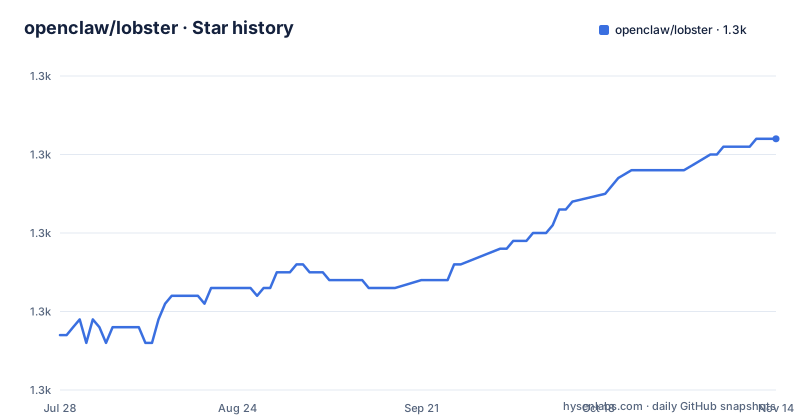
Star history
- openclaw/lobster1,282 ★ · +25
| Repository | 2026-07-28 | 2026-11-14 |
|---|---|---|
| openclaw/lobster | 1.3k | 1.3k |
25 Stars in the last 109 days, measured from the daily GitHub snapshot. Compare with other projects
Editorial analysis
Four names for one tool and two front doors
The repository is openclaw/lobster. The published package is @clawdbot/lobster. The executable is lobster. And the bin map registers two further entry points, clawd.invoke and openclaw.invoke, so one manifest carries two spellings of the parent project's name in the same object, neither of which is the scope it publishes under. A reader who has met the word clawd in one place and openclaw in another has to work out for themselves that they refer to the same thing. The manifest's homepage field points at the GitHub readme while the project's declared homepage is a documentation site, so there are two front doors and only one of them travels inside the package. None of this is broken. All of it is friction, and it lands in the places where a name is written once and then copied forever: an install line, a pinned version in CI, an issue link, a shell alias.
The published tarball is five entries long
The files array is bin, dist/src, README.md, LICENSE and VISION.md. Everything else at the root stays behind: src, test, docs, both tsconfig files, the formatter and linter configs, the lockfile, the workspace file, AGENTS.md, CHANGELOG.md, the .agents directory and .crabbox.yaml. The build script runs on prepack, so what arrives is compiled output rather than TypeScript, which is the right call for a runtime whose quick start points you at a compiled entrypoint. The cost is that a consumer receives three documents and no tests, no lint rules and no changelog, so the two questions a package normally answers in place, which version changed this behaviour and which rule have I broken, become questions about a repository instead. The excluded docs directory is the sharpest omission: it exists in the checkout and is deliberately kept out of the tarball.
Quick start runs it by path, later examples assume the path
The quick start is a contributor checklist dressed as an install guide. It asks for Node.js 22 or newer and the pnpm version pinned in package.json, then runs pnpm install --frozen-lockfile, pnpm build, pnpm test and pnpm lint before showing node ./bin/lobster.js --help. Every command is addressed by path from inside the checkout. Further on, the same page switches convention without comment, calling lobster by name:
lobster run path/to/workflow.lobster
lobster run --file path/to/workflow.lobster --args-json '{"tag":"family"}'
Nothing in the six-step sequence puts a binary named lobster on your path, so those later lines only work after installing the package or editing your shell. Two addressing conventions in one document, with the one that needs an extra step demonstrated first.
pnpm clean deletes dist, which is where the CLI lives
The clean script removes the dist directory recursively, and the build script runs clean before compiling against the build tsconfig. The test script runs clean as well, then compiles against a different tsconfig, then asserts that dist/test exists before running the test files out of dist. Two configurations, two guarantees, and both commands begin by deleting the single directory the runtime reads from. bin/lobster.js executes the compiled entrypoint in dist, and the page tells you to build after changing source files, so a Lobster process running when the suite starts is a process whose files are being removed underneath it. The scripts do nothing to keep the two apart. The revealing detail is the extra check: the test script verifies that dist/test exists before invoking the test runner, and the build script has no equivalent. Whichever path can produce a missing directory, one of them was guarded and the other was not.
The output cap is one string, per stream, and opt-in
Captured stdout and stderr are unlimited by default. LOBSTER_MAX_OUTPUT_BYTES opts into a byte limit applied per stream and per process. Unset or empty means unlimited, while zero, negative, fractional and non-numeric values are rejected before a process starts, so misconfiguration arrives as an error rather than as a truncated stream. The scope is deliberately wide: one variable governs CLI exec, workflow shell steps, SDK exec and shell calls, GitHub recipes and Gog commands.
LOBSTER_MAX_OUTPUT_BYTES=1048576 lobster run --mode tool 'exec my-command'Values exactly at the limit succeed, and overflow terminates the process tree and returns an error with no partial output, so a capped run either has its whole stream or has failed. On POSIX, capped calls own a process group, which is what stops a background producer from holding the pipe open after the cap trips. One more ceiling sits above this one and is not yours to move: the 10 MiB limit openclaw.agent already applies, which an opted-in limit can only lower.
Cancellation kills its own children and asks yours
An AbortSignal passed to new Lobster cancels SDK exec stages, including the shell form, and the signal is retained by clone and forwarded when a pipeline resumes. Aborting terminates the running child process tree before run or resume returns, and the result carries the abort reason. A signal that is already aborted stops the command from starting at all. That is a full guarantee for anything Lobster spawns itself. For stages you wrote, the signal arrives as ctx.signal and the stage has to honour it. The GitHub recipes sit on the strong side of that line too: prMonitor and prMonitorNotify both accept a signal, aborting stops the GitHub CLI child, and a cancelled fetch neither updates the saved pull request snapshot nor emits a notification. That last clause is the one to remember, because not writing state on cancellation is what makes retrying safe afterwards.
A retried loop restarts at the first item
Per-step policy comes from retry, timeout_ms and on_error, and it behaves the same whether a step runs once or inside a for_each. On a loop those policies cover the whole thing rather than each pass: every attempt is given one timeout budget, batch pauses included, and a retry restarts at the first item instead of the failed one. Items that already completed can run again, so the guidance is to enable loop retries only for work that is safe to repeat. A cost_limit stop or an attempted OpenClaw dispatch prevents retries altogether. The result is a delivery guarantee of at-least-once per loop rather than per item, which is the right default for watching a pull request and the wrong one for anything that spends money twice or asks a person twice.
Three places for a gate, and a renderer that changes at the top
An approval gate can be written as an approval step inside a workflow file, as the approve command with a TTY prompt or with --emit for OpenClaw integration, or as a named workflow invoked with run --mode tool, which is the shape the opening example takes, where OpenClaw shows the gate to a person and resumes with their decision. The preference is stated once, in a single sentence: if you need a human checkpoint before an LLM call, use a dedicated approval step in the workflow file rather than approve inside a nested pipeline. Easy to miss precisely because it appears once. Beside it is a second rule worth reading twice. In a top-level tool-mode pipeline, including resumes and the core tool API, the json and table stages preserve typed items inside the single JSON envelope instead of writing terminal output, while human-mode rendering and rendering captured within workflow-file steps stay as they were. The same script yields different bytes depending on where it starts.
Editorial conclusion
Adopt it for the parts that are specified precisely, because there are not many projects that tell you what a cancelled fetch does to its own saved state, or that a retried loop restarts at the first item instead of the failed one. Those two sentences save more debugging than the naming and packaging do cost, and the naming and packaging are the only parts a newcomer meets first. Before writing anything against it, install the published package rather than building the checkout, so the binary exists on your path, and read the output cap and the loop retry rules as design constraints rather than as options. What to check in your own setup is narrower than it looks: whether the steps you want to retry are safe to repeat, and whether your custom stages honour the cancellation signal they are handed, since Lobster will not enforce that for you.
Frequently asked questions
What is the openclaw lobster package for?
It is a workflow runtime for AI agents built around deterministic pipelines and approval gates. Pipelines carry typed objects and arrays rather than text, and a named workflow can be invoked in one step so an agent spends fewer tokens on the plumbing.
How do you install and run lobster?
The documented path is a clone plus a build: Node.js 22 or newer, the pnpm version pinned in package.json, then pnpm install --frozen-lockfile, pnpm build and node ./bin/lobster.js --help. A doctor command is available too. Later examples in the docs call lobster by name, which requires the published package on your path.
Which files does the published lobster package contain?
Five: bin, dist/src, README.md, LICENSE and VISION.md. The source, tests, documentation directory, TypeScript configs, lint and format configs, changelog and lockfile are all excluded from the tarball, although the build runs on prepack.
How does lobster limit captured process output?
Output is unlimited by default. Setting LOBSTER_MAX_OUTPUT_BYTES to a positive integer opts into a limit per stream and per process, and zero, negative, fractional and non-numeric values are rejected before a process starts. Overflow kills the process tree and returns an error with no partial output.
What happens when a lobster for_each loop fails part way through?
Retry, timeout_ms and on_error apply to the entire loop rather than to each item, so a retry restarts at the first item and previously completed children can run again. A cost_limit stop or an attempted OpenClaw dispatch prevents retries entirely.
Official sources
Add this badge to your README
If you maintain this project, the badge below links readers to this analysis and shows its maintenance status from the daily GitHub snapshot. Paste the markdown into your README; add ?metric=license or ?metric=stars to the image URL for a different field.

[](https://hysenlabs.com/projects/openclaw-lobster)Star history chart for your README
[](https://hysenlabs.com/projects/openclaw-lobster)Was this useful?